1. Įvadas
This manual provides detailed instructions for the setup, operation, and maintenance of your Intermec EasyCoder PX4i Thermal Transfer Printer. The PX4i is a robust and flexible industrial printer designed for high-volume label printing, offering monochrome output at a resolution of 203 dpi and speeds up to 12 inches per second. Please read this manual thoroughly before using the printer to ensure safe and efficient operation.
2. Produkto ypatybės
- Didelės spartos spausdinimas: Capable of printing at speeds up to 12 inches per second.
- Didelė raiška: Delivers clear monochrome prints at 203 dpi.
- Lankstus medijos tvarkymas: Supports various media types including black mark, continuous label, fanfold, gap, general identification label, notch, roll fed, tag, and ticket.
- Ethernet ryšys: Integrated Ethernet for network integration.
- Programuojamas: Designed for optimized printing operations and streamlined deployment.
- Patvarus dizainas: Pramoninės klasės konstrukcija, skirta reiklioms aplinkoms.
3. Pakuotės turinys
Verify that all items listed below are included in your printer package. If any items are missing or damaged, contact your supplier immediately.
- Intermec EasyCoder PX4i Thermal Transfer Printer
- Maitinimo laidas
- Labels (Included Components)
- User Documentation (This manual)
4. Saugos informacija
Visada laikykitės šių saugos priemonių, kad išvengtumėte sužalojimų ir spausdintuvo sugadinimo:
- Įsitikinkite, kad spausdintuvas pastatytas ant stabilaus, lygaus paviršiaus.
- Prijunkite spausdintuvą prie įžeminto maitinimo lizdo.
- Do not operate the printer in wet or excessively humid conditions.
- Eksploatacijos metu laikykite rankas ir laisvus drabužius atokiau nuo judančių dalių.
- Prieš atlikdami bet kokius techninės priežiūros ar valymo darbus, atjunkite maitinimą.
- Naudokite tik patvirtintas atsargines dalis ir priedus.
5. Sąranka
5.1 Išpakavimas
- Atsargiai išimkite spausdintuvą iš pakuotės.
- Nuimkite visas pakavimo medžiagas, juosteles ir apsaugines plėveles.
- Išsaugokite originalią pakuotę būsimam transportavimui ar saugojimui.
5.2 Maitinimo prijungimas
- Įsitikinkite, kad spausdintuvo maitinimo jungiklis yra IŠJUNGTOJE padėtyje.
- Connect the power cord to the printer's power inlet.
- Kitą maitinimo laido galą įkiškite į įžemintą elektros lizdą.
5.3 Medijos (etikečių) įdėjimas
The PX4i printer supports various label types. Follow these general steps to load your labels:

Vaizdas: priekis view of the Intermec EasyCoder PX4i printer, showing a label being fed out of the front slot. The control panel with an LCD screen and numeric keypad is visible on the top front.
- Atidarykite spausdintuvo laikmenos dangtelį.
- Place the roll of labels onto the media supply spindle, ensuring it unwinds correctly.
- Feed the leading edge of the labels through the media guides and under the printhead assembly.
- Adjust the media guides to fit the width of your labels snugly but without binding.
- Close the media cover. The printer may automatically calibrate to the new media.
5.4 Prijungimas prie kompiuterio / tinklo
The PX4i offers Ethernet connectivity for network integration.
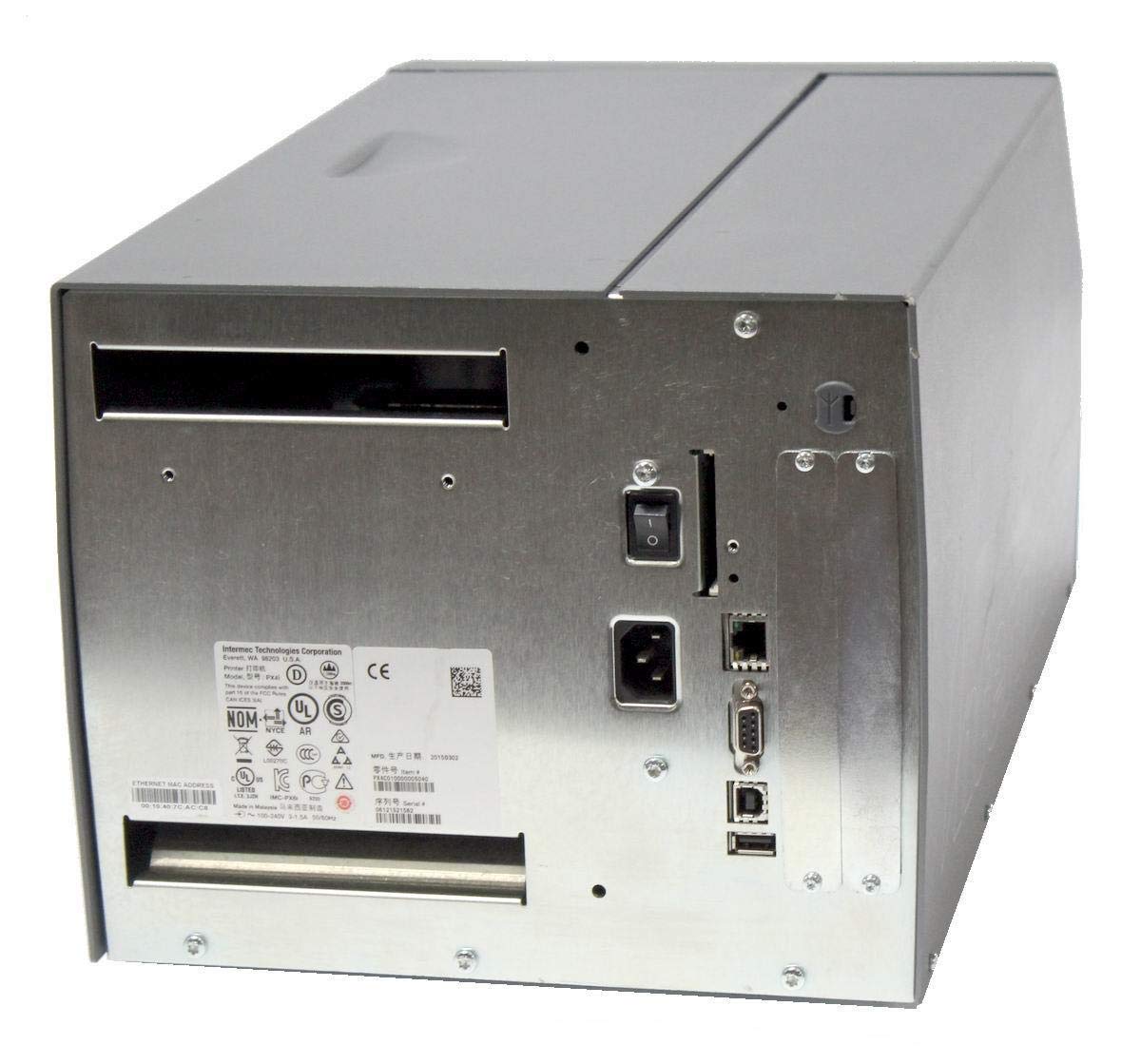
Vaizdas: Galinis view of the Intermec EasyCoder PX4i printer, displaying the power inlet, power switch, Ethernet port, serial ports, and USB ports. The metallic casing is clearly visible.
- Locate the Ethernet port on the rear of the printer.
- Connect a standard Ethernet cable from the printer to your network router or switch.
- For direct connection to a computer, use an appropriate USB or serial cable if supported by your system and printer configuration.
- Refer to the printer's network configuration guide for setting up IP addresses and other network parameters.
6. Operacija
6.1 Valdymo skydas baigtasview
The front control panel provides access to printer functions and status information.
Image: Close-up of the Intermec EasyCoder PX4i control panel, featuring an LCD display, navigation buttons (up, down, left, right, enter), and a numeric keypad with function keys like Pause, Feed, and Clear.
- LCD ekranas: Shows printer status, menu options, and error messages.
- Naršymo mygtukai: Naudojamas meniu naršymui ir parinktims pasirinkti.
- Skaitmeninė klaviatūra: For entering data or selecting numbered options.
- Pauzės mygtukas: Temporarily stops printing.
- Tiekimo mygtukas: Perkelia vieną etiketę į priekį.
- Sąrankos mygtukas: Accesses printer configuration menus.
6.2 Pagrindinis spausdinimas
- Įsitikinkite, kad spausdintuvas įjungtas ir prijungtas prie kompiuterio arba tinklo.
- Open the document or application from which you wish to print labels.
- Select the Intermec PX4i printer from your printer list.
- Configure print settings such as label size, orientation, and quantity as needed.
- Initiate the print job. The printer will begin feeding and printing labels.
6.3 Adjusting Print Settings
Advanced print settings can be adjusted through the printer's control panel or via the printer driver on your computer. These settings include print darkness, print speed, label gap sensing, and more. Consult your printer driver documentation for software-based adjustments.
7. Priežiūra
Reguliarus aptarnavimas užtikrina optimalų našumą ir pailgina spausdintuvo tarnavimo laiką.
7.1 Spausdinimo galvutės valymas
The printhead should be cleaned regularly, especially if print quality degrades.
- Išjunkite spausdintuvą ir atjunkite maitinimo laidą.
- Atidarykite spausdinimo galvutės bloką.
- Using a lint-free cloth or a printhead cleaning pen moistened with isopropyl alcohol, gently wipe the printhead surface from center to edge.
- Allow the printhead to dry completely before closing the assembly and reconnecting power.
7.2 Replacing Media and Ribbon
When the label roll or thermal transfer ribbon (if used) runs out, replace it promptly.
- Turn off the printer and open the media cover.
- Remove the empty label roll and/or used ribbon core.
- Install a new roll of labels and/or a new ribbon, following the loading instructions in Section 5.3.
- Ensure media and ribbon are properly tensioned and aligned.
- Uždarykite žiniasklaidos dangtelį.
8. Problemų sprendimas
This section addresses common issues you might encounter with your PX4i printer.
- Spausdintuvas neįsijungia: Check power cord connection, power outlet, and printer's power switch.
- Nėra spausdinimo išvesties: Verify printer is online, connected to the computer/network, and has media loaded. Check for error messages on the LCD.
- Prasta spausdinimo kokybė: Clean the printhead (Section 7.1). Adjust print darkness settings. Ensure correct media and ribbon are used.
- Etiketės netiekiamos tinkamai: Check media loading (Section 5.3) and ensure media guides are properly adjusted. Calibrate media sensors if necessary.
- Klaidos pranešimai: Refer to the printer's LCD display for specific error codes and consult the full Intermec PX4i technical manual for detailed explanations and solutions.
9. Specifikacijos
| Funkcija | Aprašymas |
|---|---|
| Modelio pavadinimas | PX4i |
| Prekės modelio numeris | PX4C010000000020 |
| Spausdinimo technologija | Terminis perdavimas |
| Spausdinimo spalva | Vienspalvis |
| Maksimalus spausdinimo greitis | 12 in/s (Monochrome) |
| Didžiausia spausdinimo raiška | 203 dpi |
| Ryšio technologija | Ethernet |
| Maksimalus laikmenos dydis | 12 colių |
| Įtraukti komponentai | Etiketės |
| Valdiklio tipas | Mygtukas |
| Gamintojas | INTERMEC INDUSTRIAL PRINTERS |
| Pakuotės matmenys | 23.25 x 15.5 x 15.25 colio; 36.2 svaro |
10. Garantija ir palaikymas
The Intermec EasyCoder PX4i Thermal Transfer Printer comes with a standard manufacturer's warranty. For specific warranty terms and conditions, please refer to the warranty card included with your product or visit the official Intermec (Honeywell) support website. For technical assistance, troubleshooting beyond this manual, or to inquire about service, please contact Intermec customer support or your authorized dealer.
Internetiniai ištekliai: For the latest drivers, firmware updates, and additional documentation, please visit the official Intermec support portal.


