
Įvadas
This manual provides comprehensive instructions for the proper installation, operation, and maintenance of your LAMAX DRIVE C7 Dashcam. Please read this manual thoroughly before using the device to ensure optimal performance and longevity. The LAMAX DRIVE C7 is designed to record your journeys in Full HD 1080p, offering crucial evidence in case of incidents and enhancing your driving safety.
Pakuotės turinys
- LAMAX DRIVE C7 Dashcam
- Automobilinis pakrovėjas
- Siurbimo puodelio laikiklis
- Lipnus laikiklis
- USB kabelis
- Memory Card (as per product specifications)
- Vartotojo vadovas (šis dokumentas)
Įrenginys baigtasview
Familiarize yourself with the various components and controls of your LAMAX DRIVE C7 Dashcam.
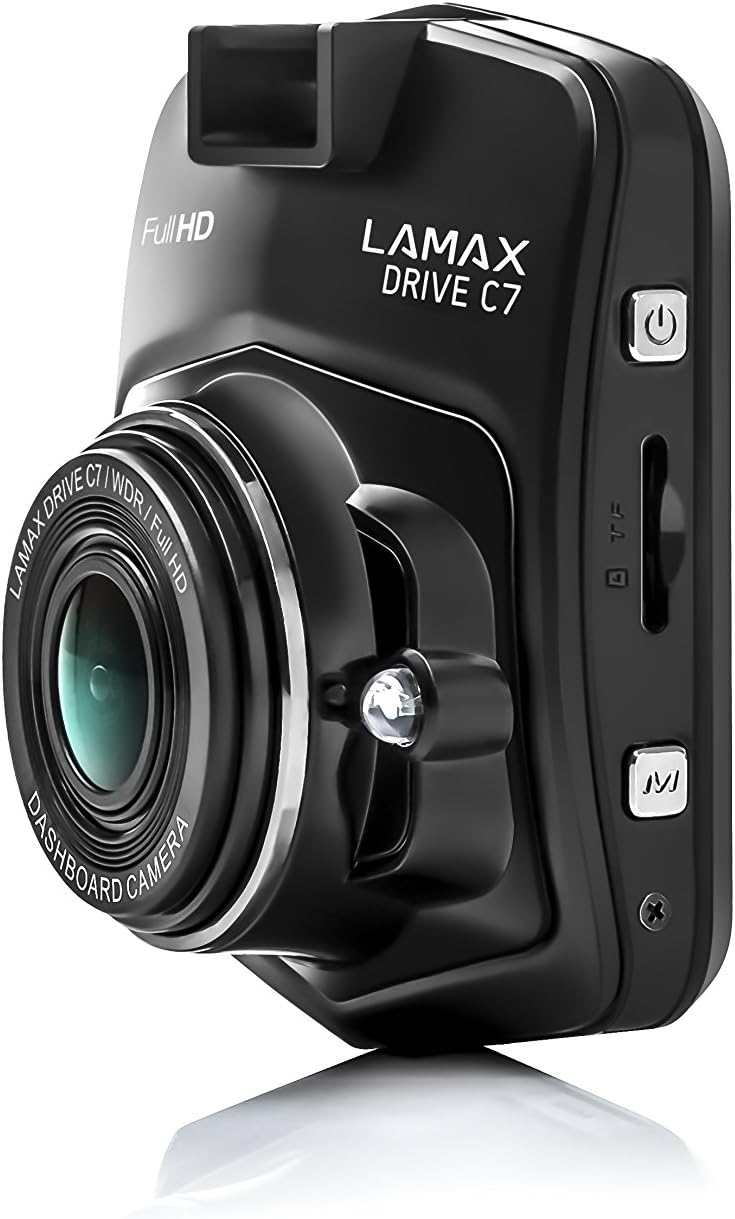
Vaizdas: Šoninė view of the dashcam, highlighting the power button, memory card slot, and USB port.

Vaizdas: priekis view of the dashcam with the 2.4-inch LCD display and control buttons below.
- Objektyvas: High-resolution camera lens.
- Ekranas: 2.4-inch LCD screen for viewing recordings and menu.
- Maitinimo mygtukas: Įjungia/išjungia įrenginį.
- Meniu mygtukas: Pasiekia nustatymus ir parinktis.
- Aukštyn/žemyn mygtukai: Naršykite meniu parinktis.
- Gerai mygtukas: Patvirtina pasirinkimus.
- MicroSD kortelės lizdas: Insert memory card here.
- USB prievadas: Maitinimo tiekimui ir duomenų perdavimui.
- Atkūrimo mygtukas: Resets the device (use a thin object).
Sąranka
1. Atminties kortelės įdėjimas
Ensure the dashcam is powered off before inserting or removing the microSD card. Insert the card into the slot until it clicks into place. Use a Class 10 or higher microSD card, up to 32GB capacity, for optimal performance. It is recommended to format the memory card within the dashcam settings before first use and periodically thereafter.
2. Dashcam montavimas
Pasirinkite vietą ant priekinio stiklo, kuri neužstotų jūsų view of the road. Clean the windshield surface thoroughly before applying the mount.

Image: The dashcam attached to its suction cup mount, ready for windshield installation.

Vaizdas: Galinis view of the dashcam with the suction cup mount attached, showing the screen and buttons.
- Attach the chosen mount (suction cup or adhesive) to the dashcam.
- Press the mount firmly against the windshield and secure it.
- Sureguliuokite kameros kampą, kad užtikrintumėte aiškų vaizdą view kelio priekyje.
3. Prisijungimas prie maitinimo
Connect the car charger to the dashcam's USB port and plug the other end into your vehicle's 12V power outlet (cigarette lighter socket). The dashcam will automatically power on and begin recording when the vehicle's ignition is turned on.
Naudojimo instrukcijos
Maitinimo įjungimas/išjungimas
- Automatinis: The dashcam powers on/off automatically with the vehicle's ignition.
- Rankinis: Norėdami rankiniu būdu įjungti arba išjungti įrenginį, paspauskite ir palaikykite nuspaudę maitinimo mygtuką.
Įrašymo režimai
- Ciklo įrašymas: The dashcam records video in continuous loops (e.g., 1, 3, or 5 minutes). When the memory card is full, the oldest unlocked files yra perrašomi.
- G jutiklis: In the event of a sudden impact or collision, the G-Sensor automatically locks the current recording, preventing it from being overwritten. The sensitivity of the G-Sensor can be adjusted in the settings.
- Parkavimo režimas: When enabled, the dashcam will automatically start recording if it detects motion or an impact while the vehicle is parked. This feature provides 24-hour surveillance for your vehicle.
- Laiko trukmės vaizdo įrašas: This feature allows the camera to record at a lower frame rate (e.g., 1 frame per second), compressing long periods of time into short videos. This can significantly extend the recording capacity of your memory card.
Meniu naršymas
Paspauskite Meniu button to access the settings. Use the Aukštyn/Žemyn mygtukai, skirti naršyti parinktis ir OK mygtuką, kad patvirtintumėte pasirinkimus. Paspauskite Meniu dar kartą, kad išeitumėte iš nustatymų.
Atkūrimas
Į view recorded videos, stop recording (if active), then press the Režimas button to switch to playback mode. Use the Aukštyn/Žemyn mygtukus, kad pasirinktumėte a file ir OK to play it. You can also connect the dashcam to a computer via USB to access files tiesiogiai.
Priežiūra
Atminties kortelių valdymas
- Formatavimas: Regularly format your microSD card (at least once a month) using the dashcam's format function to prevent data corruption and ensure smooth recording.
- Talpa: Ensure sufficient free space on the memory card. Locked files from G-Sensor events can accumulate and fill the card. Periodically review ir ištrinkite nereikalingus užrakintus files.
Valymas
Wipe the camera lens with a soft, lint-free cloth to ensure clear video quality. Use a slightly damp cloth to clean the body of the dashcam. Do not use harsh chemicals or abrasive cleaners.
Programinės aparatinės įrangos naujiniai
Check the official LAMAX website periodically for available firmware updates. Updates can improve performance, add new features, or fix bugs. Follow the instructions provided with the firmware update carefully.
Trikčių šalinimas
| Problema | Galima priežastis / sprendimas |
|---|---|
| Vaizdo registratorius neįsijungia. |
|
| Įrašymas netikėtai nutrūksta. |
|
| Vaizdo įrašo kokybė prasta arba vaizdas neryškus. |
|
| Vaizdo registratorius užstringa arba nereaguoja. |
|
Specifikacijos
| Funkcija | Detalė |
|---|---|
| Vaizdo raiška | Full HD 1080p |
| Viewing kampas | 150° |
| Ekrano dydis | 2.4 inches (6.1 cm) LCD |
| Ciklo įrašymas | Taip |
| G jutiklis | Taip |
| Parkavimo režimas | Yes (24h) |
| Naktinis matymas | Taip |
| Integruotas GPS | Optional (via external module) |
| Sandėliavimas | MicroSD card (Class 10+, up to 32GB recommended) |
| Matmenys | 3.3 x 6.1 x 7.2 cm |
| Svoris | 60 g |
| Įtraukti komponentai | Memory Card (as per product details) |
Garantija ir palaikymas
Informacija apie garantiją
The LAMAX DRIVE C7 Dashcam comes with a standard manufacturer's warranty. Please refer to the warranty card included in your package or visit the official LAMAX webIšsamias garantijos sąlygas, taikomas jūsų regionui, rasite svetainėje. Išsaugokite pirkimo įrodymą, jei prireiktų pateikti garantijos pretenzijas.
Pagalba klientams
For technical assistance, troubleshooting, or product inquiries, please visit the official LAMAX support website or contact their customer service department. Contact details can typically be found on the brand's official websvetainėje arba ant produkto pakuotės.
Official LAMAX Store: Visit LAMAX Store on Amazon


