1. Įvadas
This manual provides detailed instructions for the Sharp EL1750V EL-1750V Two-Color Printing Calculator. This device is designed for efficient financial and general calculations, featuring a two-color printing mechanism for clear record-keeping. It includes functions such as automatic tax keys, a change calculation feature, and a large display for enhanced usability.
Pagrindinės funkcijos:
- Two-color printing (positive numbers in black, negative in red) at 2.2 lines per second.
- 12-digit LCD display for large calculations.
- Built-in antimicrobial protection.
- Change calculation feature.
- Automatic Tax Keys (TAX+, TAX-).
- Rounding and Decimal Switches.
- Grand Total (GT) function.
- 4-key memory.
- Cost, Sell, Margin (CSM) keys.
2. Produktas baigtasview
Familiarize yourself with the components and key features of your Sharp EL1750V calculator.

1 pav.: priekis view of the Sharp EL1750V calculator, showing the display, keypad, and paper roll.

2 pav. Baigtaview of key functions including Automatic Tax Keys, Rounding Switch, Decimal Switch, Grand Total Function, 4 Key Memory, Backspace Key, and Percent Key.
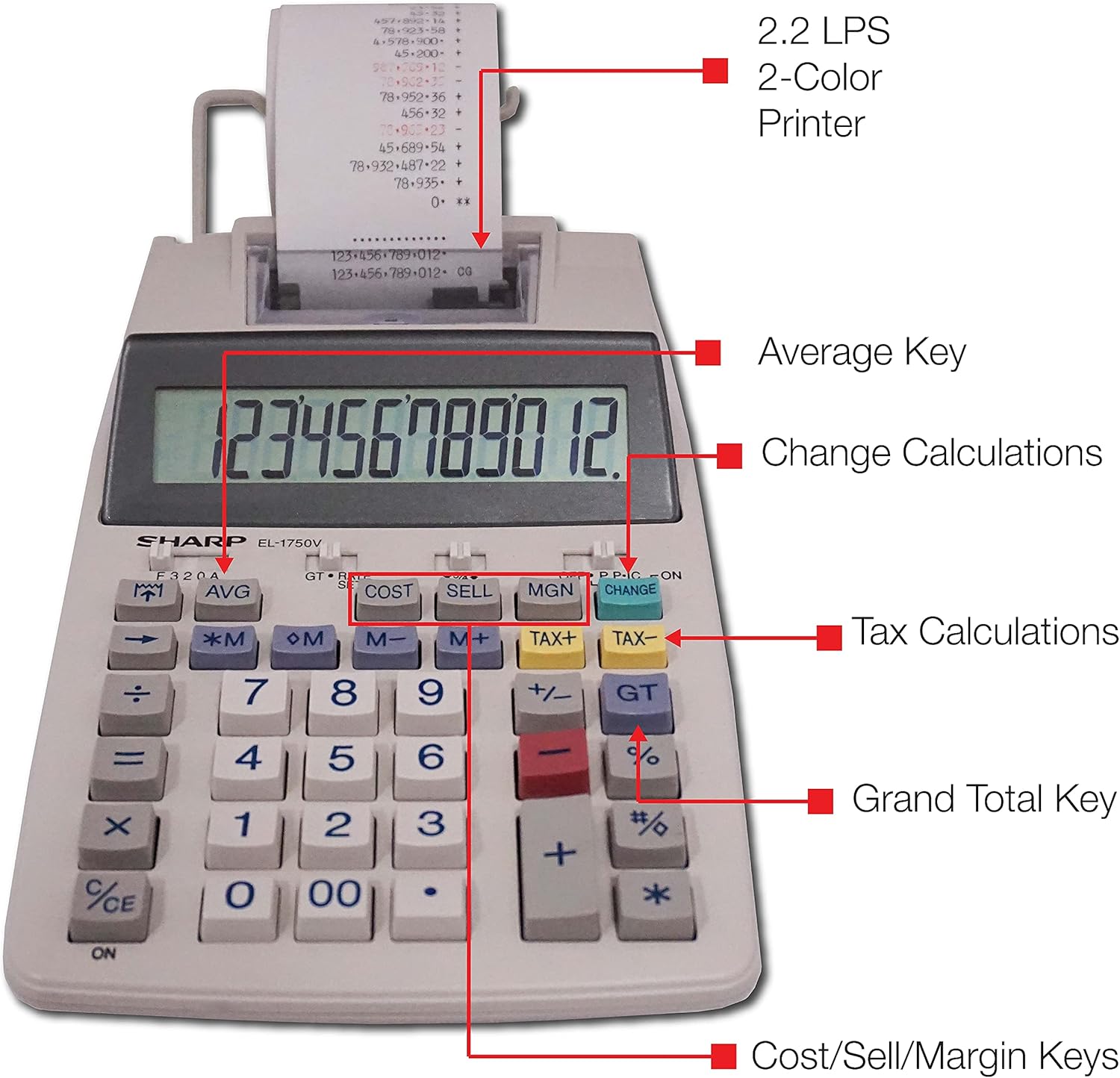
3 pav. Išsamus view highlighting the 2.2 LPS 2-Color Printer, Average Key, Change Calculations, Tax Calculations, Grand Total Key, and Cost/Sell/Margin Keys.

Figure 4: Dimensions of the Sharp EL1750V calculator, showing a width of 5.9 inches, depth of 9.1 inches, and height of 2 inches, with a 0.75 inch 12-digit LCD display.
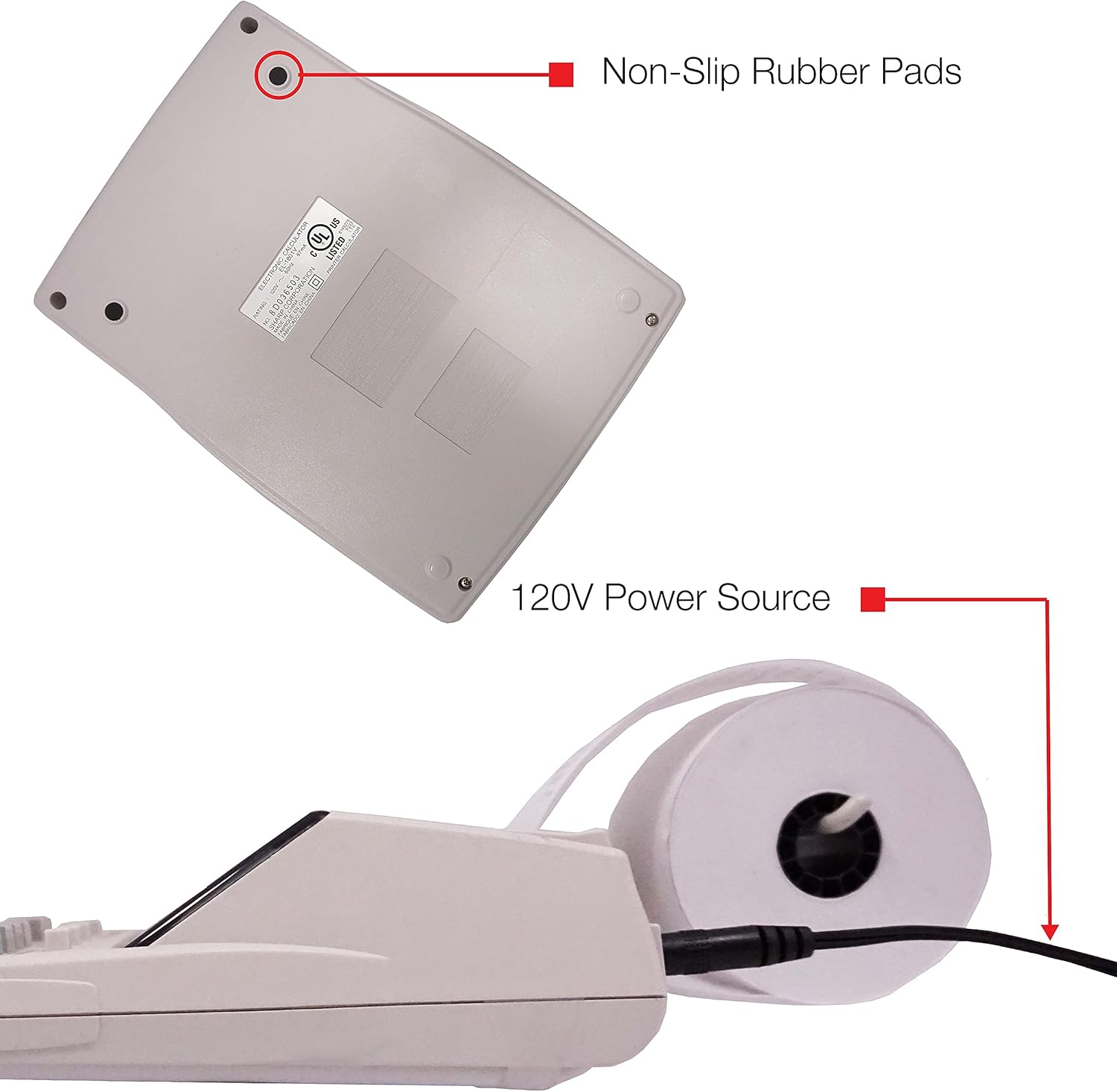
5 pav. Apačia view of the calculator, illustrating the non-slip rubber pads and the 120V power source input.
3. Sąranka
3.1 Maitinimo šaltinis
The Sharp EL1750V can be powered by an AC adapter (120V) or batteries. Ensure the correct power source is connected before operation.
- Kintamosios srovės adapteris: Connect the provided AC adapter to the power input port on the side of the calculator (refer to Figure 5) and plug it into a standard 120V electrical outlet.
- Baterijos: If using batteries, open the battery compartment (typically on the underside) and insert the required batteries, observing correct polarity.
3.2 Popieriaus ritinio įdėjimas
- Lift the printer cover to expose the paper roll compartment.
- Įdėkite naują popieriaus ritinį į skyrių, užtikrindami, kad popierius būtų tiekiamas iš ritinio apačios.
- Feed the leading edge of the paper into the printer mechanism slot until it emerges from the top.
- Uždarykite spausdintuvo dangtį.
- Press the paper feed key (often marked with an arrow pointing up) to advance the paper and ensure it is properly aligned.
4. Naudojimo instrukcijos
4.1 Pagrindiniai skaičiavimai
Atlikite standartinius aritmetinius veiksmus:
- Papildymas (+): Įveskite pirmąjį skaičių, paspauskite +, įveskite antrą skaičių, paspauskite =.
- Atimtis (-): Įveskite pirmąjį skaičių, paspauskite -, įveskite antrą skaičių, paspauskite =.
- Daugyba (x): Įveskite pirmąjį skaičių, paspauskite x, įveskite antrą skaičių, paspauskite =.
- Skyrius (÷): Įveskite pirmąjį skaičių, paspauskite ÷, įveskite antrą skaičių, paspauskite =.
- Švarus įrašas (CE/C): Išvalo paskutinį įvestą skaičių.
- Viskas aišku (AC): Išvalo visus įrašus ir skaičiavimus.
4.2 Specialiosios funkcijos
- Mokesčių apskaičiavimas (TAX+, TAX-):
- Set the tax rate using the appropriate function (refer to the calculator's specific tax rate setting procedure, usually involving a dedicated key or mode).
- Įveskite sumą, tada paspauskite TAX+ pridėti mokestį arba TAX- atimti mokestį.
- Change Calculation (CHANGE):
- Enter the total amount of the sale.
- Paspauskite PAKEISTI raktas.
- Įveskite iš kliento gautą sumą.
- Paspauskite = to display the change due.
- Bendra suma (GT): Paspauskite GT to recall the grand total of all previous calculations.
- Memory Functions (M+, M-, RM/CM):
- M+: Įtraukia rodomą reikšmę į atmintį.
- M-: Atima rodomą reikšmę iš atminties.
- RM/CM: Recalls memory content (first press) or clears memory (second press).
- Cost, Sell, Margin (COST, SELL, MGN): These keys are used for profit margin calculations.
- Enter two of the three values (Cost, Selling Price, Margin Percentage) and press the key for the unknown value to calculate it.
- Rounding and Decimal Switches: Adjust these switches (typically located above the keypad) to control the number of decimal places and rounding method for calculations.
5. Priežiūra
5.1 Valymas
To maintain the calculator's performance and appearance:
- Išorę nuvalykite minkšta, sausa šluoste.
- Įsisenėjusiam purvui šiek tiek pamirkykiteamplt šluostę nuvalykite vandeniu arba švelniu, neabrazyviniu valikliu.
- Do not use strong solvents or abrasive cleaners, as these can damage the surface or display.
- Venkite purkšti skysčius tiesiai ant skaičiuotuvo.
5.2 Popieriaus ritinio keitimas
Replace the paper roll when it runs out or the print becomes faint. Refer to Section 3.2 for installation instructions.
5.3 Rašalo volelio keitimas
When the print becomes faint or incomplete, the ink roller needs to be replaced. Consult your calculator's specific instructions for ink roller replacement, as the procedure may vary slightly.
6. Problemų sprendimas
| Problema | Galima priežastis | Sprendimas |
|---|---|---|
| Skaičiuoklė neįsijungia. | No power, AC adapter not connected, or batteries depleted/incorrectly installed. | Ensure AC adapter is securely plugged in. If using batteries, check battery installation and replace if necessary. |
| Nėra spaudinio arba spaudinys neryškus. | Paper roll empty or incorrectly installed; ink roller needs replacement. | Replace paper roll (Section 3.2). Replace ink roller (Section 5.3). |
| Display shows "E" or error message. | Calculation overflow, division by zero, or incorrect operation sequence. | Paspauskite AC to clear the error. Re-enter the calculation carefully. |
| Popieriaus strigtys. | Paper roll not installed correctly or paper is creased. | Open printer cover, remove jammed paper, and re-install paper roll correctly (Section 3.2). |
7. Specifikacijos
- Modelis: Sharp EL1750V
- Ekranas: 12 skaitmenų LCD
- Spausdinimo greitis: 2.2 eilutės per sekundę
- Printing Colors: 2 (Black for positive, Red for negative)
- Maitinimo šaltinis: AC Adapter (120V) or Battery Powered
- Matmenys (apytiksliai): 5.9 colio (p) x 9.1 colio (gylio) x 2 colio (aukščio)
- Svoris (apytiksliai): 0.16 ounces (Note: This weight seems unusually low for a printing calculator, likely an error in source data. User should refer to product packaging for accurate weight.)
- Medžiaga: Plastikiniai
- Ypatingos savybės: Antimicrobial protection, Change calculation, Tax functions, Cost/Sell/Margin functions, Grand Total, 4-key memory.
8. Garantija ir palaikymas
For warranty information and technical support, please refer to the documentation included with your purchase or visit the official Sharp websvetainėje. Išsaugokite pirkimo kvitą kaip pirkimo įrodymą garantiniams reikalavimams.
Gamintojas: Aštrus
Websvetainė: www.sharpusa.com


