1. Produktas baigtasview
The LB-link BL-MP01 is a compact and versatile 150 Mbps Wireless N Pocket Travel Router designed for easy internet access and sharing on the go. It supports multiple operating modes and features for convenient wireless connectivity.

1 pav.: priekis view of the LB-link BL-MP01 Wireless N Router, showing the WPS/RESET button and indicator lights for WiFi, LAN, and Power.
Pagrindinės funkcijos:
- Supports random selection of switching between Router, Client, and AP modes.
- WPS (Wi-Fi Protected Setup) support for one-key encryption, eliminating the need for manual password entry.
- Plug and Play functionality for easy wireless access and internet sharing.
- Built-in device for scanning wireless hotspots, remembering SSID names, and automatically bridging/relaying for convenient use.
- Equipped with RJ45 and USB ports for versatile connectivity.
2. Sąrankos vadovas
2.1 Pradinis įjungimas
- Connect the LB-link BL-MP01 to a power source using the provided USB cable.
- Palaukite, kol maitinimo indikatoriaus lemputė pradės šviesti nepertraukiamai, rodydama, kad įrenginys įjungtas.
2.2 Prisijungimas prie maršrutizatoriaus
- Belaidis ryšys: On your computer or mobile device, search for available Wi-Fi networks. Select the network name (SSID) broadcast by the BL-MP01 (e.g., "LB-link_XXXX"). Enter the default password if prompted (refer to the label on the device or packaging for default credentials).
- Laidinis ryšys: Connect an Ethernet cable from the RJ45 port of the BL-MP01 to your computer's Ethernet port.
2.3 Basic Configuration (Router Mode)
- Atidarykite a web naršyklę ir įveskite numatytąjį IP adresą (pvz.
192.168.16.1) adreso juostoje. - Log in using the default username and password (e.g.,
admin/admin). - Follow the on-screen setup wizard to configure your internet connection type (e.g., PPPoE, Dynamic IP, Static IP).
- Set a new Wi-Fi network name (SSID) and a strong password for your wireless network.
3. Veikimo režimai
The BL-MP01 supports multiple operating modes to suit various networking needs:
- Maršrutizatoriaus režimas: Connects to a modem (DSL/Cable) and creates a private wireless network for multiple devices.
- Kliento režimas: Allows a wired device (e.g., a desktop computer) to connect to an existing wireless network.
- AP (prieigos taško) režimas: Transforms a wired network connection into a wireless hotspot, allowing wireless devices to connect.
Norėdami perjungti režimus, eikite į maršrutizatoriaus web management interface and navigate to the operating mode settings. Select the desired mode and save the changes. The device may restart to apply the new settings.
4. WPS funkcionalumas
The Wi-Fi Protected Setup (WPS) feature allows for quick and secure connection to your wireless network without manually entering the password.
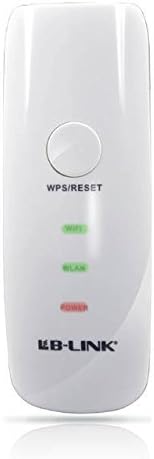
2 pav. Iš arti view of the LB-link BL-MP01 Wireless N Router, highlighting the WPS/RESET button at the top.
Naudojant WPS:
- Paspauskite WPS/ATSTATYMAS button on the BL-MP01 for approximately 1-3 seconds. The Wi-Fi indicator light will start blinking.
- Within two minutes, activate the WPS function on your client device (e.g., laptop, smartphone). Refer to your client device's manual for specific instructions on activating WPS.
- The devices will automatically establish a secure connection. The Wi-Fi indicator light on the router will become solid when connected.
5. Wireless Hotspot Scanning and Bridging
The BL-MP01 features a built-in function to scan for available wireless hotspots, remember their SSID names, and automatically bridge or relay the connection. This is particularly useful for extending Wi-Fi coverage or connecting to public hotspots.
Steps for Hotspot Connection:
- Pasiekite maršrutizatoriaus web valdymo sąsaja.
- Eikite į
Susiję dokumentai - BL-MP01

LB-LINK Router Installation Guide
Comprehensive installation guide for the LB-LINK router, covering hardware connections, internet setup, LED indicators, and interface descriptions. Learn how to connect your device and get online quickly.
BL-M35343XS1 802.11ax 150 Mbps WLAN + BLE Combo SDIO modulio specifikacija
Šiame dokumente pateikiamos integruoto 2.4 GHz WLAN+BLE+SLE kombinuoto modulio LB-LINK BL-M35343XS1 specifikacijos. Jame išsamiai aprašomos šio didelio našumo belaidžio modulio savybės, elektrinės ir šiluminės specifikacijos, radijo dažnių charakteristikos, mechaniniai matmenys ir taikymo informacija.
LB-LINK BL-M8189NS1: 150 Mbps WLAN SDIO modulio specifikacija
Išsamios LB-LINK BL-M8189NS1, 150 Mbps 802.11n WLAN SDIO modulio, specifikacijos. Apima savybes, kontaktų apibrėžimus, elektrines ir radijo dažnių specifikacijas, mechaninius matmenis ir taikymo grandines.
LB-LINK BL-M8733BS2 802.11n 150 Mbps WLAN + BT v5.2 Combo SDIO modulio specifikacija
LB-LINK BL-M8733BS2, itin integruoto dviejų dažnių WLAN + „Bluetooth v5.2 Combo SDIO“ modulio, palaikančio 802.11a/b/g/n standartus ir iki 150 Mbps PHY spartą, techninės specifikacijos dokumentas, įskaitant elektros, radijo dažnių, mechanines ir reglamentavimo informaciją.
LB-LINK BL-R8812AF1 Product Specification - IEEE 802.11ac WiFi Module
Detailed product specification for the LB-LINK BL-R8812AF1, a WLAN 11ac Dual Band USB 2.0 WiFi Module. Covers RF overview, system functions, electrical specifications, and compliance.
LB-LINK BL-M35343XU1 802.11ax 150Mbps WLAN+BLE Combo USB Module Specification
Technical specification document for the LB-LINK BL-M35343XU1, an 802.11ax 150Mbps WLAN+BLE Combo USB Module. Details features, specifications, pin assignments, electrical characteristics, RF performance, mechanical dimensions, application notes, and compliance information.