1. Įvadas
The SainSmart MetaPhix M2 Graphing Calculator is a versatile tool designed for students, educators, and professionals in various fields including mathematics, science, and engineering. It supports a wide range of calculations from basic arithmetic to advanced graphing functions, making it suitable for courses such as Pre-Algebra, Algebra I & II, Geometry, Trigonometry, Calculus, AP Calculus, AP Statistics, Biology, Chemistry, Physics, Finance, and Business.
This manual provides detailed instructions for setting up, operating, and maintaining your MetaPhix M2 calculator, ensuring you can utilize its full potential. The calculator features a solid cover to protect its keys and screen during transport and storage.

Figure 1: SainSmart MetaPhix M2 Graphing Calculator
2. Sąranka
2.1. Akumuliatoriaus įdėjimas
The MetaPhix M2 calculator requires batteries for operation (not included). To install or replace batteries:
- Išjunkite skaičiuotuvą.
- Skaičiuoklės gale suraskite baterijų skyriaus dangtelį.
- Nustumkite dangtelį.
- Įdėkite naujas baterijas, užtikrindami teisingą poliškumą (+/-), kaip nurodyta skyrelio viduje.
- Uždėkite akumuliatoriaus skyriaus dangtelį.

Figure 2: Back of the calculator with battery compartment
2.2. Maitinimo įjungimas/išjungimas
- Norėdami įjungti skaičiuotuvą, paspauskite ON mygtuką.
- Norėdami išjungti skaičiuotuvą, paspauskite SHIFT tada IŠJUNGTA (usually located above the ON button).
- The calculator features an auto power-off function to conserve battery life after a period of inactivity.
3. Naudojimo instrukcijos
3.1. Klaviatūros išdėstymas
The MetaPhix M2 keypad is organized into several functional areas:
- Ekranas: Shows input, results, and graphs. Features a 64 x 32 pixel resolution LCD for incredible readability.
- Funkciniai klavišai: Raktai kaip SHIFT, ALFA, ir REŽIMAS to access secondary functions and change calculator modes.
- Naršymo skydelis: Arrow keys for moving the cursor on the display.
- Skaitmeninė klaviatūra: Standard digits 0-9 and decimal point.
- Aritmetiniai operatoriai: Addition, subtraction, multiplication, division.
- Mokslinės funkcijos: Trigonometric (sin, cos, tan), logarithmic (log, ln), exponential, power functions.
- Grafikų raktai: Dedicated keys for drawing graphs and adjusting settings.
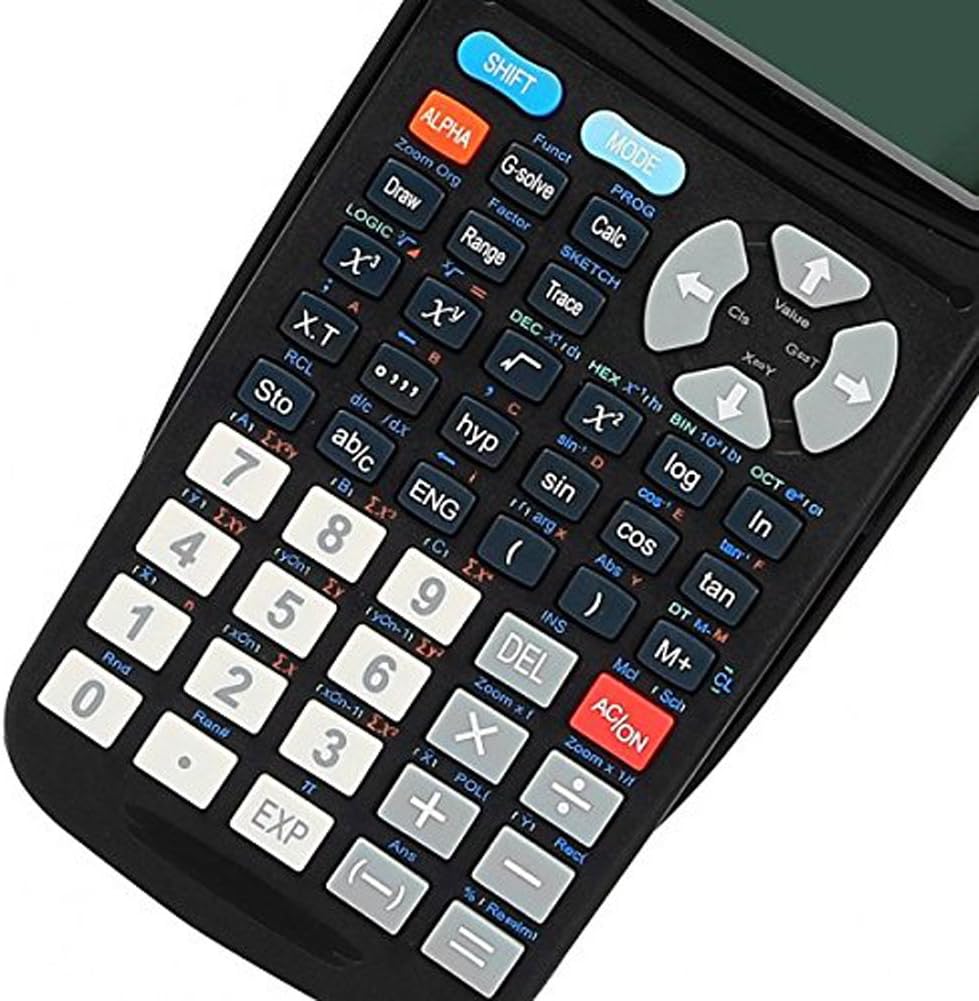
3 pav. Išsamus view of the calculator keypad
3.2. Pagrindiniai skaičiavimai
Norėdami atlikti pagrindinius aritmetinius veiksmus:
- Įveskite pirmąjį skaičių.
- Press the desired operator (+, -, ×, ÷).
- Įveskite antrąjį skaičių.
- Paspauskite = kad būtų rodomas rezultatas.
3.3. Ekrano indikatorių supratimas
The calculator's display shows various indicators to inform you about its current state or active functions:
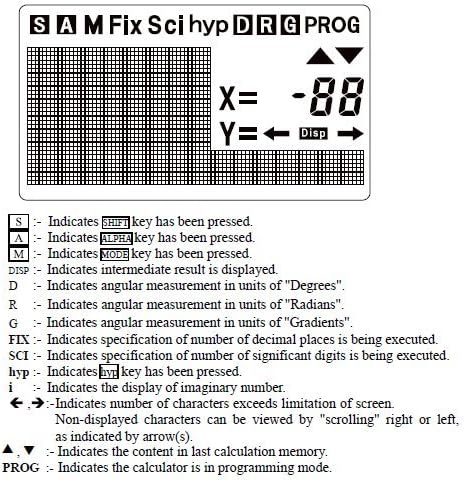
4 pav.: Ekrano indikatoriai
- S: Nurodo, SHIFT buvo paspaustas klavišas.
- A: Nurodo, ALFA buvo paspaustas klavišas.
- M: Nurodo REŽIMAS buvo paspaustas klavišas.
- Disp: Indicates an intermediate result is displayed.
- D: Indicates angular measurement in units of "Degrees".
- R: Indicates angular measurement in units of "Radians".
- G: Indicates angular measurement in units of "Gradients".
- PAtaisyti: Indicates specification of number of decimal places is being executed.
- SCI: Indicates specification of number of significant digits is being executed.
- hyp: Nurodo, hip buvo paspaustas klavišas.
- i: Indicates the display of an imaginary number.
- ←, →: Indicates number of characters exceeds screen limitation; content can be viewredagavo slinkdami.
- ▲, ▼: Indicates the content in the last calculation memory.
- PROGRAMA: Indicates the calculator is in programming mode.
3.4. Funkcijų grafikų braižymas
The MetaPhix M2 can generate various graphs. Ensure the calculator is in the appropriate mode (e.g., COMP mode for general calculations before graphing). The calculator features a great graphical user interface (GUI) for parametric graphing.
Example 1: Plotting a Sine Curve and y = 1/x Graph
To sketch a sine curve or a y = 1/x graph:
- Ensure the calculator is in COMP mode.
- Paspauskite [SHIFT] tada [FUNC] to open the function menu.
- Select the desired function slot (e.g., "Y1").
- For a sine curve, enter "sin" (e.g., by pressing the nuodėmė raktas).
- For y = 1/x, enter "x-1" (e.g., by pressing [SHIFT] tada [x-1]).
- Paspauskite [DRAW] to sketch the graph.
Note: The variable "x" is often implied for built-in graph functions or when using specific function keys.
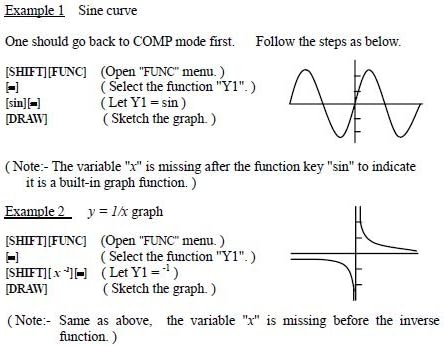
Figure 5: Sine curve and y=1/x graph examples
4. Išplėstinės funkcijos
The MetaPhix M2 calculator offers a comprehensive suite of advanced functions, supporting a deeper understanding of mathematics:
- Generation of Parametric Graphs
- Complex, Continuous & Statistical Calculation
- Regression & Integration Capability
- Logarithmic & Exponential Functions
- Answer Storage
- Scientific Calculation
- Formula Storage in Memory
- Multistatement Input
- Zooming Functions for Graphs
- Replay & Trace Functions for Graphs
- Factor & Expand Algebraic Logic & Trigonometric Expressions
- Basic arithmetic operations using binary, octal, decimal, and hexadecimal values.
5. Priežiūra
- Valymas: Skaičiuotuvo išorę valykite minkštu, sausu skudurėliu. Nenaudokite abrazyvinių valiklių ar tirpiklių.
- Saugykla: Store the calculator in a cool, dry place away from direct sunlight and extreme temperatures. Always use the protective cover when not in use.
- Baterijos keitimas: Replace batteries promptly when the low battery indicator appears or when the display becomes dim. Remove batteries if the calculator will not be used for an extended period to prevent leakage.
6. Problemų sprendimas
- Skaičiuoklė neįsijungia:
- Įsitikinkite, kad baterijos yra tinkamai įdėtos, laikantis tinkamo poliškumo.
- Pakeiskite senas arba išsikrovusias baterijas naujomis.
- Ekranas blankus arba tuščias:
- Baterijos gali būti išsikrovusios; pakeiskite jas.
- Adjust display contrast if available (refer to specific key combinations in the full manual).
- Neteisingi skaičiavimo rezultatai:
- Check the current mode (e.g., Degree/Radian for trigonometric functions).
- Verify input values and formula syntax.
- Clear memory or reset the calculator if necessary (consult the full manual for reset procedures).
- Graphing issues:
- Ensure the calculator is in graphing mode.
- Check the function input for errors.
- Sureguliuokite viewing window settings (Xmin, Xmax, Ymin, Ymax) to ensure the graph is within visible range.
For more detailed troubleshooting or persistent issues, please refer to the comprehensive manual available online or contact SainSmart customer support.
7. Specifikacijos
- Prekinis ženklas: SainSmart
- Modelis: MetaPhix M2
- Skaičiuotuvo tipas: Verslas, inžinerija / mokslas, grafikų braižymas
- Maitinimo šaltinis: Maitinamas baterijomis
- Ekrano tipas: LCD (64 x 32 pixel resolution)
- Atmintis: Built-in memory for storage and analysis
- UPC: 811820022215
8. Garantija ir palaikymas
The SainSmart MetaPhix M2 Graphing Calculator comes with a 1 metų garantija from the date of purchase. This warranty covers manufacturing defects and ensures technical support from SainSmart.
For technical assistance, warranty claims, or further inquiries, please contact SainSmart customer support through their official websvetainėje arba kontaktinę informaciją, pateiktą ant jūsų produkto pakuotės.
A detailed instruction manual is also available for download from the manufacturer's website for in-depth guidance on all functions and features.


