Įvadas
This manual provides instructions for setting up, operating, and maintaining your Mercury MW3030R Dual Band Wireless Router. Please read this manual carefully before use to ensure proper installation and optimal performance.
Saugos informacija
- Saugokite prietaisą nuo vandens ar per didelės drėgmės.
- Nebandykite patys išardyti ar taisyti įrenginio.
- Naudokite tik su prietaisu pateiktą maitinimo adapterį.
- Užtikrinkite tinkamą vėdinimą aplink maršrutizatorių, kad jis neperkaistų.
Pakuotės turinys
Patikrinkite, ar jūsų pakuotėje yra šie elementai:
- Mercury MW3030R Wireless Router
- Maitinimo adapteris
- Ethernet kabelis
- Greitas diegimo vadovas (šis vadovas yra išsamus vadovas)
Produktas baigtasview
Susipažinkite su maršrutizatoriaus komponentais ir indikatoriais.
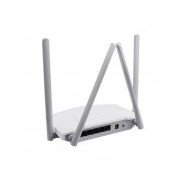
1 paveikslas: Galinis view of the Mercury MW3030R router. This image displays the four external antennas, the WAN port (typically blue), multiple LAN ports (typically yellow), and the power input jack. The reset button and WPS button are also usually located on the rear panel.
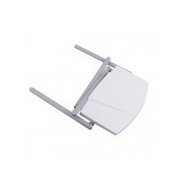
2 paveikslas: Iš viršaus į apačią view of the Mercury MW3030R router with its antennas folded. This perspective highlights the router's sleek, white casing and its overall compact form factor, suitable for various placements.
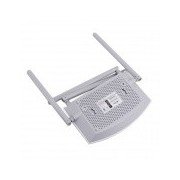
3 paveikslas: Apačia view of the Mercury MW3030R router. This image shows the ventilation holes designed for heat dissipation and the product label, which typically contains important information such as the default Wi-Fi name (SSID), password, and web management address.
LED indikatoriai:
- Maitinimo šviesos diodas: Rodo maršrutizatoriaus maitinimo būseną.
- Interneto šviesos diodas: Indicates the status of the internet connection.
- WLAN šviesos diodas: Rodo belaidžio ryšio aktyvumą.
- LAN šviesos diodai: Indicate connection status for each LAN port.
Sąranka
1. Aparatinės įrangos ryšys
- Maitinimas: Connect the power adapter to the router's power port and plug it into a wall outlet. Wait for the Power LED to become stable.
- Prisijungimas prie interneto (WAN): Connect one end of an Ethernet cable to your modem's LAN port and the other end to the router's WAN port (usually distinctively colored, e.g., blue).
- Connect Devices (LAN): For wired connections, connect your computer or other devices to the router's LAN ports (usually yellow) using Ethernet cables.
- Antenos: Adjust the four antennas for optimal signal coverage.
2. Pradinė konfigūracija (Web Sąsaja)
- Prisijunkite prie maršrutizatoriaus: Connect your computer to the router either via an Ethernet cable to a LAN port or wirelessly using the default Wi-Fi SSID and password printed on the router's label (refer to Figure 3).
- Prieiga Web Naršyklė: Atidarykite a web browser (e.g., Chrome, Firefox) and type the default access address (e.g., http://192.168.1.1 or http://tplinkwifi.net) į adreso juostą ir paspauskite „Enter“.
- Prisijungimas: Įveskite numatytąjį vartotojo vardą ir slaptažodį (paprastai admin abiem arba kaip nurodyta maršrutizatoriaus etiketėje).
- Paleiskite greitąją sąranką: Follow the on-screen instructions of the Quick Setup Wizard to configure your internet connection type (e.g., PPPoE, Dynamic IP, Static IP) and wireless settings (SSID, password).
- Pakeisti numatytąjį slaptažodį: Dėl saugumo labai rekomenduojama pakeisti numatytąjį maršrutizatoriaus prisijungimo slaptažodį web valdymo sąsaja.
Naudojimo instrukcijos
Prisijungiama prie „Wi-Fi“.
- Belaidžiame įrenginyje (išmaniajame telefone, nešiojamajame kompiuteryje) ieškokite galimų „Wi-Fi“ tinklų.
- Select your router's Wi-Fi network name (SSID) that you configured during setup.
- Enter the Wi-Fi password you set.
- Dabar jūsų įrenginys turėtų būti prijungtas prie interneto.
Dviejų juostų veikimas
The MW3030R supports both 2.4GHz and 5.0GHz wireless bands. The 2.4GHz band offers wider coverage, while the 5.0GHz band provides faster speeds with less interference over shorter distances. You can connect your devices to either band based on your needs.
Svečių tinklas
Pasiekite maršrutizatoriaus web interface to enable and configure a separate guest network. This allows guests to access the internet without accessing your main network resources.
Priežiūra
- Firmware atnaujinimai: Reguliariai tikrinkite gamintojo websvetainės, kurioje rasite programinės įrangos atnaujinimus. Atnaujinus programinę įrangą, galima pagerinti našumą, pridėti naujų funkcijų ir ištaisyti saugumo spragas.
- Maršrutizatoriaus paleidimas iš naujo: Jei kyla tinklo problemų, pabandykite iš naujo paleisti maršrutizatorių atjungdami maitinimo adapterį, palaukite 10 sekundžių ir vėl jį prijunkite.
- Valymas: Maršrutizatorių laikykite švarų ir be dulkių. Naudokite minkštą, sausą šluostę. Nenaudokite skystų valiklių.
- Vieta: Maršrutizatorių pastatykite centrinėje vietoje, atokiau nuo kliūčių ir įrenginių, kurie gali sukelti trikdžius (pvz., mikrobangų krosnelių, belaidžių telefonų).
Trikčių šalinimas
Nėra interneto prieigos
- Check if the Internet LED on the router is lit or blinking correctly.
- Įsitikinkite, kad modemo eterneto kabelis yra tvirtai prijungtas prie maršrutizatoriaus WAN prievado.
- Iš naujo paleiskite modemą ir maršrutizatorių.
- Patikrinkite interneto ryšio nustatymus maršrutizatoriaus web sąsaja.
Lėtas belaidis greitis
- Ensure your device is connected to the 5.0GHz band if it supports it, for faster speeds.
- Move closer to the router or adjust antenna positions.
- Patikrinkite, ar netrukdo kiti elektroniniai prietaisai.
- Reduce the number of devices connected to the network or bandwidth-intensive activities.
Nepavyksta pasiekti maršrutizatoriaus Web Sąsaja
- Įsitikinkite, kad jūsų įrenginys prijungtas prie maršrutizatoriaus (laidinio arba belaidžio).
- Verify the IP address you are typing in the browser is correct (e.g., http://192.168.1.1).
- Pabandykite išvalyti naršyklės talpyklą arba naudoti kitą naršyklę.
- If you forgot the login password, you may need to perform a factory reset (Warning: This will erase all your settings).
Specifikacijos
| Funkcija | Aprašymas |
|---|---|
| Modelis | MW3030R |
| Belaidžio ryšio standartai | IEEE 802.11ac/n/g/b/a |
| Dažnis | 2.4 GHz ir 5.0 GHz (dviejų dažnių juosta) |
| Belaidis greitis | Up to 600Mbps (combined) |
| Antenos | 4 išorinės antenos |
| Sąsajos | 1x WAN Port, Multiple LAN Ports (typically 3 or 4) |
| Maitinimo šaltinis | External Power Adapter (provided) |
Garantija ir palaikymas
The Mercury MW3030R router comes with a standard manufacturer's warranty. For detailed warranty information, technical support, or service inquiries, please refer to the official Mercury websvetainėje arba susisiekite su jų klientų aptarnavimo tarnyba. Išsaugokite pirkimo kvitą garantiniams reikalavimams.


