1. Įvadas
The Microsoft Surface 3 is a versatile 10.8-inch tablet designed for productivity and portability. Running on Windows 10 and powered by an Intel Atom processor, it offers a full PC experience in a compact form factor. This manual provides essential information for setting up, operating, maintaining, and troubleshooting your device.

Image: Microsoft Surface 3 Tablet with an attached red Type Cover keyboard and a silver Surface Pen. The screen displays a colorful image with digital annotations, demonstrating its versatility.
2. Kas yra dėžutėje
Upon unboxing your Microsoft Surface 3, verify that all standard components are present:
- Microsoft Surface 3 Tablet
- Power Supply Unit (Charger)
- Greito paleidimo vadovas (jei pridėtas)
Pastaba: The Surface Pen and Type Cover keyboard are optional accessories and are typically sold separately. Ensure you have these if your purchase included them.
3. Įrenginys baigtasview
Familiarize yourself with the physical features and ports of your Surface 3 tablet.
3.1 Prievadai ir mygtukai
- USB 3.0 prievadas: For connecting USB devices such as external drives, mice, or keyboards.
- Mikro USB įkrovimo prievadas: Naudojamas prietaiso įkrovimui.
- Mini DisplayPort: Skirta prijungti išorinius ekranus arba projektorius.
- Ausinių lizdas: Garso išvesčiai į ausines arba išorinius garsiakalbius.
- MicroSD kortelės lizdas: For expanding storage with a microSDXC card.
- Garsumo mygtukai: Garso lygiams reguliuoti.
- Maitinimo mygtukas: Įjungti / išjungti įrenginį arba užmigdyti.
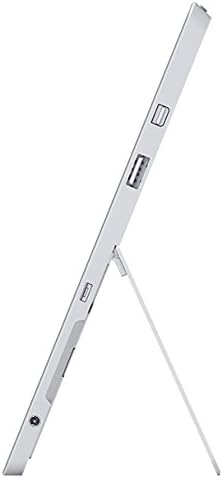
Vaizdas: Šoninė view of the Microsoft Surface 3, illustrating the various ports including USB, Mini DisplayPort, and the kickstand in an open position.

Vaizdas: Stambus planas view of the microSD card slot on the Microsoft Surface 3, with a microSD card partially inserted, demonstrating storage expansion capability.
3.2 fotoaparatai
- Galinė kamera: 8 MP for capturing photos and videos.
- Priekinė kamera: 3.5 MP vaizdo skambučiams ir asmenukėms.
4. Sąranka
4.1 Pradinis mokestis
Before first use, connect the Surface 3 to the power supply using the Micro USB charging port and allow it to charge fully. The battery indicator on the screen will show charging status.
4.2 Įjungimas ir „Windows“ sąranka
- Paspauskite ir palaikykite Maitinimo mygtukas until the Microsoft logo appears on the screen.
- Follow the on-screen prompts to complete the Windows 10 setup process. This includes selecting your language, connecting to a Wi-Fi network, and creating or signing in with a Microsoft account.
- Allow the system to download and install any pending updates for optimal performance and security.
4.3 Attaching Optional Accessories
- Type Cover: Align the Type Cover with the magnetic connector at the bottom edge of the Surface 3 until it clicks into place.
- Surface Pen: The Surface Pen can be magnetically attached to the side of the Surface 3 for storage. For initial pairing, follow the instructions provided with the pen or in Windows settings.
5. Operacinis
5.1 Navigacija
- Jutiklinis ekranas: Use gestures like tap, swipe, pinch-to-zoom for navigation.
- Surface Pen: Use the pen for precise input, drawing, writing, and annotating.
- Type Cover (Optional): Provides a traditional keyboard and trackpad experience.

Image: Microsoft Surface 3 in use with a Type Cover keyboard and Surface Pen, displaying a Windows 10 interface with various applications.
5.2 Windows 10 Features
- Pradžios meniu: Pasiekite programas, nustatymus ir maitinimo parinktis.
- Veiksmų centras: Swipe from the right edge of the screen to access quick settings and notifications.
- Užduotis View: View open applications and virtual desktops.
- Planšetinio kompiuterio režimas: Switch to Tablet Mode for a touch-optimized interface.
5.3 Prisijungimas prie „Wi-Fi“.
- Atidarykite Veiksmų centras by swiping from the right edge of the screen or clicking the icon in the taskbar.
- Bakstelėkite Wi-Fi piktogramą.
- Iš sąrašo pasirinkite norimą tinklą ir, jei būsite paraginti, įveskite slaptažodį.
6. Priežiūra
6.1 Valymas
- Naudokite minkštą, nepūkuotą audinį dampened with water or a screen cleaner specifically designed for electronics to clean the screen.
- Venkite agresyvių cheminių medžiagų, abrazyvinių medžiagų ar per didelės drėgmės.
- Clean the device exterior with a soft, dry cloth.
6.2 Programinės įrangos naujiniai
Regularly check for and install Windows updates to ensure your device has the latest security patches and performance improvements. Go to Nustatymai > Naujinimas ir sauga > „Windows“ naujinimas.
6.3 Akumuliatoriaus priežiūra
- Venkite ekstremalių temperatūrų, nes jos gali pabloginti akumuliatoriaus veikimo laiką.
- For optimal battery longevity, avoid consistently draining the battery to 0% or keeping it at 100% for extended periods.
- The Surface 3 has an average battery life of up to 8 hours under typical usage conditions.
7. Problemų sprendimas
7.1 Įrenginys neįsijungia
- Ensure the device is charged. Connect the power supply and wait a few minutes before attempting to power on again.
- Perform a force restart by holding the Maitinimo mygtukas for 10-15 seconds, then release and press it again briefly.
7.2 „Wi-Fi“ ryšio problemos
- Toggle Wi-Fi off and on in the Action Center.
- Restart your Surface 3 and your Wi-Fi router.
- Įsitikinkite, kad esate „Wi-Fi“ tinklo diapazone ir turite teisingą slaptažodį.
7.3 Lėtas veikimas
- Uždarykite nereikalingas programas, veikiančias fone.
- Patikrinkite, ar yra laukiančių „Windows“ naujinimų, ir įdiekite juos.
- Įsitikinkite, kad turite pakankamai laisvos vietos saugykloje.
8. Specifikacijos
| Funkcija | Detalė |
|---|---|
| Modelio numeris | 7G6-00014 |
| Ekrano dydis | 10.8 colių |
| Ekrano raiška | 1920 x 1280 pikselių |
| Procesorius | „Intel Atom x7-Z8700“ (2.4 GHz) |
| RAM | 4 GB |
| Sandėliavimas | 128 GB SSD |
| Operacinė sistema | Windows 10 |
| Grafikos koprocesorius | Quad-core Intel Atom x7-Z8700 processor |
| Belaidis tipas | 802.11ac „Wi-Fi“, „Bluetooth 4.0“ |
| USB prievadai | 1x USB 2.0, 1x USB 3.0 |
| Vidutinis baterijos veikimo laikas | 8 valandų |
| Prekės svoris | 1.37 svaro |
| Gaminio matmenys | 14.02 x 8.64 x 1.58 colio |
| Galinis Webkumštelio raiška | 8 MP |
| Priekyje Webkumštelio raiška | 3.5 MP |
9. Garantija ir palaikymas
Your Microsoft Surface 3 Tablet is covered by a limited manufacturer's warranty. For detailed warranty information, including terms and conditions, please refer to the documentation provided with your purchase or visit the official Microsoft support websvetainę.
For technical assistance, software updates, and additional resources, please visit the official Microsoft Support website or contact their customer service. Keep your device's serial number (located on the back of the tablet or in Windows settings) readily available when seeking support.


