Įvadas
This manual provides instructions for the proper setup, operation, and maintenance of your Motorola AURI3500W Cordless Phone. Please read this manual thoroughly before using your new phone to ensure safe and optimal performance.
The Motorola AURI3500W features DECT 6.0 wireless technology, caller ID, a reminder alarm, an integrated speakerphone, and an illuminated display and keypad for ease of use.
Pakuotės turinys
Patikrinkite, ar jūsų pakuotėje yra šie elementai:
- Motorola AURI3500W Handset
- Motorola AURI3500W Base Unit
- Bazinio įrenginio maitinimo adapteris
- Telefono linijos laidas
- Rechargeable Batteries (included)
- Vartotojo vadovas (šis dokumentas)
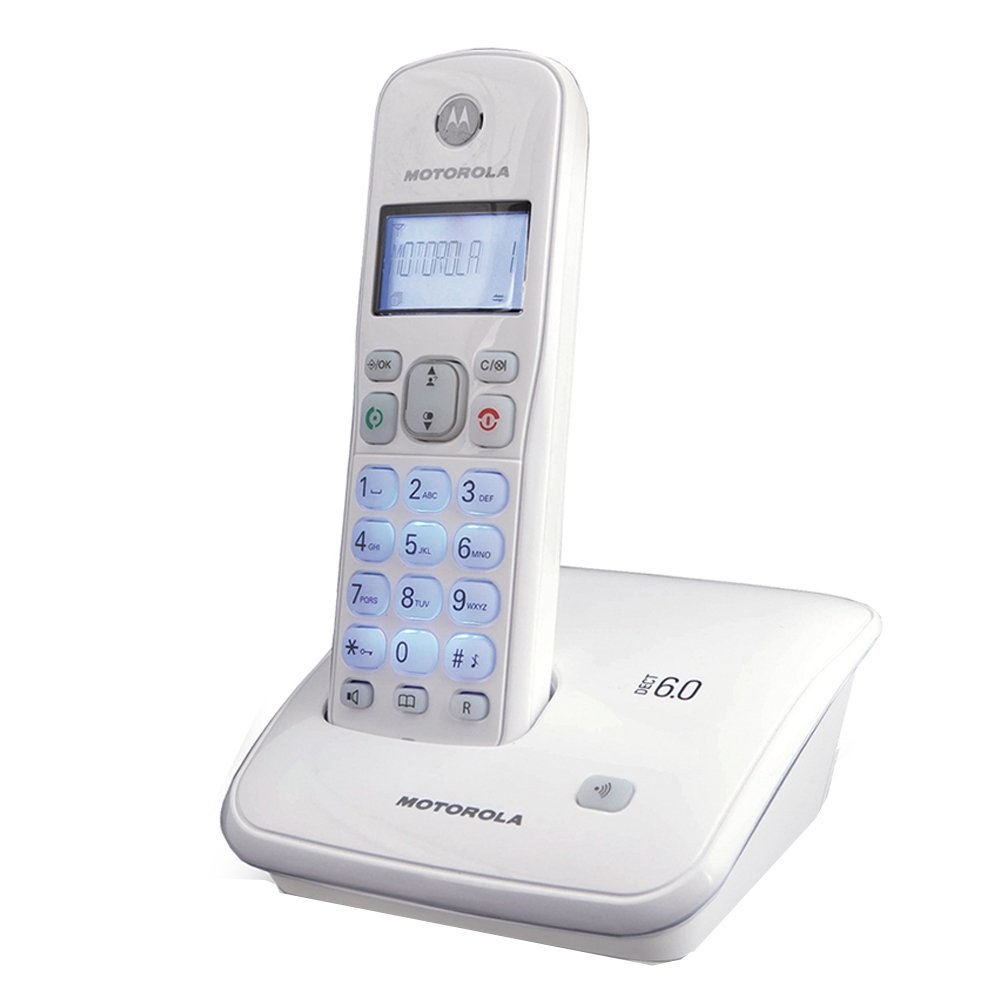
Image: Motorola AURI3500W Cordless Phone and Base Unit. This image shows the complete phone system, including the handset and its charging base.
Sąranka
1. Akumuliatoriaus įdėjimas
- Raskite akumuliatoriaus skyrių ragelio gale.
- Baterijų skyriaus dangtelį stumkite žemyn, kad jį atidarytumėte.
- Insert the provided rechargeable batteries, observing the correct polarity (+ and - markings).
- Stumkite baterijų skyriaus dangtelį atgal į vietą, kol jis spragtelės.
Note: Use only the rechargeable batteries supplied with your phone or recommended replacements. Non-rechargeable batteries may damage the device.
2. Pagrindinio įrenginio prijungimas
- Place the base unit on a flat, stable surface near a power outlet and a telephone wall jack.
- Prijunkite vieną telefono linijos laido galą prie pagrindinio bloko TEL LINE lizdo.
- Prijunkite kitą telefono linijos laido galą prie telefono sieninio lizdo.
- Connect the small end of the power adapter to the DC IN 6V jack on the base unit.
- Prijunkite didelį maitinimo adapterio galą į standartinį elektros lizdą.
Important: Use only the power adapter supplied with this product.
3. Pradinis įkrovimas
Place the handset on the base unit's charging cradle. The handset will begin charging. Allow the handset to charge for at least 12-16 hours before its first use, even if the display indicates a full charge sooner. This ensures optimal battery performance.
Naudojimo instrukcijos
Skambinimas
- Paspauskite KALBĖKITE mygtuką arba pakelkite ragelį nuo pagrindo.
- Surinkite norimą telefono numerį.
- Paspauskite PABAIGA mygtuką, kad padėtų ragelį.
Skambučio priėmimas
Kai suskamba telefonas, paspauskite KALBĖKITE mygtuką arba pakelkite ragelį nuo pagrindo, kad atsilieptumėte.
Naudojant garsiakalbį
Pokalbio metu paspauskite GALBĖJAS mygtuką, kad įjungtumėte garsiakalbį. Paspauskite jį dar kartą, kad grįžtumėte į ragelio režimą.
Skambintojo ID
If you subscribe to Caller ID service, the caller's name and number will appear on the handset display before you answer the call. You can review past calls using the CID mygtuką.
Priminimo signalas
Your phone includes a reminder alarm feature. Refer to the on-screen menu options for setting and managing alarms. Typically, this involves navigating to a "Settings" or "Alarm" menu item and following the prompts.
Illuminated Display and Keypad
The display and keypad illuminate automatically when a button is pressed or a call is received, enhancing visibility in low-light conditions.
Priežiūra
Telefono valymas
Nuvalykite telefoną ir bazinį įrenginį minkšta, šiek tiek drėgna šluosteamp cloth. Do not use cleaning sprays or abrasive cleaners, as these can damage the finish or electronic components.
Akumuliatoriaus priežiūra
- To maintain optimal battery life, always return the handset to the base unit when not in use.
- Jei telefonas nebus naudojamas ilgesnį laiką, išimkite baterijas, kad išvengtumėte elektrolito pratekėjimo.
- Senas baterijas išmeskite atsakingai laikydamiesi vietinių taisyklių.
Trikčių šalinimas
Nėra rinkimo tono
- Įsitikinkite, kad telefono linijos laidas yra tvirtai prijungtas tiek prie pagrindinio įrenginio, tiek prie sieninio lizdo.
- Patikrinkite, ar maitinimo adapteris tinkamai prijungtas prie pagrindinio įrenginio ir elektros lizdo.
- Patikrinkite, ar rankinio telefono baterijos įkrautos.
Ekranas tuščias arba blankus
- Place the handset on the base unit to charge the batteries.
- Įsitikinkite, kad baterijos yra tinkamai įdėtos.
- If the issue persists after charging, the batteries may need replacement.
Trumpas baterijos veikimo laikas
- Ensure the handset is fully charged for 12-16 hours before initial use.
- Always return the handset to the base unit when not in use.
- Batteries have a limited lifespan and may need replacement after extended use.
Negaliu skambinti arba priimti skambučių
- Check all cable connections (power, telephone line).
- Įsitikinkite, kad ragelis yra bazinio įrenginio veikimo diapazone.
- Confirm that your telephone service is active.
Specifikacijos
| Modelio numeris: | AURI3500W |
| Prekinis ženklas: | Motorola |
| Belaidė technologija: | DECT 6.0 |
| Ekrano dydis: | 1.5 colių |
| Matmenys (P x P x A): | 11.5 x 11.5 x 15 cm |
| Svoris: | 370 g |
| UPC: | 183420002134 |
| Savybės: | Caller ID, Reminder Alarm, Integrated Speakerphone, Illuminated Display & Keypad |
Garantija ir palaikymas
For warranty information and technical support, please refer to the warranty card included with your product or visit the official Motorola support websvetainėje. Išsaugokite pirkimo kvitą kaip pirkimo įrodymą garantiniams reikalavimams.
Dėl papildomos pagalbos galite susisiekti su „Motorola“ klientų aptarnavimo tarnyba oficialiais kanalais.


