1. Įvadas
This manual provides detailed instructions for the setup, operation, and maintenance of your Peavey PV 14 AT 14 Channel Compact Mixer. The PV 14 AT is designed for professional audio applications, featuring 14 channels, integrated Bluetooth connectivity, and Antares Auto-Tune pitch correction technology. Please read this manual thoroughly to ensure proper use and to maximize the performance and longevity of your mixer.
2. Svarbios saugos instrukcijos
- Maitinimo šaltinis: Connect the unit only to the type of power supply specified in this manual or on the unit.
- Drėgmė ir skysčiai: To reduce the risk of fire or electric shock, do not expose this apparatus to rain or moisture. Do not place objects filled with liquids, such as vases, on the apparatus.
- Vėdinimas: Užtikrinkite tinkamą vėdinimą. Neužblokuokite jokių ventiliacijos angų. Įrenkite pagal gamintojo instrukcijas.
- Šiluma: Nemontuokite šalia jokių šilumos šaltinių, pvz., radiatorių, šilumokaičių, viryklių ar kitų įrenginių (įskaitant ampkeltuvai), kurie gamina šilumą.
- Įžeminimas: Nepažeiskite poliarizuoto arba įžeminto kištuko saugos tikslo. Poliarizuotas kištukas turi du ašmenis, kurių vienas platesnis už kitą. Įžeminimo tipo kištukas turi dvi mentes ir trečią įžeminimo šakelę. Platus ašmenys arba trečioji šakelė yra jūsų saugumui. Jei pateiktas kištukas netelpa į jūsų elektros lizdą, kreipkitės į elektriką, kad pakeistų pasenusį lizdą.
- Maitinimo laido apsauga: Saugokite maitinimo laidą, kad ant jo neužeitų ar nesuspaustų, ypač prie kištukų, patogių lizdų ir toje vietoje, kur jie išeina iš aparato.
- Aptarnavimas: Visus techninės priežiūros darbus patikėkite kvalifikuotam techninės priežiūros personalui. Techninė priežiūra reikalinga, kai aparatas buvo kaip nors pažeistas, pvz., pažeistas maitinimo laidas arba kištukas, į aparatą išsiliejo skystis ar įkrito daiktai, aparatas buvo paveiktas lietaus ar drėgmės, neveikia normaliai. , arba buvo numestas.
3. Produktas baigtasview ir Savybės
3.1 Priekinio skydelio valdikliai
The front panel of the PV 14 AT mixer provides access to all channel inputs, equalization controls, effects, and master output faders. Each channel features dedicated gain, EQ, and auxiliary send controls for precise audio shaping.

Vaizdas: kampuotas view of the Peavey PV 14 AT mixer's front panel, showing various knobs, faders, and input jacks.
3.2 Galinio skydelio jungtys
The rear panel houses essential power and digital audio connections, including the DC power input, power switch, and the Digital Audio Port for USB connectivity to a computer. Bluetooth pairing information is also located here.

Vaizdas: Galinis view of the Peavey PV 14 AT mixer, displaying the DC power input, power switch, Digital Audio Port (USB), and Bluetooth pairing information.
3.3 Matmenys
The compact design of the PV 14 AT makes it suitable for various setups. Refer to the image below for approximate dimensions.
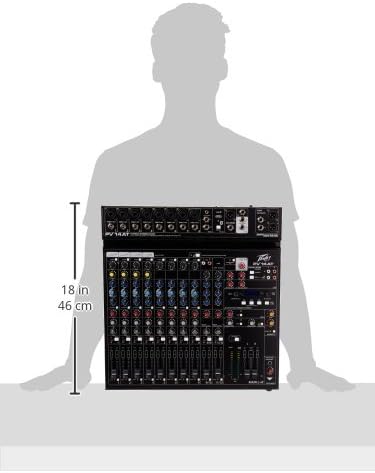
Image: Diagram showing the approximate dimensions of the Peavey PV 14 AT mixer, indicating a height of 18 inches (46 cm).
4. Sąranka
4.1 Išpakavimas
Carefully remove the mixer from its packaging. Retain all packaging materials for future transport or storage. Inspect the unit for any signs of damage incurred during shipping. If damage is found, contact your dealer immediately.
4.2 Maitinimo jungtis
- Įsitikinkite, kad maišytuvo maitinimo jungiklis yra IŠJUNGTOJE padėtyje.
- Connect the provided power adapter to the DC IN port on the rear panel of the mixer.
- Prijunkite maitinimo adapterį į tinkamą kintamosios srovės lizdą.
4.3 Garso jungtys
Connect your microphones, instruments, and other audio sources to the appropriate input channels. Use XLR cables for microphones and 1/4-inch TRS/TS cables for line-level instruments. Connect your main speakers or recording interface to the MAIN L+R outputs using XLR or 1/4-inch cables.
5. Naudojimo instrukcijos
5.1 Channel Operation
Each input channel features a GAIN control to adjust input sensitivity, a 3-band EQ (High, Mid, Low) for tone shaping, and AUX SEND controls for monitor mixes or external effects. The channel fader controls the individual channel's level in the main mix. The SOLO button allows you to monitor a single channel without affecting the main output.
5.2 Antares Auto-Tune
The PV 14 AT includes Antares Auto-Tune on select channels. To activate Auto-Tune, locate the dedicated Auto-Tune button on the desired channel and press it. Adjust the Auto-Tune parameters (if available) via the mixer's digital display and controls to achieve the desired pitch correction effect.
5.3 „Bluetooth“ ryšys
- Press the Bluetooth button on the mixer to activate Bluetooth pairing mode. The Bluetooth indicator light will flash.
- On your smart device (phone, tablet, computer), search for available Bluetooth devices and select "PV 14 AT" (or similar name).
- Once paired, the Bluetooth indicator light will become solid. You can now stream audio wirelessly to the mixer.
5.4 Skaitmeniniai efektai
The mixer features built-in digital effects. Use the EFFECTS section controls and LCD display to browse and select various effects such as reverb, delay, and chorus. Adjust the effect send levels on individual channels and the master effect return level to blend effects into your mix.
5.5 USB garso sąsaja
The Digital Audio Port (USB) on the rear panel allows the PV 14 AT to function as an audio interface for your computer. Connect a USB cable from the mixer to your computer. The mixer will be recognized as an audio input/output device, enabling multi-track recording to a Digital Audio Workstation (DAW) or playback from your computer through the mixer.
6. Priežiūra
6.1 Valymas
To clean the mixer, use a soft, dry cloth. Do not use abrasive cleaners, solvents, or waxes. Ensure the unit is powered off and disconnected from the power source before cleaning.
6.2 Saugykla
Kai maišytuvas ilgesnį laiką nenaudojamas, jį laikykite vėsioje, sausoje vietoje, toliau nuo tiesioginių saulės spindulių ir ekstremalių temperatūrų. Rekomenduojama naudoti originalią pakuotę, kad būtų apsaugota sandėliavimo ar transportavimo metu.
7. Problemų sprendimas
7.1 Nėra galios
- Check if the power adapter is securely connected to both the mixer and a working power outlet.
- Įsitikinkite, kad maitinimo jungiklis galiniame skydelyje yra ON padėtyje.
- Patikrinkite, ar maitinimo lizdas veikia, prijungdami prie jo kitą įrenginį.
7.2 Nėra garso išvesties
- Confirm that all channel faders and the MAIN L+R faders are raised.
- Check all audio cables for secure connections and proper functionality.
- Ensure input sources (microphones, instruments) are active and producing sound.
- Verify that the connected speakers or headphones are powered on and functioning correctly.
7.3 Hum or Noise
- Įsitikinkite, kad visi kabeliai yra tinkamai ekranuoti ir geros būklės.
- Check for ground loops by ensuring all equipment is connected to the same power circuit or using a ground loop isolator.
- Reduce gain levels if input signals are too hot, causing clipping.
7.4 „Bluetooth“ ryšio problemos
- Ensure the mixer's Bluetooth is in pairing mode.
- Move your smart device closer to the mixer to ensure it is within range.
- Forget the device from your smart device's Bluetooth settings and attempt to re-pair.
8. Specifikacijos
| Prekės svoris | 12 svaro |
| Gaminio matmenys | 12 x 12 x 12 colio |
| Prekės modelio numeris | PV14AT |
| Techninės įrangos sąsaja | Bluetooth |
| Medžiagos tipas | Nerūdijantis plienas |
| Maišytuvo kanalo kiekis | 14 |
| Maitinimo šaltinis | Su laidu elektra |
| Ryšio technologija | Bluetooth |
9. Garantija ir palaikymas
For warranty information and technical support, please refer to the warranty card included with your product or visit the official Peavey website. You can also contact Peavey customer service directly for assistance with product registration, troubleshooting, and service inquiries.


