Įvadas
This manual provides essential information for the proper installation, operation, and maintenance of your Uniden BT-905 BBTY0663001 rechargeable cordless phone battery. Please read these instructions carefully to ensure optimal performance and longevity of your battery.
Produktas baigtasview
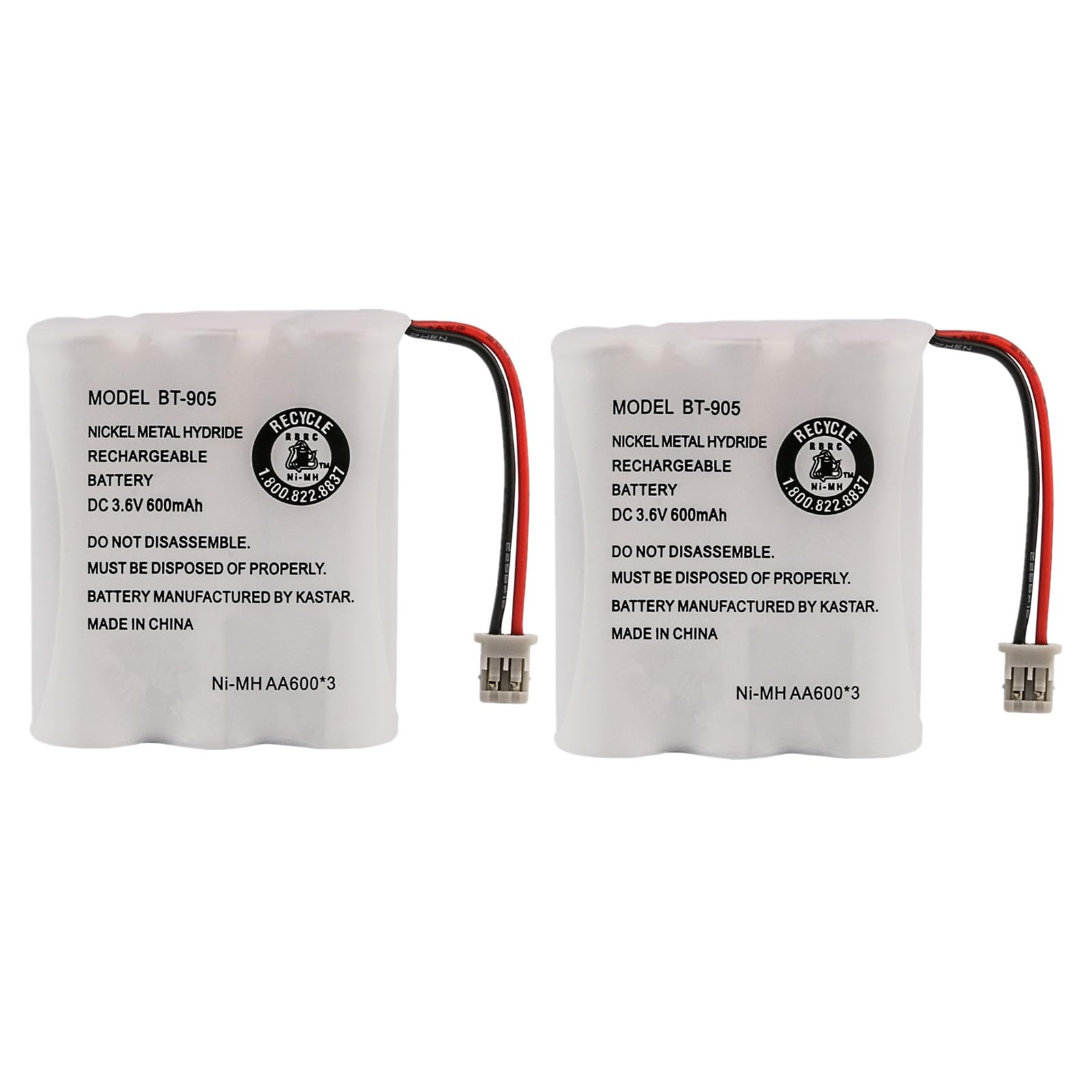
The Uniden BT-905 BBTY0663001 is a genuine replacement battery designed for various Uniden cordless telephone models. It is a Nickel-Metal Hydride (NiMH) battery, known for its reliability in cordless phone applications.
Pagrindinės specifikacijos:
- ttage: 3.6 V
- Talpa: 600 mAh
- Sudėtis: NiMH
Compatible Replacement Battery Models:
- BT-1006
- BT800
- GE-TL26154
- CPB-400B
Compatible Uniden Cordless Telephone Models:
This battery is compatible with a wide range of Uniden cordless phones across 900MHz, 2.4GHz, and 5.8GHz frequencies. A partial list includes:
- 900MHz Models: DXI386-2, DXI986-2, EHD1200, EXA2950, EXA2955, EXA3955, EXAI2980, EXAI2980i, EXAI378, EXAI378i, EXAI398, EXAI398i, EXAI7980, EXAI918, EXAI978, EXAI985HS, EXI376, EXI960, EXI976, EXI2926, EXI2960, EXI3965, EXI7926, EXI7960, EXI8965, EXI8966, EXL8900, EXLI8962, EXP2800, EXP2905, EXP6900, EXP7900, EWCI936, EXP7901, EXS2080, EZI996
- 2.4GHz Models: DXAI3288-2, DXAI4288-2, DXAI4588-2, DXAI7288-2, DXI3286-2, DXI4286-2, DXI4560-2, DXI4561-2, DXI7286-2, EXA3245, EXAI2248, EXAI3248, EXAI3248i, EXAI4248, EXAI4248i, EXAI4580, EXI2246, EXI3226, EXI3246, EXI4246, EXP2240, EXP2243, EXP3240, EXP3241, EXP4240, EXP4241, EXI4560, EXI4561, TRU3466
- 5.8GHz Models: CEZAI998, CXAI5198, CXAI5698, DXAI5188-2, DXAI5588-2, DXAI5588-3, DXAI5588-4, DXAI5688-2, DXAI5688-3, DXAI5688-4, DXAI8580-2, DXAI8580-3, DXI5186-2, DXI5586-2, DXI5586-3, DXI5586-3T, DXI5586-3TA, DXI5686-2, DXI5686-3, DXI8560-2, DXI8560-3, EXAI5180, EXAI5580, EXAI5680, EXI8560, EXAI8580, EXI5160, EXI5560, EXI5660
Montavimas
Follow these steps to correctly install the new battery in your cordless phone handset:
- Raskite akumuliatoriaus skyrių: Turn your cordless phone handset over. The battery compartment is typically located on the back, secured by a cover.
- Nuimkite akumuliatoriaus dangtelį: Slide or unclip the battery compartment cover. You may need a small screwdriver for some models.
- Atjunkite seną bateriją: Carefully disconnect the old battery pack from the phone's connector. Note the orientation of the connector.
- Įdėkite naują bateriją: Connect the new Uniden BT-905 battery pack to the phone's connector, ensuring it is oriented correctly. Do not force the connection.
- Įdėkite bateriją: Place the new battery pack into the compartment. Ensure the wires are not pinched. Note: In some cases, you may need to slightly adjust or trim the battery pack's wrapper where the wires exit to allow the battery cover to close properly. This ensures the wires are not obstructing the cover.
- Pakeiskite akumuliatoriaus dangtelį: Saugiai vėl uždėkite akumuliatoriaus skyriaus dangtelį.

Initial Charging and Operation
After installing the new battery, it is crucial to perform an initial charge cycle.
- Place Handset on Charger: Place the handset with the new battery into its charging cradle. Ensure the charging indicator on the handset or base station illuminates.
- Pradinis mokestis: Allow the battery to charge continuously for at least 12-15 hours before its first use, even if the phone indicates a full charge sooner. This conditions the battery for optimal performance.
- Normalus veikimas: After the initial charge, the phone is ready for normal use. For best battery life, return the handset to the charger when not in use.
Priežiūra ir priežiūra
Proper care can extend the life of your NiMH battery:
- Reguliarus įkrovimas: Always return the handset to the charging cradle when not in use. NiMH batteries do not suffer from a 'memory effect' as severely as NiCd batteries, but consistent charging is beneficial.
- Venkite gilaus iškrovimo: While occasional full discharge and recharge cycles can be beneficial for NiMH batteries, frequently allowing the battery to completely drain can shorten its lifespan.
- Temperatūra: Store and operate the battery at room temperature. Extreme heat or cold can degrade battery performance and life.
- Valymo kontaktai: Periodically clean the charging contacts on both the handset and the charging cradle with a dry cloth to ensure a good connection.
Trikčių šalinimas
If you experience issues with your battery, consider the following:
- Akumuliatorius neįkraunamas:
- Įsitikinkite, kad ragelis tinkamai įdėtas į įkrovimo stotelę.
- Verify the charging cradle is properly connected to power.
- Clean the charging contacts on both the handset and cradle.
- Confirm the battery is correctly installed and connected inside the handset.
- Short Talk Time/Poor Battery Life:
- Ensure the initial 12-15 hour charge cycle was completed.
- The battery may require several charge/discharge cycles to reach full capacity.
- If the battery is old, its capacity may have naturally degraded over time, requiring replacement.
- Telefonas neįsijungia:
- Patikrinkite, ar akumuliatorius tinkamai prijungtas ir įkrautas.
- Verify the phone's power adapter is working.
- If the issue persists, the phone itself may have a fault.
Specifikacijos
| Funkcija | Detalė |
|---|---|
| Modelio numeris | BT-905 / BBTY0663001 |
| Baterijos tipas | Nikelio-metalo hidridas (NiMH) |
| ttage | 3.6 V |
| Talpa | 600 mAh |
| Gaminio matmenys | 3.6 x 2.1 x 1.7 colio |
| Prekės svoris | 1.6 uncijos |
| Gamintojas | JustGreatDealz (for this specific listing) |
| Prekės ženklas | Uniden |
Saugos informacija
Laikykitės šių saugos priemonių:
- Do not disassemble, crush, puncture, or short-circuit the battery.
- Saugokite bateriją nuo aukštos temperatūros ar ugnies.
- Baterijas laikykite vaikams nepasiekiamoje vietoje.
- Panaudotas baterijas išmeskite pagal vietinius reikalavimus. Nemeskite jų į buitines atliekas.
- Use only with compatible Uniden cordless telephone models as specified.
Garantija ir palaikymas
For warranty information and customer support regarding your Uniden BT-905 BBTY0663001 battery, please refer to the documentation provided with your purchase or contact the seller directly. You may also visit the official Unideno parduotuvė bendros informacijos apie produktą.


