1. Įvadas
The Alpine IVA-W520E is a full-featured 2DIN DVD player solution designed for in-car entertainment and media. It integrates advanced video and audio technologies, including a 7-inch LED touchscreen and a Burr-Brown 24-bit DAC, to deliver high-quality sound and clear images. This manual provides essential information for the proper installation, operation, and maintenance of your IVA-W520E unit.
2. Saugos informacija
Prieš įrengdami arba naudodami įrenginį, atidžiai perskaitykite visas saugos instrukcijas. Nesilaikant šių instrukcijų, galite susižaloti arba sugadinti įrenginį ar transporto priemonę.
- Profesionalus montavimas rekomenduojamas: Due to the complexity of car audio-visual systems, professional installation is highly recommended to ensure proper wiring and functionality.
- Maitinimo šaltinis: Įrenginį junkite tik prie 12 V nuolatinės srovės maitinimo šaltinio su neigiamu įžeminimu.
- Venkite blaškymosi: Do not operate the unit's controls or view video content while driving, as this can lead to accidents. Always pull over to a safe location before making adjustments.
- Vėdinimas: Užtikrinkite tinkamą vėdinimą aplink įrenginį, kad jis neperkaistų. Neužblokuokite ventiliacijos angų.
- Drėgmė ir skysčiai: Keep the unit away from moisture and liquids. Do not expose it to rain or water.
- Valymas: Valymui naudokite minkštą, sausą šluostę. Venkite abrazyvinių valiklių ar tirpiklių.
3. Pakuotės turinys
Prieš tęsdami montavimą, patikrinkite, ar pakuotėje yra visi reikalingi daiktai:
- Alpine IVA-W520E Head Unit
- Maitinimo / garsiakalbio laidai
- Tvirtinimo detalės (varžtai, laikikliai)
- Apdailos žiedas
- Vartotojo vadovas (šis dokumentas)
- Informacija apie garantiją
4. Sąranka ir diegimas
4.1. Montavimo gairės
Proper installation is crucial for optimal performance and safety. It is highly recommended to have the unit installed by a qualified professional.
- Atjunkite akumuliatorių: Prieš pradėdami bet kokius elektros darbus, atjunkite automobilio akumuliatoriaus neigiamą gnybtą, kad išvengtumėte trumpojo jungimo.
- Montavimas: Securely mount the unit in the vehicle's double-DIN opening using the provided mounting brackets and screws. Ensure it is stable and does not obstruct any vehicle controls.
- Laidai: Connect the power harness, speaker wires, and other input/output cables according to the wiring diagram provided in the separate installation guide. Pay close attention to ground connections.
- Antenna and External Devices: Connect the radio antenna and any external devices such as a reverse camera or external ampgelbėtojai.
4.2. Pradinė sąranka
After installation, reconnect the battery and power on the unit for the first time.
- Kalbos pasirinkimas: Vykdykite ekrane pateikiamus nurodymus, kad pasirinktumėte pageidaujamą kalbą.
- Laikas ir data: Set the correct time and date for accurate display.
- Garso nustatymai: Adjust basic audio settings such as volume, balance, and fader.
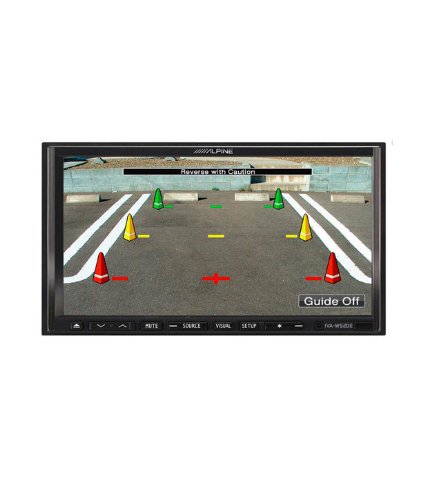
4.1 pav. Pvzample of the IVA-W520E displaying a reverse camera feed, showing parking guidelines. This feature aids in safe vehicle maneuvering.
5. Įrenginio valdymas
5.1. Touchscreen and Button Controls
The IVA-W520E features a responsive 7-inch LED touchscreen for primary control, supplemented by physical buttons for quick access to common functions.
- Jutiklinis ekranas: Navigate menus, select sources, and control playback by touching the screen.
- Garsumo valdymas: Use the dedicated volume buttons or on-screen controls to adjust audio levels.
- Šaltinio mygtukas: Press to cycle through available audio/video sources (Radio, DVD, USB, iPod, AUX, Bluetooth).
- Nutildymo mygtukas: Temporarily mutes the audio output.
- Sąrankos mygtukas: Pasiekite sistemos nustatymų meniu.
5.2. Garso atkūrimas
The unit supports various audio formats and sources, enhanced by its Burr-Brown 24-bit DAC for superior sound quality.
- USB garsas: Prijunkite USB įrenginį, kuriame yra garso failų files. The unit will display track information and allow navigation through folders.
- iPod/iPhone Connectivity: Connect your iPod or iPhone for direct audio playback and control.
- DVD/CD atkūrimas: Insert a DVD or CD into the disc slot for audio or video playback.
- Radijo imtuvas: Pasiekite AM/FM radijo stotis.
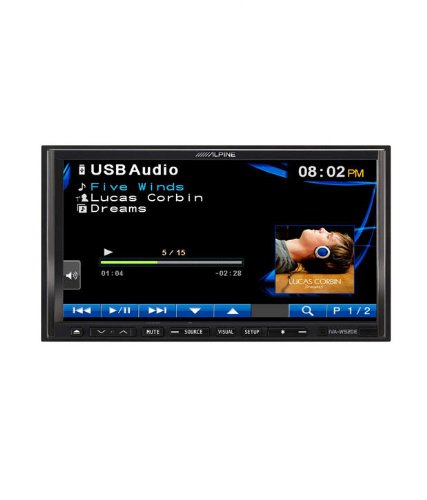
Figure 5.1: The IVA-W520E displaying the USB Audio interface, showing current track, artist, and playback controls. This allows for easy navigation of digital music files.
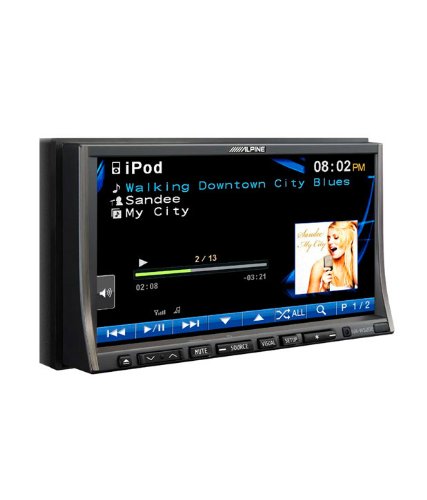
Figure 5.2: The IVA-W520E displaying the iPod interface, showing a list of songs and album art. This demonstrates seamless integration with Apple devices for music playback.
5.3. Vaizdo įrašų atkūrimas
The 7-inch LED screen provides enhanced image quality with higher resolution, better contrast, and improved color reproduction compared to standard LCD screens.
- DVD Video: Insert a video DVD for playback. Ensure the parking brake safety wire is correctly connected for video to display while the vehicle is stationary.
- External Video Input: The unit supports external video sources, such as a reverse camera or other video devices.
5.4. Bluetooth ryšys
The IVA-W520E is upgradable for Bluetooth hands-free system functionality, allowing for safe and convenient communication while driving.
- Poravimas: Refer to the separate Bluetooth module manual (if applicable) for pairing instructions with your mobile phone.
- Skambinimas laisvų rankų įranga: Make and receive calls directly through the unit.
- Garso transliacija: Stream audio from your Bluetooth-enabled device.
5.5. Navigation System (Upgradable)
The unit is designed to be upgradable with a navigation system. Consult your Alpine dealer for compatible navigation modules and installation.
6. Priežiūra
Regular maintenance helps ensure the longevity and optimal performance of your Alpine IVA-W520E.
- Ekrano valymas: Gently wipe the touchscreen with a soft, lint-free cloth. For stubborn smudges, slightly dampen the cloth with water or a screen-specific cleaner. Do not spray cleaner directly onto the screen.
- Disko lizdas: Disko lizdą laikykite švarų nuo dulkių ir šiukšlių. Nedėkite sulenktų, subraižytų ar netaisyklingos formos diskų.
- Bendras valymas: Use a soft, dry cloth to wipe the unit's exterior. Avoid harsh chemicals or abrasive materials.
7. Problemų sprendimas
If you encounter issues with your IVA-W520E, refer to the following common problems and solutions:
| Problema | Galima priežastis | Sprendimas |
|---|---|---|
| Nėra galios | Perdegęs saugiklis, neteisingas laidų sujungimas, atsilaisvinęs prijungimas. | Check vehicle fuses and unit's fuse. Verify power and ground wiring connections. Ensure battery is connected. |
| Nėra garso | Volume too low, mute activated, speaker wiring issue, incorrect source selected. | Padidinkite garsumą. Išjunkite nutildymą. Patikrinkite garsiakalbių jungtis. Pasirinkite tinkamą garso šaltinį. |
| Disko klaida | Nešvarus, subraižytas arba nesuderinamas diskas. | Clean the disc. Try a different, known-good disc. Ensure disc format is supported. |
| Vaizdo įrašas nerodomas (vairuojant) | Parking brake safety wire not connected or incorrectly connected. | This is a safety feature. Video playback is disabled while the vehicle is in motion. Ensure the parking brake wire is correctly connected to the vehicle's parking brake circuit. |
| „Bluetooth“ poravimo problemos | Bluetooth module not connected, phone not in pairing mode, interference. | Ensure optional Bluetooth module is correctly installed. Put phone in pairing mode. Move closer to the unit. |
If the problem persists after trying these solutions, please contact your authorized Alpine dealer or customer support.
8. Specifikacijos
Key technical specifications for the Alpine IVA-W520E:
- Modelis: IVA-W520E
- Ekrano dydis: 7 colių (18 cm)
- Ekrano tipas: LED LCD Touchscreen
- Rezoliucija: 480 x 272 pikselių
- Garso DAC: Burr-Brown 24-bit
- Suderinami įrenginiai: Smartphone (via USB/iPod, Bluetooth upgradable)
- Ypatingos savybės: Touchscreen, Bluetooth (upgradable)
- Garso išvesties režimas: Pranešėjas
- Gamintojas: Alpinis
- Pirmas prieinamas: 20 m. rugpjūčio 2015 d
9. Garantija ir palaikymas
For detailed warranty information, please refer to the warranty card included with your product package or visit the official Alpine websvetainėje. Išsaugokite pirkimo kvitą kaip pirkimo įrodymą.
For technical support, service, or inquiries about compatible accessories and upgrades (such as navigation modules or Bluetooth kits), please contact your authorized Alpine dealer or visit the Alpine customer support portal online.
Alpine Official Websvetainė: www.alpine.com


