1. Įvadas
This manual provides detailed instructions for the safe and effective operation of the Meco 2250-HZ Auto Digital Clamp Meter. This device is designed for measuring various electrical parameters, including AC/DC voltage, AC current, frequency, continuity, and diode testing. Please read this manual thoroughly before use and retain it for future reference.
2. Saugos informacija
Always observe standard safety precautions when working with electrical circuits. Failure to do so may result in injury or damage to the meter. This meter is designed with over-voltage protection up to 200V DC and AC Peak. However, exercise caution.
- Nebandykite matuoti tūriotagsrovės, viršijančios nurodytas didžiausias ribas.
- Prieš atlikdami matavimus, įsitikinkite, kad bandymo laidai yra geros būklės ir tinkamai prijungti.
- Do not operate the meter if it appears damaged or if the battery cover is not securely closed.
- Avoid using the meter in wet environments or in the presence of explosive gases or dust.
- Always disconnect power to the circuit before connecting or disconnecting test leads, especially for current measurements.
3. Produktas baigtasview
The Meco 2250-HZ Auto Digital Clamp Meter features a robust design for reliable performance. Familiarize yourself with the components shown below.
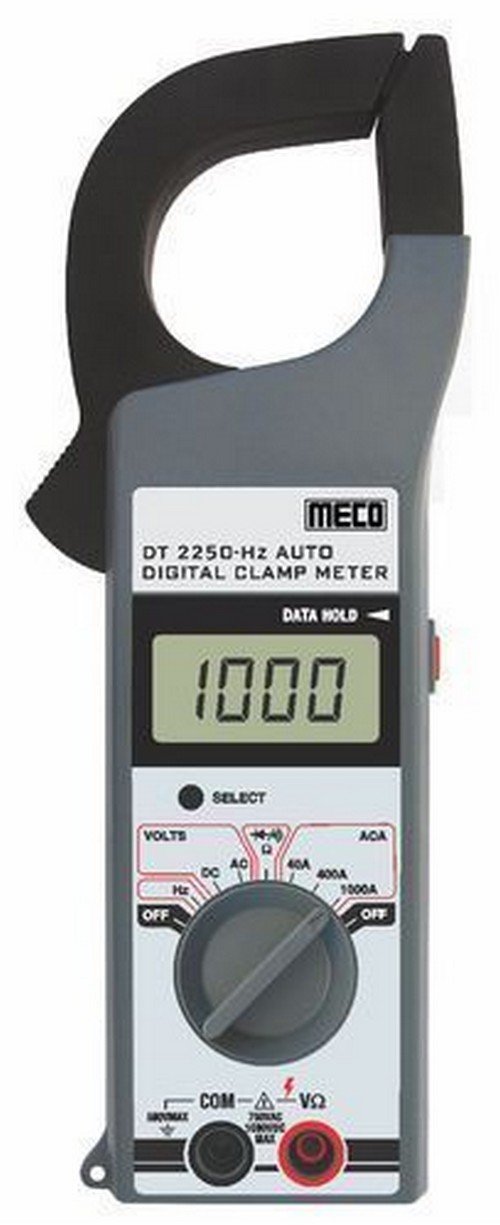
1 paveikslas: Priekyje view of the Meco 2250-HZ Auto Digital Clamp Meter. This image displays the clamp jaw at the top, the LCD screen showing '1000', the function dial, and the input terminals at the bottom. The 'SELECT' and 'DATA HOLD' buttons are visible next to the display.
Pagrindiniai komponentai:
- Clamp Žandikaulis: Used for non-contact AC current measurement.
- LCD ekranas: 3¾ digit liquid crystal display with a maximum reading of 3999. Shows measurement values, polarity, overrange indication (OL or -OL), and low battery indication.
- Funkcinis ratukas: Rotary switch to select measurement functions (OFF, Volts DC/AC, Hz, ACA 40A/400A/1000A).
- SELECT mygtukas: Used to switch between DC and AC voltage modes, or other sub-functions within a dial setting.
- DATA HOLD Button: Įšaldo dabartinį rodmenį ekrane. Paspauskite dar kartą, kad atleistumėte.
- Input Terminals (COM, VΩ): Tūrio matavimo laidų prijungimuitage, resistance, continuity, and diode measurements.
4. Sąranka
4.1 Akumuliatoriaus įdėjimas
The Meco 2250-HZ Auto Digital Clamp Meter requires batteries for operation. Batteries are not included with the product. To install or replace batteries:
- Įsitikinkite, kad skaitiklis yra IŠJUNGTAS.
- Raskite baterijų skyrių matuoklio gale.
- Baterijų skyriaus dangteliui atidaryti naudokite atsuktuvą.
- Insert the required batteries, observing correct polarity (+ and -).
- Uždėkite akumuliatoriaus skyriaus dangtelį ir pritvirtinkite jį varžtu.
A low battery indication will appear on the display when the battery voltage is low, signaling the need for replacement.
5. Naudojimo instrukcijos
5.1 Bendras veikimas
- Turn the function dial to the desired measurement setting.
- Connect test leads to the appropriate input terminals (COM and VΩ) for voltage, resistance, continuity, or diode tests.
- Srovės matavimams naudokite clamp žandikaulis aplink vieną laidininką.
- Paspauskite PASIRINKTI button to toggle between AC/DC modes or other sub-functions if available for the selected range.
- Paspauskite DUOMENŲ LAIKYMAS mygtuką, kad sustabdytumėte dabartinį rodmenį ekrane. Paspauskite dar kartą, kad atleistumėte.
5.2 AC/DC ttage Matavimas
- Set the function dial to the "VOLTS" position.
- Connect the black test lead to the COM terminal and the red test lead to the VΩ terminal.
- Paspauskite PASIRINKTI button to choose between AC or DC voltage measurement. The display will indicate "AC" or "DC".
- Prijunkite bandymo laidus lygiagrečiai prie bandomosios grandinės arba komponento.
- Perskaitykite ttage reikšmė LCD ekrane.
5.3 Kintamosios srovės matavimas (Clamp)
- Set the function dial to the desired AC current range (40A, 400A, or 1000A).
- Atidarykite klamp žandikaulį paspausdami gaiduką.
- Į laidą įdėkite tik vieną grandinės laidininką.amp žandikaulis. Įsitikinkite, kad žandikaulis yra visiškai uždarytas.
- Nuskaitykite kintamosios srovės vertę LCD ekrane.
5.4 Frequency (Hz) Measurement
- Set the function dial to the "Hz" position.
- Connect the black test lead to the COM terminal and the red test lead to the VΩ terminal.
- Connect the test leads in parallel to the circuit where frequency needs to be measured.
- Read the frequency value in Hertz (Hz) on the LCD display.
5.5 Audible Continuity Check
- Set the function dial to the continuity/diode symbol (often shared with resistance).
- Connect the black test lead to the COM terminal and the red test lead to the VΩ terminal.
- Touch the test probes across the component or circuit to be tested.
- If continuity exists (low resistance), the meter will emit an audible beep.
5.6 Diodų bandymas
- Set the function dial to the continuity/diode symbol.
- Connect the black test lead to the COM terminal and the red test lead to the VΩ terminal.
- Connect the red test lead to the anode of the diode and the black test lead to the cathode. The display will show the forward voltage lašas.
- Reverse the test leads. The display should show "OL" (overload) for a good diode.
6. Priežiūra
6.1 Valymas
Nuvalykite skaitiklio casing su reklamaamp cloth and a mild detergent. Do not use abrasives or solvents. Keep the display clean and dry.
6.2 Akumuliatoriaus keitimas
Refer to Section 4.1 for battery installation and replacement instructions. Replace batteries promptly when the low battery indicator appears to ensure accurate readings.
7. Problemų sprendimas
| Problema | Galima priežastis | Sprendimas |
|---|---|---|
| Matuoklis neįsijungia. | Neišsikrovusios arba neteisingai įdėtos baterijos. | Patikrinkite baterijų poliškumą ir, jei reikia, pakeiskite baterijas. |
| "OL" or "-OL" displayed. | Overrange condition; measurement exceeds meter's range. | Select a higher range or ensure the measured value is within the meter's capabilities. |
| Netikslūs rodmenys. | Low battery, poor test lead connection, or incorrect function selection. | Replace batteries, ensure secure connections, verify function dial setting. |
| No audible beep during continuity test. | Nutraukta grandinė arba didelė varža. | Verify the circuit is closed and resistance is low enough for continuity. |
8. Specifikacijos
| Funkcija | Detalė |
|---|---|
| Ekranas | 3¾ digit LCD, max reading 3999 |
| Poliškumas | Automatic, negative polarity indication |
| Perviršio indikacija | "OL" or "-OL" displayed |
| Nulio koregavimas | Automatinis |
| Baterijos veikimo laikas | 200 valandų tipiškas |
| Per ttage Apsauga | 200V DC and AC Peak |
| Audible Continuity Check | Taip |
| Diodo testas | Taip |
| Išsikrovusio akumuliatoriaus indikatorius | Taip |
| Prekės svoris | 600 g (1.32 svaro) |
| Gaminio matmenys | 21 x 13 x 6 cm |
| Medžiaga | Plastikiniai |
| Gamintojas | Meco instrumentai |
9. Garantija ir palaikymas
For warranty information or technical support, please contact the retailer or the manufacturer, Meco Instruments, directly. Keep your purchase receipt as proof of purchase.


