1. Įvadas
This manual provides comprehensive instructions for the setup, operation, and maintenance of the EDUP EP-3701 USB WiFi Disk. The EP-3701 is a portable wireless storage device designed to expand storage and facilitate data sharing for iOS and Android smartphones and tablets without the need for cables or a computer.
Prieš naudodami įrenginį, atidžiai perskaitykite šį vadovą, kad užtikrintumėte tinkamą veikimą ir išvengtumėte pažeidimų.
2. Produktas baigtasview
The EDUP EP-3701 acts as a bridge between your USB storage devices (like USB flash drives or external hard drives) and your mobile devices via a Wi-Fi connection. It creates its own Wi-Fi hotspot, allowing multiple devices to connect and access stored files vienu metu.
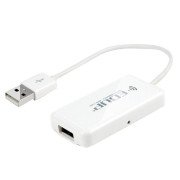
2.1 vaizdas: priekis view of the EDUP EP-3701 USB WiFi Disk, showing the USB host port and the integrated USB cable.
3. Pagrindinės savybės
- Wireless Data Access: Prieiga files on connected USB storage devices wirelessly from smartphones, tablets, and computers.
- Kelių vartotojų palaikymas: Allows multiple users to connect and stream/access data simultaneously.
- Nešiojamas dizainas: Compact and lightweight, ideal for travel and on-the-go use.
- Maitinimo šaltinis: Powered via USB, can be connected to a USB wall adapter, power bank, or computer USB port.
- Programos valdymas: Dedicated mobile application for easy file management and device configuration.
4. Pakuotės turinys
Patikrinkite, ar pakuotėje yra visi reikalingi daiktai:
- EDUP EP-3701 USB WiFi Disk
- Greitos pradžios vadovas (šis vadovas)
5. Sąranka
5.1. Įrenginio įjungimas
- Connect the integrated USB cable of the EP-3701 to a USB power source (e.g., a 5V/1A USB wall adapter, a power bank, or a computer's USB port).
- The power indicator light on the device will illuminate, indicating it is powered on.
5.2. Connecting USB Storage
- Insert your USB flash drive or external hard drive into the USB host port on the EP-3701.
- Ensure the USB storage device is properly seated.
5.3. Connecting Mobile Device
- On your smartphone or tablet, go to Wi-Fi settings.
- Locate and connect to the Wi-Fi network named "EDUP_XXXXXX" (XXXXXX will be the last six digits of the device's MAC address).
- The default password is "12345678". It is recommended to change this password after initial setup.
- Download and install the "WiFi Disk" application from your device's app store (App Store for iOS, Google Play Store for Android).
- Open the "WiFi Disk" app. The app will automatically detect and connect to the EP-3701.
6. Naudojimo instrukcijos
6.1. File Valdymas
- Naršyti Files: Within the "WiFi Disk" app, navigate through the folders and files on the connected USB storage.
- Įkelti Files: Perdavimas files from your mobile device to the USB storage connected to the EP-3701.
- Atsisiųsti Files: Perdavimas files from the USB storage to your mobile device.
- Srauto laikmena: Leiskite vaizdo įrašus, muziką ir view photos directly from the USB storage without downloading.
6.2. Tinklo nustatymai
The "WiFi Disk" app allows you to configure network settings:
- Change Wi-Fi Name (SSID): Modify the name of the EP-3701's Wi-Fi network.
- Keisti „Wi-Fi“ slaptažodį: Update the password for the Wi-Fi network.
- Internet Passthrough (Bridge Mode): Connect the EP-3701 to an existing Wi-Fi network to provide internet access to connected devices while still allowing access to the USB storage.
7. Priežiūra
- Valymas: Įrenginio išorę valykite minkštu, sausu skudurėliu. Nenaudokite skystų valiklių ar aerozolių.
- Saugykla: Laikykite prietaisą vėsioje, sausoje vietoje, apsaugotoje nuo tiesioginių saulės spindulių ir ekstremalių temperatūrų.
- Firmware atnaujinimai: Periodically check the "WiFi Disk" app or the EDUP official websvetainę, kurioje rasite programinės įrangos atnaujinimus, kad būtų užtikrintas optimalus našumas ir saugumas.
- Saugus pašalinimas: Always ensure data transfer is complete before disconnecting the USB storage device or powering off the EP-3701.
8. Problemų sprendimas
8.1. Įrenginys neįsijungia
- Ensure the USB cable is securely connected to a working USB power source.
- Išbandykite kitą USB prievadą arba maitinimo adapterį.
8.2. Nepavyksta prisijungti prie „Wi-Fi“ tinklo
- Verify you are selecting the correct "EDUP_XXXXXX" network.
- Double-check the Wi-Fi password (default is "12345678").
- Restart the EP-3701 device and your mobile device.
8.3. USB Storage Not Detected
- Ensure the USB storage device is properly inserted into the EP-3701's USB host port.
- Check if the USB storage device is formatted in a supported file system (FAT32, NTFS, exFAT).
- Some high-power consumption external hard drives may require an external power source.
- Try a different USB storage device to rule out a faulty drive.
8.4. Programėlė neveikia tinkamai
- Ensure your mobile device is connected to the EP-3701's Wi-Fi network.
- Close and reopen the "WiFi Disk" app.
- Reinstall the "WiFi Disk" app.
- Patikrinkite programėlių atnaujinimus savo įrenginio programėlių parduotuvėje.
9. Specifikacijos
| Funkcija | Aprašymas |
|---|---|
| Modelis | EP-3701 |
| Sąsaja | USB 2.0 (Host), USB 2.0 (Power Input) |
| bevielio ryšio standartas | IEEE 802.11b/g/n |
| Dažnių juosta | 2.4 GHz |
| Saugumas | WPA / WPA2, WPA-PSK / WPA2-PSK |
| Palaikoma File Sistemos | FAT32, NTFS, exFAT |
| Maitinimo įvestis | DC 5V/1A (via USB) |
| Matmenys | (Approximate, based on typical USB dongle size) 60mm x 25mm x 10mm |
| Darbinė temperatūra | nuo 0°C iki 40°C (32°F iki 104°F) |
10. Garantija ir palaikymas
EDUP products typically come with a limited warranty. Please refer to the warranty card included with your purchase or visit the official EDUP websvetainėje, kurioje rasite išsamias garantijos sąlygas, taikomas jūsų regionui.
For technical support, product inquiries, or warranty claims, please contact EDUP customer service through their official websvetainėje arba kontaktinę informaciją, pateiktą jūsų produkto pakuotėje.
Websvetainė: www.szedup.com


