Įvadas
This manual provides instructions for the HAVIT HV-KB366L RGB Backlit Mechanical Gaming Keyboard. This keyboard features blue mechanical switches, full anti-ghosting, and customizable RGB backlighting, designed for reliable performance.
Sąrankos instrukcijos
Klaviatūros prijungimas
- Kompiuteryje raskite laisvą USB prievadą.
- Connect the USB cable from the HAVIT HV-KB366L keyboard to the USB port on your computer.
- Klaviatūra yra „plug-and-play“ tipo ir turėtų būti automatiškai atpažinta jūsų operacinės sistemos.
Sistemos suderinamumas
- Compatible with Windows 10 and other Windows operating systems.
- Mac OS supports 6-key rollover only.
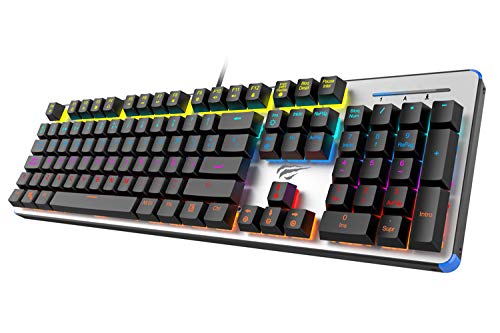
Figure 1: HAVIT HV-KB366L RGB Backlit Mechanical Gaming Keyboard. An overhead view klaviatūros, parodykiteasing its full layout with RGB lighting on the keys and a white frame.
Naudojimo instrukcijos
Mechaniniai raktiniai jungikliai
The keyboard is equipped with blue mechanical switches, providing tactile feedback and an audible click with each keystroke. This design is intended for precise input during typing and gaming.
Apsaugos nuo šešėlių funkcija
The full key anti-ghosting mechanism ensures that all key presses are registered accurately, even when multiple keys are pressed simultaneously. This feature is beneficial for fast-paced gaming.
Foninio apšvietimo reguliavimas
- To change the backlight color or mode, press the Fn klavišą vienu metu su Foninis apšvietimas key. Repeated presses will cycle through available modes and colors.
- Marquee Mode: In 7-color backlit mode (non-breathing), press the Foninis apšvietimas key once to activate marquee mode. Press the Foninis apšvietimas key again to deactivate marquee mode and return to 7-color backlit mode.
- Ryškumo lygiai: The backlight offers 4 levels of brightness adjustment.
- Kvėpavimo dažnis: The breathing effect has 10 adjustable levels.
Priežiūra
Klaviatūros valymas
- Prieš valydami atjunkite klaviatūrą nuo kompiuterio.
- Klaviatūros paviršiui nuvalyti naudokite minkštą, sausą šluostę.
- Dulkėms ir šiukšlėms tarp klavišų pašalinti naudokite suslėgtą orą.
- Avoid using harsh chemicals or abrasive materials, as these can damage the finish or keycaps.
Patvarumas
The keyboard features an aluminum top housing with a sanded finish and a metal base, contributing to its overall durability and stable performance.
Trikčių šalinimas
Klaviatūra nereaguoja
- Įsitikinkite, kad USB laidas yra tvirtai prijungtas prie klaviatūros ir kompiuterio.
- Pabandykite prijungti klaviatūrą prie kito kompiuterio USB prievado.
- Išbandykite klaviatūrą kitame kompiuteryje, kad nustatytumėte, ar problema susijusi su klaviatūra, ar kompiuterio USB prievadu.
Foninis apšvietimas neveikia arba yra netinkamas
- Verify that the keyboard is properly connected and receiving power.
- Paspauskite Fn + Backlit key to cycle through backlight modes and ensure it is not turned off or set to a very low brightness.
- Refer to the "Backlight Adjustment" section for detailed instructions on changing modes and brightness.
Specifikacijos
| Prekės ženklas | HAVIT |
| Modelio numeris | HV-KB366L |
| Gamintojas | HAVIT |
| Gaminio matmenys | 50.5x17.6x6 cm |
| Prekės svoris | 1.33 kg |
| Ryšio technologija | Laidinis (USB) |
| Klaviatūros aprašymas | Mechaninė žaidimų klaviatūra |
| Ypatinga funkcija | RGB Backlit, Anti-Ghosting |
| Aparatinės įrangos platforma | Nešiojamasis kompiuteris, kompiuteris |
| Operacinė sistema | Windows 10 (and compatible), Mac OS (6-key rollover) |
| ttage | 5 voltų |
| Įtraukti komponentai | USB kabelis |
Garantija ir palaikymas
Informacija apie garantiją
Specific warranty details for the HAVIT HV-KB366L keyboard are not provided in the product data. Please refer to the product packaging or contact HAVIT directly for warranty terms and conditions.
Pagalba klientams
For technical assistance, troubleshooting, or further inquiries, please contact HAVIT customer support through their official websvetainę arba perkant pateiktą kontaktinę informaciją.


