1. Įvadas
Ačiū, kad pirkoteasing the Gotech GTV-7-TFT 7-inch Portable Color TFT LCD TV. This manual provides essential information for the safe and efficient operation of your device. Please read it thoroughly before use and retain it for future reference.
2. Svarbios saugos instrukcijos
- Saugokite įrenginį nuo lietaus ar drėgmės, kad išvengtumėte gaisro ar elektros smūgio.
- Neatidarykite casing. Visus techninės priežiūros darbus patikėkite kvalifikuotiems darbuotojams.
- Venkite įrenginio statyti šalia šilumos šaltinių arba tiesioginiuose saulės spinduliuose.
- Užtikrinkite tinkamą vėdinimą aplink įrenginį.
- Naudokite tik nurodytą maitinimo adapterį.
- Saugokite įrenginį nuo stiprių magnetinių laukų.
- Prietaisą valykite minkštu, sausu skudurėliu. Nenaudokite skystų valiklių.
3. Pakuotės turinys
Patikrinkite, ar pakuotėje yra visi reikalingi daiktai:
- Gotech GTV-7-TFT Portable TV Unit
- Nuotolinio valdymo pultas
- AC/DC adapteris
- Car Cord (Car Holder not explicitly listed as included, but mentioned as a feature)
- Antenos lizdas
- AV kabelis
- Nuimamas stovas

Image 3.1: The retail box for the Gotech GTV-7-TFT Portable TV, showing the product, remote control, and included accessories.
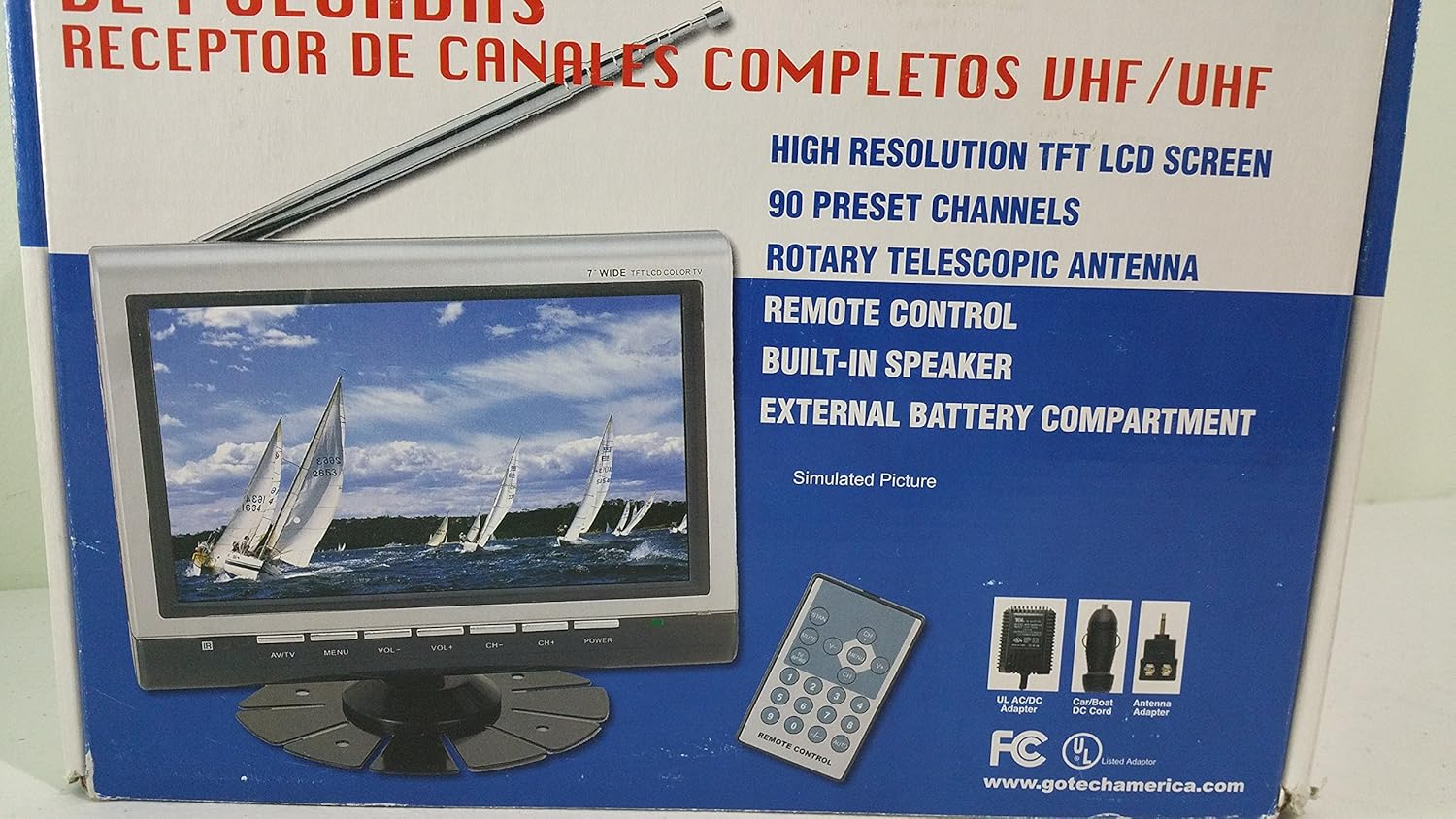
3.2 paveikslėlis: Pritraukėjas view of the Gotech GTV-7-TFT TV screen and the remote control, as depicted on the product packaging.
4. Produktas baigtasview
4.1 Pagrindinės savybės
- 7-inch High Resolution TFT LCD Screen
- Full Channel VHF/UHF Receiver
- 90 Iš anksto nustatyti kanalai
- Digital Up/Down Tuning
- Auto Channel Programming
- Rotacinė teleskopinė antena
- On-Screen Display (OSD) for Picture and Volume Adjustment
- Integruotas garsiakalbis
- External Battery Compartment (requires 10x AA batteries, not included)
- Remote Control with Button Cell
- New Detachable Stand with Battery

Image 4.1: Side panel of the Gotech GTV-7-TFT packaging, detailing the product's main features.
5. Sąranka
5.1 Powering the TV
The GTV-7-TFT can be powered in several ways:
- AC/DC adapteris: Connect the provided AC/DC adapter to the TV's power input and then to a standard wall outlet.
- Car Cord: For in-vehicle use, connect the car cord to the TV's power input and then to your vehicle's 12V power outlet.
- Išorinės baterijos: Open the external battery compartment and insert 10x AA size batteries (UM3) according to the polarity indicators. Ensure the batteries are fresh and correctly oriented.
5.2 Antenos prijungimas
Extend the rotary telescopic antenna for optimal signal reception. For improved reception, you may connect an external antenna to the antenna jack using the provided antenna jack adapter.
5.3 Connecting External Devices (AV Input)
To connect external devices such as a DVD player or gaming console, use the provided AV cable. Connect one end to the TV's AV input port and the other end to the AV output ports of your external device. Select the AV input source on the TV to view turinį iš prijungto įrenginio.
6. Operacija
6.1 Maitinimo įjungimas/išjungimas
Paspauskite GALIA button on the TV unit or the remote control to turn the TV on or off.
6.2 Kanalų derinimas
- Auto Channel Programming: It is recommended to perform an auto channel scan upon first use or when moving to a new location. Access the menu, navigate to the channel setup, and select 'Auto Scan' or 'Auto Program'. The TV will search and store available channels.
- Digital Up/Down Tuning: Naudokite CH+ ir CH- buttons on the TV or remote control to navigate through the preset channels.
6.3 Volume and Picture Adjustment
Naudokite VOL+ ir VOL- buttons on the TV or remote control to adjust the volume. Picture settings (brightness, contrast, color) can be adjusted via the on-screen display (OSD) menu. Press the MENIU button to access these options.
6.4 Nuotolinis valdymas
The remote control allows convenient operation from a distance. Ensure the button cell battery is correctly inserted. Point the remote control directly at the TV's infrared sensor.
7. Priežiūra
7.1 Valymas
Wipe the TV screen and casing with a soft, dry, lint-free cloth. Do not use abrasive cleaners, waxes, or solvents as they may damage the finish or screen.
7.2 Saugykla
If the TV will not be used for an extended period, remove the external batteries to prevent leakage. Store the unit in a cool, dry place away from direct sunlight and extreme temperatures.
8. Problemų sprendimas
| Problema | Galima priežastis | Sprendimas |
|---|---|---|
| Nėra galios | Neprijungtas maitinimo adapteris; Baterijos išsikrovusios arba neteisingai įdėtos. | Check power connections; Replace or correctly insert batteries. |
| Nėra vaizdo/garso | Incorrect input source; Antenna not connected or extended; No channels scanned. | Select correct input (TV/AV); Extend antenna or connect external one; Perform auto channel scan. |
| Prastas priėmimas | Weak signal; Antenna position. | Adjust antenna position; Try an external antenna; Check for local signal strength. |
| Nuotolinio valdymo pultas neveikia | Battery depleted; Obstruction between remote and TV. | Replace remote control battery; Remove any obstructions. |
9. Specifikacijos
| Funkcija | Detalė |
|---|---|
| Modelio numeris | gtv-7-tft |
| Ekrano dydis | 7 colio (17.8 cm) |
| Ekrano tipas | TFT LCD spalvotas ekranas |
| Tunerio tipas | Full Channel VHF/UHF Receiver |
| Iš anksto nustatyti kanalai | 90 |
| Garso išvesties tipas | Integruotas garsiakalbis |
| Kontrolės metodas | Nuotolinio valdymo pultas |
| Suderinami įrenginiai | Televizija, garsiakalbis |
| Maitinimo šaltinis | AC/DC Adapter, Car Cord, External Battery Compartment (10x AA batteries, not included) |
10. Garantija ir palaikymas
Specific warranty information and customer support details are not provided within this manual. Please refer to the product packaging or contact your retailer for warranty claims and technical assistance.


