PRORECK Party 15 Portable PA Speaker System
Vartotojo vadovas
Model: PARTY 15
Įvadas
Ačiū, kad pirkoteasing the PRORECK Party 15 Portable PA Speaker System. This system is designed to deliver powerful and clear audio for various applications, including parties, DJ events, home studios, and social gatherings. Featuring Bluetooth connectivity, USB/SD card playback, FM radio, and integrated LED lights, the Party 15 offers versatile audio solutions. Please read this manual thoroughly before operating the system to ensure proper use and to maximize its performance and longevity.
Svarbi saugos informacija
Naudodami šį gaminį, visada laikykitės pagrindinių saugos priemonių, kad sumažintumėte gaisro, elektros smūgio ir sužalojimų riziką.
- Saugokite šią įrangą nuo lietaus ar drėgmės.
- Do not open the speaker enclosure. There are no user-serviceable parts inside. Refer all servicing to qualified service personnel.
- Užtikrinkite maitinimo šaltinio ttage atitinka ttage nurodyta ant įrenginio.
- Saugokite maitinimo laidą, kad ant jo neužeitų ar nesuspaustų, ypač prie kištukų, patogių lizdų ir toje vietoje, kur jie išeina iš aparato.
- Atjunkite šį įrenginį žaibuojant arba kai nenaudojate ilgą laiką.
- Neužblokuokite jokių ventiliacijos angų. Montuokite pagal gamintojo instrukcijas.
- Naudokite tik su gamintojo nurodytu arba kartu su aparatu parduodamu vežimėliu, stovu, trikoju, laikikliu ar stalu.
Kas yra dėžutėje
Carefully unpack your PRORECK Party 15 system and ensure all items listed below are present and in good condition. If any items are missing or damaged, please contact your retailer immediately.

Image: Complete PRORECK Party 15 system with all included accessories.
- 1 x aktyvus garsiakalbis
- 1 x pasyvus garsiakalbis
- 2 x garsiakalbių stovai
- 1x laidinis mikrofonas
- 1 x Speakon Cable (for connecting active to passive speaker)
- 1x maitinimo laidas
- 1x nuotolinio valdymo pultas

Vaizdas: Išsamus view of the wired microphone, remote control, and various cables.
Sąranka
Follow these steps to set up your PRORECK Party 15 speaker system.
1. Garsiakalbio stovo surinkimas
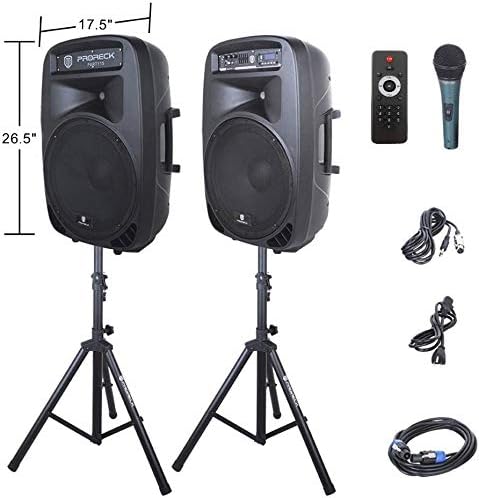
Image: The two included speaker stands.
- Unfold the tripod legs of each speaker stand until they are fully extended and stable.
- Loosen the height adjustment knob on the stand and extend the pole to your desired height. Ensure the safety pin is inserted through the appropriate hole to secure the height.
- Tvirtai priveržkite aukščio reguliavimo rankenėlę.
2. Garsiakalbio išdėstymas
- Carefully lift each speaker and place it onto the top pole of a speaker stand. Ensure the speaker is securely seated.
- Position the active speaker (the one with the control panel) near a power outlet.
- Place the passive speaker within reach of the included Speakon cable from the active speaker.
Image: PRORECK Party 15 speakers set up on their stands.
3. Garsiakalbių prijungimas
- Locate the Speakon output on the rear panel of the active speaker and the Speakon input on the rear panel of the passive speaker.
- Connect one end of the Speakon cable to the active speaker's Speakon output and the other end to the passive speaker's Speakon input. Ensure a secure connection.

Image: Rear panels of the active and passive speakers, highlighting the Speakon connection.
4. Maitinimo prijungimas
- Ensure the master volume knob on the active speaker is turned down to its minimum setting.
- Connect the power cable to the active speaker's power input and then plug it into a suitable electrical outlet.
Naudojimo instrukcijos
This section details how to operate your PRORECK Party 15 speaker system and utilize its various features.
Valdymo skydas baigtasview

Vaizdas: Išsamus view of the active speaker's control panel.
The active speaker features a comprehensive control panel with an LCD display, various input options, volume controls, and an equalizer.
1. Maitinimo įjungimas/išjungimas
- After connecting the power cable, locate the power switch on the rear panel of the active speaker.
- Flip the switch to the "ON" position to power on the system. The LCD display will illuminate.
- Norėdami išjungti, perjunkite jungiklį į padėtį „IŠJUNGTA“.
2. Režimo pasirinkimas
Paspauskite REŽIMAS button on the control panel or remote control to cycle through available input modes: Bluetooth, USB, SD Card, FM Radio, and Line Input.
3. Bluetooth ryšys
- Pasirinkite „Bluetooth“ režimą naudodami REŽIMAS button. The LCD display will show "BLUE".
- Savo „Bluetooth“ įrenginyje (išmaniajame telefone, planšetiniame kompiuteryje ir kt.) ieškokite galimų „Bluetooth“ įrenginių.
- Select "PRORECK PARTY 15" from the list. Once paired, the speaker will emit a confirmation sound.
- Dabar galite leisti garsą iš savo įrenginio per garsiakalbius.
4. USB / SD kortelės atkūrimas
- Įdėkite USB atmintinę arba SD kortelę su MP3 garso įrašu fileį atitinkamą valdymo skydelio angą.
- The system will automatically switch to USB or SD mode and begin playing the first compatible audio file. If not, press the REŽIMAS mygtuką, kad pasirinktumėte tinkamą įvestį.
- Naudokite PALEISTI / PAUZĖ, ANKSTESNĖ, ir KITAS buttons on the control panel or remote to manage playback.
5. FM radijas
- Select "FM Radio" mode using the REŽIMAS mygtuką.
- Paspauskite PALEISTI / PAUZĖ button to initiate an automatic scan for available FM stations. The system will save detected stations.
- Naudokite ANKSTESNĖ ir KITAS mygtukais naršykite po išsaugotas stotis.
6. Mikrofono naudojimas
- Connect the wired microphone to the 1/4'' MIC input on the control panel.
- Adjust the "MIC VOL" knob to control the microphone's volume level.
- Ensure the main volume is set appropriately to avoid feedback.
7. Nuotolinio valdymo funkcijos
Image: The included remote control.
The remote control allows for convenient operation from a distance (up to 20 feet). Functions include:
- MODE: Switch between input modes.
- PAGRINDIMAS / PAUZĖ: Paleisti arba pristabdyti garso atkūrimą.
- ANKSTESNIS KITAS: Skip tracks or navigate FM stations.
- VOL+/VOL-: Sureguliuokite pagrindinį garsumą.
- EQ: Perjungti iš anksto nustatytus ekvalaizerio parametrus.
- Numeric buttons for direct track selection (in USB/SD mode).
8. Ekvalaizerio reguliavimas
The control panel features a 5-band graphic equalizer. Adjust the sliders to fine-tune the audio output to your preference. Experiment with different settings to achieve the desired sound for various music genres or vocal performances.
9. LED lemputės

Image: PRORECK Party 15 speakers demonstrating various LED light colors.
The PRORECK Party 15 speakers are equipped with built-in LED lights that activate with sound. These lights enhance the party atmosphere. There is a dedicated switch on the rear of the active speaker to turn the LED lights on or off.
Priežiūra
Tinkama priežiūra užtikrina jūsų garsiakalbių sistemos ilgaamžiškumą ir optimalų veikimą.
- Valymas: Use a soft, dry cloth to clean the exterior of the speakers. Do not use abrasive cleaners, waxes, or solvents.
- Saugykla: Kai garsiakalbių nenaudojate ilgesnį laiką, laikykite juos vėsioje, sausoje vietoje, toliau nuo tiesioginių saulės spindulių ir ekstremalių temperatūrų.
- Vėdinimas: Įsitikinkite, kad ventiliacijos angos yra švarios nuo dulkių ir šiukšlių, kad išvengtumėte perkaitimo.
- Kabeliai: Reguliariai tikrinkite visus kabelius, ar nėra susidėvėjimo ar pažeidimų. Nedelsdami pakeiskite pažeistus kabelius.
Trikčių šalinimas
If you encounter issues with your PRORECK Party 15 system, refer to the following common problems and solutions.
| Problema | Galima priežastis | Sprendimas |
|---|---|---|
| Nėra galios | Neprijungtas maitinimo laidas; Išjungtas maitinimo jungiklis; Lizdo gedimas. | Ensure power cable is securely connected and plugged into a working outlet. Check power switch on rear panel. |
| Iš garsiakalbių nėra garso | Volume too low; Incorrect input mode; Speakon cable loose/damaged; Audio source issue. | Increase master volume. Select correct input mode. Check Speakon cable connection between active and passive speakers. Verify audio source is playing. |
| „Bluetooth“ nesusieja | Speaker not in Bluetooth mode; Device too far; Device already paired to another speaker. | Ensure speaker is in Bluetooth mode ("BLUE" on display). Move device closer to speaker. Disconnect device from other Bluetooth connections. |
| Mikrofonas neveikia | Mic volume too low; Microphone not connected properly; Microphone faulty. | Increase "MIC VOL" knob. Ensure microphone is fully inserted into the 1/4'' input. Test with another microphone if available. |
| Iškraipytas garsas | Volume too high; Input signal too strong; Equalizer settings. | Reduce master volume or input source volume. Adjust equalizer settings. |
| LED lemputės neveikia | LED switch off; Volume too low for activation. | Ensure the LED switch on the rear panel is in the "ON" position. Increase volume to activate sound-reactive lights. |
Specifikacijos
| Modelio pavadinimas | 15 vakarėlis |
| Garsiakalbio tipas | Žemų dažnių garsiakalbis |
| Garsiakalbio dydis | 15 colių |
| Didžiausia garsiakalbio išėjimo galia | 2000 Watts P.M.P.O (Peak Music Power Output) |
| Ryšio technologija | Laidinis, belaidis („Bluetooth“) |
| Belaidžio ryšio technologija | Bluetooth |
| Bluetooth diapazonas | 10 metrų (apie 33 pėdas) |
| Ypatingos savybės | LED Light, FM Radio, USB Port, SD Card Reader, Digital LCD Display |
| Įėjimai | 1/4'' Mic, RCA Line Inputs, USB, SD Card |
| Išėjimai | Speakon Output (for passive speaker), RCA Line Output |
| Medžiaga | Akrilnitrilo butadieno stirenas (ABS) |
| Gaminio matmenys (kiekvieno garsiakalbio) | 19"D x 30"W x 29"H (approximate, likely including handles/feet) |
| Prekės svoris (bendras) | 81.6 svaro |
| Maitinimo šaltinis | Su laidu elektra |
Garantija ir palaikymas
PRORECK products come with a limited warranty. For specific warranty terms and conditions, please refer to the warranty card included with your product or visit the official PRORECK website. For technical support, troubleshooting assistance, or parts inquiries, please contact PRORECK customer service through their official channels.
Manufacturer: PRORECK AUDIO


