1. Įvadas
This manual provides essential information for the safe and efficient operation of your NEC X555UNS 55-inch 1080p LED TV. Please read these instructions thoroughly before installation and use, and retain them for future reference.
The NEC X555UNS is designed for professional signage applications, particularly for building video walls, offering superior off-angle viewing and minimal color shift due to its S-IPS panel technology. It supports 24/7 operation with advanced heat management and localized dimming for improved brightness uniformity.

Image: The NEC X555UNS 55-inch LED TV displaying vibrant, colorful content, showcasing its high-quality visual output.
2. Saugos informacija
Visada laikykitės šių saugos priemonių, kad nesugadintumėte gaminio ir užtikrintumėte naudotojo saugumą:
- Ensure the product is installed by qualified personnel.
- Neuždenkite vėdinimo angų.
- Stenkitės, kad įrenginys nepatektų į lietų ar drėgmę.
- Naudokite tik kartu su įrenginiu pateiktą maitinimo laidą arba tinkamą pakaitalą.
- Prieš valydami ar atlikdami techninę priežiūrą, atjunkite maitinimą.
- Nebandykite patys taisyti įrenginio. Visus techninės priežiūros darbus patikėkite kvalifikuotiems techninės priežiūros specialistams.
3. Pakuotės turinys
Patikrinkite, ar pakuotėje yra visi reikalingi daiktai:
- NEC X555UNS 55-inch LED TV Unit
- Stovi
- Maitinimo laidas
- Nuotolinio valdymo pultas
- Instrukcijų vadovas (šis dokumentas)

Vaizdas: priekis view of the NEC X555UNS 55-inch LED TV, showing its sleek, dark display panel when powered off.
4. Sąranka ir diegimas
4.1 Fizinis įrengimas
The NEC X555UNS is designed for video wall applications. Ensure proper mounting hardware is used for secure installation. The unit weighs approximately 81 pounds (36.7 kg).
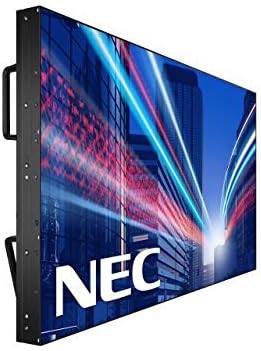
Vaizdas: Šoninė view of the NEC X555UNS 55-inch LED TV, highlighting its robust construction and integrated handles for easier installation in video wall configurations.
4.2 Ryšys
Connect your video sources and network cables to the appropriate ports on the display. The X555UNS offers various connectivity options:
- HDMI: Didelės raiškos vaizdo ir garso įvestims.
- DVI-D: For digital video input.
- LAN: For network control and content distribution.
- DisplayPort: Supports UHD pass-through for daisy-chaining multiple displays in a video wall setup.
- OPS lizdas: Allows for integration of single board computers.
For video wall configurations, utilize the DisplayPort for UHD daisy-chaining to achieve a high-resolution display across the entire wall.
4.3 Pradinis įjungimas
- Connect the power cord to the display and a suitable power outlet.
- Press the power button on the display or remote control.
- The display will power on and show the NEC logo.
- Use the on-screen menu to configure initial settings such as language, input source, and display mode.
The Auto ID feature can simplify installation time, especially in multi-display setups, by reducing configuration steps to a single button press.
5. Naudojimo instrukcijos
5.1 Pagrindinės operacijos
Use the remote control or the buttons on the display to navigate the on-screen menu (OSD). Adjust settings such as brightness, contrast, color temperature, and input source.
5.2 Ekrano funkcijos
- S-IPS Panel Technology: Provides excellent off-angle viewing and minimizes color shift, making it ideal for public viewing and video walls.
- Direct LED Backlighting with Localized Dimming: Enhances brightness uniformity and achieves a higher dynamic contrast ratio.
- Veikimas 24/7: Designed for continuous use with advanced thermal protection, internal temperature sensors, and fan-based cooling.
- 700 cd/m² Brightness: Ensures clear visibility even in brightly lit environments.
6. Priežiūra
6.1 Ekrano valymas
Norėdami išvalyti ekraną, švelniai nuvalykite jį minkštu, nepūkuotu skudurėliu. Jei dėmės sunkiai įveikiamos,ampen the cloth slightly with water or a mild, non-abrasive screen cleaner. Do not spray liquid directly onto the screen.
6.2 Bendroji priežiūra
- Laikykite ekraną gerai vėdinamoje vietoje, kad neperkaistumėte.
- Venkite dėti sunkių daiktų ant ekrano.
- Reguliariai tikrinkite kabelių jungtis, kad įsitikintumėte, jog jos yra tvirtos.
7. Problemų sprendimas
If you encounter issues with your NEC X555UNS, refer to the following common problems and solutions:
| Problema | Galima priežastis | Sprendimas |
|---|---|---|
| Nėra galios | Power cord disconnected; Power outlet faulty. | Check power cord connection; Test power outlet with another device. |
| Nėra vaizdo | Pasirinktas neteisingas įvesties šaltinis; vaizdo kabelis atsilaisvinęs arba sugedęs. | Pasirinkite tinkamą įvesties šaltinį; patikrinkite vaizdo kabelio jungtis. |
| Prasta vaizdo kokybė | Resolution mismatch; Display settings incorrect. | Adjust resolution on source device; Calibrate display settings (brightness, contrast). |
If the problem persists, contact NEC customer support.
8. Specifikacijos
| Funkcija | Detalė |
|---|---|
| Modelio pavadinimas | X555UNS |
| Ekrano dydis | 55 colių |
| Ekrano technologija | LED, S-IPS Panel |
| Rezoliucija | 1080p (viskas viename) |
| Krašto santykis | 16:9 |
| Atnaujinimo dažnis | 60 Hz |
| Ryškumas | 700 cd/m² (nits) |
| Ryšys | HDMI, DVI-D, LAN, DisplayPort |
| Ypatingos savybės | Flat, S-IPS Panel, Auto ID, UHD Daisy Chain, OPS Slot, 24/7 Operation, Advanced Thermal Protection |
| Gaminio matmenys | 54 x 12 x 34 colio (apytiksliai) |
| Prekės svoris | 81 svaro (apytiksliai) |
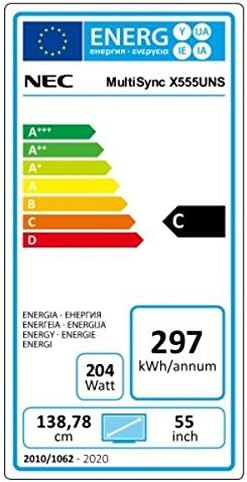
Image: Energy efficiency label for the NEC MultiSync X555UNS, showing energy consumption details and efficiency class.
9. Garantija ir palaikymas
For warranty information and technical support, please refer to the official NEC website or contact your local NEC representative. Keep your purchase receipt as proof of purchase.
Internetiniai ištekliai: Apsilankykite www.necdisplay.com for product documentation, drivers, and support contact information.
Klientų aptarnavimas: For direct assistance, please contact NEC customer service.