Įvadas
The esinkin Bluetooth Audio Adapter is designed to bring wireless music streaming capabilities to your existing sound systems. Connect it to computer speakers, home stereo systems, or other speaker systems via 3.5mm or RCA cables, and then pair it with your Bluetooth-enabled devices like smartphones or tablets to stream audio wirelessly. This adapter acts as a Bluetooth receiver, enabling your non-Bluetooth audio equipment to receive wireless signals.
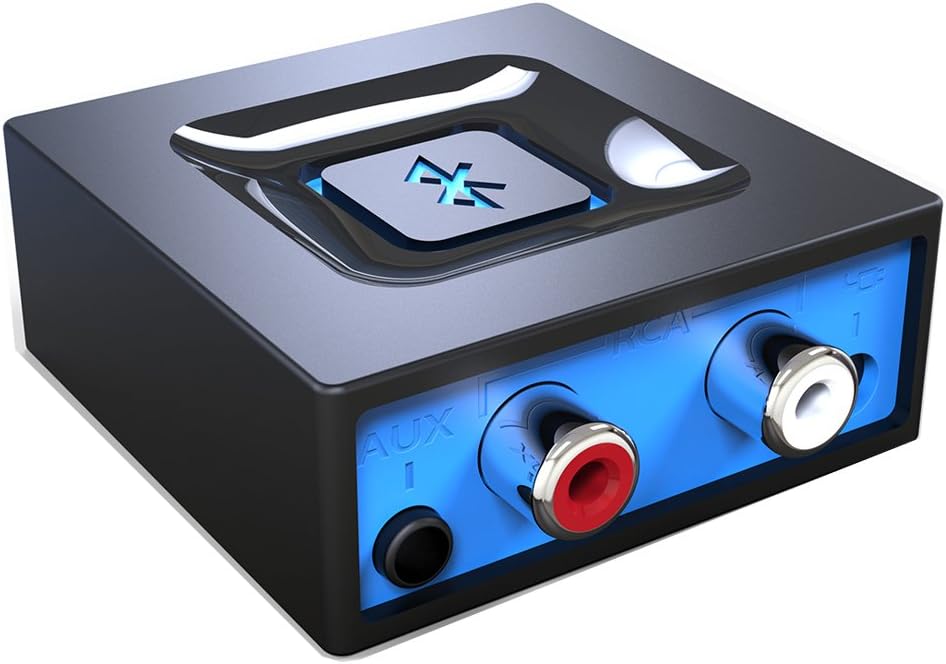
Vaizdas: priekis view of the esinkin Bluetooth Audio Adapter, showing the AUX and RCA input ports.
Kas yra dėžutėje
Atidarius pakuotę, įsitikinkite, kad yra visi šie daiktai:
- 1x Bluetooth imtuvas
- 1 x AC to DC Power adapter
- 1 x 3.5mm to RCA Audio cable
- 1 x USB maitinimo laidas
- 1 x Vartotojo vadovas
 Image: All included accessories for the esinkin Bluetooth Audio Adapter.
Sąranka
Follow these steps to set up your esinkin Bluetooth Audio Adapter:
- Prijunkite prie maitinimo: Connect the Bluetooth adapter to a power source using either the provided AC to DC power adapter or the USB cable. Note that this adapter does not have a built-in battery and requires continuous power.
- Prisijunkite prie garso sistemos: Connect the adapter to your computer speakers, home stereo system, or other speaker system using either the 3.5mm audio cable or the RCA cable. Ensure the connection is secure.
- Maitinimas: The device will power on when connected to power.
- Susiejimo režimas: Press and hold the large Bluetooth symbol button in the middle of the adapter for approximately 3 seconds until the blue light starts blinking. This indicates the adapter is in pairing mode.
- Susiekite su įrenginiu: On your Bluetooth-enabled device (smartphone, tablet, computer), go to the Bluetooth settings and search for available devices. Select the esinkin Bluetooth Audio Adapter from the list to pair. Once paired, the blue light on the adapter will become solid.

Image: Connection diagram for the esinkin Bluetooth Audio Adapter.

Image: Illustrates the function of the main Bluetooth button for power and playback control.
Naudojimo instrukcijos
Once successfully set up and paired, operating the esinkin Bluetooth Audio Adapter is straightforward:
- Muzikos transliacija: After pairing, music played on your Bluetooth-enabled device will stream wirelessly to the connected audio system.
- Atkūrimo valdymas:
- Click the Bluetooth symbol button once to Pradėti / pristabdyti muzikos atkūrimas.
- Hold the Bluetooth symbol button for 3 seconds to turn the device ĮJUNGTA/IŠJUNGTA.
- Automatinis pakartotinis prisijungimas: The adapter is designed to automatically reconnect with the last paired device when both are within range and Bluetooth is enabled.
- Belaidis diapazonas: The effective wireless range indoors (without significant obstacles) is approximately 30-40 feet (10-12 meters).

Image: Demonstrates wireless music streaming from mobile devices to a home stereo via the adapter.
Priežiūra
To ensure the longevity and optimal performance of your esinkin Bluetooth Audio Adapter, please observe the following maintenance guidelines:
- Valymas: Use a soft, dry cloth to clean the surface of the adapter. Avoid using liquid cleaners or abrasive materials.
- Maitinimo apsauga: To protect the adapter from potential damage due to power surges or brown-outs, especially during electrical supply issues or storms, it is recommended to unplug the unit from the wall outlet.
- Saugykla: Kai ilgesnį laiką nenaudojate adapterio, laikykite jį vėsioje, sausoje vietoje, apsaugotoje nuo tiesioginių saulės spindulių ir ekstremalių temperatūrų.
- Nepertraukiamas veikimas: The adapter is designed to remain powered when connected to a power source. To completely turn it off, disconnect it from the power outlet.
Trikčių šalinimas
If you encounter issues with your esinkin Bluetooth Audio Adapter, please refer to the following common solutions:
| Problema | Galima priežastis / sprendimas |
|---|---|
| Nėra garso arba garsas per mažas: |
|
| Nepavyksta susieti su įrenginiu: |
|
| Intermittent connection or poor range: |
|
| Adapter is always on: |
|
Specifikacijos
| Funkcija | Detalė |
|---|---|
| Prekės ženklas | esinkin |
| Modelio numeris | W29 |
| Belaidis tipas | Bluetooth |
| Prekės svoris | 3.52 uncijos |
| Gaminio matmenys (IxPxH) | 1.97 x 1.97 x 0.94 colio |
| Spalva | Juoda |
| Suderinami įrenginiai | Smartphone, Tablet, Home Stereo System |
| Jungties tipas | RCA, Auxiliary (3.5mm) |
| Maitinimo įvestis | 5V === 150mA |
Garantija ir palaikymas
For warranty information or technical support, please refer to the documentation included with your purchase or visit the official esinkin websvetainėje. Klientų aptarnavimo kontaktiniai duomenys paprastai pateikiami ant produkto pakuotės arba prekės ženklo internetiniame pagalbos puslapyje.
Norėdami gauti daugiau išteklių ir informacijos apie produktą, apsilankykite esinkin Store on Amazon.


