Įvadas
This manual provides comprehensive instructions for the operation and maintenance of your ONN X5 HiFi Music Player. Please read this manual thoroughly before using the device to ensure proper functionality and to maximize your listening experience. The ONN X5 is designed to deliver high-fidelity audio playback in a compact and user-friendly format.
Produktas baigtasview
The ONN X5 is a portable HiFi music player featuring a 2.0-inch TFT screen and an aluminum alloy shell. It supports a wide range of audio formats, including lossless files, and offers expandable storage via a MicroSD card.
Pagrindinės funkcijos:
- Aukšta garso kokybė: Supports WAV, FLAC, ALAC, APE, OGG lossless formats, and high-definition music up to 24Bit/192 KHz.
- Ekranas: 2.0-inch TFT screen (176x220 pixels) for clear navigation and information display.
- Saugykla: 8GB internal memory, expandable up to 32GB with a MicroSD/TF card.
- Patvarus dizainas: Lightweight aluminum alloy body (60g) for enhanced durability and reduced external interference noise.
- Vartotojo sąsaja: Intuitive key-based operation.
- Papildomos funkcijos: FM Radio support.
- Baterija: High-capacity rechargeable lithium polymer battery.
- Kelių kalbų palaikymas: English, Russian, Korean, German, Japanese, Polish, Indonesian, Chinese.
Įrenginio išdėstymas:

Vaizdas: priekis view of the ONN X5 HiFi Music Player, showing its display and control buttons. The screen displays track information, audio quality (e.g., 24BIT, 88HHZ), and playback status.

Vaizdas: Šoninė view of the ONN X5 HiFi Music Player, illustrating the location of the MicroSD card slot on the right side of the device.

Vaizdas: Priekinė ir galinė dalys view of the ONN X5 HiFi Music Player. The back panel shows the model number "X5" and branding information.
Sąranka
1. Įrenginio įkrovimas:
- Connect the ONN X5 to a power source using the provided USB cable.
- Ekrane esantis akumuliatoriaus indikatorius rodys įkrovimo būseną.
- A full charge is recommended before first use. The device uses a high-capacity rechargeable lithium polymer battery.
2. Inserting a MicroSD/TF Card:
- Locate the MicroSD/TF card slot on the side of the player.
- Gently insert a compatible MicroSD/TF card (up to 32GB) into the slot until it clicks into place.
- Ensure the card is inserted correctly to avoid damage.

Image: Contents of the ONN X5 package, showing the player, USB charging cable, and other accessories. This illustrates the components available for setup.
3. Muzikos perkėlimas Files:
- Connect the ONN X5 to your computer using the USB cable.
- Įrenginys bus rodomas kaip išimama atminties kortelė.
- Nuvilkite norimą garso įrašą files (MP3, WMA, APE, FLAC, WAV, ALAC, OGG) into the player's internal storage or the MicroSD card.
- Prieš atjungdami USB laidą, saugiai atjunkite įrenginį nuo kompiuterio.
Naudojimo instrukcijos
Maitinimo įjungimas/išjungimas:
- To power on, press and hold the power button (usually marked with a universal power symbol) until the screen illuminates.
- Norėdami išjungti, paspauskite ir palaikykite maitinimo mygtuką, kol įrenginys išsijungs.
Navigacija:
The ONN X5 uses physical buttons for navigation. Refer to the device layout for button identification.
- VOL: Reguliuoja garsumą.
- M (Meniu): Accesses menus and confirms selections.
- Rodyklių mygtukai (< / >): Navigate through menus, select tracks, or fast forward/rewind during playback.
- Maitinimo mygtukas: Also functions as a play/pause button during music playback.
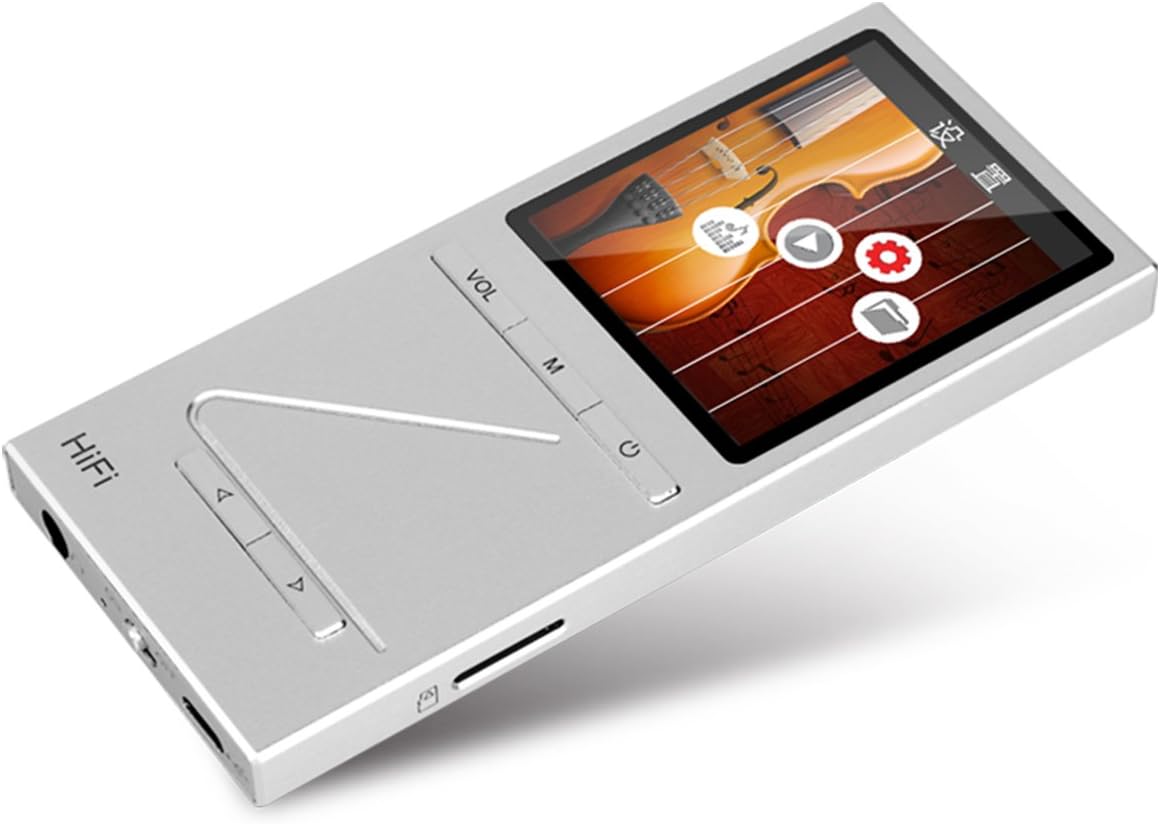
Vaizdas: kampuotas view of the ONN X5 HiFi Music Player, showing the screen with various menu icons, indicating the user interface for navigation.
Muzikos atkūrimas:
- From the main menu, navigate to "Music" or "Files “.
- Browse through your folders and select a track to play.
- Press the Power/Play button to start or pause playback.
- Use the arrow buttons to skip tracks or fast forward/rewind.
- Adjust volume using the VOL button.
FM radijas:
- Navigate to the "FM Radio" option from the main menu.
- Use the navigation buttons to scan for stations or manually tune to a frequency.
- Ensure headphones are connected as they often act as the antenna for FM radio.
Kalbos nustatymai:
Įrenginys palaiko kelias kalbas. Norėdami pakeisti kalbą:
- Pagrindiniame meniu eikite į „Nustatymai“.
- Select "Language" and choose your preferred language from the list (English, Russian, Korean, German, Japanese, Polish, Indonesian, Chinese).
Priežiūra
- Valymas: Įrenginį valykite minkšta, sausa šluoste. Venkite skystų valiklių ar abrazyvinių medžiagų.
- Saugykla: Grotuvą laikykite vėsioje, sausoje vietoje, toliau nuo tiesioginių saulės spindulių ir ekstremalių temperatūrų.
- Akumuliatoriaus priežiūra: Norėdami pailginti akumuliatoriaus veikimo laiką, venkite dažnai visiškai jį iškrauti. Reguliariai įkraukite įrenginį, net jei jis ilgą laiką nenaudojamas.
- Venkite poveikio: The aluminum alloy shell provides durability, but avoid dropping the device or subjecting it to strong impacts.
- Vandens ekspozicija: Šis prietaisas nėra atsparus vandeniui. Venkite sąlyčio su vandeniu ar didele drėgme.
Trikčių šalinimas
Įrenginys neįsijungia:
- Įsitikinkite, kad akumuliatorius įkrautas. Prijunkite įrenginį prie maitinimo šaltinio ir leiskite jam įkrauti bent 30 minučių, prieš bandydami vėl įjungti.
- Try performing a hard reset (if applicable, refer to manufacturer's specific instructions for hard reset, usually involves holding power button for an extended period).
Nėra garso:
- Patikrinkite garsumo lygį ir įsitikinkite, kad jis nėra nutildytas.
- Verify that headphones or external speakers are properly connected.
- Test with different headphones or audio output devices.
- Užtikrinkite garsą file is not corrupted or in an unsupported format.
Negalima perkelti Files:
- Įsitikinkite, kad USB laidas yra tvirtai prijungtas prie grotuvo ir kompiuterio.
- Išbandykite kitą kompiuterio USB prievadą arba kitą USB kabelį.
- Verify that the device is recognized by your computer as a removable drive.
- Check if the MicroSD card is properly inserted and not full.
Ekranas nereaguoja / užstringa:
- Paspauskite ir palaikykite maitinimo mygtuką maždaug 10–15 sekundžių, kad priverstumėte įrenginį paleisti iš naujo.
- Jei problema išlieka, įsitikinkite, kad akumuliatorius įkrautas.
Specifikacijos
| Funkcija | Detalė |
|---|---|
| Modelio numeris | X5 |
| Prekės ženklas | ONN |
| Ekrano dydis | 2.0 Inches TFT (176x220 PIXEL) |
| Vidinė atmintis | 8 GB |
| Išplečiama saugykla | MicroSD/TF card up to 32 GB |
| Palaikomi garso formatai | APE, FLAC, ALAC, WAV, WMA, OGG, MP3 (up to 24Bit/192 KHz) |
| Ryšio technologija | Papildoma jungtis, USB |
| Ypatinga funkcija | FM radijas |
| Baterija | 1 Lithium Ion battery required (High-capacity rechargeable lithium polymer) |
| Prekės svoris | 7 uncijos (apie 0.2 kilogramo) |
| Pakuotės matmenys | 6.21 x 4.7 x 1.2 colio |
| Gamintojas | SZTZWY |
Garantija ir palaikymas
For detailed warranty information, please refer to the warranty card included with your purchase or visit the official ONN product support website. For technical assistance or further inquiries, please contact ONN customer support through their official channels.


