1. Įvadas
This manual provides detailed instructions for the installation, operation, and maintenance of your Reolink RLC-410WS 4MP Super HD Dual-Band Wi-Fi Wireless Security IP Camera. Please read this manual thoroughly before using the product to ensure correct usage and optimal performance.
2. Produktas baigtasview
2.1 Kameros komponentai
Familiarize yourself with the main components of your RLC-410WS camera:

2.1 vaizdas: Reolink RLC-410WS Camera Component Diagram. This image illustrates the various parts of the camera including the antenna, lens, IR LEDs, daylight sensor, and connection ports for power, network, and the reset button.
- Antena: Dėl „Wi-Fi“ ryšio.
- Metalinis aliuminio korpusas: Patvarus korpusas, skirtas naudoti lauke.
- High Definition F=4.0mm Lens: Captures 4MP Super HD video.
- 36 PCS IR LEDs: Provides infrared illumination for night vision up to 100ft.
- Dienos šviesos jutiklis: Aptinka aplinkos šviesą, kad perjungtų dienos ir nakties režimus.
- Atkūrimo mygtukas: Naudojamas gamykliniams numatytiesiems nustatymams atkurti.
- Maitinimo prievadas: Skirta 12 V nuolatinės srovės maitinimo adapteriui prijungti.
- Tinklo kabelio prievadas: For initial setup and optional wired Ethernet connection.
2.2 Pagrindinės savybės
- 4 MP itin aukštos raiškos vaizdo įrašas: Records clear video at 1440p resolution, supporting 1080p and 720p.
- 100 pėdų naktinis matymas: Equipped with IR LEDs for clear surveillance in low-light conditions.
- Dviejų juostų „Wi-Fi“: Supports 2.4GHz and 5GHz Wi-Fi for flexible and stable wireless connection.
- Judesio aptikimo įspėjimai: Sends real-time email alerts with photos or 30-second video clips, and push notifications to mobile phones.
- Vietinė saugykla: Built-in 16GB Micro SD card for recording and storing up to 400 motion-activated events.
- Nuotolinė prieiga: Monitor your home from anywhere using the Reolink Client software (PC/Mac) or Reolink App (iPhone/Android).
- 80 laipsnių Viewpakreipimo kampas: Suteikia platų lauką view.
- IP67 atsparumas oro sąlygoms: Sukurta naudoti lauke įvairiomis oro sąlygomis.
3. Kas yra dėžutėje
Patikrinkite, ar pakuotėje yra visi reikalingi daiktai:

3.1 vaizdas: Package Contents. This image displays the camera, antenna, power adapter, extension cable, network cable, software CD, quick start guide, surveillance sign, mounting template, and screws.
- Reolink RLC-410WS Camera
- Maitinimo adapteris
- Maitinimo ilgintuvas
- Network Cable (1 meter)
- Antena
- Greitos pradžios vadovas
- Montavimo angos šablonas
- Sraigtai ir sieniniai kištukai
- Stebėjimo ženklas
- CD (Manual/Software)
4. Sąranka ir diegimas
4.1 Pradinė konfigūracija
- Connect Power and Ethernet: Connect the camera to the power adapter and then to your router using the provided Ethernet cable.
- Download Reolink App/Client: Download the Reolink App from the App Store or Google Play, or the Reolink Client software from the official Reolink website for PC/Mac.
- Pridėti fotoaparatą: Open the app/client, click the "+" icon to add the camera. The app/client should automatically detect the camera on your local network.
- Nustatyti slaptažodį: Sukurkite stiprų slaptažodį savo kamerai.
- Konfigūruoti „Wi-Fi“: Once connected via Ethernet, navigate to the camera settings in the app/client to configure Wi-Fi. Select your 2.4GHz or 5GHz network and enter the password. Ensure a strong Wi-Fi signal at the installation location. Note: Wi-Fi settings can typically only be changed while the camera is connected via Ethernet.
- Bandomasis ryšys: After configuring Wi-Fi, test the connection. Once successful, you can disconnect the Ethernet cable.
4.2 Fotoaparato montavimas
Consider the following when mounting your camera:
- Vieta: Pasirinkite vietą, kuri suteikia norimą viewkampas ir yra jūsų „Wi-Fi“ tinklo diapazone.
- Power Cable Routing: The power cable requires a hole of approximately 3/4 inch (19mm) to pass through a wall due to the Ethernet socket and reset switch on the breakout cable. Plan your cable routing carefully.
- Kronšteino reguliavimas: The mounting bracket allows for three-dimensional adjustment. Loosen the small Allen screws to adjust the camera angle, then tighten them securely.
- Vandens apsauga: For outdoor installations, ensure the breakout cable connections (power, network, reset button) are protected from water. Consider using a waterproof junction box.

4.1 vaizdas: Camera Dimensions. This image provides the physical measurements of the RLC-410WS camera, useful for planning installation.
5. Fotoaparato valdymas
5.1 Prieiga prie kameros
You can access your Reolink RLC-410WS camera using various platforms:

5.1 vaizdas: Reolink Software Platform. This image illustrates how the Reolink camera can be accessed and managed from various devices, including Mac, Windows, iPhone, and Android.
- Reolink App: Available for iOS (iPhone/iPad) and Android devices. Provides live view, playback, and settings management.
- Reolink Client: Desktop software for Windows and macOS. Offers comprehensive control, multi-camera viewing, and recording options.
- Web Naršyklė: Access the camera directly via its IP address using a web browser (features may be limited compared to the app/client).
5.2 Judesio aptikimas ir įrašymas
The RLC-410WS camera features customizable motion detection:
- Jautrumo reguliavimas: Sureguliuokite judesio aptikimo jautrumą, kad sumažintumėte klaidingų aliarmų skaičių.
- Aptikimo zonos: Apibrėžkite konkrečias sritis kameros viduje view to monitor for motion, ignoring irrelevant areas.
- Privatumo kaukė: Mask out sensitive areas from being recorded or viewred.
- Įspėjimai: Receive instant push notifications on your phone, email alerts with snapshots or video clips, and upload recordings to an FTP server.
- Vietinė saugykla: Motion-activated events are recorded to the built-in 16GB Micro SD card for later playback.
5.3 Vaizdo kokybė ir naktinis matymas
The camera provides high-quality video day and night:
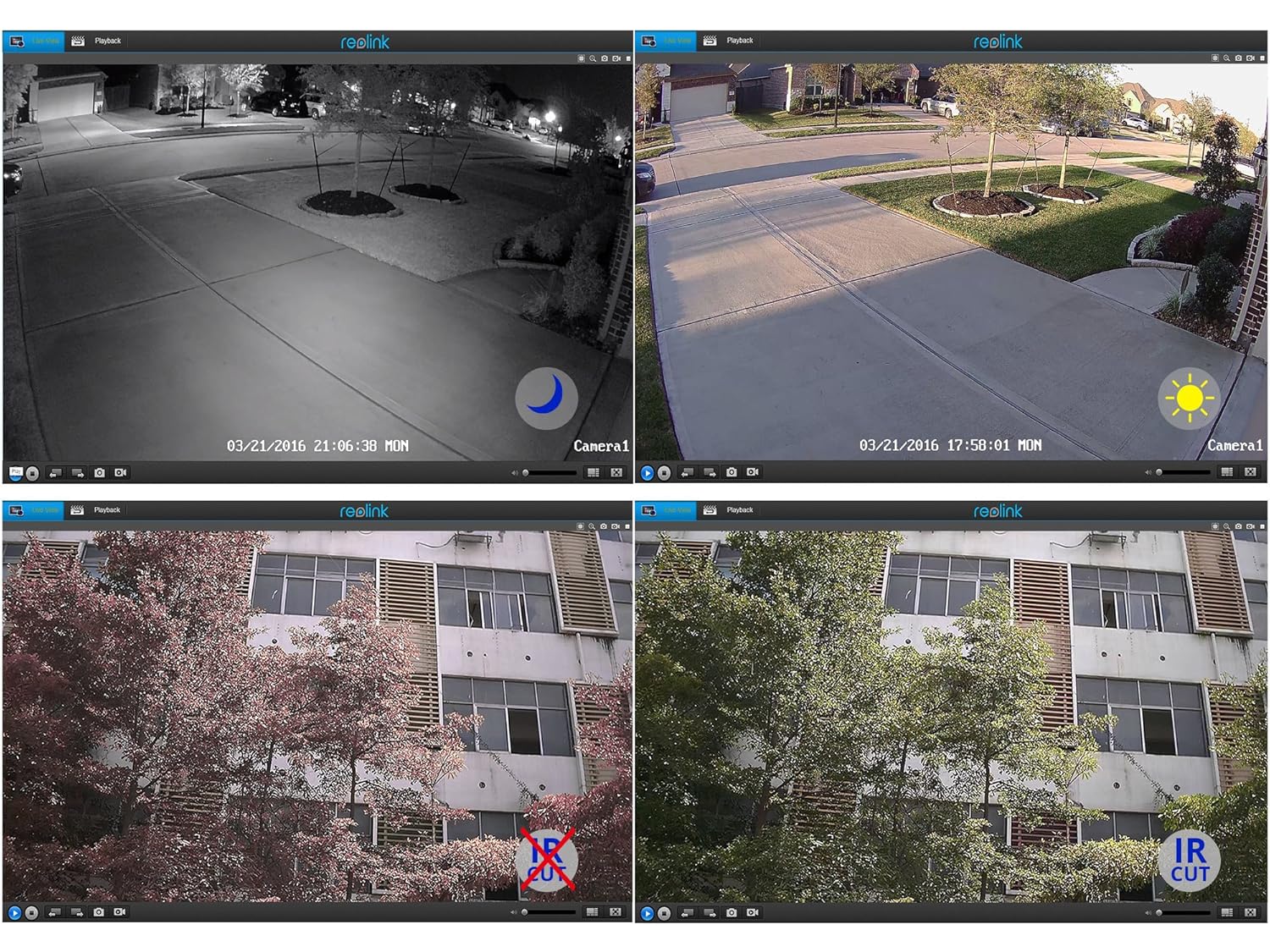
5.2 vaizdas: Day and Night Vision Comparison. This image demonstrates the camera's ability to capture clear video in both daylight and low-light conditions using its infrared capabilities.
- 4MP Super HD: Delivers crisp and clear video footage.
- Infraraudonųjų spindulių nakties vizija: Automatically switches to night mode in low light, providing clear black and white video up to 100 feet.
- IR supjaustytas filtras: Ensures accurate color reproduction during the day and enhanced infrared sensitivity at night.
6. Specifikacijos
Detailed technical specifications for the Reolink RLC-410WS camera:
| Funkcija | Specifikacija |
|---|---|
| Modelis | RLC-410WS |
| Efektyvi vaizdo raiška | 4 MP (1440p) |
| Viewing kampas | 80 laipsnių |
| Naktinio matymo diapazonas | 100 pėdų |
| Kadrų dažnis | 25 kadrų per sekundę |
| Belaidis ryšys | Wi-Fi (2.4/5Ghz Dual Band) |
| Sandėliavimas | Integruota 16 GB „Micro SD“ kortelė |
| Maitinimo šaltinis | 12 voltų DC |
| Tarptautinis apsaugos įvertinimas | IP67 |
| Matmenys (I x P x A) | 18.8x6.6x6.6 cm |
| Prekės svoris | 454 g (1 svaras) |
| Kontrolės metodas | Programėlė |
| Montavimo tipas | Sieninis laikiklis |

6.1 vaizdas: Reolink Model Feature Comparison. This table highlights the features available across various Reolink camera models, including PoE, Wi-Fi, Micro SD storage, optical zoom, and pan/tilt capabilities.
7. Problemų sprendimas
This section addresses common issues you might encounter with your RLC-410WS camera.
7.1 „Wi-Fi“ ryšio problemos
- Nėra „Wi-Fi“ ryšio:
- Ensure the camera is initially configured via Ethernet before setting up Wi-Fi.
- Patikrinkite, ar jūsų „Wi-Fi“ slaptažodis teisingas.
- Perform a firmware update. Outdated firmware can cause connectivity problems.
- Ensure the camera is within range of your Wi-Fi router and has a strong signal. Signal strength can drop quickly with distance.
- If changing Wi-Fi settings, ensure the camera is connected via Ethernet, run a connection test, and save changes.
- Frequent Disconnects:
- Check Wi-Fi signal strength at the camera's location. Consider using a Wi-Fi extender if the signal is weak.
- Ensure your router's 2.4GHz and 5GHz channels are not overly congested.
- Atnaujinkite fotoaparato programinę įrangą į naujausią versiją.
7.2 Camera Not Responding After Settings Change/Firmware Update
- If the camera becomes unresponsive after a settings change or firmware update, try power cycling the camera (unplug and re-plug the power adapter).
- If power cycling does not work, reconnect the camera via Ethernet. This often restores connectivity and allows further troubleshooting or re-configuration.
- If the issue persists, perform a factory reset using the reset button on the breakout cable. Note: This will erase all settings.
7.3 False Motion Detection Alerts
- Kameros nustatymuose reguliuokite judesio aptikimo jautrumą.
- Define specific motion detection zones to exclude areas with frequent irrelevant movement (e.g., trees swaying, busy roads).
- In night vision mode, insects flying close to the IR illuminators can trigger alerts. Consider adjusting sensitivity or, if possible, using an external IR illuminator placed away from the camera.
8. Priežiūra
- Valymas: Reguliariai valykite kameros objektyvą ir korpusą minkšta,amp šluoste, kad užtikrintumėte aiškią vaizdo kokybę. Venkite abrazyvinių valiklių.
- Firmware atnaujinimai: Periodically check the official Reolink websvetainės, kurioje rasite programinės įrangos atnaujinimus. Nuolat atnaujinant fotoaparato programinę įrangą užtikrinamas optimalus veikimas, saugumas ir prieiga prie naujų funkcijų.
- Kabelio apžiūra: Periodically inspect all cables and connections for wear or damage, especially in outdoor installations. Ensure waterproof seals are intact.
- SD kortelės tvarkymas: While the camera manages the 16GB SD card, it's good practice to occasionally check its status via the app/client.
9. Garantija ir palaikymas
For warranty information, please refer to the warranty card included in your product package or visit the official Reolink website. Reolink provides dedicated customer support.
- Techninė pagalba: For technical assistance, troubleshooting, or any product-related queries, please contact Reolink support via their official website. Email support is typically provided with responses within 24 hours.
- Firmware Downloads: Latest firmware versions and software clients can be downloaded from the Reolink support page.


