1. Įvadas
This manual provides comprehensive instructions for the installation, operation, and maintenance of your Lorex LNR1141TC4 4-Channel 1TB Network Video Recorder (NVR) system with four 1080p HD cameras. This system is designed to provide high-definition surveillance for your property, offering real-time recording and remote access capabilities.
Please read this manual thoroughly before setting up and operating your system to ensure proper functionality and to maximize its features.
2. Pakuotės turinys
Patikrinkite, ar pakuotėje yra visi toliau išvardyti komponentai. Jei trūksta kokių nors elementų arba jie pažeisti, susisiekite su „Lorex“ palaikymo tarnyba.
- 1 x NVR with Pre-Installed 1TB HDD
- 1x HDMI laidas
- 1 x maitinimo adapteris NVR
- 1 x USB pelė
- 1 x Ethernet kabelis
- Greito pradžios vadovai
- 4 x IP Bullet Cameras (1080p HD)
- 4 x Mounting Kits for Cameras
- 4 x 60ft (18m) Cat5e Ethernet Cables
3. Sistema baigtaview
The Lorex LNR1141TC4 system consists of a Network Video Recorder (NVR) and four 1080p HD IP cameras. The NVR manages video recording, storage, and network connectivity, while the cameras capture high-definition video footage.
3.1 NVR and Camera Components

3.1 paveikslas: Lorex LNR1141TC4 NVR system with four 1080p HD bullet cameras. This image displays the main components of the surveillance system, including the central NVR unit and the four included bullet-style IP cameras.
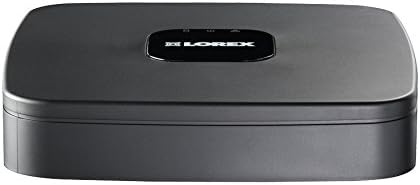
3.2 paveikslas: Į viršų view of the Lorex LNR1141TC4 NVR. The NVR unit features a sleek black design with the Lorex logo prominently displayed on the top surface.

3.3 paveikslas: Rear panel of the Lorex LNR1141TC4 NVR. This view shows the various input and output ports, including HDMI, VGA, USB, Ethernet, and the four Power over Ethernet (PoE) ports for camera connections.

3.4 paveikslas: Close-up of a Lorex 1080p HD bullet camera lens. This image highlights the camera's lens, infrared LEDs for night vision, and light sensor.
4. Sąranka
Follow these steps to set up your Lorex LNR1141TC4 NVR system.
4.1 NVR prijungimas
- Prijunkite monitorių: Connect the NVR to a monitor using the supplied HDMI cable or a VGA cable (not included).
- Prijunkite pelę: Plug the USB mouse into one of the USB ports on the NVR's rear panel.
- Tinklo ryšys (nebūtinas, bet rekomenduojamas): Connect the NVR to your router using the supplied Ethernet cable for remote access and system updates.
- Maitinimas: Connect the NVR power adapter to the NVR and then to a power outlet. The NVR will power on automatically.
4.2 Kamerų prijungimas
The Lorex LNR1141TC4 NVR features Power over Ethernet (PoE) ports, simplifying camera installation.
- Kamerų tvirtinimas: Securely mount each camera in your desired location using the provided mounting kits. Ensure the camera's field of view apima sritį, kurią norite stebėti.
- Prijunkite Ethernet kabelius: Connect one end of the supplied 60ft Cat5e Ethernet cable to the camera's Ethernet port and the other end to one of the PoE ports on the NVR's rear panel. The NVR will automatically detect and power the cameras.
- Sureguliuokite kameros kampą: Once connected, adjust each camera's angle to optimize surveillance coverage.
5. Operacija
This section covers the basic operation of your Lorex NVR system.
5.1 Pradinio nustatymo vedlys
Upon first power-up, the NVR will guide you through an initial setup wizard to configure basic settings such as language, date/time, network settings, and password creation. Follow the on-screen prompts.
5.2 Įrašymas
- Nepertraukiamas įrašymas: The NVR is configured for continuous recording by default, utilizing the pre-installed 1TB hard drive.
- Suplanuotas įrašymas: You can customize recording schedules for each camera through the NVR's menu. This allows you to set specific times for recording.
- Judesio įrašymas: Configure motion detection zones and sensitivity to trigger recording only when movement is detected. This helps conserve storage space.
- High Definition 1080p: The system records in 1080p resolution at 30/25 frames per second (fps) per channel, ensuring clear and detailed footage.
5.3 Atkūrimas
Prieiga įrašyta footage through the NVR's playback menu. You can search by date, time, and event type (e.g., motion detection). The system supports selectable area digital zoom during live view and playback for detailed examination.
5.4 Remote Access (FLIR Cloud)
The FLIR Cloud connectivity solution enables remote viewing of your surveillance system.
- Atsisiųsti programą: Download the free Lorex FLIR Cloud app on your iOS or Android smartphone or tablet.
- Nuskaityti QR kodą: Use the app to scan the QR code located on your NVR or in the quick start guide.
- Prisijunkite: Follow the app's instructions to connect to your NVR. This allows you to view live feeds, playback recordings, and receive push notifications for motion events and instant email alerts with snapshot attachments from anywhere with an internet connection.
6. Priežiūra
Reguliarus techninis aptarnavimas užtikrina jūsų stebėjimo sistemos ilgaamžiškumą ir optimalų veikimą.
- Valymas: Reguliariai valykite fotoaparato objektyvus minkšta,amp cloth to remove dust and smudges. Ensure the NVR's ventilation openings are clear of obstructions.
- Kietojo disko sveikata: The NVR's hard drive is crucial for recording. Monitor its health through the NVR's system settings. Consider backing up important footage reguliariai.
- Firmware atnaujinimai: Patikrinkite Lorexą website for any available firmware updates for your NVR to ensure you have the latest features and security enhancements.
7. Problemų sprendimas
This section addresses common issues you might encounter with your Lorex LNR1141TC4 system.
- Nėra vaizdo išvesties monitoriuje:
- Įsitikinkite, kad HDMI/VGA kabelis yra tvirtai prijungtas prie NVR ir monitoriaus.
- Verify the monitor is set to the correct input source.
- Išbandykite kitą HDMI/VGA kabelį arba monitorių.
- Kameros nerodo vaizdo:
- Check that the Ethernet cables are securely connected to both the cameras and the NVR's PoE ports.
- Įsitikinkite, kad NVR įjungtas.
- If a camera is still not detected, try connecting it to a different PoE port on the NVR.
- A power cycle of the NVR (unplug and replug) can sometimes resolve camera detection issues.
- Nuotolinė prieiga neveikia:
- Verify the NVR is connected to your router and has internet access.
- Įsitikinkite, kad jūsų išmanusis telefonas / planšetinis kompiuteris turi stabilų interneto ryšį.
- Double-check the QR code scan and account login details in the FLIR Cloud app.
- Įrašymo problemos:
- Check the hard drive status in the NVR's system settings.
- Įsitikinkite, kad įrašymo tvarkaraščiai yra teisingai sukonfigūruoti.
- Verify that motion detection settings are appropriate if using motion-triggered recording.
8. Specifikacijos
| Funkcija | Detalė |
|---|---|
| Modelio numeris | LNR1141TC4 |
| Vaizdo įrašymo raiška | 1080p HD |
| Kanalų skaičius | 4 |
| Atminties talpa | 1 TB (iš anksto įdiegtas standusis diskas) |
| Ryšio technologija | Wired (Ethernet, PoE for cameras) |
| Ypatinga funkcija | Motion Sensor, Remote Access (FLIR Cloud) |
| Kadrų dažnis | 30/25 fps per channel |
| Įrašymo režimas | Continuous, Scheduled, Motion |
| Maitinimo šaltinis | Su laidu elektra |
| NVR matmenys (I x P x A) | 8.1 x 8.1 x 1.8 colio (20.6 x 20.6 x 4.6 cm) |
| NVR Item Weight | 1.1 svaro (0.5 kg) |
| Suderinami įrenginiai | Cameras, Personal Computers, Smartphones, Tablets |
9. Garantija ir palaikymas
For warranty information and technical support, please refer to the documentation included with your product or visit the official Lorex website. Lorex provides resources and customer service to assist with any questions or issues you may encounter.
Internetiniai ištekliai: www.lorex.com/support


