1. Įvadas
The Aduro Amplify LED Wireless Speaker, model BSP15, is a portable audio device designed for wireless music playback and hands-free calling. It features integrated LED lighting with multiple settings to enhance the audio experience. This manual provides instructions for the proper setup, operation, and maintenance of your speaker.
Kas yra dėžutėje:
- Aduro Amplify LED Wireless Speaker (BSP15)
- Įkrovimo kabelis
2. Saugos informacija
- Do not expose the speaker to water or moisture. This product is not water-resistant.
- Avoid extreme temperatures. Do not place near heat sources or in direct sunlight for extended periods.
- Do not attempt to disassemble or modify the speaker. This may void the warranty and cause damage.
- Naudokite tik pridedamą įkrovimo laidą arba sertifikuotą lygiavertį laidą.
- Laikyti vaikams nepasiekiamoje vietoje.
3. Produkto ypatybės
- Belaidis ryšys: Prisijungia prie išmaniųjų telefonų, planšetinių kompiuterių ir kitų įrenginių su „Bluetooth“.
- Easy-Touch Pairing: Simplifies the process of connecting to your device.
- Integruotas mikrofonas: Allows for hands-free phone calls.
- Aukštos kokybės garso išvestis: Delivers clear and loud audio.
- Multiple LED Settings: Offers various light modes to complement your audio experience.
4. Valdymasview
The Aduro Amplify speaker features intuitive controls located on the top panel for easy access to functions.
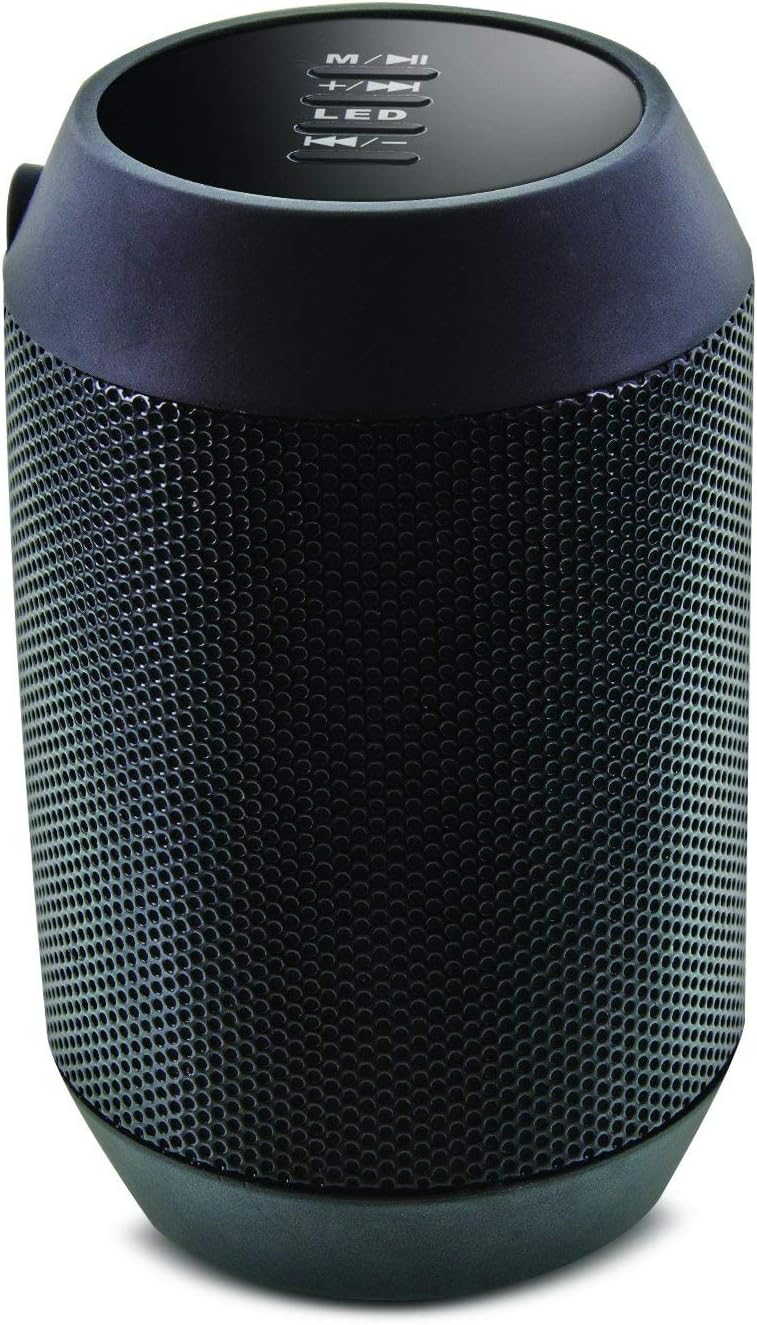
Vaizdas: Viršus view of the Aduro Amplify speaker, highlighting the control panel. From top to bottom, buttons include: M/▶█ (Mode/Play/Pause), +/▶▶ (Volume Up/Next Track), LED (LED Mode Control), ◀◀/- (Volume Down/Previous Track).
- M/▶█ Button: Press to switch between modes (e.g., Bluetooth, AUX). Press and hold to power on/off. Short press to Play/Pause music.
- +/▶▶ Button: Trumpas paspaudimas, norint padidinti garsumą. Paspauskite ir palaikykite, norėdami pereiti prie kito takelio.
- LED mygtukas: Press to cycle through different LED light modes.
- ◀◀/- Button: Short press to decrease volume. Press and hold to go to the previous track.
5. Sąrankos instrukcijos
5.1 Garsiakalbio įkrovimas
Before first use, fully charge the speaker. Connect the provided charging cable to the speaker's charging port and the other end to a USB power source (e.g., computer USB port, USB wall adapter). The LED indicator will show charging status and turn off or change color when fully charged.
5.2 Įjungimas / išjungimas
- Norėdami įjungti: Paspauskite ir palaikykite M/▶█ button for approximately 3 seconds until you hear an audible prompt or see the LED indicator light up.
- Norėdami išjungti: Paspauskite ir palaikykite M/▶█ button for approximately 3 seconds until you hear an audible prompt or the LED indicator turns off.
5.3 Bluetooth poravimas
Norėdami prijungti garsiakalbį prie „Bluetooth“ įrenginio:
- Ensure the speaker is powered on and in Bluetooth pairing mode. The LED indicator will typically flash rapidly, indicating it is ready to pair.
- On your smartphone, tablet, or other device, navigate to the Bluetooth settings.
- Įjunkite Bluetooth ir ieškokite galimų įrenginių.
- Select "Aduro BSP15" (or similar name) from the list of found devices.
- Once paired, the speaker will emit an audible confirmation, and the LED indicator will typically stop flashing and remain solid.
- Įjungus garsiakalbį, jis automatiškai bandys prisijungti prie paskutinio suporuoto įrenginio.
5.4 Laidinis ryšys (AUX)
For devices without Bluetooth, you can use a 3.5mm audio cable (not included) to connect to the speaker's AUX input port. Once connected, the speaker should automatically switch to AUX mode. If not, press the M/▶█ mygtuką, kad perjungtumėte į AUX režimą.
6. Naudojimo instrukcijos
6.1 Garso grojimas
- Leisti / pristabdyti: Trumpai paspauskite M/▶█ mygtuką.
- Pagarsink: Trumpai paspauskite +/▶▶ mygtuką.
- Patildyti: Trumpai paspauskite ◀◀/- mygtuką.
- Kitas takelis: Paspauskite ir palaikykite +/▶▶ mygtuką.
- Ankstesnis takelis: Paspauskite ir palaikykite ◀◀/- mygtuką.
6.2 Skambučiai laisvų rankų įranga
Prijungus per „Bluetooth“, garsiakalbyje įmontuotas mikrofonas leidžia skambinti laisvų rankų įranga.
- Atsiliepti į skambutį: Trumpai paspauskite M/▶█ mygtuką, kai suskamba įeinantis skambutis.
- Baigti skambutį: Trumpai paspauskite M/▶█ mygtuką pokalbio metu.
- Atmesti skambutį: Paspauskite ir palaikykite M/▶█ mygtuką, kai suskamba įeinantis skambutis.
6.3 LED Light Settings
Paspauskite LED button to cycle through the available light modes. The speaker offers various visual effects, including pulsating lights that react to music.
7. Priežiūra
7.1 Valymas
Wipe the speaker with a soft, dry cloth. Do not use abrasive cleaners, alcohol, or other chemical solvents, as these may damage the surface.
7.2 Saugykla
When not in use for extended periods, store the speaker in a cool, dry place away from direct sunlight and extreme temperatures. It is recommended to charge the battery periodically to maintain its lifespan.
8. Problemų sprendimas
- Garsiakalbis neįsijungia:
Įsitikinkite, kad akumuliatorius įkrautas. Prijunkite įkrovimo laidą ir bandykite dar kartą po kelių minučių. - Nepavyksta susieti su „Bluetooth“ įrenginiu:
Ensure the speaker is in pairing mode (LED flashing). Make sure Bluetooth is enabled on your device and it is within range (typically 10 meters/30 feet). Turn both devices off and on again, then try pairing. Ensure no other devices are currently connected to the speaker. - Nėra garso arba garsas per mažas:
Check the volume levels on both the speaker and your connected device. Ensure the speaker is correctly paired or the AUX cable is fully inserted. If using AUX, ensure the correct mode is selected. - Neveikia LED lemputės:
Press the LED button to cycle through modes. If still unresponsive, power cycle the speaker.
9. Specifikacijos

Vaizdas: Šoninė view of the Aduro Amplify LED Wireless Speaker, showing its cylindrical design and speaker grille.
| Modelio pavadinimas | BSP15 |
| Prekės modelio numeris | LU4-01-BSP15 |
| Prekės ženklas | Aduro |
| Medžiaga | Plastikiniai |
| Garsiakalbio tipas | Žemųjų dažnių garsiakalbis |
| Ypatingos savybės | Built-in Microphone, Portable |
| Ryšio technologija | Belaidis ryšys („Bluetooth“) |
| Belaidis ryšys | Bluetooth |
| Garso išvesties režimas | Stereo |
| Didžiausia garsiakalbio išėjimo galia | 5 vatų |
| Kontrolės metodas | Palieskite |
| Gaminio matmenys | 6 "D x 3.8" P x 3.5" A |
| Prekės svoris | 6.7 uncijos |
| Atsparumo vandeniui lygis | Neatsparus vandeniui |
| Maitinimo šaltinis | Laidinis elektrinis (įkrovimui) |
10. Garantija ir palaikymas
10.1 Ribota garantija
This Aduro product is covered by a limited warranty against defects in materials and workmanship under normal use. The duration and terms of the warranty may vary. Please refer to the warranty card included with your purchase or contact Aduro customer support for specific details.
10.2 Pagalba klientams
For technical assistance, warranty claims, or product inquiries, please contact Aduro customer support. Contact information can typically be found on the manufacturer's official websvetainėje arba ant produkto pakuotės.
Manufacturer: Aduro


