1. Įvadas
The Muse M-192 CR is a versatile clock radio designed to provide reliable timekeeping, alarm functions, and FM radio reception. It features a large, easy-to-read digital display, dual alarms, and convenient functions such as snooze, sleep, and NAP. This manual provides detailed instructions for the proper setup, operation, and maintenance of your device.
2. Saugos instrukcijos
- Prieš naudodami įrenginį, atidžiai perskaitykite visas instrukcijas.
- Laikykite prietaisą atokiau nuo vandens ar drėgmės.
- Neužblokuokite jokių ventiliacijos angų. Užtikrinkite pakankamai vietos aplink įrenginį tinkamam oro cirkuliavimui.
- Use only the AC adapter supplied with the unit.
- Saugokite, kad prietaisas nepatektų į ekstremalias temperatūras, tiesioginius saulės spindulius ar didelę drėgmę.
- Nebandykite ardyti ar modifikuoti įrenginio. Visus techninės priežiūros darbus patikėkite kvalifikuotiems darbuotojams.
3. Pakuotės turinys
Patikrinkite pakuotę, ar joje yra šie daiktai:
- 1 x Muse M-192 CR Clock Radio
- 1 x kintamosios srovės adapteris
- 1 x naudojimo instrukcija (šis dokumentas)
4. Produktas baigtasview
Familiarize yourself with the various parts and controls of your Muse M-192 CR Clock Radio.

1 pav.: Priekinė kampinė dalis view of the Muse M-192 CR Clock Radio, showcasing its large digital display and control buttons.
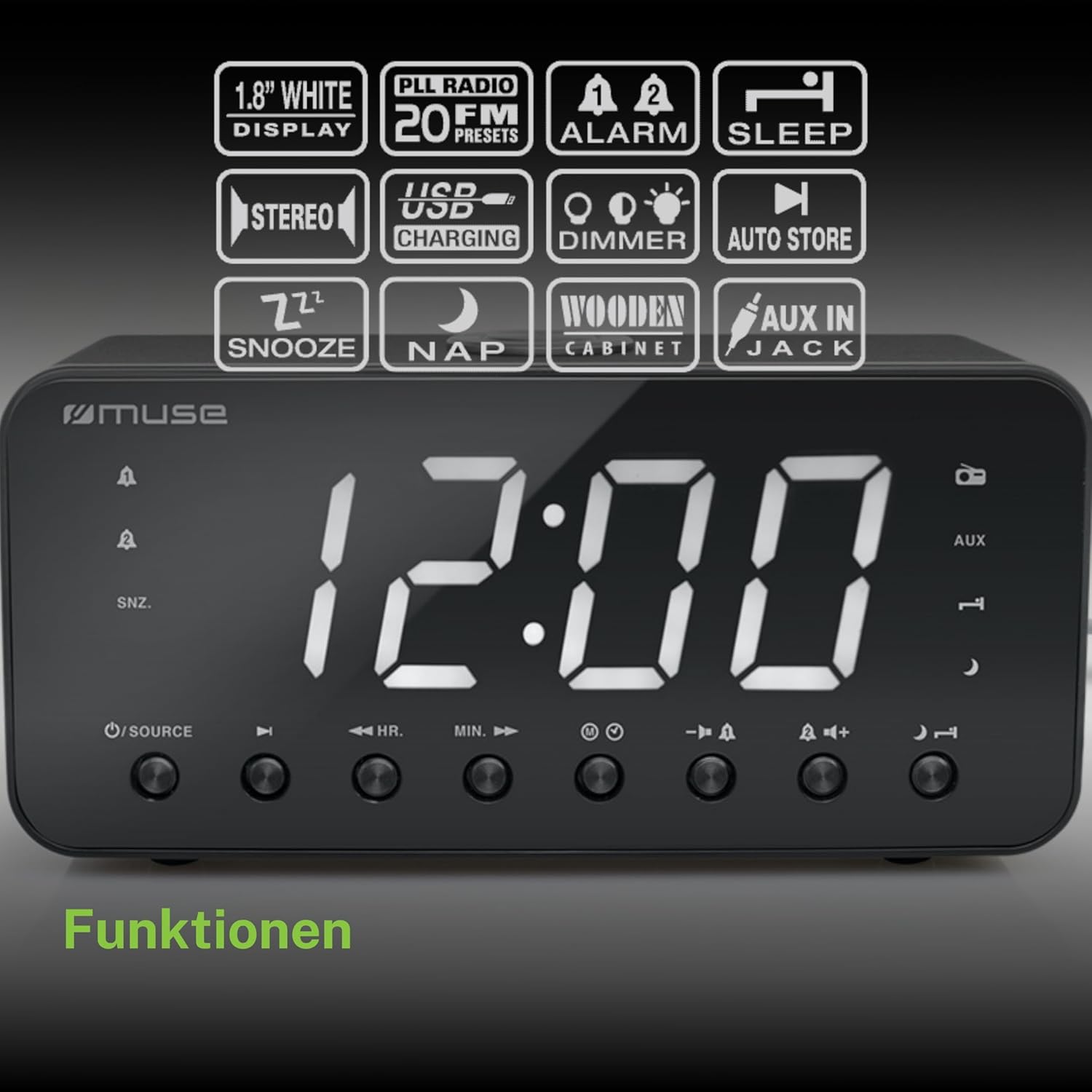
Figure 2: Diagram illustrating the key features and control buttons on the Muse M-192 CR Clock Radio, including the 1.8-inch white display, PLL FM radio with 20 presets, dual alarms, sleep, snooze, NAP functions, USB charging, dimmer, auto store, and AUX input jack.
Priekinio skydelio valdikliai:
- Ekranas: Large 1.8-inch white LED display for time and status.
- SOURCE mygtukas: Selects between FM radio and AUX input.
- HR (Hour) Button: Adjusts hour for time and alarm settings.
- MIN (Minute) Button: Adjusts minute for time and alarm settings.
- ALARM 1 Button: Sets and activates/deactivates Alarm 1.
- ALARM 2 Button: Sets and activates/deactivates Alarm 2.
- Snaudimo / pritemdymo mygtukas: Activates snooze during an alarm; adjusts display brightness (High/Low/Off) when not alarming.
- MIEGO mygtukas: Sets the sleep timer for radio playback.
- NAP mygtukas: Sets a short nap alarm.
- Garsumo didinimo / mažinimo mygtukai: Reguliuoja garso stiprumą.
Galinio skydelio jungtys:
- AUX IN lizdas: Prijungia išorinius garso įrenginius.
- USB įkrovimo prievadas: Provides power to charge compatible devices.
- DC IN lizdas: Connects the AC adapter for power.
- Baterijų skyrius: Holds backup batteries.
5. Sąranka
5.1 Maitinimo jungtis
- Insert the small plug of the supplied AC adapter into the DC IN jack on the rear of the clock radio.
- Prijunkite kintamosios srovės adapterį į standartinį sieninį lizdą. Ekranas užsidegs.
5.2 Atsarginio akumuliatoriaus įrengimas
The clock radio requires 2 x 1.5V AAA batteries (not included) for backup power. These batteries maintain the time and alarm settings during a power outage.
- Atidarykite baterijų skyriaus dangtelį, esantį įrenginio apačioje.
- Įdėkite dvi AAA tipo baterijas, laikydamiesi teisingo poliškumo (+ ir -), kaip nurodyta skyrelio viduje.
- Saugiai uždarykite akumuliatoriaus skyriaus dangtelį.
Note: Battery backup only preserves settings; the display will not illuminate and alarms will not sound during a power outage if only running on battery backup.
6. Naudojimo instrukcijos
6.1 Laiko nustatymas
- In standby mode (when the radio is off), press and hold the LAIKO NUSTATYMAS button (if available, otherwise use HR/MIN directly or a dedicated time set button not explicitly listed but implied by HR/MIN). If no dedicated button, proceed to step 2.
- Paspauskite HR mygtuką, norėdami reguliuoti valandas.
- Paspauskite MIN mygtuką, kad nustatytumėte minutes.
- Release the buttons to confirm the time. The time will automatically set after a few seconds of inactivity.
6.2 Žadintuvų nustatymas (1 ir 2 žadintuvai)
The Muse M-192 CR features two independent alarms.
- Paspauskite ir palaikykite 1 pavojaus signalas button until the alarm time flashes on the display.
- Naudokite HR ir MIN mygtukus, kad nustatytumėte norimą žadintuvo laiką.
- Paspauskite 1 pavojaus signalas dar kartą paspauskite mygtuką, kad pasirinktumėte žadintuvo šaltinį: Skambutis or Radijas.
- Paspauskite 1 pavojaus signalas button a third time to confirm and activate Alarm 1. An alarm icon will appear on the display.
- Pakartokite procesą, 2 pavojaus signalas naudojant 2 pavojaus signalas mygtuką.
Norėdami išjungti žadintuvą, paspauskite atitinkamą SIGNALAS button until its icon disappears from the display.
6.3 Snausti funkcija
Kai suskamba žadintuvas, paspauskite SNOZUOTAS/REŽIMUOTOJAS button to temporarily silence the alarm. The alarm will sound again after approximately 9 minutes.
6.4 Miego funkcija
The sleep function allows you to fall asleep to the radio, which will automatically turn off after a set period.
- Kol groja radijas, paspauskite MIEGAS Pakartotinai spauskite mygtuką , kad perjungtumėte galimus miego laikus (pvz., 90, 60, 30, 15 minučių arba IŠJUNGTA).
- Radijas gros pasirinktą laiką ir tada automatiškai išsijungs.
6.5 NAP Function
The NAP function sets a short alarm for a specified duration.
- Paspauskite NAP button repeatedly to select a nap duration (e.g., 10, 20, 30, 60, 90, 120 minutes, or OFF).
- The alarm will sound after the selected duration.
6.6 Radijo veikimas (FM)
- Paspauskite ŠALTINIS mygtuką, kad pasirinktumėte FM radijo režimą.
- Paspauskite ir palaikykite HR or MIN button to automatically scan for the next available station. Briefly press to manually tune.
- Reguliuokite garsumą naudodami Garsumo didinimas / sumažinimas mygtukai.
Radijo išankstinių nuostatų nustatymas:
The unit supports up to 20 FM radio presets.
- Nustatykite norimą FM stotį.
- Paspauskite ir palaikykite NUSTATYMAS button (often combined with a number or memory button, if not explicitly labeled, refer to the full manual for specific button). If no dedicated PRESET button, the HR/MIN buttons might serve this function in radio mode.
- Naudokite HR or MIN mygtukais pasirinkite iš anksto nustatytos stoties numerį (P01–P20).
- Paspauskite NUSTATYMAS mygtuką dar kartą, kad išsaugotumėte stotį.
- Norėdami iškviesti išankstinį nustatymą, trumpai paspauskite NUSTATYMAS mygtuką ir tada naudokite HR or MIN norėdami pasirinkti norimą išankstinio nustatymo numerį.
6.7 AUX įvestis
Connect an external audio device (e.g., MP3 player, smartphone) to the AUX IN jack on the rear of the unit using a 3.5mm audio cable (not included).
- Connect one end of the audio cable to your external device's headphone jack.
- Connect the other end to the AUX IN jack on the clock radio.
- Paspauskite ŠALTINIS mygtuką, kad pasirinktumėte AUX režimą. Ekrane bus rodoma „AUX“.
- Play audio from your external device. Adjust volume using the clock radio's Garsumo didinimas / sumažinimas buttons and your external device's volume control.
6.8 USB įkrovimas
The USB port on the rear of the unit can be used to charge compatible devices.

Figure 3: The Muse M-192 CR Clock Radio highlighting its jumbo white display and the USB charging port located on the rear of the unit.
- Connect your device's USB charging cable to the USB charging port on the clock radio.
- Įsitikinkite, kad laikrodis-radijas įjungtas.
- Your device should begin charging.
Note: The USB port is for charging only and does not support data transfer or audio playback.
6.9 Ekrano pritemdymas
Adjust the brightness of the display to suit your preference.
- Laukimo režimu paspauskite SNOZUOTAS/REŽIMUOTOJAS mygtuką pakartotinai.
- Cycle through the brightness levels: High, Low, and Off.
7. Priežiūra
- Valymas: Nuvalykite įrenginį minkštu, sausu skudurėliu. Nenaudokite abrazyvinių valiklių, vaško ar tirpiklių.
- Vėdinimas: Laikykite ventiliacijos angas švarias nuo dulkių ir šiukšlių.
- Saugykla: Jei įrenginį ilgesnį laiką sandėliuosite, atjunkite jį nuo maitinimo lizdo ir išimkite atsargines baterijas.
8. Problemų sprendimas
| Problema | Galima priežastis | Sprendimas |
|---|---|---|
| Nėra maitinimo / Ekranas išjungtas | Kintamosios srovės adapteris neprijungtas arba sugedęs. | Įsitikinkite, kad kintamosios srovės adapteris yra tvirtai prijungtas prie įrenginio ir veikiančio sieninio lizdo. |
| Signalizacija neskamba | Signalizacija neįjungta arba nustatyta neteisingai. | Verify alarm time and source are set correctly and the alarm icon is visible on the display. |
| Prastas FM radijo priėmimas | Antena nėra ištiesta arba yra trukdžių. | Extend the FM wire antenna fully. Reposition the unit to improve reception. |
| Ekranas per ryškus/tamsus | Reikia pakoreguoti pritemdymo nustatymus. | Paspauskite SNOZUOTAS/REŽIMUOTOJAS mygtuką, kad perjungtumėte ryškumo lygius. |
9. Specifikacijos

Figure 4: Technical drawing illustrating the dimensions of the Muse M-192 CR Clock Radio (226mm length, 86mm width, 108mm height).
- Modelis: M-192 CR
- Ekranas: 1.8-inch White Digital LED
- Radijas: FM PLL Radio with 20 Presets
- Signalizacijos funkcijos: Dual Alarm, Snooze, Sleep, NAP
- Signalizacijos šaltinis: Radijas arba garsinis signalas
- Ryšys: AUX-in, USB Charging Port
- Galia: AC Power (Adapter Included), Battery Backup (2 x 1.5V AAA batteries, not included)
- Išėjimo galia: 2 vatų
- Matmenys (P x P x A): 22.6 x 8.6 x 10.8 cm
- Svoris: 800 g
10. Garantija ir palaikymas
For detailed warranty information and technical support, please refer to the documentation provided with your purchase or contact your retailer. Keep your proof of purchase for any warranty claims.


