1. Įvadas
This manual provides detailed instructions for the installation, operation, and maintenance of your Alpine CDE-163BT Advanced Bluetooth CD Receiver. Please read this manual thoroughly before using the unit to ensure proper operation and to prevent damage. Keep this manual for future reference.
The Alpine CDE-163BT is a versatile car stereo receiver featuring advanced Bluetooth connectivity for hands-free calling and audio streaming, CD playback, USB input, and FM/AM tuner capabilities. It is designed to deliver high-quality audio performance and user-friendly control.
2. Sąranka ir diegimas
2.1 Pakuotės turinys
Prieš pradėdami montavimą, patikrinkite, ar yra visi komponentai:
- Alpine CDE-163BT Head Unit
- Laidų laidai
- Mounting Sleeve and Trim Ring
- Microphone for Bluetooth Hands-Free Calling
- Naudotojo vadovas (šis dokumentas)
- Tvirtinimo detalės (varžtai, laikikliai)
2.2 Sujungimo schema
Refer to the wiring diagram provided with the unit's installation guide for specific connections. Key connections include:
- Galia: Yellow (constant 12V), Red (switched 12V), Black (ground).
- Garsiakalbiai: White/White-Black (Front Left), Gray/Gray-Black (Front Right), Green/Green-Black (Rear Left), Purple/Purple-Black (Rear Right).
- Antena: Blue (power antenna/amplifier remote turn-on).
- Mikrofonas: Connect the supplied microphone to the dedicated input for hands-free calling.
Atsargiai: Incorrect wiring can cause damage to the unit or vehicle's electrical system. If you are unsure about any wiring connections, consult a qualified professional installer.
2.3 Pradinis įjungimas
After installation, turn on your vehicle's ignition. The unit should power on. Follow any on-screen prompts for initial setup, such as language selection or clock setting.
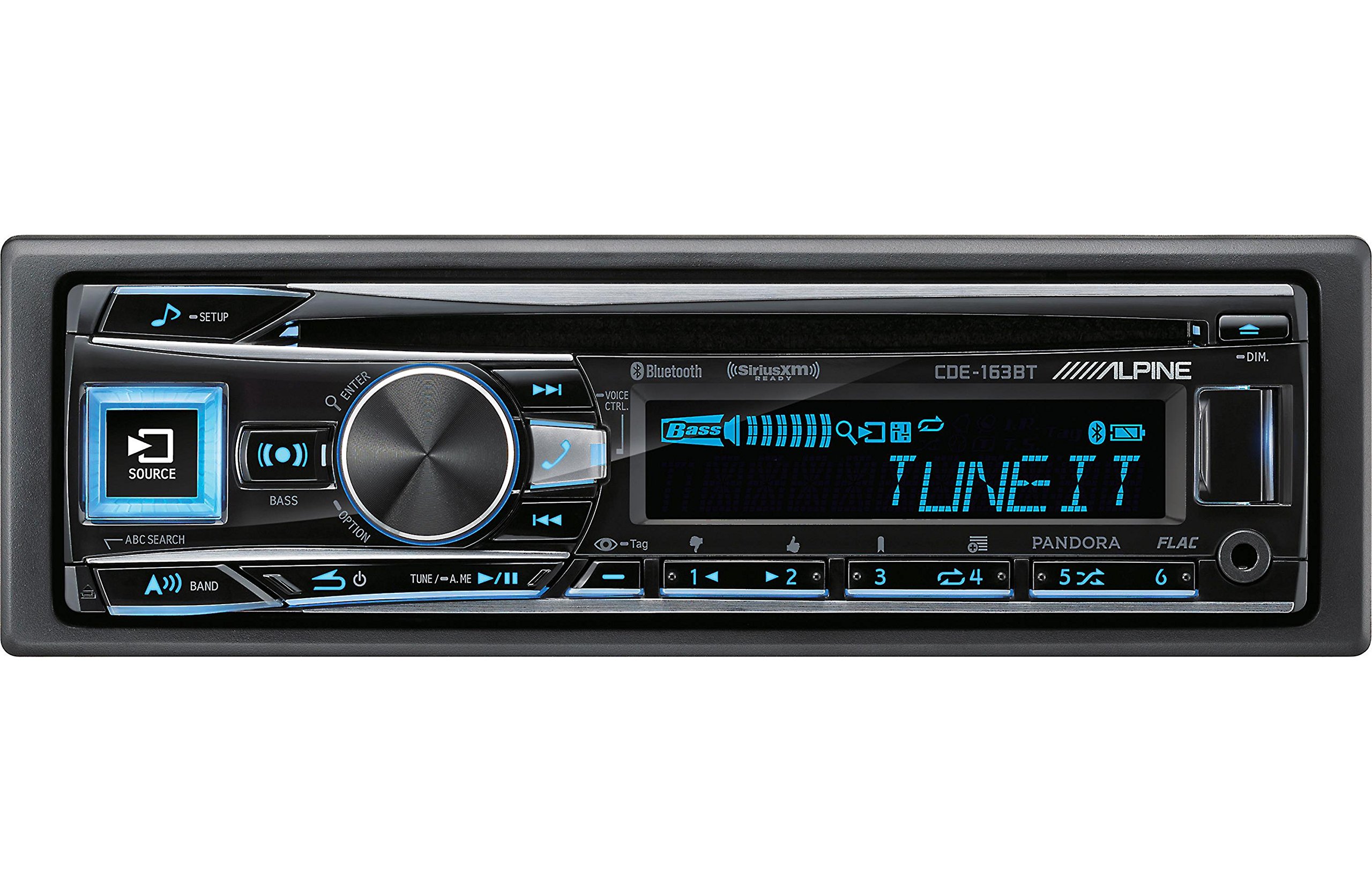
Figure 2.3.1: Front panel of the Alpine CDE-163BT receiver. This image displays the main controls, including the large rotary knob, source button, setup button, and display screen showing "TUNEIT" and "Bass" indicators.
3. Operacija
3.1 Priekinio skydelio valdikliaiview
Familiarize yourself with the main controls on the front panel:
3.1.1 pav. Išsamus view of the Alpine CDE-163BT front panel. Key controls include the SOURCE button (left, illuminated), SETUP button (top left), large central rotary knob for volume and selection, BASS/OPTION button, VOICE CTRL button, and various preset/track skip buttons along the bottom.
- SOURCE mygtukas: Selects the audio source (CD, Tuner, USB, Bluetooth Audio, AUX).
- SETUP mygtukas: Accesses the main setup menu for system adjustments.
- Rotary Knob (Volume/ENTER): Turns to adjust volume. Press to confirm selections in menus.
- BASS/OPTION Button: Provides quick access to bass settings or other options depending on the current mode.
- VOICE CTRL Button: Activates voice control features on connected smartphones.
- Juostos mygtukas: Switches between FM1, FM2, FM3, and AM bands in tuner mode.
- TUNE/A.ME/II Buttons: Used for manual tuning, auto memory, and play/pause functions.
- Track Skip/Preset Buttons (1-6): Used for skipping tracks or selecting radio presets.
- DIM mygtukas: Reguliuoja ekrano ryškumą.
3.2 Įjungimas / išjungimas ir šaltinio pasirinkimas
- Norėdami pasukti įrenginį ON, press any button (e.g., SOURCE or the Rotary Knob).
- Norėdami pasukti įrenginį IŠJUNGTA, press and hold the power button (often integrated with the TUNE/A.ME button).
- Paspauskite ŠALTINIS button repeatedly to cycle through available audio sources: CD, Tuner, USB, Bluetooth Audio, AUX.
3.3 Garsumo valdymas
Rotate the large central Rotacinė rankenėlė pagal laikrodžio rodyklę, norėdami padidinti garsumą, ir prieš laikrodžio rodyklę, norėdami sumažinti garsumą.
3.4 Garso nustatymai
Paspauskite BASS/OPTION button or navigate through the SETUP menu to adjust audio settings such as Bass, Treble, Balance (left/right), and Fader (front/rear). Use the Rotary Knob to adjust values and press it to confirm.
3.5 Radio Operation (FM/AM Tuner)
- Select "Tuner" as the source using the ŠALTINIS mygtuką.
- Paspauskite BAND mygtuką, norėdami perjungti FM1, FM2, FM3 ir AM diapazonus.
- Rankinis derinimas: Paspauskite TUNE buttons (◀ / ▶) to manually tune frequencies.
- Ieškokite derinimo: Paspauskite ir palaikykite TUNE mygtukus, kad automatiškai ieškotų kitos stiprios stoties.
- Iš anksto nustatytos stotys: Norėdami išsaugoti stotį, nustatykite norimą dažnį, tada paspauskite ir palaikykite vieną iš sunumeruotų išankstinio nustatymo mygtukų (1–6), kol išgirsite pyptelėjimą. Norėdami iškviesti iš anksto nustatytą stotį, tiesiog paspauskite atitinkamą sunumeruotą mygtuką.
3.6 CD atkūrimas
- Įdėkite kompaktinį diską į diskų angą. Įrenginys automatiškai persijungs į kompaktinio disko šaltinį ir pradės groti.
- Use the ◀ / ▶ buttons to skip tracks.
- Paspauskite TUNE/A.ME/II button for Play/Pause.
- Paspauskite ABC SEARCH button to search for tracks by name.
3.7 „Bluetooth“ ryšys
The CDE-163BT features built-in Bluetooth for hands-free calling and audio streaming.
3.7.1 „Bluetooth“ įrenginio susiejimas
- Įsitikinkite, kad jūsų mobiliajame įrenginyje įjungtas „Bluetooth“.
- On the CDE-163BT, go to the SETUP menu and select "Bluetooth Setup".
- Choose "Pairing" or "Device Search".
- On your mobile device, search for available Bluetooth devices and select "Alpine CDE-163BT".
- Confirm the pairing code if prompted. Once paired, the Bluetooth icon on the receiver's display will illuminate.
3.7.2 Skambinimas laisvų rankų įranga
- When a call comes in, the unit will display the caller ID. Press the ENTER button (Rotary Knob) to answer.
- Norėdami baigti pokalbį, paspauskite ENTER mygtuką dar kartą.
- Use the supplied microphone for clear communication.
- Paspauskite VOICE CTRL button to activate your smartphone's voice assistant.
3.7.3 „Bluetooth“ garso transliacija
- Select "Bluetooth Audio" as the source.
- Start playback on your paired mobile device. Audio will stream through the receiver.
- Use the ◀ / ▶ buttons on the receiver to skip tracks.
3.8 USB atkūrimas
- Connect a USB storage device (e.g., USB flash drive) to the USB port.
- Select "USB" as the source. The unit will automatically detect and begin playing compatible audio files (including FLAC format).
- Use the ◀ / ▶ buttons to skip tracks.
- The unit supports various audio formats.
3.9 Pandora and SiriusXM Ready
- Pandora: Connect your iPhone or Android smartphone via USB or Bluetooth and launch the Pandora app. Select Pandora as the source on the receiver to control the app.
- SiriusXM: This unit is SiriusXM Ready. An optional SiriusXM Connect Vehicle Tuner and subscription are required for satellite radio reception. Connect the tuner and select SiriusXM as the source.
3.10 Ekrano nustatymai
- Paspauskite DIM button to adjust the display brightness.
- Access the SETUP menu to customize display colors for buttons and the screen.
4. Priežiūra
4.1 Įrenginio valymas
Priekinį skydelį nuvalykite minkštu, sausu skudurėliu. Jei dėmės sunkiai įveikiamos,ampen the cloth lightly with water. Avoid using harsh chemicals, abrasive cleaners, or solvents as they can damage the finish.
4.2 Diskų priežiūra
Handle CDs by their edges. Keep discs clean and free of scratches. If a disc is dirty, wipe it gently from the center outwards with a soft, lint-free cloth. Do not use solvents or abrasive cleaners on discs.
5. Problemų sprendimas
If you experience issues with your CDE-163BT, refer to the table below for common problems and solutions.
| Problema | Galima priežastis | Sprendimas |
|---|---|---|
| Nėra galios | Neteisingas laidų prijungimas; perdegęs saugiklis; išjungtas automobilio uždegimas. | Check power connections; Replace fuse; Turn vehicle ignition on. |
| Nėra garso | Per mažas garsumas; Įjungtas nutildymas; Neteisingas garsiakalbių sujungimas; Ampgyvybingesnis. | Padidinkite garsumą; Išjunkite nutildymą; Patikrinkite garsiakalbių jungtis; Patikrinkite ampkeliamoji galia. |
| Bluetooth neprisijungia | Device not in pairing mode; Bluetooth off on phone; Interference. | Ensure phone Bluetooth is on and discoverable; Re-attempt pairing; Move closer to unit. |
| CD skips or won't play | Dirty or scratched disc; Disc inserted incorrectly. | Clean disc; Insert disc correctly; Try a different disc. |
| USB įrenginys neatpažintas | Incompatible format; Damaged USB device; Loose connection. | Užtikrinti files are compatible; Try a different USB device; Reconnect USB device. |
Jei problema išlieka ir išbandžius šiuos sprendimus, susisiekite su „Alpine“ klientų aptarnavimo tarnyba.
6. Specifikacijos
Below are the technical specifications for the Alpine CDE-163BT Advanced Bluetooth CD Receiver:
- Modelio numeris: 79380
- Gaminio matmenys: 5 x 11 x 10 colio
- Prekės svoris: 4.05 pounds (4.1 Pounds)
- Belaidžio ryšio technologijos: Bluetooth
- Ryšio technologijos: Bluetooth
- Ypatingos savybės: Built-In Bluetooth, FM Tuner
- Kitos ekrano funkcijos: Bevielis
- Spalva: JUODAS
- Gamintojas: Alpinis
- Ryšio technologija: Bluetooth
- Suderinami įrenginiai: Išmanusis telefonas
- Jungties tipas: 3.5 mm lizdas, USB
- Garso išvesties režimas: Monofoninis, stereofoninis
- Erdvinio garso kanalo konfigūracija: 4 kanalas
- Vattage: 200 vatų
- Pirmą kartą pasiekiama data: 19 m. sausio 2016 d
7. Garantija ir klientų aptarnavimas
7.1 Informacija apie garantiją
Alpine products are manufactured to the highest quality standards. This product is covered by a limited warranty. Please refer to the separate warranty card included with your purchase for specific terms, conditions, and duration of coverage. Retain your proof of purchase for warranty claims.
7.2 Pagalba klientams
For technical assistance, troubleshooting beyond this manual, or warranty service, please contact Alpine customer support:
- Websvetainė: Apsilankykite oficialiame „Alpine“ websvetainė, kurioje rasite pagalbos išteklių, DUK ir kontaktinių formų.
- Telefonas: Žiūrėkite Alpių website or your warranty card for regional customer service phone numbers.
- Įgalioti aptarnavimo centrai: For repairs, locate an authorized Alpine service center through the official websvetainę.
When contacting support, please have your product model number (CDE-163BT) and serial number ready.


