Įvadas
This manual provides instructions for the proper installation, operation, and maintenance of your Aduro UNI-SPH01-SVM U-Grip Swivel Vent Mount. Please read this manual thoroughly before use to ensure optimal performance and longevity of the product.
Produkto savybės
- „Universal Fit“: The expandable jaw securely holds most smartphones up to 6-inch screens, including various iPhone, Android, Samsung, HTC, and Windows phone models. It is also compatible with most phone cases.
- Lengvas ir kompaktiškas dizainas: Yra mažai profesionalusfile swivel air vent mount.
- Secure Rubber Gripping: Utilizes soft, non-slip rubber to stably mount smartphones, reduce slippage, and minimize road vibrations. Designed not to scratch vehicle interiors or devices.
- Crosshair Clip: Compatible with various air vent blade sizes for easy, one-hand mounting with a secure quick-snapping jaw.
- Tilts & Swivels: A swivel ball joint supports 360° rotation, allowing for adjustment to achieve optimal viewing angles for GPS directions, music streaming, and hands-free calls.
Sąranka ir diegimas
Follow these steps to properly install your Aduro U-Grip Swivel Vent Mount:
- Identify a Suitable Vent: Choose a car air vent that provides a clear view of your device without obstructing your driving view or vehicle controls. Ensure the vent blades are sturdy enough to support the mount and your phone.
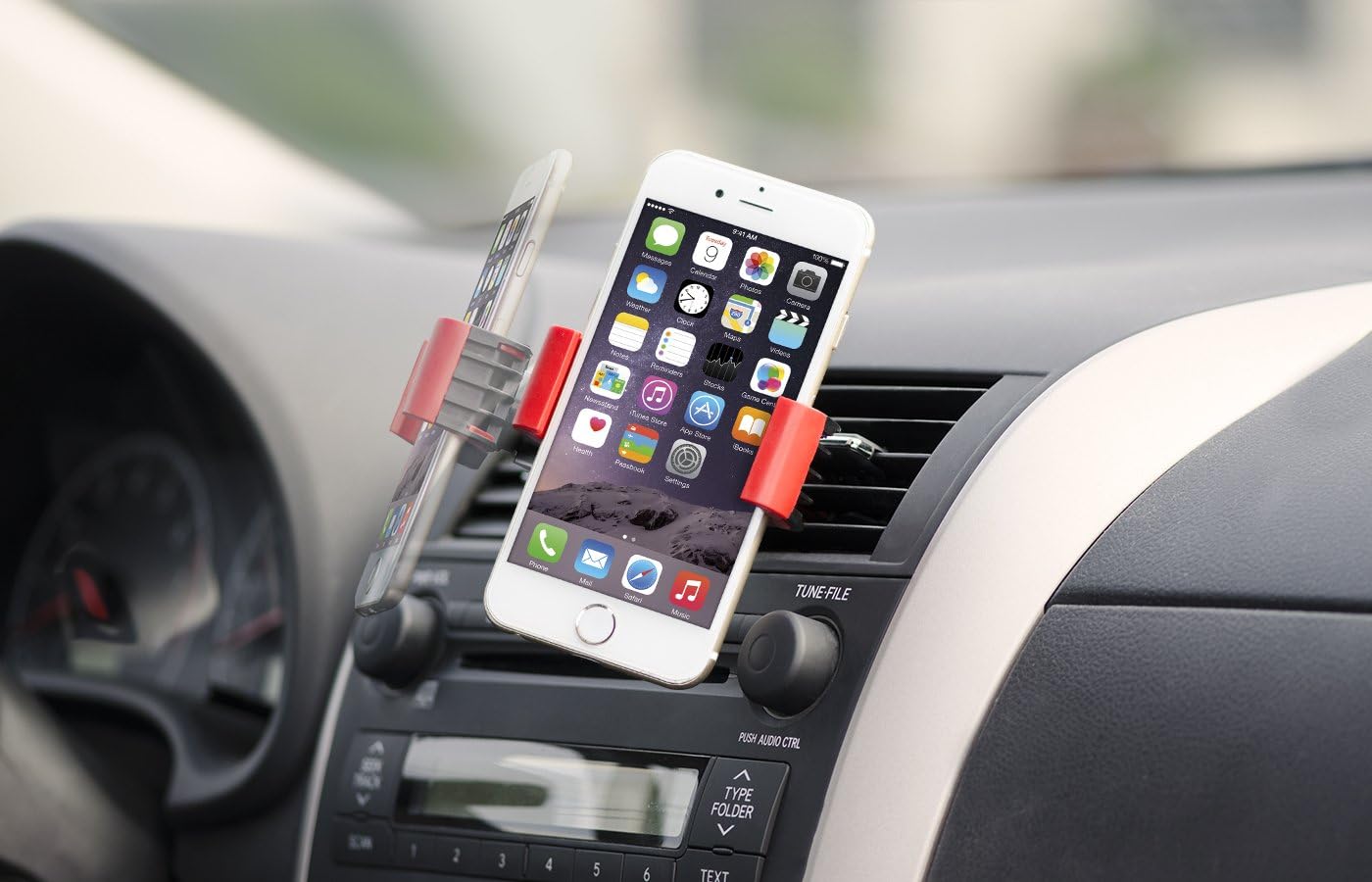
Image: The Aduro U-Grip Swivel Vent Mount securely attached to a car's air vent, displaying a smartphone in a vertical orientation. This demonstrates proper placement for optimal viewing.
- Pritvirtinkite laikiklį prie ventiliacijos angos: Gently push the crosshair clip of the mount onto one of the air vent blades. The clip is designed to securely grip the vent. Ensure it is firmly seated and does not wobble. The clip can be rotated to accommodate different vent orientations (horizontal or vertical).
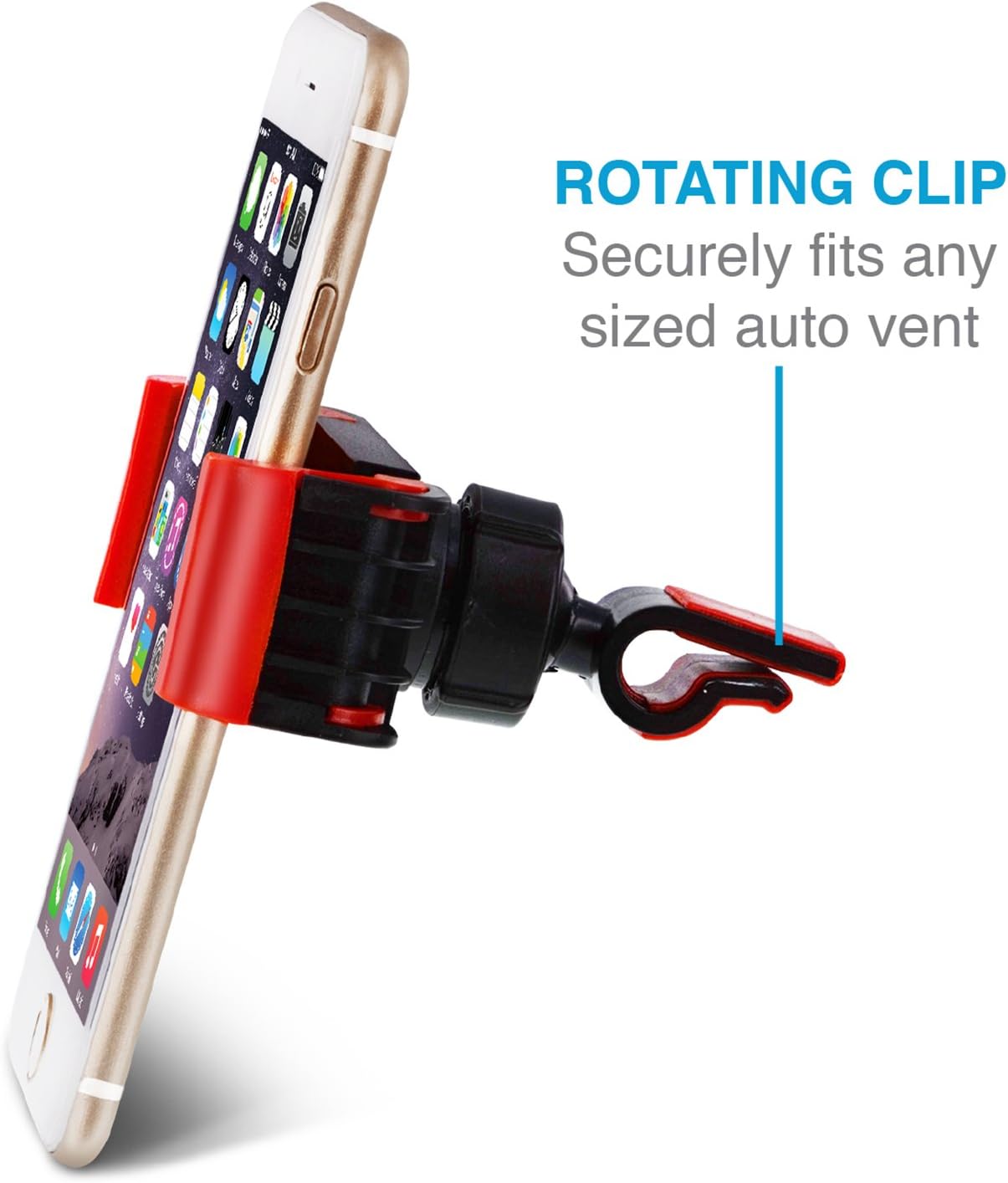
Paveikslėlis: detalus view of the mount's rotating clip, illustrating its design for secure attachment to various auto vent types.
- Įdėkite savo išmanųjį telefoną: Expand the adjustable jaws of the mount by pulling them apart. Carefully place your smartphone into the mount, ensuring the rubber grips hold it firmly on both sides. Release the jaws to secure the phone.

Image: A close-up of the rubber grip components of the mount, highlighting their role in maximizing friction to prevent slippage and minimize vibrations.
Naudojimo instrukcijos
Once installed, the Aduro U-Grip Swivel Vent Mount offers flexible viewparinktys:
- Reguliavimas Viewpakreipimo kampas: The mount features a swivel ball joint that allows for 360° rotation. Gently rotate or tilt your smartphone to achieve the desired viewing angle, whether portrait or landscape.

Image: The swivel ball joint mechanism, demonstrating its capability to allow easy adjustment of the viewing angle for the mounted smartphone.
- Išmaniojo telefono atjungimas: To remove your phone, gently expand the adjustable jaws and lift the phone out. It is recommended to use two hands for removal to prevent accidental drops or dislodging the mount.
- Vent Airflow: If the vent is active, the airflow may affect your phone's temperature. Consider closing the vent or adjusting its direction if your phone becomes too hot or cold.
Priežiūra
To maintain your Aduro U-Grip Swivel Vent Mount in good condition:
- Valymas: Nuvalykite laikiklį minkšta,amp cloth. Avoid using harsh chemicals or abrasive cleaners, as these can damage the rubber grips or plastic components.
- Guminės rankenos: Ensure the rubber grips are free from dust and debris to maintain optimal non-slip performance.
- Saugykla: Kai ilgesnį laiką nenaudojate laikiklio, laikykite jį vėsioje, sausoje vietoje, apsaugotoje nuo tiesioginių saulės spindulių.
Trikčių šalinimas
| Problema | Galima priežastis | Sprendimas |
|---|---|---|
| Mount feels loose or falls off the vent. | Vent blades are too thin, or the clip is not fully engaged. | Ensure the crosshair clip is pushed firmly onto a vent blade. Try a different vent if the current one is too flimsy. |
| Smartphone slips out of the mount. | Jaws not fully closed, or rubber grips are dirty/worn. | Ensure the phone is centered and the jaws are securely gripping it. Clean the rubber grips if they appear dirty. |
| Difficulty rotating the phone. | Swivel ball joint is stiff. | Apply gentle, consistent pressure to rotate. Avoid excessive force. |
Specifikacijos
| Funkcija | Detalė |
|---|---|
| Gaminio matmenys | 5.75 x 4.41 x 2.99 colio |
| Prekės svoris | 2.39 uncijos |
| Modelio numeris | UNI-SPH01-SVM |
| Spalva | Juoda/raudona |
| Suderinami įrenginiai | Smartphones (up to 6-inch screens) |
| Montavimo tipas | Vent |
| Ypatingos savybės | Lightweight, Rotatable |
Garantija ir palaikymas
The Aduro UNI-SPH01-SVM U-Grip Swivel Vent Mount includes an Aduro lifetime warranty for complete peace of mind. For warranty claims, technical support, or further assistance, please visit the official Aduro websvetainėje arba susisiekite su jų klientų aptarnavimo skyriumi. Išsaugokite pirkimo kvitą kaip pirkimo įrodymą.
Aduro Contact Information: Please refer to the packaging or the official Aduro websvetainę, kurioje rasite naujausią kontaktinę informaciją.


