1. Įvadas
Ačiū, kad pirkoteasing the Vivitar 4-Device Jumbo Universal Remote Control. This remote is designed to simplify your home entertainment experience by controlling up to four different audio/video devices from a single unit. It is compatible with most major brands of televisions, Blu-Ray players, DVD players, VCRs, cable boxes, satellite receivers, and home theater systems. Please read this manual thoroughly to ensure proper setup and operation.
2. Sąranka
2.1 Akumuliatoriaus įdėjimas
The Vivitar Jumbo Universal Remote requires two (2) AAA batteries (not included).
- Nuotolinio valdymo pulto gale raskite baterijų skyriaus dangtelį.
- Paspauskite skirtuką žemyn ir nustumkite dangtelį.
- Įdėkite dvi naujas AAA baterijas, užtikrindami, kad teigiamas (+) ir neigiamas (-) poliai sutaptų su skyriaus viduje esančiomis diagramomis.
- Stumkite baterijų skyriaus dangtelį atgal į vietą, kol jis tvirtai spragtelės.
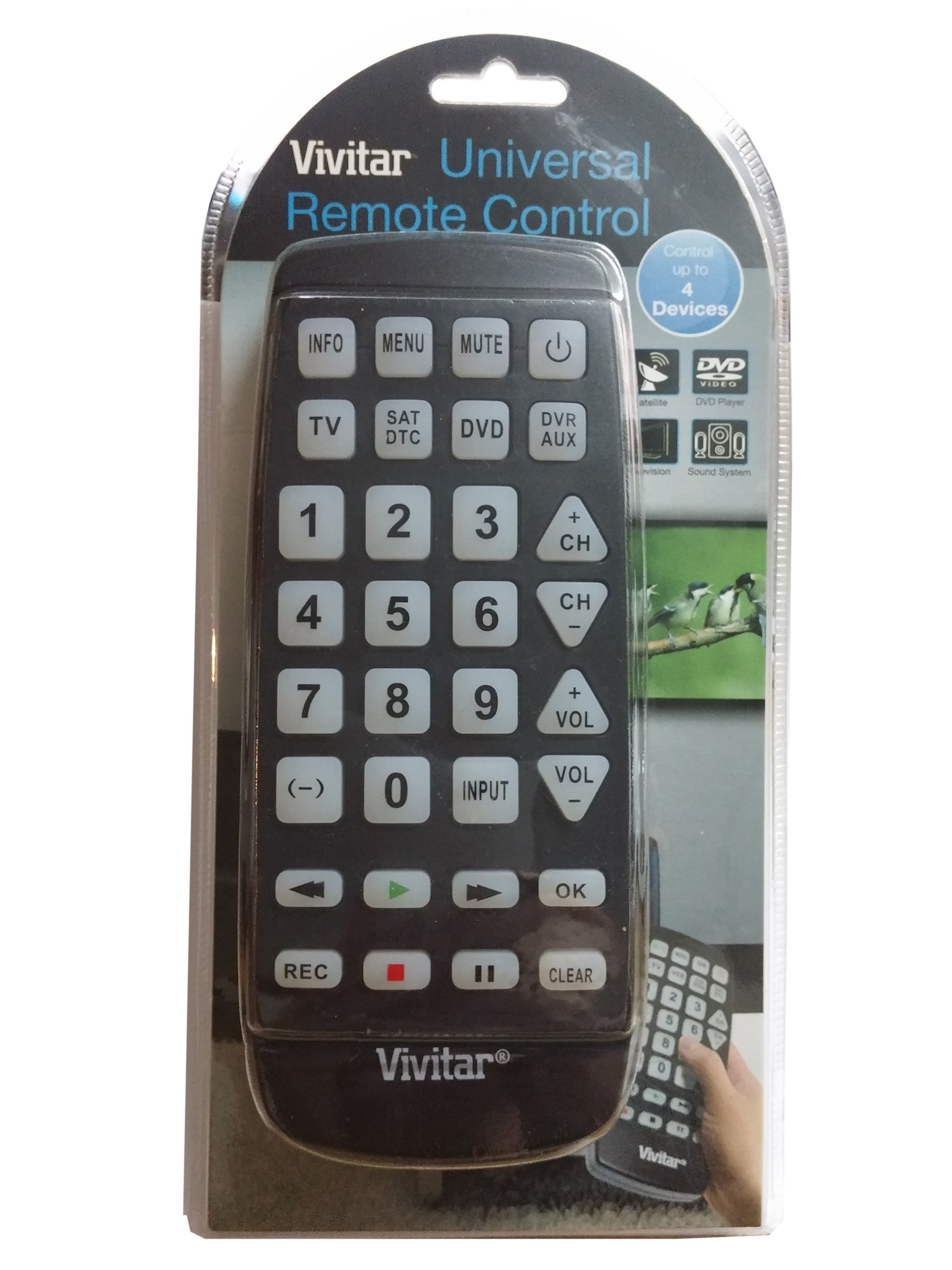
Vaizdas: priekis view of the Vivitar 4-Device Jumbo Universal Remote Control, showing its large buttons and ergonomic design. The battery compartment is located on the rear.
2.2 Programming Your Remote (Code Entry Method)
To program the remote for your specific device, you will need to enter a 3-digit code corresponding to your device's brand. A list of common codes is usually provided in a separate code booklet (not included in this digital manual).
- Įjunkite įrenginį, kurį norite valdyti (pvz., televizorių, DVD grotuvą).
- Paspauskite ir palaikykite NUSTATYTI mygtuką ant nuotolinio valdymo pulto, kol užsidegs raudona indikatoriaus lemputė.
- Laikant NUSTATYTI, press the desired device button (e.g., TV, DVD, CBL) once. The red indicator light will blink once and then remain lit.
- Atleiskite NUSTATYTI mygtuką.
- Enter the 3-digit code for your device brand using the number buttons. After entering the third digit, the red indicator light should turn off.
- Patikrinkite nuotolinio valdymo pultą paspausdami GALIA button. If the device turns off, the code was accepted. If not, repeat the process with the next code listed for your brand.
Pastaba: If your device does not respond after trying all codes for its brand, proceed to the Auto Code Search method.
2.3 Automatinė kodo paieška
If you cannot find a working code for your device, the remote can search for it automatically.
- Įjunkite įrenginį, kurį norite valdyti.
- Paspauskite ir palaikykite NUSTATYTI mygtuką, kol užsidegs raudona indikatoriaus lemputė.
- Laikant NUSTATYTI, press the desired device button (e.g., TV, DVD, CBL) once. The red indicator light will blink once and then remain lit.
- Atleiskite NUSTATYTI mygtuką.
- Nukreipkite nuotolinio valdymo pultą į įrenginį ir kelis kartus paspauskite GALIA mygtuką (arba CH+ for TV/VCR, ŽAISTI for DVD/VCR) slowly, pausing briefly after each press. The remote is sending different codes with each press.
- As soon as your device turns off (or performs the desired function), immediately press the NUSTATYTI button once to save the code. The red indicator light will turn off.
- Test the remote's functions (Volume, Channel, Playback) to ensure all controls work correctly. If not, repeat the auto code search.
3. Operating Your Remote
Once programmed, operating your Vivitar Jumbo Universal Remote is straightforward.
3.1 Įrenginio pasirinkimas
Norėdami valdyti konkretų įrenginį, paspauskite atitinkamą įrenginio mygtuką nuotolinio valdymo pulto viršuje (TV, DVD, CBL, AUX). The remote will then send commands only to the selected device.
3.2 Pagrindinės funkcijos
- GALIA: Įjungia arba išjungia pasirinktą įrenginį.
- VOL+/VOL-: Increases or decreases the volume of the selected device.
- CH+/CH-: Changes the channel up or down on the selected device.
- Nutildyti: Nutildo arba įjungia garsą.
- SKAIČIŲ Mygtukai (0–9): Used for direct channel entry or code programming.
- PLAY/PAUSE/STOP/REW/FF: Controls playback functions for DVD, Blu-Ray, or VCR devices.
- MENIU: Atidaro pasirinkto įrenginio meniu.
- VADOVAS: Displays the program guide (for Cable/Satellite boxes).
- ĮVESTIS / ŠALTINIS: Changes the input source on your TV.
4. Priežiūra
4.1 Valymas
To clean your remote control, use a soft, slightly damp cloth. Do not use abrasive cleaners, solvents, or harsh chemicals, as these can damage the remote's finish or internal components. Ensure no liquid enters the remote.
4.2 Akumuliatoriaus keitimas
Replace batteries when the remote's performance degrades or the indicator light fails to illuminate. Always replace both batteries at the same time with new AAA batteries. Do not mix old and new batteries, or different types of batteries. Remove batteries if the remote will not be used for an extended period to prevent leakage.
4.3 Saugykla
Nuotolinio valdymo pultą laikykite vėsioje, sausoje vietoje, apsaugotoje nuo tiesioginių saulės spindulių ir ekstremalių temperatūrų.
5. Problemų sprendimas
5.1 Remote Not Working
- Patikrinkite baterijas: Įsitikinkite, kad baterijos įdėtos teisingai, tinkamu poliškumu (+/-), ir nėra išsekusios. Jei reikia, pakeiskite naujomis AAA baterijomis.
- Matymo linija: Make sure there is a clear line of sight between the remote and the device you are trying to control. Obstructions can block the infrared signal.
- Įrenginio pasirinkimas: Confirm you have pressed the correct device button (TV, DVD, CBL, AUX) for the device you intend to control.
5.2 Device Not Responding to Commands
- Neteisingas kodas: The remote may be programmed with an incorrect code. Try reprogramming the remote using a different code from the code list for your device's brand, or use the Auto Code Search method.
- Įrenginio suderinamumas: While this remote is universal, some older or very new devices may not be compatible.
5.3 Indicator Light Not Illuminating
- This usually indicates dead or incorrectly inserted batteries. Replace batteries and check polarity.
5.4 Resetting the Remote
If you encounter persistent issues, you can try resetting the remote to its factory default settings. Remove the batteries, wait for 30 seconds, then reinsert them. You will need to reprogram all your devices after a reset.
6. Specifikacijos
| Modelio numeris: | 4330255290 |
| Prekinis ženklas: | „Vivitar“ |
| Gaminio matmenys: | 11.3 x 1.8 x 5.6 colio |
| Prekės svoris: | 13.1 uncijos |
| Baterijos tipas: | 2 x AAA (neįtraukta) |
| Įrenginių skaičius: | 4 (TV, DVD, Cable/Satellite, AUX) |
| Ypatinga funkcija: | Universalus suderinamumas |
| Valdiklio tipas: | Mygtukų valdymas |
7. Garantija ir palaikymas
7.1 Ribota garantija
Vivitar warrants this product against defects in materials and workmanship for a period of one (1) year from the original date of purchase. This warranty does not cover damage caused by misuse, abuse, accident, unauthorized modification, or normal wear and tear. Proof of purchase is required for all warranty claims.
7.2 Pagalba klientams
For technical assistance, troubleshooting, or warranty inquiries, please contact Vivitar Customer Support. Refer to the Vivitar official websvetainėje rasite naujausią kontaktinę informaciją, įskaitant telefono numerius ir el. pašto adresus.


