1. Įvadas
The Brydge 7.9 Keyboard is designed to enhance the functionality of your iPad Mini (2019) or iPad Mini 4, transforming it into a versatile laptop-like device. This keyboard features a full QWERTY layout with backlit keys and dedicated iOS function keys, providing a comfortable and efficient typing experience. Constructed from 100% high-grade aluminum, it offers durability and a premium aesthetic that complements your iPad.
The patented hinges allow for a 180-degree viewing angle, securing your iPad in various positions. The keyboard connects wirelessly via Bluetooth and can be easily detached when not needed. Its slim and lightweight design ensures portability without compromising on build quality.

This manual provides detailed instructions for setting up, operating, and maintaining your Brydge 7.9 Keyboard.
2. Saugos informacija
- Saugokite klaviatūrą nuo skysčių ar ekstremalių temperatūrų.
- Avoid dropping or subjecting the keyboard to severe impacts.
- Laikyti vaikams nepasiekiamoje vietoje.
- Naudokite tik pridedamą įkrovimo laidą arba sertifikuotą lygiavertį laidą.
- Do not attempt to disassemble or repair the keyboard yourself. This may void the warranty.
3. Kas yra dėžutėje
- Brydge 7.9 Keyboard
- USB įkrovimo laidas
- Vartotojo vadovas (šis dokumentas)
4. Sąranka
4.1 „iPad“ prijungimas
- Ensure your iPad Mini (2019) or iPad Mini 4 is clean and free of debris.
- Gently align the iPad with the hinges of the Brydge keyboard.
- Carefully slide the iPad into the hinges until it is securely seated. The hinges are designed to hold the iPad firmly.

4.2 Klaviatūros įkrovimas
Before initial use, fully charge your Brydge keyboard. Connect the provided USB charging cable to the charging port on the keyboard and the other end to a USB power adapter (not included) or a computer's USB port. The charging indicator light will show the charging status.
4.3 Bluetooth poravimas
- Turn on the Brydge keyboard by pressing the power button.
- Savo „iPad“ įrenginyje eikite į Nustatymai > Bluetooth.
- Įsitikinkite, kad jūsų „iPad“ įrenginyje įjungtas „Bluetooth“.
- On the Brydge keyboard, press and hold the Bluetooth key (often indicated by a Bluetooth symbol) for a few seconds until the Bluetooth indicator light flashes.
- On your iPad, select 'Brydge Keyboard' from the list of available devices.
- Follow any on-screen prompts to complete the pairing process. The indicator light on the keyboard will turn solid to confirm a successful connection.
5. Klaviatūros valdymas
5.1 General Typing
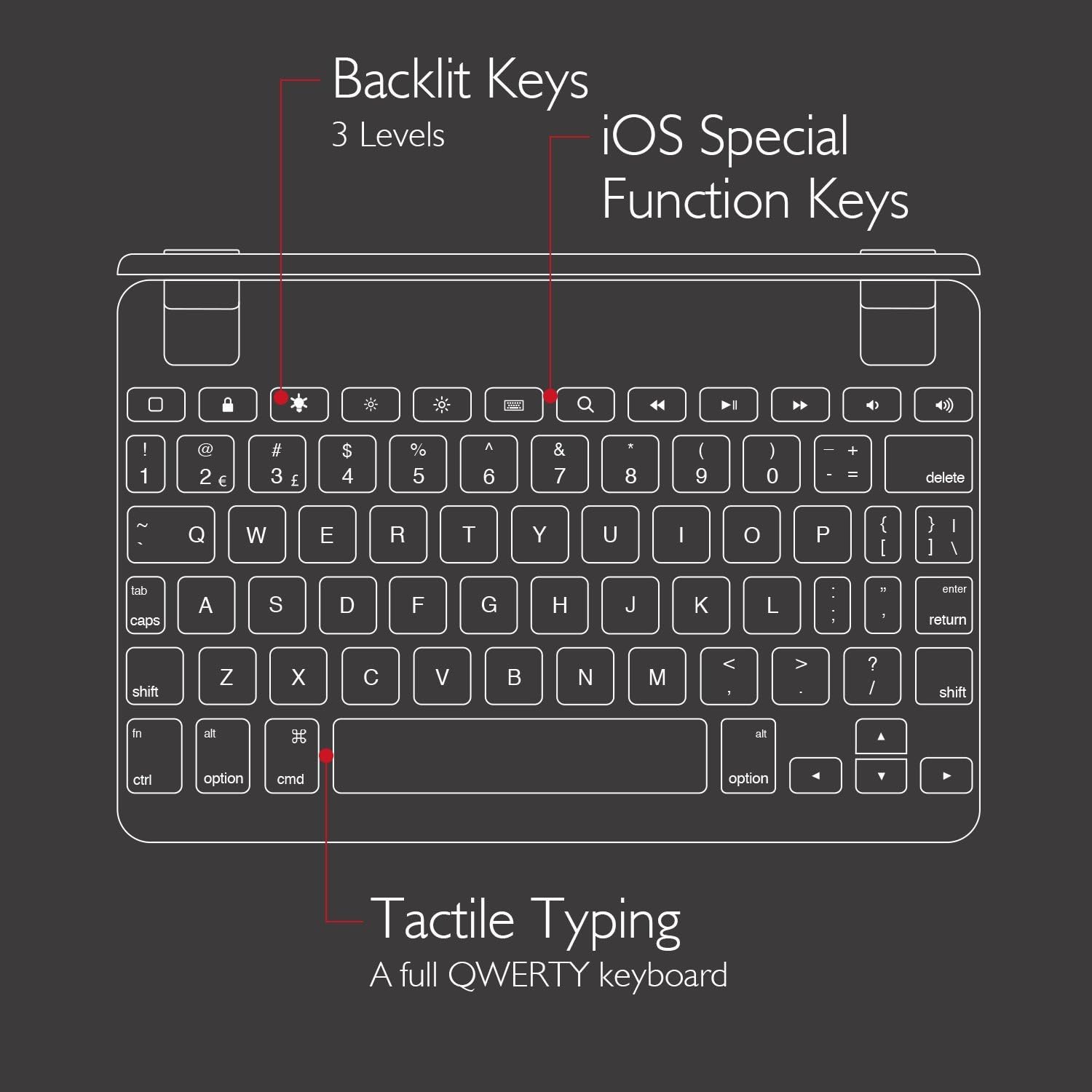
The Brydge 7.9 Keyboard provides a full QWERTY layout for comfortable and efficient typing. Keys offer a responsive tactile feedback.
5.2 Apšviesti klavišai
The keyboard features backlit keys with three adjustable brightness levels. To adjust the backlight, press the dedicated backlight key (often indicated by a sun or light bulb icon) repeatedly to cycle through the brightness settings or turn the backlight off.
5.3 iOS Special Function Keys
The top row of the keyboard includes dedicated iOS special function keys for quick access to common iPad features, such as:
- Pagrindinis ekranas
- Ekrano ryškumo reguliavimas
- Paieška
- Medijos atkūrimo valdikliai (leisti / pristabdyti, kitas / ankstesnis takelis)
- Garsumo valdymas
- Užrakinimo ekranas

5.4 180-Degree Viewing and Detachable Design
The keyboard's patented hinges allow the iPad to rotate up to 180 degrees, offering various viewing angles for typing, watching media, or presenting. The iPad can also be easily removed from the hinges if you prefer to use it as a standalone tablet.

6. Priežiūra
6.1 Valymas
- Klaviatūrai valyti naudokite minkštą, nepūkuotą šluostę.
- Įsisenėjusioms dėmėms šiek tiek pamirkykiteamplt šluostę nuvalykite vandeniu arba švelniu, neabrazyviniu valikliu.
- Avoid spraying cleaners directly onto the keyboard.
- Ensure the keyboard is completely dry before use or charging.
6.2 Saugykla
When not in use, store the keyboard in a cool, dry place away from direct sunlight and extreme temperatures. If storing for an extended period, ensure the keyboard has a partial charge (around 50%) to preserve battery health.
7. Problemų sprendimas
7.1 Klaviatūra neprisijungia per „Bluetooth“
- Įsitikinkite, kad klaviatūra įjungta ir visiškai įkrauta.
- Patikrinkite, ar jūsų „iPad“ įrenginyje įjungtas „Bluetooth“ ryšys.
- Try unpairing and re-pairing the keyboard from your iPad's Bluetooth settings.
- Restart both your iPad and the Brydge keyboard.
- Move the keyboard closer to your iPad to rule out interference.
7.2 Klavišai nereaguoja
- Patikrinkite, ar klaviatūra tinkamai prijungta per „Bluetooth“.
- Įsitikinkite, kad klaviatūra įkrauta.
- If specific keys are not working, try cleaning around the keys to remove any debris.
- Perform a hard reset on the keyboard (refer to manufacturer's website for specific instructions if needed, as this model may not have a dedicated reset button).
7.3 Neveikia foninis apšvietimas
- Ensure the keyboard is sufficiently charged, as low battery can disable backlighting.
- Paspauskite foninio apšvietimo mygtuką, kad perjungtumėte ryškumo lygius.
8. Specifikacijos
| Prekės ženklas | Bridžas |
| Modelio numeris | 5103 BRY |
| Suderinami įrenginiai | iPad Mini (2019), iPad Mini 4 |
| Ryšio technologija | Bluetooth |
| Klaviatūros aprašymas | Bevielis |
| Ypatingos savybės | Backlit, Rechargeable, 180-degree rotating hinges, Detachable |
| Medžiaga | 100% High-Grade Aluminum |
| Spalva | Gold (as per product listing, other colors may vary) |
| Prekės svoris | Maždaug 11 uncijos (312 gramai) |
| Gaminio matmenys (IxPxH) | 7.9 x 5.3 x 0.3 colio (20.07 x 13.46 x 0.76 cm) |
| Maitinimo šaltinis | Maitinamas su baterijomis (pridedama 1 ličio jonų baterija) |

9. Garantija ir palaikymas
9.1 Informacija apie garantiją
Specific warranty details for your Brydge 7.9 Keyboard may vary by region and retailer. Please refer to the warranty card included with your product or visit the official Brydge webSvetainė, kurioje rasite naujausią garantijos informaciją.
9.2 Pagalba klientams
For technical assistance, troubleshooting, or general inquiries, please contact Brydge customer support through their official website. You may also find additional resources, FAQs, and support articles online.