Įvadas
The Intermec PB51 is a rugged, 4-inch direct thermal mobile receipt printer designed for demanding field service, route accounting, and point-of-service applications. It offers fast, reliable printing performance to enhance productivity for mobile workers.
This manual provides essential information for the proper setup, operation, maintenance, and troubleshooting of your PB51 printer.
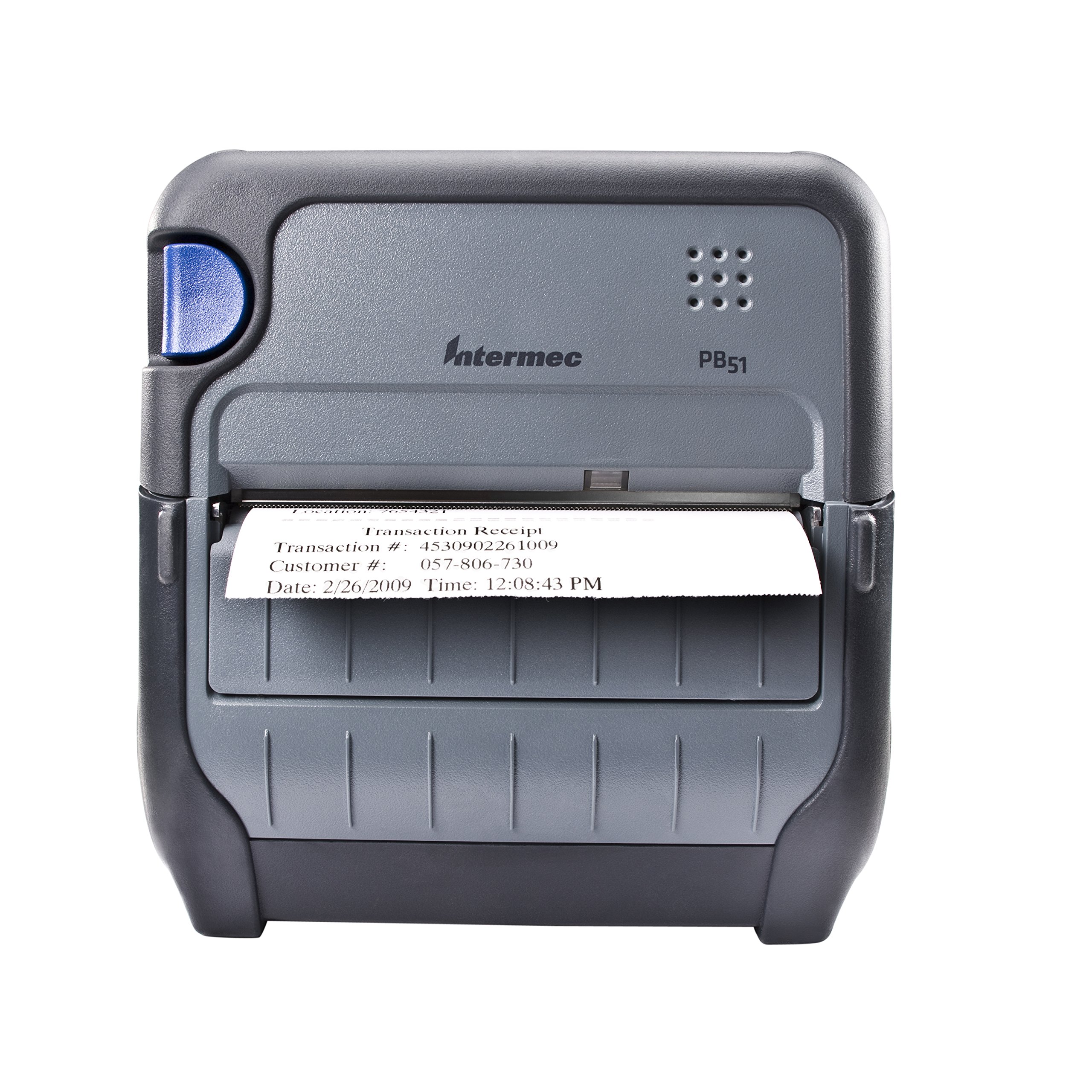
1 pav.: priekis view of the Intermec PB51 mobile receipt printer. A receipt is partially ejected from the front slot, displaying "Transaction Receipt", "Transaction #: 4530902261009", "Customer #: 057-806-730", and "Date: 2/26/2009 Time: 12:08:43 PM". The printer features a dark gray casing with a blue button on the left side and the "Intermec PB51" logo on the top panel.
Sąranka
1. Išpakavimas ir patikrinimas
- Atsargiai išimkite spausdintuvą ir visus priedus iš pakuotės.
- Patikrinkite, ar yra visi važtaraštyje išvardyti komponentai.
- Inspect the printer for any visible damage. If damage is found, contact your supplier immediately.
2. Baterijos įdėjimas ir įkrovimas
- Įsitikinkite, kad spausdintuvas išjungtas.
- Locate the battery compartment on the printer.
- Įdėkite bateriją, užtikrindami tinkamą kontaktų sulygiavimą.
- Saugiai uždarykite akumuliatoriaus skyrių.
- Connect the AC adapter to the printer and a power outlet. The battery indicator light will show charging status. Allow the battery to fully charge before first use.
3. Terminio popieriaus įdėjimas
- Atidarykite popieriaus skyriaus dangtį.
- Insert the thermal paper roll with the print-side facing the print head.
- Pull a small amount of paper out past the print mechanism.
- Close the paper compartment cover firmly until it latches.
- The printer's paper sensors will detect the paper, minimizing lost transactions.
4. Connectivity Setup (Bluetooth / USB / Serial)
- Bluetooth: Turn on the printer and enable Bluetooth on your host device (e.g., smartphone, tablet, or computer). Ieškokite available devices and select the PB51. Pair using the default PIN (refer to the printer's display or documentation for the specific PIN).
- USB: Connect the printer to your host device using a standard USB cable. Install the necessary printer drivers on your host device if prompted.
- Serialas: Connect the printer to your host device using a serial cable. Configure the serial port settings (baud rate, data bits, parity, stop bits) on both the printer and the host device to match.
Naudojimo instrukcijos
1. Įjungimas/išjungimas
- Norėdami įjungti, paspauskite ir palaikykite maitinimo mygtuką, kol ekranas užsidegs.
- To power off, press and hold the power button until the display indicates shutdown, then release.
2. Printing a Receipt
- Ensure the printer is powered on and connected to your host device.
- Open the application on your host device that generates receipts or invoices.
- Initiate the print command from your application. The PB51 is designed for 20-30% faster time-to-receipt printing.
- The printer will automatically feed and print the receipt.
- Tear off the receipt along the serrated edge.
3. LCD ekrano naudojimas
The standard LCD display provides important information about the printer's status, battery level, connectivity, and error messages. Use the navigation buttons (if present) to scroll through menu options and settings.
Priežiūra
1. Spausdinimo galvutės valymas
- Power off the printer and disconnect it from any power source.
- Atidarykite popieriaus skyrių.
- Gently wipe the print head surface with a lint-free cloth dampsu izopropilo alkoholiu.
- Prieš uždarydami dangtį ir įjungdami spausdintuvą, leiskite spausdinimo galvutei visiškai išdžiūti.
- Perform this cleaning regularly, especially if print quality degrades.
2. Akumuliatoriaus priežiūra
- Norėdami pailginti akumuliatoriaus veikimo laiką, venkite dažnai visiškai jį iškrauti.
- Store the printer and battery in a cool, dry place when not in use for extended periods.
- Use only genuine Intermec replacement batteries.
3. Bendras valymas
Nuvalykite spausdintuvo išorę minkšta,amp cloth. Do not use harsh chemicals or abrasive cleaners. Ensure no liquid enters the printer's openings.
Trikčių šalinimas
| Problema | Galima priežastis | Sprendimas |
|---|---|---|
| Spausdintuvas neįsijungia | Low or dead battery; faulty power adapter; loose battery connection. | Charge the battery; check power adapter connection; re-seat the battery. |
| Nėra spausdinimo išvesties | No paper; paper loaded incorrectly; connectivity issue; print head dirty. | Load paper correctly; check Bluetooth/USB/Serial connection; clean print head. |
| Prasta spausdinimo kokybė | Dirty print head; incorrect paper type; low battery. | Clean print head; ensure thermal paper is used; charge battery. |
| Ryšio problemos | Incorrect pairing; driver issues; out of range. | Re-pair Bluetooth; reinstall drivers; move closer to host device. |
If the problem persists after attempting these solutions, please contact Intermec customer support.
Specifikacijos
| Funkcija | Detalė |
|---|---|
| Modelio pavadinimas | PB51B33004100 |
| Spausdinimo technologija | Tiesioginis terminis |
| Spausdintuvo išvestis | Vienspalvis |
| Maksimalus laikmenos dydis | 4 colių |
| Ryšio technologija | USB, Serial, Bluetooth |
| Prekės svoris | 42 uncijos (apie 2.63 svaro) |
| Pakuotės matmenys | 10.2 x 10 x 5 colio |
| Valdiklio tipas | „Android“ (suderinamas) |
| Gamintojas | „Intermec“ |
Garantija ir palaikymas
Specific warranty information for the Intermec PB51 printer is not available in this document. Please refer to the warranty card included with your product or visit the official Intermec (now Honeywell) websvetainėje, kurioje pateikiamos išsamios garantijos sąlygos.
For technical support, service, or to purchase accessories, please contact your authorized Intermec/Honeywell dealer or visit their official support portal.


