Įvadas
This manual provides comprehensive instructions for the safe and proper installation, operation, and maintenance of your Vogel's MA4000 Flat Screen Wall Mount. Please read all instructions carefully before installation and retain this manual for future reference.
The Vogel's MA4000 is designed to securely mount flat screen televisions ranging from 40 to 80 inches (102-203 cm) with a maximum weight capacity of 80 kg (176 lbs). It features a slim profile and a tilt function to optimize viewfotografavimo kampus ir sumažina akinimą.
Saugos informacija
ĮSPĖJIMAS:
- Įsitikinkite, kad tvirtinimo paviršius gali saugiai atlaikyti laikiklio ir televizoriaus bendrą svorį.
- Always use appropriate tools and follow all installation steps precisely.
- Neviršykite maksimalaus 80 kg (176 svarų) svorio.
- Verify VESA compatibility with your television before installation.
- Jei abejojate dėl kurios nors įrengimo dalies, kreipkitės į kvalifikuotą specialistą.
Pakuotės turinys
Before beginning installation, please verify that all components are present and undamaged. Refer to the included parts list in your product packaging for a complete inventory.

Vaizdo aprašymas: Pridėtinė view of the Vogel's MA4000 Flat Screen Wall Mount, showing the main wall plate and the two vertical TV brackets. The mount is black and designed for flat panel televisions.
The image above displays the primary components of the Vogel's MA4000 wall mount: the wall plate and the two TV interface bars. Additional hardware such as screws, washers, and spacers are included in the retail package.
Specifikacijos
| Modelio numeris | MA4000 (8554000) |
| Prekės ženklas | Vogelio |
| Montavimo tipas | Flat, Tilting |
| Medžiaga | Nerūdijantis plienas |
| Spalva | Juoda |
| Suderinami televizoriaus dydžiai | 40–80 colio (102–203 cm) |
| Maksimali svorio talpa | 80 kg (176 svaro) |
| VESA suderinamumas | Min 100x100 mm, Max 600x400 mm |
| Didžiausias pasvirimo kampas | 12 laipsnių |
| Atstumas nuo sienos | Maždaug 30 mm (1.2 colio) |
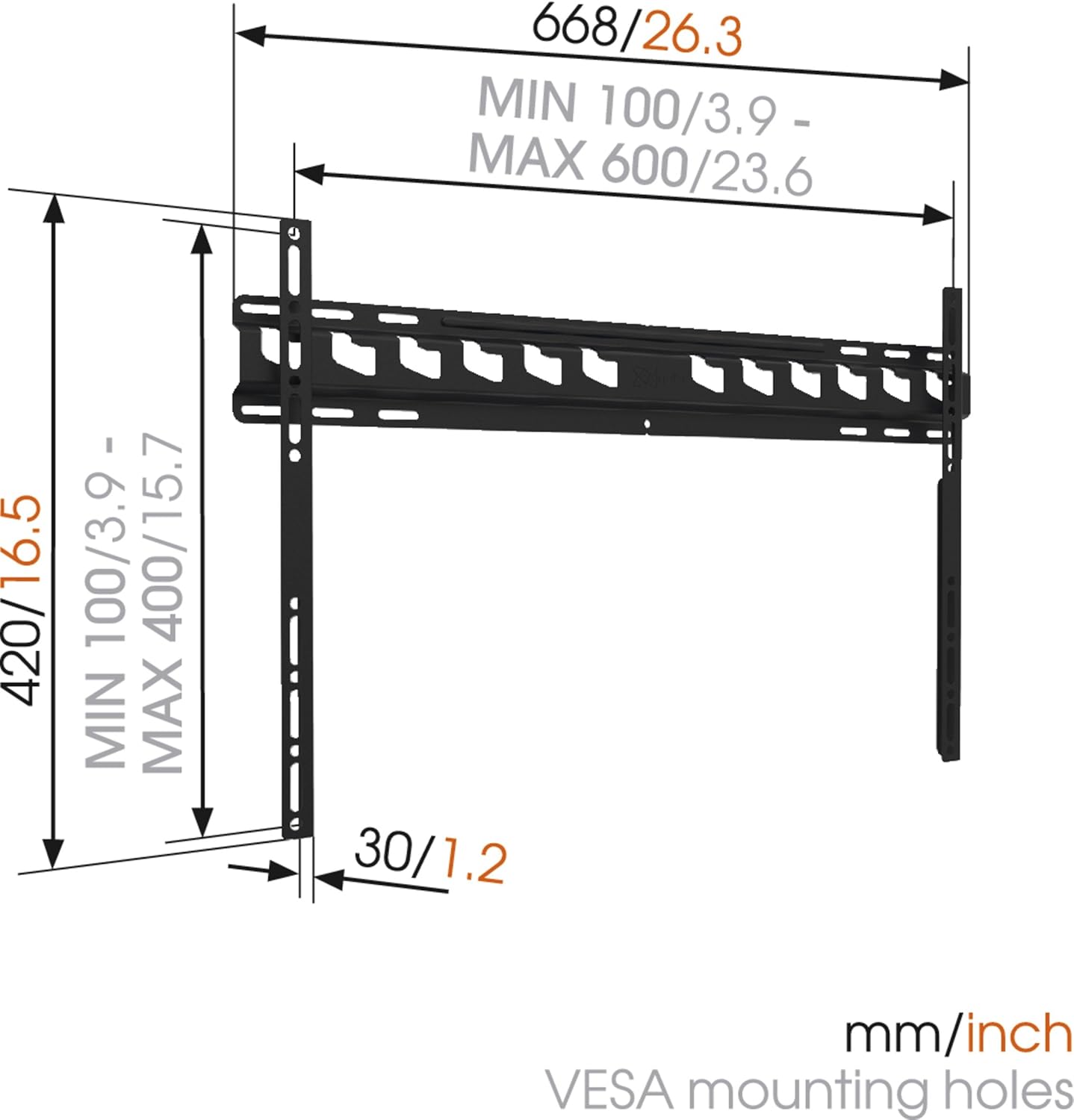
Vaizdo aprašymas: A technical diagram illustrating the dimensions of the Vogel's MA4000 wall mount. It shows the overall width (668mm / 26.3 inches), height (420mm / 16.5 inches), and the minimum and maximum VESA mounting hole patterns (100-600mm horizontally, 100-400mm vertically). The distance from the wall is indicated as 30mm (1.2 inches).
Sąranka ir diegimas
This section outlines the general steps for installing your Vogel's MA4000 wall mount. Always refer to the detailed graphical instructions included with your product for specific drilling templates and hardware usage.
Reikalingi įrankiai (neįtraukta):
- Gręžtuvas
- Drill bits appropriate for your wall type (wood, concrete, brick, etc.)
- Stud finder (for wood stud walls)
- Lygis
- Pieštukas
- Matavimo juosta
- Atsuktuvas arba veržliaraktis
Diegimo žingsniai:
- Nustatykite montavimo vietą: Choose a suitable location on your wall, ensuring it is structurally sound and free from electrical wires or plumbing. Use a stud finder if mounting to wood studs.
- Gręžimo skylių žymėjimas: Hold the wall plate against the wall at the desired height and use a level to ensure it is straight. Mark the drilling holes with a pencil.
- Gręžimo skylės: Drill pilot holes according to the marked positions and your wall type. Insert wall anchors if required.
- Pritvirtinkite sieninę plokštę: Pritvirtinkite sieninę plokštę prie sienos naudodami pateiktus varžtus ir poveržles. Įsitikinkite, kad ji tvirtai pritvirtinta ir lygi.
- Televizoriaus laikiklių tvirtinimas prie televizoriaus: Attach the two vertical TV interface bars to the back of your television using the appropriate screws, washers, and spacers from the hardware kit. Ensure the brackets are centered and securely fastened to the VESA mounting points.
- Televizoriaus tvirtinimas prie sieninės plokštės: Carefully lift the television and hook the TV brackets onto the wall plate. Ensure both brackets are properly seated.
- Saugi televizija: Engage the safety locking mechanism (if applicable) to prevent the TV from accidentally dislodging from the wall plate.

Vaizdo aprašymas: Papildomas profesionalasfile view of a flat screen television mounted flush against a white wall, demonstrating the slim design and minimal wall distance achieved with the Vogel's MA4000 wall mount. The mount itself is barely visible behind the television.
Operating Instructions (Tilting Function)
The Vogel's MA4000 wall mount allows for a slight tilt to optimize your viewing experience and reduce glare.
- Pakreipimo reguliavimas: Gently push or pull the bottom edge of the television to achieve the desired tilt angle. The mount supports a maximum tilt of 12 degrees.
- Securing Tilt: Some models may have a locking mechanism for the tilt. Refer to your product's specific instructions for details on securing the tilt position if available.
Priežiūra
The Vogel's MA4000 wall mount requires minimal maintenance to ensure long-term performance and safety.
- Reguliarus patikrinimas: Periodiškai patikrinkite visus varžtus ir jungtis, kad jie būtų tvirtai priveržti. Jei reikia, priveržkite.
- Valymas: Laikiklį valykite minkšta, sausa šluoste. Venkite abrazyvinių valiklių ar tirpiklių, kurie gali pažeisti apdailą.
- Svorio limitas: Never exceed the maximum weight capacity of 80 kg (176 lbs).
Trikčių šalinimas
| Problema | Galima priežastis | Sprendimas |
|---|---|---|
| TV is not level after mounting. | Wall plate was not installed level. | Remove TV, adjust wall plate, and remount. Ensure a level is used during installation. |
| Televizorius ant laikiklio jaučiasi nestabilus. | Screws are loose; TV not properly seated; safety lock not engaged. | Ensure all screws are tightened. Verify TV brackets are fully engaged with the wall plate. Engage safety lock. Do not exceed weight capacity. |
| Cannot achieve desired tilt angle. | Obstruction; maximum tilt angle reached. | Check for cables or other obstructions. The mount has a maximum tilt of 12 degrees. |
Garantija ir palaikymas
For warranty information and customer support, please refer to the documentation included with your product or visit the official Vogel's websvetainėje. Išsaugokite pirkimo įrodymą garantiniams reikalavimams.
Vogel's Official Websvetainė: www.vogels.com