1. Įvadas
This manual provides comprehensive instructions for the installation, operation, and maintenance of your DS18 DD652 Double DIN In-Dash Car Multimedia System. Please read this manual thoroughly before using the product to ensure proper functionality and to prevent damage. Keep this manual for future reference.
2. Saugos informacija
- Do not operate the system in a way that distracts you from driving. Always prioritize road safety.
- Ensure all wiring is correctly connected to prevent short circuits or damage. Incorrect wiring can lead to fire or electric shock.
- Saugokite įrenginį nuo drėgmės ar ekstremalių temperatūrų.
- Nebandykite ardyti ar modifikuoti įrenginio. Visus techninės priežiūros darbus patikėkite kvalifikuotiems darbuotojams.
- Garsumą palaikykite tokį, kad girdėtumėte išorinio eismo garsus.
3. Produktas baigtasview
3.1 Priekinio skydelio išdėstymas
The DS18 DD652 features a 6.2-inch HD digital panel and intuitive controls for easy operation. Below is an illustration of the front panel with key components identified.
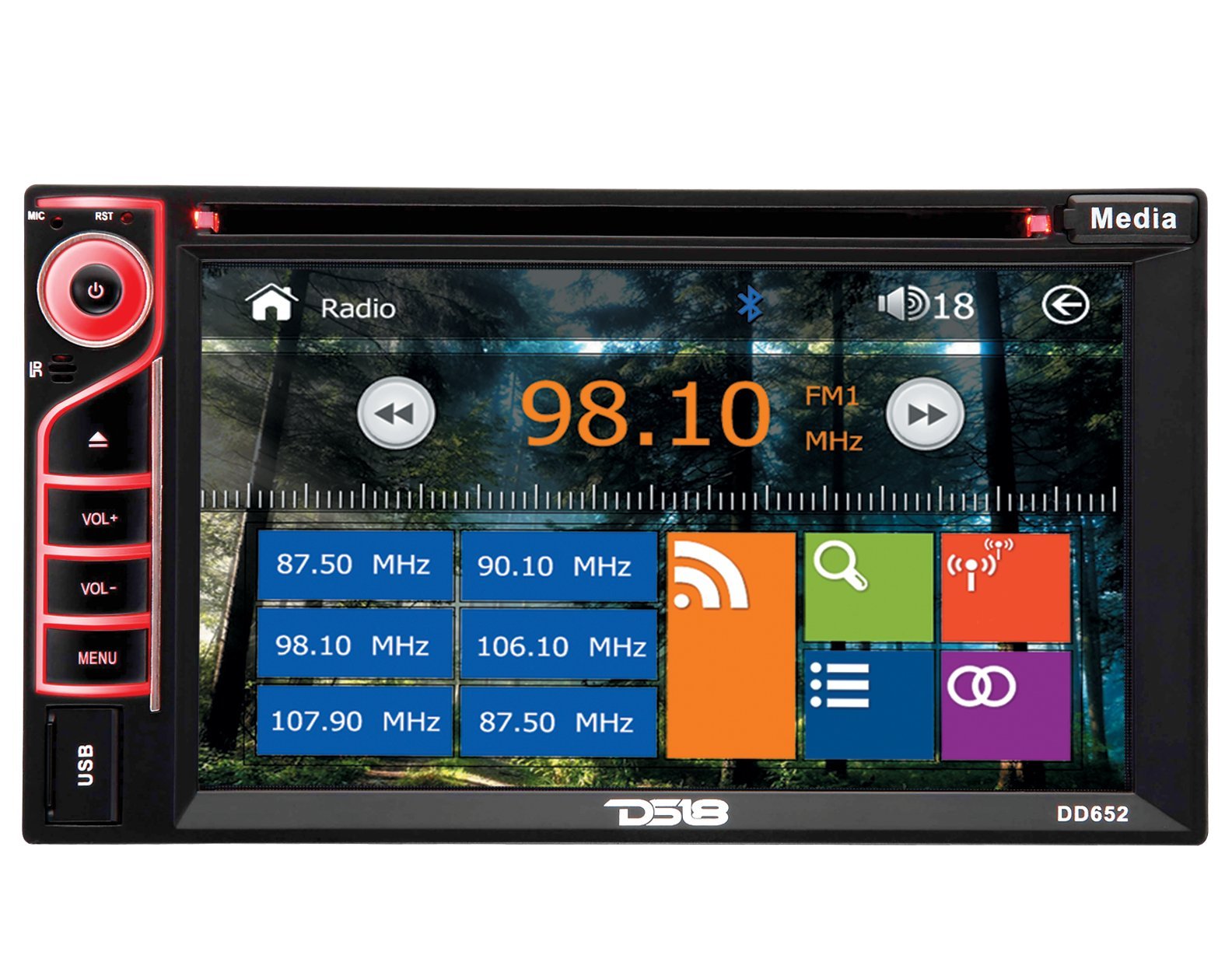
Figure 1: Front Panel of DS18 DD652 Multimedia System
- Power/Mute Button (G): Press to turn the unit on/off. Short press to mute/unmute audio.
- MIC: Integruotas mikrofonas skambinti laisvų rankų įranga.
- RST (Atstatyti): Small button for system reset (requires a pointed object).
- IR: Infraraudonųjų spindulių imtuvas nuotolinio valdymo pultui.
- VOL+ / VOL-: Volume Up / Volume Down buttons.
- MENIU: Atidaryti pagrindinį meniu arba grįžti į ankstesnį ekraną.
- USB prievadas: Prijunkite USB atmintines, kad galėtumėte atkurti medijos failus.
- Medijos mygtukas: Perjungia skirtingus medijos šaltinius.
- 6.2" HD Digital Touchscreen: Primary interface for navigation and control. Displays radio frequency (e.g., 98.10 MHz), Bluetooth icon, and various application icons.
- SD kortelės lizdas: Located behind the panel (not visible in image, but mentioned in features).
4. Montavimas
Installation of the DS18 DD652 requires technical knowledge and experience with car audio systems. It is highly recommended to have this unit installed by a professional car audio technician to ensure proper wiring and functionality, and to avoid damage to your vehicle or the unit.
4.1 Laidų schema (bendrosios gairės)
Refer to the wiring diagram provided with your product packaging for specific connections. General connections include:
- Galia: Geltoną laidą prijunkite prie nuolatinės 12 V įtampos, raudoną laidą – prie priedo 12 V, o juodą laidą – prie įžeminimo.
- Garsiakalbiai: Prijunkite garsiakalbių laidus prie atitinkamų teigiamų ir neigiamų gnybtų.
- Antena: Connect the car's radio antenna.
- Galinisview Kameros įvestis: Connect the video signal from a rearview fotoaparatas.
- Vairo valdymas: Prijunkite prie savo transporto priemonės vairo valdymo sąsajos (jei taikoma).
Warning: Incorrect wiring can cause severe damage to the unit and your vehicle's electrical system. Always disconnect the vehicle's battery before beginning installation.
5. Pradinė sąranka
5.1 Įjungimas
After installation, press the Power button (G) on the front panel to turn on the unit. The DS18 logo will appear, followed by the main menu or the last active source.
5.2 Pagrindiniai nustatymai
From the main menu, navigate to the "Settings" icon (often represented by a gear). Here you can adjust:
- Kalba: Pasirinkite norimą kalbą.
- Laikas / data: Nustatykite dabartinį laiką ir datą.
- Ekranas: Adjust brightness, contrast, and backlight settings.
- Garsas: Fine-tune equalizer settings, balance, and fader.
6. Naudojimo instrukcijos
6.1 Radijo valdymas
From the main menu, tap the "Radio" icon. The screen will display the current frequency (e.g., 98.10 MHz FM1). You can:
- Melodija: Use the left/right arrow icons on the screen to manually tune or seek for stations.
- Juostos pasirinkimas: Tap "FM1" to cycle through FM1, FM2, FM3, AM1, AM2 bands.
- Iš anksto nustatytos stotys: Touch and hold a frequency box (e.g., "87.50 MHz") to save the current station as a preset. Tap a preset box to recall a saved station.
- RDS (radijo duomenų sistema): If available in your region, RDS provides station information like station name and program type.
6.2 Medijos atkūrimas (DVD / CD / USB / SD)
The DS18 DD652 supports various media formats including DVD, VCD, CD, MP3, and MP4. Insert the media into the appropriate slot (DVD/CD slot or USB/SD card slot).
- DVD/CD: Insert a disc into the slot. The system will automatically switch to DVD/CD mode and begin playback.
- USB / SD: Insert a USB drive into the front USB port or an SD card into the SD card slot. Select "USB" or "SD" from the main menu or by pressing the "Media" button. Browse files and select your desired media.
- Palaikomi formatai: MP3, MP4, WMA, AVI, etc. (Refer to product specifications for a complete list).
6.3 „Bluetooth“ ryšys
Pair your Bluetooth-enabled device (e.g., smartphone) with the DD652 for hands-free calling and audio streaming.
- From the main menu, tap the "Bluetooth" icon (often represented by a 'B' or a Bluetooth symbol).
- On your mobile device, search for available Bluetooth devices. The unit's name will typically be "DS18 DD652" or similar.
- Select the unit and enter the pairing code (usually "0000" or "1234") if prompted.
- Susiejus, galite skambinti / priimti skambučius ir transliuoti garsą belaidžiu būdu.
6.4 Galinisview Kameros įvestis
Kai galinisview camera is connected and the vehicle is shifted into reverse, the unit will automatically display the camera feed on the screen, enhancing parking safety.
6.5 Vairo valdymas
If your vehicle supports steering wheel controls, the DD652 can be configured to respond to these controls. Refer to the installation section for wiring and the system settings for programming the functions.
7. Priežiūra
- Ekrano valymas: Jutiklinį ekraną švelniai nuvalykite minkšta, nepūkuota šluoste. Nenaudokite abrazyvinių valiklių ar tirpiklių.
- Disko priežiūra: Diskus imkite už kraštų. Laikykite juos švarius ir nesubraižytus.
- Bendra priežiūra: Keep the unit free from dust and debris. Avoid extreme temperatures and direct sunlight for prolonged periods.
8. Problemų sprendimas
| Problema | Galima priežastis | Sprendimas |
|---|---|---|
| Nėra galios | Neteisingas laidų prijungimas; Perdegęs saugiklis; Išsikrovęs automobilio akumuliatorius. | Patikrinkite maitinimo jungtis; Pakeiskite saugiklį; Įkraukite / patikrinkite automobilio akumuliatorių. |
| Nėra garso | Per mažas garsumas; Įjungtas nutildymas; Neteisingas garsiakalbių sujungimas. | Padidinkite garsumą; Išjunkite nutildymą; Patikrinkite garsiakalbių jungtis. |
| Prastas radijo priėmimas | Antena neprijungta; Silpno signalo zona. | Ensure antenna is properly connected; Try tuning to a stronger station. |
| Bluetooth neprisijungia | Device not in pairing mode; Incorrect pairing code. | Ensure device is discoverable; Re-enter pairing code; Restart both devices. |
| Disc/USB/SD not playing | Unsupported format; Damaged media; Incorrectly inserted. | Check media format; Try a different disc/USB/SD; Re-insert media correctly. |
If problems persist after attempting these solutions, please contact DS18 customer support or a qualified service technician.
9. Specifikacijos
| Modelio numeris | DD652 |
| Ekrano tipas | LCD |
| Ekrano raiška | 800x480 |
| Ekrano dydis | 6.2 colių |
| Palaikoma laikmena | DVD, VCD, CD, MP3, MP4 |
| Ryšys | USB, SD Card, Bluetooth, Rearview Kameros įvestis, valdymas vairu |
| Ypatingos savybės | RDS, Internal Microphone, Wireless Remote Control |
| Matmenys (I x P x A) | 24.13 x 16.51 x 22.86 cm (9.5 x 6.5 x 9 colio) |
| Svoris | 2.04 kg (4.5 svaro) |
10. Garantija ir palaikymas
DS18 products are designed and engineered for quality. For warranty information, please refer to the warranty card included with your product or visit the official DS18 website. For technical support or service inquiries, please contact DS18 customer service through their official channels.
Išsaugokite pirkimo įrodymą, kad galėtumėte kreiptis dėl garantijos.


