Įvadas
Welcome to the Jura J80 Automatic Coffee Center. This manual provides essential information for the safe and efficient operation, maintenance, and troubleshooting of your new coffee machine. Please read all instructions carefully before using the appliance for the first time and keep this manual for future reference.

Image: The Jura J80 Automatic Coffee Center, a sleek black machine, is shown from an angled perspective, actively brewing a layered latte into a clear glass. The control panel and spouts are visible.
Saugos instrukcijos
Norėdami užtikrinti saugų darbą ir išvengti žalos, laikykitės šių saugos priemonių:
- Prieš naudodami prietaisą, atidžiai perskaitykite visas instrukcijas.
- Šis prietaisas skirtas naudoti tik buityje.
- Nemerkite prietaiso, maitinimo laido ar kištuko į vandenį ar kitus skysčius.
- Įsitikinkite, kad ttagPrieš prijungdami, patikrinkite, ar ant prietaiso nurodytas maitinimo šaltinis atitinka jūsų vietinį maitinimo šaltinį.
- Venkite sąlyčio su karštais paviršiais. Naudokite rankenas arba rankenėles.
- Prietaisą laikykite vaikams nepasiekiamoje vietoje.
- Kai nenaudojate ir prieš valydami, atjunkite prietaisą nuo lizdo.
- Nenaudokite prietaiso, kurio laidas ar kištukas pažeistas, arba po to, kai prietaisas neveikia arba buvo kaip nors sugadintas.
Sąranka
Follow these steps for the initial setup of your Jura J80:
- Išpakavimas: Carefully remove all components from the packaging. Retain packaging for potential future transport.
- Vieta: Position the coffee machine on a stable, level, and heat-resistant surface, away from direct sunlight and heat sources. Ensure adequate ventilation around the appliance.
- Vandens bakas: Remove the water tank, rinse it, and fill it with fresh, cold tap water up to the 'Max' mark. Reinsert the tank securely.
- Pupelių konteineris: Open the aroma preservation cover and fill the bean container with fresh coffee beans. Close the cover firmly.
- Maitinimo jungtis: Connect the power cord to the machine and then plug it into a grounded electrical outlet.
- Pradinis skalavimas: The machine will prompt you to perform an initial rinse cycle. Follow the on-screen instructions to complete this process. This primes the system and ensures optimal coffee quality.
Veikiantis
Your Jura J80 is designed for intuitive operation. Here’s how to brew your favorite beverages:
- Maitinimas: Press the power button to turn on the machine. The display will show the readiness status.
- Gėrimų pasirinkimas: Use the display and navigation buttons to scroll through and select your desired beverage, such as Cappuccino, Espresso, Latte Macchiato, Coffee, or Hot Water.
- Nustatymų reguliavimas: Before brewing, you can often adjust settings like coffee strength and water volume. Follow the on-screen prompts to customize your drink.
- Alaus gamyba: Place a cup or glass under the coffee and/or milk spouts. Press the start button for the selected beverage. The machine will automatically grind the beans, brew, and dispense your drink.
- Išjungti: To turn off the machine, press the power button. The machine will perform an automatic rinse before shutting down.
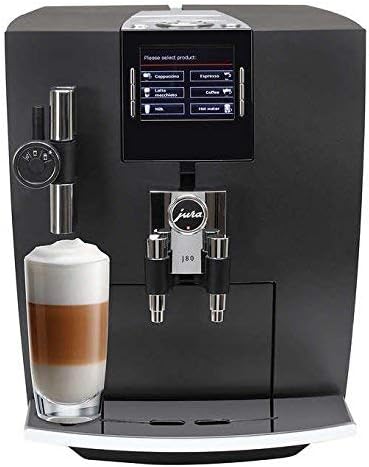
Paveikslėlis: Priekinė dalis view of the Jura J80 Automatic Coffee Center. The display shows beverage options, and a clear glass with a layered latte is positioned under the milk frother and coffee spout.
Priežiūra
Regular maintenance ensures the longevity and optimal performance of your Jura J80. The machine will prompt you for necessary cleaning cycles.
- Daily Milk System Cleaning: After preparing milk-based beverages, it is crucial to clean the milk system daily. Failure to do so can lead to blockages and malfunction of the frother. Rinse the frother system with water after each use, and perform a full cleaning with Jura milk system cleaner as prompted by the machine.
- Lašėjimo padėklas ir kavos tirščių talpykla: Empty and clean the drip tray and coffee grounds container regularly, typically when prompted by the machine. Rinse with warm water.
- Integrated Cleaning Program: The machine will periodically request a cleaning program. Use Jura cleaning tablets and follow the on-screen instructions. This is typically a monthly cleaning process.
- Nukalkinimas: The J80 features an intelligent descaling program. When prompted, use Jura descaling tablets and follow the step-by-step instructions on the display.
- Vandens filtro keitimas: If you are using a CLARIS water filter, replace it when indicated by the machine to ensure optimal water quality and reduce the frequency of descaling.
Trikčių šalinimas
If you encounter issues with your Jura J80, consult the following common troubleshooting tips:
- Kava nepilama:
- Patikrinkite, ar vandens bakelis pripildytas ir tinkamai įdėtas.
- Ensure the bean container has enough coffee beans.
- Verify that the brewing unit is not blocked.
- Milk Frother Not Working / Poor Foam Quality:
- This is often due to insufficient cleaning. Perform a thorough cleaning of the milk system using Jura milk system cleaner. Disassemble the frother components and soak them if necessary.
- Ensure the milk is fresh and cold.
- Mašina neįsijungia:
- Check if the power cord is securely plugged into both the machine and a functional electrical outlet.
- Išbandykite lizdą kitu prietaisu.
- Klaidos pranešimai ekrane:
- Note the specific error code or message. Consult the Jura support website or your full user manual for detailed explanations and solutions.
If the problem persists after attempting these solutions, please contact Jura customer support.
Specifikacijos
| Prekės ženklas | Jura |
| Modelis | J80 |
| Gaminio matmenys | 17 x 11.2 x 13.3 colio |
| Prekės svoris | 31.9 svaro |
| Talpa | 14 uncijos |
| Medžiaga | Glass (for certain components) |
| Ypatinga funkcija | Programuojamas |
| Kavos virimo aparato tipas | Espreso aparatas |
| Žmogaus sąsajos įvestis | Mygtukai |
| UPC | 794151411197 |
| ASIN | B01F96ITWK |
Garantija ir palaikymas
For detailed warranty information, technical assistance, or to purchase accessories and cleaning products, please visit the official Jura website or contact Jura customer service directly. Keep your proof of purchase for warranty claims.
Jura Official Websvetainė: us.jura.com


