Įvadas
The VIZIO SmartCast 38-inch 2.1 Sound Bar System delivers an immersive audio experience for your home theater. This system includes a 2-channel sound bar and a wireless subwoofer, providing up to 100 dB of clear sound with less than 1% total harmonic distortion. Enhance your entertainment with powerful audio and convenient control options.
Pagrindinės funkcijos:
- 2.1 Channel home theater solution with incredible audio performance.
- Download the VIZIO SmartCast app to turn your smartphone or tablet into a powerful touchscreen remote.
- Simply tap the Cast button from 100+ audio apps to start playing on your sound bar.
Kas yra dėžutėje
Your VIZIO SB3821-D6 Sound Bar System package includes the following components:
- VIZIO SmartCast 38-inch 2.1 Sound Bar
- Belaidis žemųjų dažnių garsiakalbis
- Nuotolinio valdymo pultas
- 4’ Optical cable with Toslink ends
- 4’ Power cord for Subwoofer
- 5’ Digital 75 ohm coaxial cable with RCA connectors
- 5’ RCA to 3.5mm Stereo Mini Jack
- 8’ Power cord for Sound Bar
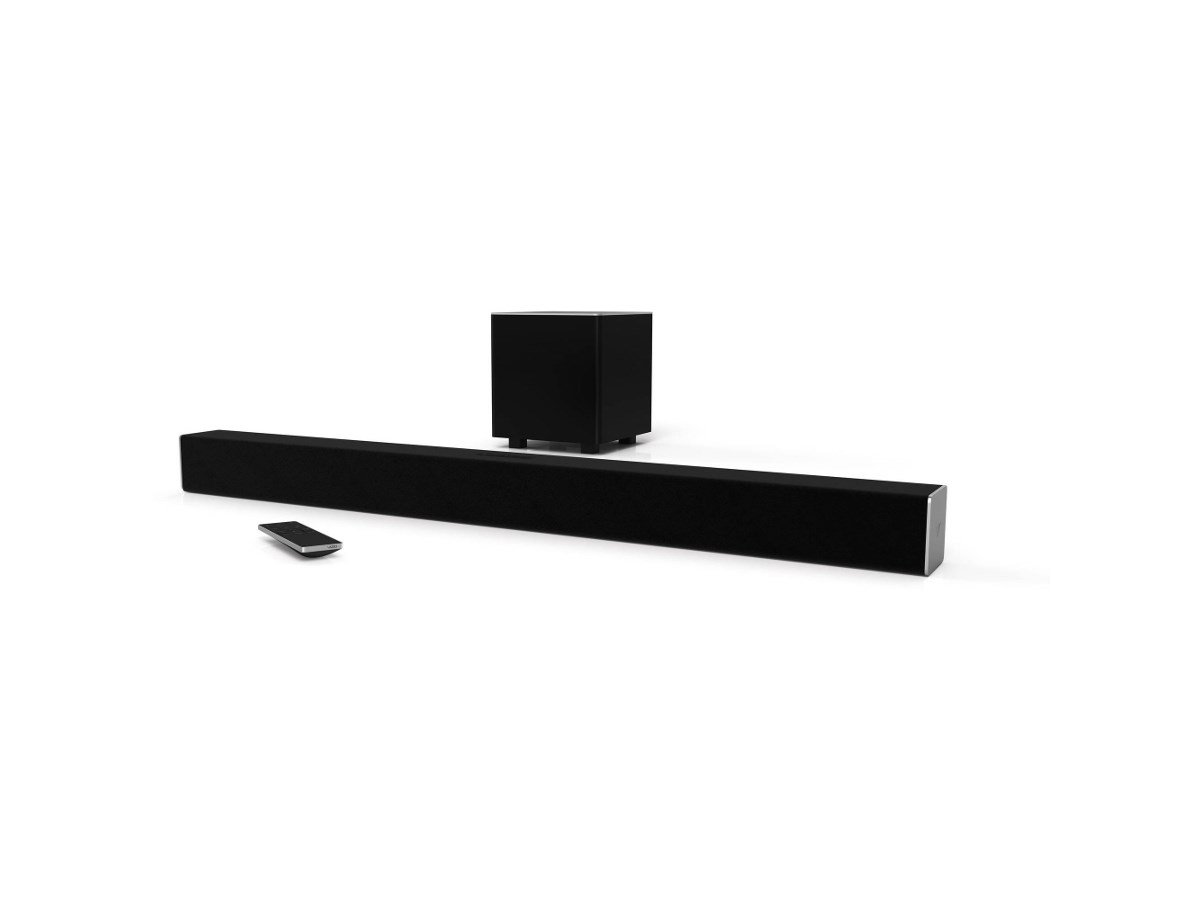
Image: The VIZIO SB3821-D6 Sound Bar and its accompanying wireless subwoofer.
Sąranka
Setting up your VIZIO Sound Bar System is designed to be quick and straightforward. Follow these general steps:
- Padėties nustatymas: Place the sound bar (A) in front of your TV, ensuring it has a clear path for audio. Position the wireless subwoofer (B) in a suitable location, ideally near the sound bar or in a corner for optimal bass.
- Ryšys: Connect the sound bar to your TV using one of the provided audio cables. The recommended connection is via the HDMI ARC or eARC port on your TV with an HDMI cable (not included, but often preferred for best audio quality and control). Alternatively, use the Optical cable for digital audio.
- Galia: Plug the power cords for both the sound bar and the wireless subwoofer into electrical outlets. The subwoofer will automatically pair with the sound bar.
- Initial Sound Test: Once powered on, a sound should play. If not, ensure your TV's audio output is set to the correct source (e.g., HDMI ARC, Optical).
Image: A VIZIO Quick Setup Guide illustrating the steps for positioning and connecting the sound bar system.
Naudojimo instrukcijos
Your VIZIO Sound Bar System offers multiple ways to control your audio experience:
- Nuotolinio valdymo pultas: Use the included remote to power on/off, adjust volume, change input sources (Digital, Optical, USB, AUX, Bluetooth), and fine-tune audio settings.
- VIZIO „SmartCast“ programėlė: Download the VIZIO SmartCast app on your smartphone or tablet. This app transforms your mobile device into a comprehensive remote, allowing you to control all sound bar functions, including advanced EQ settings and dialogue enhancement.
- Bluetooth ryšys: Easily pair your smartphone or other Bluetooth-enabled devices to stream music wirelessly. Select Bluetooth as the input source on your sound bar and pair your device.
- Google Cast Built-in: Cast your favorite audio content from 100+ compatible apps directly to your sound bar.
Priežiūra
To ensure the longevity and optimal performance of your VIZIO Sound Bar System, follow these maintenance guidelines:
- Valymas: Garso juostos ir žemųjų dažnių garsiakalbio paviršiams valyti naudokite minkštą, sausą šluostę. Venkite naudoti skystus valiklius ar abrazyvines medžiagas, nes jos gali pažeisti apdailą.
- Vėdinimas: Ensure that the sound bar and subwoofer have adequate ventilation. Do not block any ventilation openings.
- Vieta: Venkite sistemos laikymo tiesioginiuose saulės spinduliuose, šalia šilumos šaltinių ar didelės drėgmės vietose.
- Kabelių valdymas: Periodiškai patikrinkite visas kabelių jungtis, kad įsitikintumėte, jog jos yra tvirtos ir nepažeistos.
Trikčių šalinimas
If you encounter issues with your VIZIO Sound Bar System, refer to the following common troubleshooting tips:
- Nėra garso:
- Patikrinkite, ar visi kabeliai yra tvirtai prijungti.
- Ensure the correct input source is selected on the sound bar and your TV.
- Check your TV's audio output settings to ensure sound is being sent to the sound bar.
- Žemųjų dažnių garsiakalbis nesuporuojamas:
- Įsitikinkite, kad žemųjų dažnių garsiakalbis įjungtas ir yra garso juostos diapazone.
- Refer to the VIZIO Quick Setup Guide for specific pairing instructions if automatic pairing fails.
- Programos ryšio problemos:
- If the VIZIO SmartCast app frequently disconnects or shows the sound bar offline, try restarting your phone, the sound bar, and your internet router.
- Ensure your mobile device and sound bar are on the same Wi-Fi network.
- Neaiškus dialogas:
- Use the VIZIO SmartCast app to adjust the dialogue setting, increasing it to improve vocal clarity over surround sound effects.
Specifikacijos
| Funkcija | Specifikacija |
|---|---|
| Modelio pavadinimas | SB3821-D6 |
| Garsiakalbio tipas | Garso juosta su belaidžiu žemųjų dažnių garsiakalbiu |
| Erdvinio garso kanalo konfigūracija | 2.1 |
| Garsiakalbio dydis | 38 colių |
| Prekės svoris | 5.8 svaro |
| Gaminio matmenys | 3 "D x 38.2" P x 3" A |
| Išėjimo vattage | 120 vatų |
| Didžiausia garsiakalbio išėjimo galia | 400 vatų |
| Ryšio technologija | Wi-Fi, Bluetooth, Ethernet |
| Kontrolės metodas | Balsas, nuotolinis valdymas, programėlė |
| Medžiaga | Plastikiniai |
| Spalva | Juoda |
Garantija ir palaikymas
The VIZIO SB3821-D6 SmartCast 38-inch 2.1 Sound Bar System comes with a limited warranty. For detailed information regarding warranty coverage, terms, and conditions, please refer to the warranty card included in your product packaging or visit the official VIZIO support websvetainę.
For further assistance, technical support, or to register your product, please visit www.vizio.com.


