1. Įvadas
This manual provides essential information for setting up, operating, maintaining, and troubleshooting your HP 15-AY075NR Notebook. Please read this guide thoroughly to ensure proper use and to maximize the lifespan of your device. This notebook is designed for general computing tasks, featuring an Intel Core i3-5005U processor, 6GB of RAM, a 500GB HDD, and runs on Windows 10.
2. Pakuotės turinys
Prieš tęsdami sąranką, patikrinkite, ar pakuotėje yra visi elementai:
- HP 15-AY075NR Notebook
- Kintamosios srovės adapteris ir maitinimo laidas
- Greito paleidimo vadovas (jei pridėtas)
- Garantijos informacija (jei yra)
3. Fizinis viršusview
Familiarize yourself with the main components and ports of your HP 15-AY075NR Notebook.
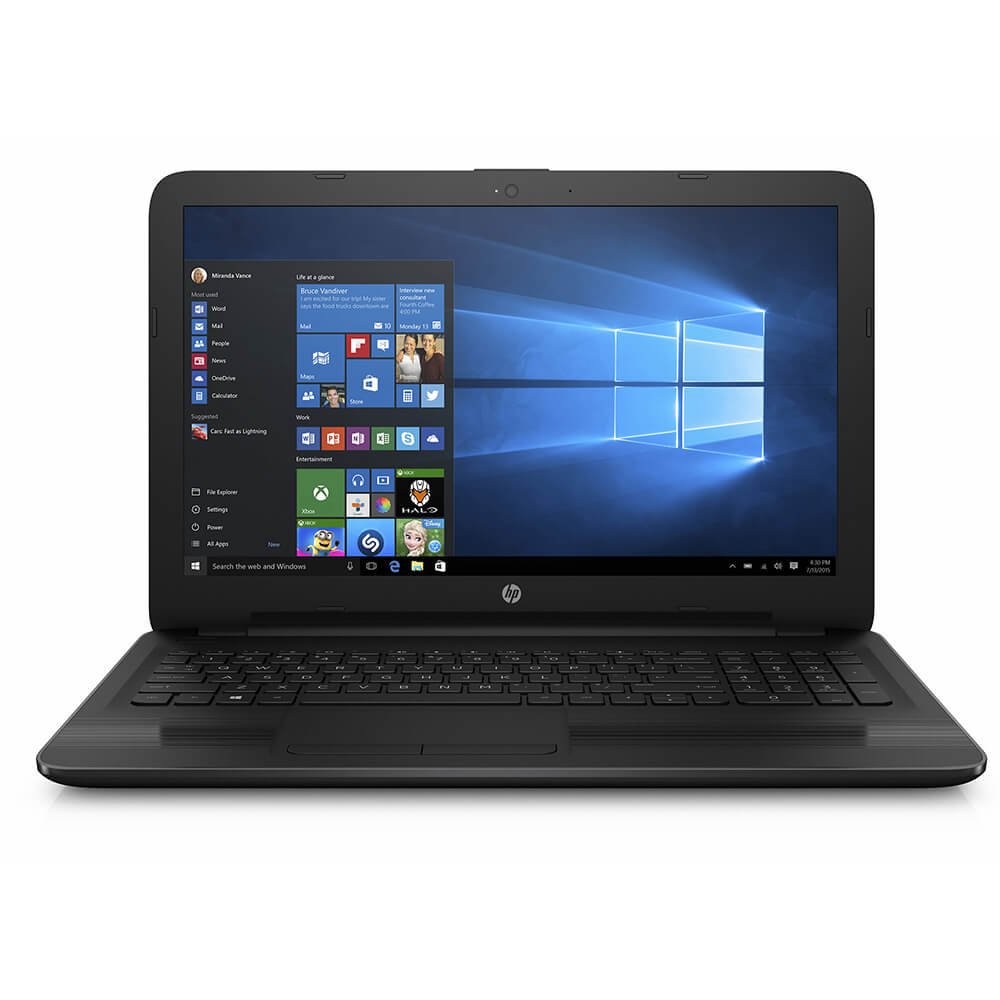
3.1 paveikslas: Priekyje view of the HP 15-AY075NR Notebook. This image displays the laptop in a closed position, highlighting its sleek black design and overall form factor.
3.1. Kairiosios pusės prievadai
- Maitinimo jungtis: Prijungia kintamosios srovės adapterį.
- Ethernet (RJ-45) prievadas: Laidinio tinklo ryšiui.
- HDMI prievadas: Connects to external displays or TVs.
- USB 3.0 prievadas: Didelės spartos duomenų perdavimui su suderinamais įrenginiais.
- USB 2.0 prievadas: Periferinių įrenginių prijungimui.
- Ausinių / mikrofono jungtis: Garso įvesties / išvesties jungtims.
3.2. Dešinės pusės prievadai
- Optical Drive (DVD Super Multi): For reading and writing CDs/DVDs.
- USB 2.0 prievadas: Periferinių įrenginių prijungimui.
- SD kortelių skaitytuvas: Skirta SD atminties kortelių skaitymui.
3.3. Klaviatūra ir jutiklinė planšetė
The notebook features a full-size island-style keyboard with a numeric keypad for efficient data entry. The multi-touch touchpad allows for precise cursor control and gesture-based navigation.
4. Sąranka
4.1. Maitinimo adapterio prijungimas
- Connect the AC adapter to the power connector on the left side of the notebook.
- Įjunkite maitinimo laidą į įžemintą elektros lizdą.
- Baterija pradės krautis automatiškai. Prieš pirmą kartą naudojant, rekomenduojama ją visiškai įkrauti.
4.2. Pradinis įjungimas ir „Windows 10“ sąranka
- Open the notebook lid and press the power button, typically located above the keyboard.
- Follow the on-screen instructions to complete the Windows 10 initial setup. This includes selecting your region, language, accepting license terms, creating a user account, and setting up network connections.
- Connect to a Wi-Fi network or use a wired Ethernet connection during setup to download necessary updates.
5. Operacinis
5.1. Maitinimo valdymas
- Maitinimas: Paspauskite maitinimo mygtuką.
- Išjungti: Spustelėkite mygtuką Pradėti, tada Maitinimas > Išjungti.
- Miegojimo rezimas: Uždarykite dangtelį arba spustelėkite mygtuką „Pradėti“, tada „Maitinimas“ > „Miego režimas“.
- Paleisti iš naujo: Spustelėkite mygtuką „Pradėti“, tada „Maitinimas“ > „Paleisti iš naujo“.
5.2. Prisijungimas prie tinklų
- „Wi-Fi“: Click the network icon in the taskbar, select your desired network, and enter the password if prompted.
- Laidinis (eternetas): Connect an Ethernet cable from your router/modem to the Ethernet port on the notebook.
5.3. Išorinių įrenginių naudojimas
- USB įrenginiai: Įkiškite USB diskus, peles ar kitus periferinius įrenginius į laisvus USB 2.0 arba USB 3.0 prievadus.
- Išorinis ekranas: Connect an HDMI cable from the notebook's HDMI port to an external monitor or TV. Press „Windows“ klavišas + P , kad sureguliuotumėte ekrano nustatymus.
- SD kortelės: Insert an SD card into the card reader slot until it clicks into place.
- Optical Discs: Press the eject button on the optical drive to open the tray. Place a CD or DVD onto the tray, label side up, and gently push the tray back in.
6. Priežiūra
6.1. Cleaning the Notebook
- Šiek tiek naudokite minkštą, be pūkelių šluostę dampvandeniu arba ekrano valikliu ekranui valyti.
- Klaviatūrai ir korpusui valyti naudokite minkštą, sausą šluostę. Venkite stiprių cheminių medžiagų ar abrazyvinių medžiagų.
- Reguliariai naudokite suslėgtą orą, kad pašalintumėte dulkes iš ventiliacijos angų, ir užtikrintumėte tinkamą oro srautą.
6.2. Akumuliatoriaus priežiūra
- Venkite dažnai visiškai iškrauti akumuliatorių.
- Store the notebook in a cool, dry place if not used for extended periods.
- If the battery is removable (check your specific model), ensure it is properly seated.
6.3. Programinės įrangos atnaujinimai
Reguliariai tikrinkite, ar yra „Windows“ ir HP tvarkyklių naujinimų, ir juos įdiekite, kad užtikrintumėte optimalų našumą ir saugumą. Pasiekite „Windows“ naujinimus per Nustatymai > Naujinimas ir sauga > „Windows“ naujinimas.
7. Problemų sprendimas
7.1. No Power / Does Not Turn On
- Ensure the AC adapter is securely connected to both the notebook and a working power outlet.
- Patikrinkite, ar maitinimo lizdas veikia, prijungdami prie jo kitą įrenginį.
- Jei akumuliatorius visiškai išsikrovęs, prieš bandydami įjungti, leiskite jam įkrauti bent 15–30 minučių.
7.2. Blank or Black Screen
- Ensure the notebook is powered on.
- Connect an external monitor to the HDMI port to check if the display output works. If it does, the internal display may have an issue.
- Try adjusting the screen brightness using the function keys (e.g., Fn + F2 / F3 or similar, depending on your keyboard layout).
7.3. „Wi-Fi“ ryšio problemos
- Ensure Wi-Fi is enabled (check the wireless key or function key, e.g., Fn + F12).
- Iš naujo paleiskite maršrutizatorių ir modemą.
- Paleiskite „Windows“ tinklo trikčių šalinimo įrankį (Nustatymai > Tinklas ir internetas > Būsena > Tinklo trikčių šalinimo įrankis).
8. Specifikacijos
| Funkcija | Specifikacija |
|---|---|
| Modelis | 15-AY075NR (X0H79UA#ABA) |
| Procesorius | Intel Core i3-5005U (2.0 GHz, Dual Core) |
| RAM | 6 GB DDR3L-1600 SDRAM |
| Sandėliavimas | 500 GB HDD (5400 RPM) |
| Grafika | „Intel HD Graphics“ (integruota) |
| Ekranas | 15.6-inch HD SVA BrightView WLED-backlit (1366 x 768) |
| Operacinė sistema | Windows 10 |
| Belaidis ryšys | Intel 802.11a/b/g/n/ac (1x1) Wi-Fi, Bluetooth 4.0 |
| Uostai | 1x USB 3.0, 2x USB 2.0, 1x HDMI, 1x RJ-45, 1x Headphone/Mic Combo, 1x Multi-format SD Media Card Reader |
| Optinis diskas | DVD „Super Multi“ |
| Baterijos veikimo laikas (vidutinis) | 6.25 valandų |
| Svoris | 4.73 svaro |
| Matmenys (IxPxH) | 24 x 4 x 14 colio (gaminio matmenys) |
9. Garantija ir palaikymas
Your HP 15-AY075NR Notebook is covered by a standard manufacturer's warranty. For specific warranty terms and conditions, please refer to the documentation included with your product or visit the official HP support website. HP provides technical support, driver downloads, and troubleshooting resources online.
For further assistance, please visit the official HP Support websvetainė: support.hp.com