Įvadas
The C2G 40914 Compact Ampkeltuvas yra skirtas amplify dynamic microphone or stereo audio signals, providing 15 Watts of power per channel to a sound reinforcement system. This amplifier features a discreet installation and remote control capability via an included wall plate. It is suitable for various audio setups requiring compact amplification and external volume management.
Kas yra dėžutėje
Prieš tęsdami montavimą, patikrinkite, ar yra visi komponentai:
- Kompaktiškas Ampgyvybingesnis
- Decorator Volume Control Wall Plate
- Veido plokštės dangtelis
- Maitinimo adapteris
- Bracket Mounting Screws 6-32 (25mm) qty. 2
- Wall Plate Mounting Screw M3.5 (8mm) qty. 3
- Vartotojo vadovas
Produktas baigtasview
Susipažinkite su amplifier and wall plate components.

1 paveikslas: Priekyje view of the C2G 40914 Compact Amplifier. This image displays the local volume control knob, power indicator LED, 1/4 inch microphone input, 3.5mm auxiliary input, and input select switch.

2 paveikslas: Galinis view of the C2G 40914 Compact Ampkeltuvas. Tai view shows the speaker output terminals (L+, L-, R+, R-), the remote volume control port (RJ45), and the DC 12V power input.

3 paveikslas: Decorator Volume Control Wall Plate and face plate cover. The wall plate features a rotary volume knob and a power indicator LED.
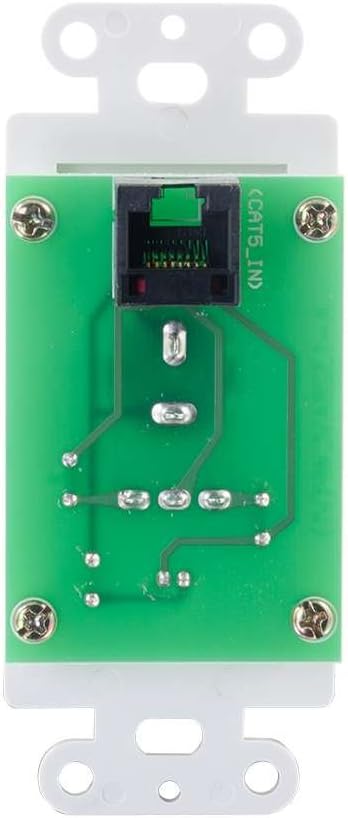
4 paveikslas: Galinis view of the Decorator Volume Control Wall Plate, showing the RJ45 connector for remote communication with the ampgyvesnis.
Sąranka
-
Montavimas Ampgyvybingesnis:
The amplifier includes a built-in mounting bracket. Secure the amplifier to a suitable surface using the provided 6-32 (25mm) mounting screws. Ensure adequate ventilation around the unit.
-
Garsiakalbių prijungimas:
Prijunkite pasyviuosius garsiakalbius prie garsiakalbių išvesties gnybtų, esančių įrenginio gale. amplifier (L+, L-, R+, R-). Ensure correct polarity (+ to + and - to -) for each speaker channel. The amplifier provides 15 watts per channel.
-
Garso šaltinių prijungimas:
- Mikrofono įvestis: Connect a dynamic microphone to the 1/4 inch MIC IN jack on the front panel.
- Pagalbinė įvestis: Connect an audio source (e.g., smartphone, media player) to the 3.5mm AUX IN jack on the front panel.
-
Connecting the Remote Wall Plate:
Install the Decorator Volume Control Wall Plate in a standard wall box. Connect a Cat5e/Cat6 cable (not included) from the RJ45 port on the rear of the wall plate to the REMOTE port (RJ45) on the rear of the amplifier. Secure the wall plate with the provided M3.5 (8mm) screws and attach the face plate cover.
-
Maitinant Ampgyvybingesnis:
Connect the included power adapter to the DC 12V input on the rear of the amplifier, then plug the adapter into a standard AC power outlet. The power indicator LED on the amplifier and wall plate will illuminate.
Naudojimo instrukcijos
-
Maitinimo įjungimas/išjungimas:
The amplifier powers on automatically when connected to power. The power indicator LED on both the amplifier and the wall plate will light up.
-
Įvesties pasirinkimas:
Naudokite ĮVESTIES PASIRINKIMAS switch on the front panel of the amplifier to choose between the MIC IN and AUX IN audio sources.
-
Garsumo valdymas:
The amplifier offers both local and remote volume control options:
- Local Volume: Adjust the rotary knob labeled TOMAS priekiniame skydelyje ampgyvesnis.
- Remote Volume: Adjust the rotary knob labeled TOMAS on the Decorator Volume Control Wall Plate.
Naudokite GARSUMO PASIRINKIMAS įjunkite amplifier to determine whether the local or remote volume control is active. Set to 'LOCAL' to use the amplifier's knob, or 'REMOTE' to use the wall plate's knob.
-
Mikrofono naudojimas:
When MIC IN is selected, speak into the connected dynamic microphone. Adjust the volume using the selected volume control (local or remote) to achieve the desired output level.
Priežiūra
- Laikykite amplifier and wall plate clean by wiping with a soft, dry cloth.
- Avoid using liquid cleaners or aerosol sprays, which may damage the unit.
- Užtikrinkite tinkamą vėdinimą aplink ampkeltuvas, kad būtų išvengta perkaitimo.
- Nelaikykite įrenginio per didelėje drėgmėje ar ekstremalioje temperatūroje.
Trikčių šalinimas
If you encounter issues with your C2G 40914 Compact Amplifier, žr. šiuos įprastus sprendimus:
-
Nėra garso išvesties:
- Ensure the power adapter is securely connected and the power indicator LEDs are lit.
- Verify that speakers are correctly wired to the amplifier's output terminals with correct polarity.
- Patikrinkite, ar ĮVESTIES PASIRINKIMAS switch is set to the correct source (MIC or AUX).
- Patvirtinkite, kad GARSUMO PASIRINKIMAS switch is set to the active volume control (LOCAL or REMOTE) and that the volume knob is turned up.
- Test with a different audio source or microphone to rule out source device issues.
-
Remote Volume Control Not Working:
- Ensure the Cat5e/Cat6 cable connecting the wall plate to the amplifier is securely plugged into both RJ45 ports.
- Patikrinkite, ar GARSUMO PASIRINKIMAS įjunkite amplifier is set to 'REMOTE'.
- Check the wall plate's power indicator LED to ensure it is receiving power.
-
Iškraipytas garsas:
- Sumažinkite abiejų įrenginių garsumo lygį amplifier/wall plate and the audio source device.
- Įsitikinkite, kad garsiakalbio varža atitinka amplifier's requirements (typically 4-8 ohms).
- Patikrinkite visas kabelių jungtis, ar jos nėra atsilaisvinusios ar pažeistos.
Specifikacijos
| Funkcija | Detalė |
|---|---|
| Gaminio matmenys | 1.95 x 1.3 x 4.05 colio (I x P x A) |
| Prekės svoris | 1 svaras |
| Modelio numeris | 40914 |
| Išėjimo galia | 15 Watts per channel (30W total) |
| Įvesties jungtys | 1/4 inch Dynamic Microphone, 3.5mm Stereo Audio Line Level |
| Išvesties jungtys | Speaker Terminals (L+, L-, R+, R-) |
| Nuotolinio valdymo pultas | RJ45 for external volume control wall plate |
| Maitinimo šaltinis | DC 12V (Power Adapter included) |
| Suderinami įrenginiai | Garsiakalbiai |
| Spalva | Juoda |
Garantija ir palaikymas
The C2G 40914 Compact Amplifier is thoroughly inspected and tested to ensure quality and comes with a warranty for your complete satisfaction. For specific warranty terms and conditions, please refer to the documentation included with your purchase or visit the official C2G websvetainę.
For technical support, troubleshooting assistance, or further inquiries, please visit the C2G Store arba jų oficialiuose pagalbos kanaluose.


