Įvadas
This manual provides detailed instructions for the proper use and maintenance of your ELECTRA RC7 Air Conditioner Remote Control. Please read this manual thoroughly before operating the device to ensure optimal performance and longevity. The RC7 remote control is designed for specific Airwell, Emailair, and Electra air conditioning units.
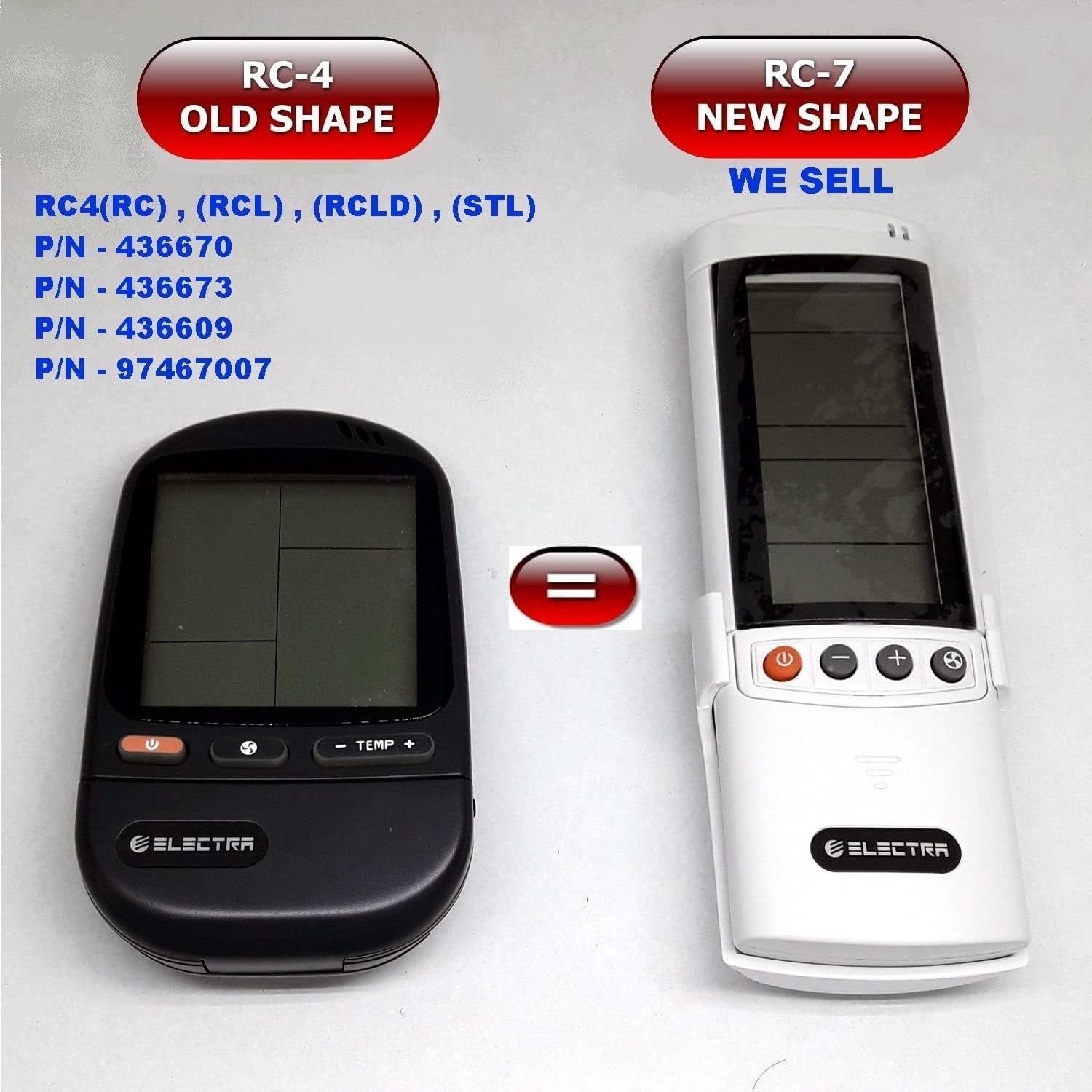
Image: Comparison of the older RC-4 model and the newer RC-7 model. This image helps users identify the correct remote control for their air conditioning unit.
Pakuotės turinys
- 1 x ELECTRA RC7 Air Conditioner Remote Control
- 1 x Wall Mount Holder (optional, may vary by package)

Image: The ELECTRA RC7 remote control shown alongside its accompanying wall mount holder, illustrating the complete package contents.
Produktas baigtasview
The ELECTRA RC7 remote control features an ergonomic design with clearly labeled buttons and a digital display for easy operation. Familiarize yourself with the layout below.
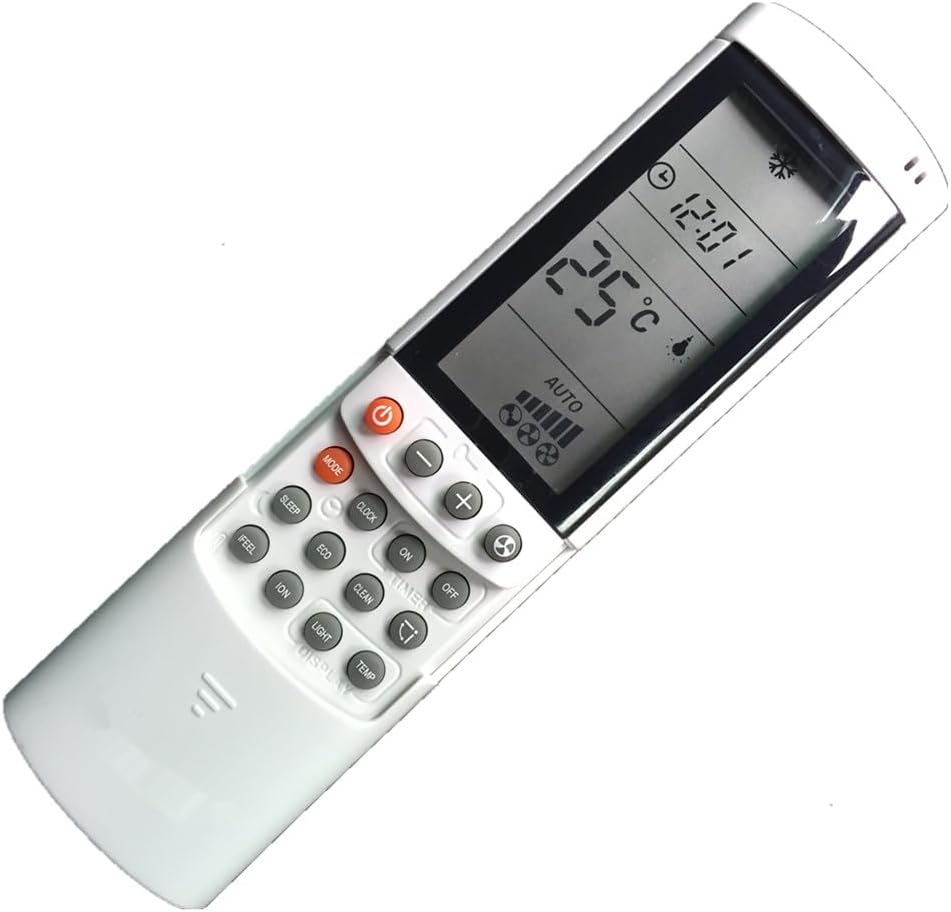
Paveikslėlis: detalus view of the ELECTRA RC7 remote control, highlighting the digital display and various function buttons for air conditioner operation.
Mygtukų funkcijos:
- Galia (⏻): Turns the air conditioner unit On or Off.
- REŽIMAS: Perjungia veikimo režimus (pvz., vėsinimas, šildymas, ventiliatorius, džiovinimas, automatinis).
- NUSTATYTI: Used for confirming settings or entering specific menus.
- Temperatūros padidėjimas (+) / Žemyn (-): Reguliuoja pageidaujamą temperatūrą.
- Ventiliatoriaus greitis (☁): Reguliuoja ventiliatoriaus greitį (pvz., Mažas, Vidutinis, Didelis, Automatinis).
- LAIKMATIS: Sets the timer for automatic On/Off operation.
- MIEGAS: Activates or deactivates sleep mode for comfortable night operation.
- IŠVALYTI: Clears current settings or cancels a function.
- JAUSTI: Activates a specific comfort mode based on ambient conditions.
- KAMBARYS: Displays or sets the room temperature.
- ŠVIESA: Controls the display light on the indoor unit.
- EKRANAS: Toggles the remote's display backlight or unit's display.
- EKO: Activates energy-saving mode.
- ŠVARUS: Initiates a self-cleaning function for the indoor unit.
- JONŲ: Activates the ionizer function (if available on the AC unit).
- Sūpynės (⇄): Controls the louver swing direction.
Sąranka
Akumuliatoriaus montavimas:
- Nuotolinio valdymo pulto gale raskite baterijų skyriaus dangtelį.
- Norėdami atidaryti, stumkite dangtelį žemyn arba paspauskite fiksatorių.
- Insert two (2) AAA batteries, ensuring the positive (+) and negative (-) terminals match the markings inside the compartment.
- Uždėkite baterijų skyriaus dangtelį, įsitikindami, kad jis tvirtai užsifiksavo.
Pastaba: Visada naudokite naujas baterijas ir keiskite abi baterijas vienu metu. Nemaišykite senų ir naujų baterijų arba skirtingų tipų baterijų.
Naudojimo instrukcijos
Ensure the remote control is pointed directly at the air conditioner's receiver when sending commands.
Pagrindinė operacija:
- Maitinimo įjungimas/išjungimas: Paspauskite Galia vieną kartą, kad įjungtumėte įrenginį. Paspauskite mygtuką dar kartą, kad išjungtumėte įrenginį.
- Režimo pasirinkimas: Paspauskite REŽIMAS button repeatedly to cycle through available operating modes (e.g., Auto, Cool, Dry, Fan, Heat). The selected mode will be displayed on the remote's screen.
- Temperatūros reguliavimas: Naudokite Temperatūros padidėjimas (+) or žemyn (-) mygtukus norimai temperatūrai nustatyti.
- Ventiliatoriaus greičio reguliavimas: Paspauskite Ventiliatoriaus greitis button to cycle through different fan speed settings (e.g., Auto, Low, Medium, High).
Išplėstinės funkcijos:
- Laikmačio funkcija: Paspauskite LAIKMATIS button to set a specific time for the unit to turn on or off. Follow the on-screen prompts to adjust the time using the temperature buttons and confirm with NUSTATYTI.
- Miegojimo rezimas: Paspauskite MIEGAS button to activate sleep mode, which typically adjusts temperature and fan speed for quiet, comfortable sleep.
- ECO režimas: Paspauskite EKO button to engage energy-saving operation, which optimizes settings to reduce power consumption.
- Sūpynės funkcija: Paspauskite Sūpynės button to activate or adjust the automatic louver swing, distributing air evenly.
Priežiūra
Nuotolinio valdymo pulto valymas:
- Nuotolinio valdymo pulto paviršių nuvalykite minkšta, sausa šluoste.
- Esant sunkiai įsisenėjusiems nešvarumams, švelniai dampnuvalykite šluostę vandeniu ir švelniu plovikliu, tada nedelsdami nusausinkite.
- Do not use abrasive cleaners, alcohol, or chemical solvents, as these can damage the remote's surface or internal components.
Baterijos keitimas:
Replace batteries when the remote's display becomes dim or the remote fails to operate the air conditioner from a normal distance. Refer to the "Battery Installation" section under Setup for detailed instructions.
Svarbu: Jei nuotolinio valdymo pultas nebus naudojamas ilgesnį laiką, išimkite baterijas, kad išvengtumėte ištekėjimo ir pažeidimų.
Trikčių šalinimas
- Nuotolinis nereaguoja:
- Patikrinkite, ar baterijos įdėtos teisingai, tinkamu poliškumu.
- Pakeiskite senas baterijas naujomis.
- Įsitikinkite, kad tarp nuotolinio valdymo pulto ir oro kondicionieriaus imtuvo nėra jokių kliūčių.
- Įsitikinkite, kad nuotolinio valdymo pultas nukreiptas tiesiai į oro kondicionierių.
- Ekranas blankus arba tuščias:
- Baterijos gali būti išsikrovusios. Pakeiskite jas.
- Ribotas veikimo diapazonas:
- Batteries may be weak. Replace them.
- Ensure no strong light sources (e.g., direct sunlight) are interfering with the signal.
Specifikacijos
- Modelis: RC7
- Prekinis ženklas: ELECTRA (Compatible with Airwell, Emailair, Electra)
- Valdiklio tipas: Mygtukų valdymas
- Ypatinga funkcija: Ergonomiškas dizainas
- Spalva: Baltas
- Maksimalus palaikomų įrenginių skaičius: 1 (kiekvienam nuotolinio valdymo pultui)
- Didžiausias diapazonas: Approximately 10 Meters (33 feet)
- Maitinimo šaltinis: 2 x AAA baterijos (į komplektą neįeina)
Garantija ir palaikymas
For warranty information or technical support, please refer to the documentation provided with your air conditioning unit or contact the original seller or manufacturer of the ELECTRA RC7 remote control. Keep your purchase receipt as proof of purchase.


