1. Įvadas
This manual provides detailed instructions for the safe and efficient use of your Altec Lansing IMW576 Boomjacket Portable Bluetooth Speaker. Please read this manual thoroughly before operating the device and retain it for future reference. The Boomjacket speaker is designed for robust outdoor use, featuring IP67 water, sand, shock, and snow resistance, Bluetooth connectivity, and an extended battery life with power bank functionality.
2. Pakuotės turinys
Patikrinkite, ar jūsų pakuotėje yra visi toliau išvardyti daiktai:
- Altec Lansing IMW576 Boomjacket Portable Bluetooth Speaker
- Universalus kalnas
- Įkrovimo laidas (USB)
- Vartotojo vadovas (šis dokumentas)
3. Produktas baigtasview
Familiarize yourself with the various components and controls of your Boomjacket speaker.

3.1 pav.: priekis View. This image displays the front of the Altec Lansing IMW576 Boomjacket speaker, highlighting its robust grille and the Altec Lansing logo. The speaker features a durable, black, ruggedized exterior designed for outdoor use.
3.1 Viršutinio skydelio valdikliai
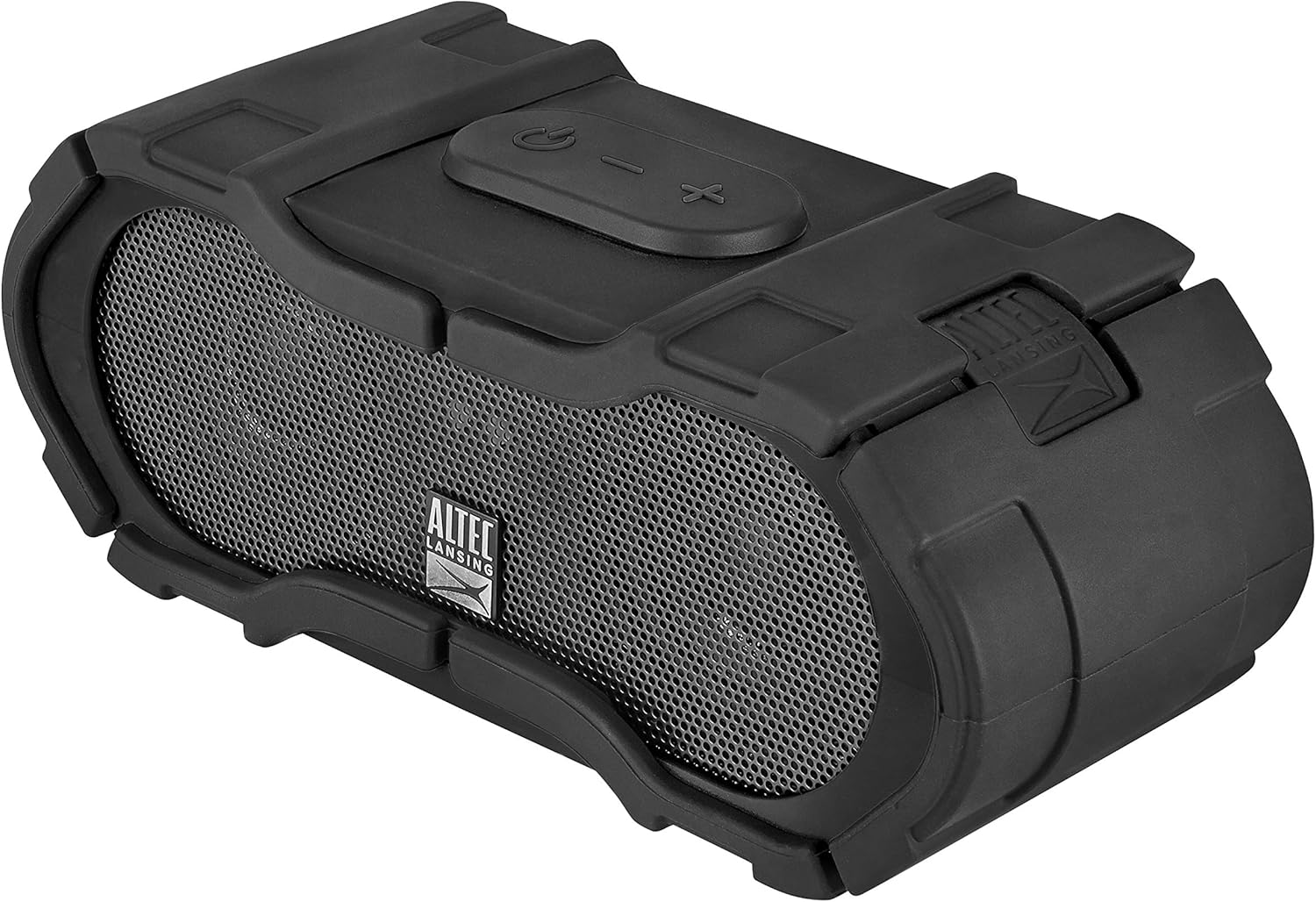
Figure 3.2: Top Controls. This image shows the top panel of the speaker, featuring the power button, volume up/next track button, volume down/previous track button, and the multi-function button for play/pause/call management.
- Maitinimo mygtukas: Paspauskite ir palaikykite, kad įjungtumėte/išjungtumėte.
- Garsumo didinimo / kito takelio mygtukas: Paspauskite, jei norite padidinti garsumą. Paspauskite ir palaikykite, jei norite pereiti prie kito takelio.
- Garsumo mažinimo / ankstesnio takelio mygtukas: Paspauskite, jei norite sumažinti garsumą. Paspauskite ir palaikykite, jei norite grįžti į ankstesnį takelį.
- Daugiafunkcis mygtukas: Press to play/pause music or answer/end calls. Press and hold to activate voice assistant.
3.2 Galinio skydelio prievadai

Figure 3.3: Rear Ports. This image illustrates the rear panel of the speaker, revealing the DC IN 5V charging port, AUX IN port, and USB 5V 500mA output port, all protected by a waterproof cover. A warning label emphasizes keeping the cover completely closed for water resistance.
- DC IN 5V Port: Skirta garsiakalbio vidinei baterijai įkrauti.
- AUX IN prievadas: Įrenginiams prijungti per 3.5 mm garso kabelį.
- USB 5V 500mA Port: Veikia kaip išorinė baterija išoriniams įrenginiams įkrauti.
- Vandeniui atsparus dangtelis: Ensures water and dust resistance when securely closed.
Svarbu: Always ensure the waterproof cover for the ports is completely closed and sealed before exposing the speaker to water or moisture to maintain its IP67 rating.
4. Sąranka
4.1 Garsiakalbio įkrovimas
- Open the waterproof cover on the rear panel.
- Connect the small end of the USB charging cable to the DC IN 5V prievadas ant garsiakalbio.
- Prijunkite didesnį USB įkrovimo laido galą prie USB maitinimo adapterio (nepridedamas) arba kompiuterio USB prievado.
- Užsidegs įkrovimo indikatoriaus lemputė. Visiškas įkrovimas trunka maždaug 4–5 valandas.
- Once fully charged, disconnect the cable and securely close the waterproof cover.
A full charge provides up to 40 hours of audio playback, depending on usage and volume levels.
4.2 Įjungimas / išjungimas
- Norėdami įjungti: Paspauskite ir palaikykite Maitinimo mygtukas on the top panel for approximately 3 seconds. You will hear a power-on tone and a voice confirmation.
- Norėdami išjungti: Paspauskite ir palaikykite Maitinimo mygtukas for approximately 3 seconds. You will hear a power-off tone and a voice confirmation.
4.3 Bluetooth poravimas
- Įsitikinkite, kad garsiakalbis įjungtas ir yra ne toliau kaip 10 metrų (33 pėdų) atstumu nuo „Bluetooth“ įrenginio.
- The speaker will automatically enter pairing mode upon powering on if no device is connected. The Bluetooth indicator light will flash.
- „Bluetooth“ palaikančioje įrangoje (išmaniajame telefone, planšetiniame kompiuteryje, kompiuteryje) eikite į „Bluetooth“ nustatymus.
- Ieškokite available devices and select "IMW576" from the list.
- Once paired, you will hear a voice confirmation, and the Bluetooth indicator light will turn solid.
- Jei prašoma slaptažodžio, įveskite „0000“.
Įjungus garsiakalbį, jis automatiškai bandys prisijungti prie paskutinio suporuoto įrenginio.
4.4 Pagalbinis (AUX) prijungimas
- Open the waterproof cover on the rear panel.
- Connect a 3.5mm audio cable (not included) from your audio device's headphone jack to the Aux in prievadas ant garsiakalbio.
- Garsiakalbis automatiškai persijungs į AUX režimą.
- Adjust volume on both your audio device and the speaker.
- After use, disconnect the cable and securely close the waterproof cover.
5. Naudojimo instrukcijos
5.1 Muzikos atkūrimas („Bluetooth“ režimas)
- Leisti / pristabdyti: Paspauskite Daugiafunkcis mygtukas.
- Pagarsink: Paspauskite Garsumo didinimo mygtukas.
- Patildyti: Paspauskite Garsumo mažinimo mygtukas.
- Kitas takelis: Paspauskite ir palaikykite Garsumo didinimo mygtukas.
- Ankstesnis takelis: Paspauskite ir palaikykite Garsumo mažinimo mygtukas.
5.2 Skambučių valdymas
- Atsiliepti į skambutį: Paspauskite Daugiafunkcis mygtukas kai ateina skambutis.
- Baigti skambutį: Paspauskite Daugiafunkcis mygtukas pokalbio metu.
- Atmesti skambutį: Paspauskite ir palaikykite Daugiafunkcis mygtukas kai ateina skambutis.
- Suaktyvinti „Voice Assistant“: Paspauskite ir palaikykite Daugiafunkcis mygtukas (e.g., Siri, Google Assistant).
The integrated microphone allows for hands-free communication.
5.3 Išorinės baterijos funkcionalumas
The Boomjacket speaker can be used to charge other devices:
- Open the waterproof cover on the rear panel.
- Connect your device's charging cable to the USB 5V 500mA output port on the speaker.
- Garsiakalbio vidinė baterija pradės krauti prijungtą įrenginį.
- Stebėkite savo įrenginio įkrovimo būseną.
- After charging, disconnect the cable and securely close the waterproof cover.
Using the power bank feature will reduce the speaker's playback time.
6. Priežiūra ir priežiūra
6.1 Valymas
- Nuvalykite garsiakalbį minkšta, damp audinys.
- Nenaudokite abrazyvinių valiklių, tirpiklių ar stiprių cheminių medžiagų.
- Ensure all ports are closed before cleaning with water.
6.2 Atsparumas vandeniui ir dulkėms (IP67)
The IMW576 Boomjacket is rated IP67, meaning it is protected from dust ingress and can withstand immersion in water up to 1 meter for 30 minutes. To maintain this rating:
- Always ensure the waterproof cover for the charging, AUX, and USB ports is completely closed and securely sealed.
- Saugokite garsiakalbį nuo sūraus vandens ar kitų cheminių medžiagų, nes laikui bėgant tai gali pažeisti sandariklius.
- If the speaker gets wet, dry it thoroughly before opening any port covers or charging.
6.3 Saugykla
- Garsiakalbį laikykite vėsioje, sausoje vietoje, toliau nuo tiesioginių saulės spindulių ir ekstremalių temperatūrų.
- Jei akumuliatorių sandėliuosite ilgesnį laiką, įkraukite jį maždaug iki 50 % kas kelis mėnesius, kad pailgintumėte jo veikimo laiką.
7. Problemų sprendimas
| Problema | Galima priežastis | Sprendimas |
|---|---|---|
| Garsiakalbis neįsijungia. | Senka baterija. | Įkraukite garsiakalbį bent 30 minučių. |
| Nepavyksta susieti per „Bluetooth“. | Garsiakalbis neįjungtas susiejimo režimu; įrenginio „Bluetooth“ išjungtas; per toli nuo garsiakalbio. | Ensure speaker is on and Bluetooth indicator is flashing. Turn Bluetooth on your device. Move device closer to speaker. Forget "IMW576" on your device and re-pair. |
| Iš garsiakalbio nėra garso. | Per mažas garsumas; neteisingas įvesties šaltinis; įrenginys negroja. | Increase volume on speaker and connected device. Ensure correct mode (Bluetooth/AUX). Check if audio is playing on the source device. |
| Prasta garso kokybė. | Bluetooth interference; low battery; source audio quality. | Move speaker closer to device. Charge speaker. Try a different audio source. |
| Neįkraunamas išorinis akumuliatorius. | Speaker battery low; cable issue; device not compatible. | Ensure speaker is sufficiently charged. Try a different USB cable. Verify device compatibility with 5V 500mA output. |
8. Specifikacijos
| Funkcija | Detalė |
|---|---|
| Modelio pavadinimas | BOOM JACKET (IMW576) |
| Ryšio technologija | Bluetooth |
| Belaidis ryšys | Bluetooth |
| Garso išvesties režimas | Stereo |
| Maksimali garsiakalbio išvesties galia | 40 vatų |
| Maitinimo šaltinis | Battery Powered (1 Lithium-ion battery) |
| Baterijos veikimo laikas | Iki 40 valandų |
| Atsparumo vandeniui įvertinimas | IP67 (Waterproof, Sand-resistant, Shock-resistant, Snow-resistant) |
| Integruotas mikrofonas | Taip |
| Kontrolės metodas | Balsas, mygtukai |
| USB Output (Power Bank) | 5V 500mA |
| Matmenys (I x P x A) | 7.6 x 7.6 x 17.8 cm |
| Svoris | 911 gramų |
| Suderinami įrenginiai | All Bluetooth-enabled devices, devices with 3.5mm audio output |
| Įtraukti komponentai | Universal Mount, Power Bank (integrated) |
9. Garantija ir palaikymas
For warranty information or technical support, please refer to the documentation included with your purchase or visit the official Altec Lansing websvetainėje. Išsaugokite pirkimo įrodymą garantiniams reikalavimams.
Gamintojas: Altec Lansing Technologies


