Įvadas
Thank you for choosing the Divoom Onbeat 500 Portable Wireless Bluetooth Speaker. This device is designed to deliver powerful sound with convenient wireless connectivity. This manual will guide you through the setup, operation, and maintenance of your speaker to ensure optimal performance and longevity.
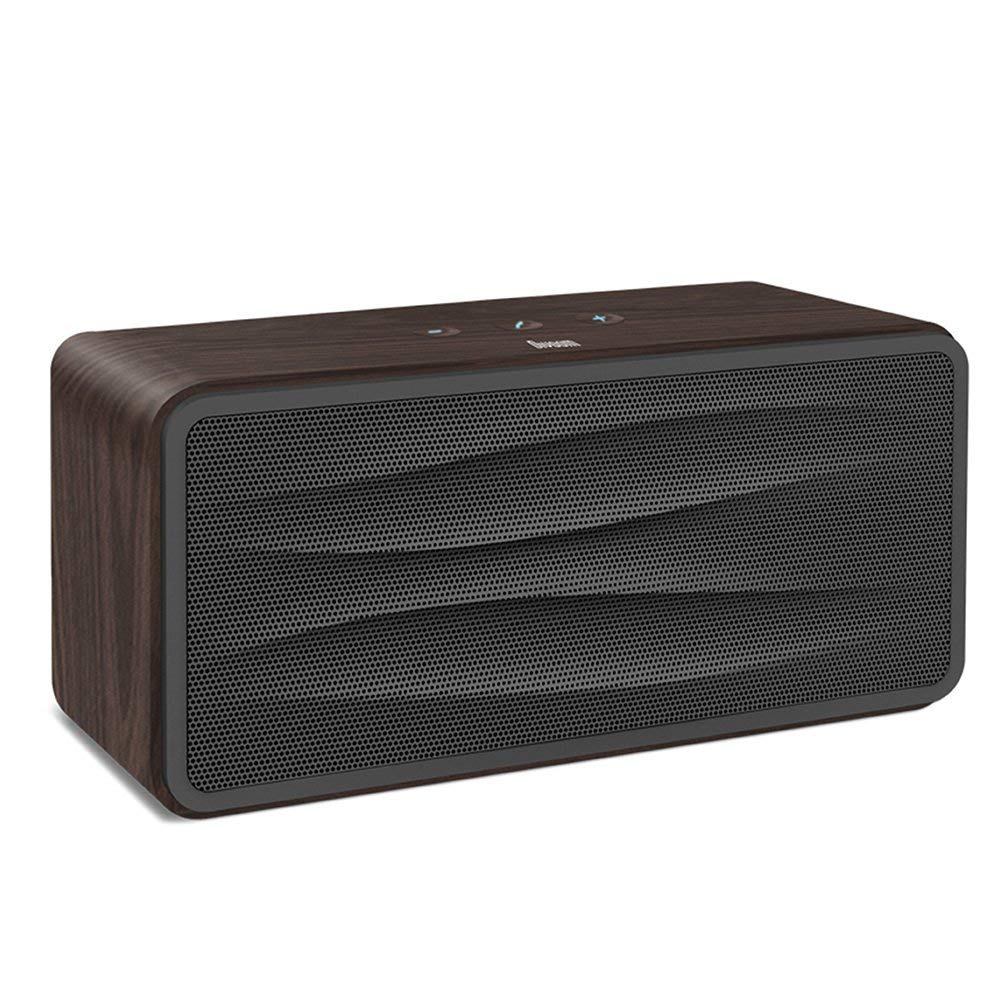
1 paveikslas: Priekyje view of the Divoom Onbeat 500 speaker. This image displays the speaker's main grille and overall design.
Pakuotės turinys
Patikrinkite pakuotę, ar joje yra šie daiktai:
- Divoom Onbeat 500 Speaker
- Mikro USB įkrovimo laidas
- Pagalbinis kabelis
- Vartotojo vadovas (šis dokumentas)
- Garantijos kortelė
Produkto savybės
The Divoom Onbeat 500 speaker offers a range of features for an enhanced audio experience:
- Galingas garsas: 2.1 channel design with a proprietary passive bass radiator for rich audio.
- NFC technologija: Tap-to-pair functionality for quick and easy Bluetooth connection.
- Bluetooth ryšys: Wirelessly play and control music from up to 33 feet (10 meters) away.
- Integruotas garsiakalbis: Allows you to make and take calls directly from the speaker.
- Ilgai veikianti baterija: Integrated 5000mAh battery provides extended playback time.
- Pagalbinė įvestis: For wired connection to non-Bluetooth devices.
Sąranka
1. Įkraukite garsiakalbį
Before initial use, fully charge your Divoom Onbeat 500 speaker. Use the provided Micro USB charging cable to connect the speaker to a USB power source (e.g., computer USB port, USB wall adapter). The charging indicator light will illuminate during charging and turn off or change color when fully charged. A full charge typically provides 8-10 hours of playback.
2. Įjungimas/išjungimas
- Norėdami įjungti: Press and hold the Power button for a few seconds until you hear an audible prompt or see the indicator light illuminate.
- Norėdami išjungti: Dar kartą paspauskite ir kelias sekundes palaikykite nuspaudę maitinimo mygtuką, kol garsiakalbis išsijungs.
3. „Bluetooth“ poravimas
The Onbeat 500 offers two methods for wireless connection:
NFC (Near Field Communication) Pairing:
If your device supports NFC, you can pair quickly:
- Įsitikinkite, kad jūsų išmaniajame telefone arba planšetiniame kompiuteryje įjungtas NFC.
- With the Onbeat 500 powered on, gently tap your NFC-enabled device against the NFC area on the speaker.
- Confirm the pairing request on your device. The speaker will indicate a successful connection.
Standartinis „Bluetooth“ susiejimas:
For devices without NFC or for manual pairing:
- Power on the Divoom Onbeat 500 speaker. It will automatically enter Bluetooth pairing mode if no device is connected, or you may need to press a dedicated Bluetooth button (refer to speaker controls).
- On your audio device (smartphone, tablet, computer), go to the Bluetooth settings and enable Bluetooth.
- Ieškokite available devices. You should see "Divoom Onbeat 500" in the list.
- Select "Divoom Onbeat 500" to connect. The speaker will confirm the connection with an audible prompt.
4. AUX jungtis
To connect a device using the auxiliary cable:
- Connect one end of the provided auxiliary cable to the AUX-in port on the Divoom Onbeat 500.
- Connect the other end of the auxiliary cable to the headphone jack or audio output of your device.
- The speaker will automatically switch to AUX mode, or you may need to select it manually (refer to speaker controls).

2 paveikslas: Šoninė view of the Divoom Onbeat 500, illustrating the location of the charging port, AUX input, and control buttons.
Garsiakalbio valdymas
1. Muzikos atkūrimas
Once connected via Bluetooth or AUX, you can control music playback from your connected device. The speaker may also have integrated controls for volume adjustment, play/pause, and track skipping. Refer to the speaker's physical buttons for these functions.
2. Garsiakalbio funkcionalumas
When connected to a smartphone via Bluetooth, the Divoom Onbeat 500 can be used as a speakerphone:
- Atsiliepimas į skambutį: Press the Call button (often indicated by a phone icon) on the speaker.
- Skambučio pabaiga: Dar kartą paspauskite skambinimo mygtuką.
- Skambučio atmetimas: Paspauskite ir palaikykite nuspaudę skambinimo mygtuką.

3 paveikslas: Galinis view of the Divoom Onbeat 500, highlighting the passive bass radiator for enhanced low-frequency sound.
Priežiūra
1. Valymas
Norėdami išlaikyti garsiakalbio išvaizdą ir funkcionalumą:
- Išorę nuvalykite minkštu, sausu, nepūkuotu skudurėliu.
- Do not use abrasive cleaners, alcohol, benzene, or other chemical solvents, as these may damage the finish.
- Venkite drėgmės patekimo į bet kokias angas.
2. Akumuliatoriaus priežiūra
To prolong the life of the built-in lithium-ion battery:
- Venkite dažnai visiškai iškrauti akumuliatorių.
- Kai garsiakalbio ilgesnį laiką nenaudojate, laikykite jį vėsioje, sausoje vietoje.
- Charge the speaker at least once every three months if stored for a long time to prevent deep discharge.
Trikčių šalinimas
If you encounter issues with your Divoom Onbeat 500, please refer to the following common solutions:
| Problema | Galimas sprendimas |
|---|---|
| Garsiakalbis neįsijungia | Ensure the battery is charged. Connect the speaker to a power source using the Micro USB cable and try again. |
| Nėra garso iš garsiakalbio | Check the volume level on both the speaker and your connected device. Ensure the speaker is correctly paired via Bluetooth or connected via AUX. Try re-pairing the Bluetooth device. |
| „Bluetooth“ susiejimas nepavyksta | Ensure the speaker is in pairing mode. Turn off and on Bluetooth on your device. Move your device closer to the speaker. Clear previous Bluetooth connections on your device and try again. |
| Prasta garso kokybė | Ensure the speaker and connected device are within range (for Bluetooth). Check for interference from other wireless devices. Try a different audio source or cable. |
Specifikacijos
Detailed technical specifications for the Divoom Onbeat 500 speaker:
- Modelio pavadinimas: Divoom Onbeat 500
- Garsiakalbio tipas: Kompiuterio garsiakalbis
- Ryšio technologija: Bluetooth
- Belaidžio ryšio technologija: Bluetooth
- Kontrolės metodas: Palieskite
- Maitinimo šaltinis: Maitinamas baterijomis
- Baterija: 1 Lithium Ion battery (5000mAh)
- Garso vatatage: 20 vatų
- Didžiausia garsiakalbio išėjimo galia: 100 vatų
- Erdvinio garso kanalo konfigūracija: 2.1
- Suderinami įrenginiai: Android, Windows, iPhone (iOS)
- Jungties tipas: USB (įkrovimui)
- Gaminio matmenys: 22.5 x 7.49 x 10.49 cm (IxPxA)
- Prekės svoris: 1.55 kg
- Spalva: Anglis
- Ypatingos savybės: NFC, Built-in Speakerphone, Passive Bass Radiator
Garantija ir palaikymas
Your Divoom Onbeat 500 speaker comes with a limited warranty. Please refer to the included Warranty Card for detailed terms and conditions, including warranty period and coverage.
For technical support, service inquiries, or further assistance, please visit the official Divoom website or contact their customer service department using the information provided on your Warranty Card or product packaging. Please have your model number (Onbeat 500) and purchase details ready when contacting support.


