1. Įvadas
Thank you for choosing the Frewico Wearable Bluetooth Speaker Watch. This device combines a portable Bluetooth speaker with a comfortable watch design, offering hands-free calls, TF card music playback, TWS stereo pairing, RGB lights, and a remote selfie function. Its IP45 waterproof rating makes it suitable for various outdoor activities. This manual provides essential information for the proper setup, operation, and maintenance of your speaker watch.

Image: A person cycling with the Frewico Wearable Bluetooth Speaker Watch on their wrist, demonstrating its wearable design for active use.
2. Pakuotės turinys
Patikrinkite pakuotę, ar joje yra šie daiktai:
- 1 x Frewico Wearable Bluetooth Speaker Watch (Model: X10-BL)
- 1x USB įkrovimo laidas
- 1 x Vartotojo vadovas

Image: The Frewico X10 Sports Music Watch retail box, displaying the watch, a USB charging cable, and the user manual as included accessories.
3. Produkto ypatybės
- Nešiojamas dizainas: Portable watch design, comfortable and secure fit, weighing approximately 2.85 ounces.
- Bluetooth ryšys: Wireless pairing with any Bluetooth-enabled mobile phone, smart watch, tablet, laptop, or netbook.
- Skambučiai laisvų rankų įranga: Built-in microphone for clear, hands-free communication.
- TF kortelės lizdas: Supports Micro SD storage cards for offline music playback.
- TWS stereofoninio ryšio susiejimas: Connect two X10 speakers for true wireless stereo sound.
- RGB lemputės: Integrated RGB lighting for visual appeal.
- Remote Selfie Function: Control your phone's camera remotely to capture photos.
- IP45 atsparus vandeniui: Resistant to water splashes, rain, and sweat, suitable for workouts and outdoor use.
- Bright LED Flash: Increases visibility in low-light conditions.
- Balso asistento palaikymas: Compatible with Google Assistant and Siri intelligent voice commands.
- Ilgas grojimo laikas: Iki 10 valandų nepertraukiamo grojimo vienu įkrovimu.

Image: The Frewico Wearable Speaker Watch on a person's wrist, emphasizing its lightweight, secure, and comfortable portable design.
4. Darbo pradžia
4.1 Įrenginio įkrovimas
Before first use, fully charge your Frewico Speaker Watch. Connect the provided USB charging cable to the charging port on the device and a standard USB power adapter (5V DC). The charging time is approximately 1.5 hours. A full charge provides up to 10 hours of playtime.
4.2 Maitinimo įjungimas/išjungimas
- Norėdami įjungti: Press and hold the Power button for a few seconds until you hear an audible prompt and the indicator lights activate.
- Norėdami išjungti: Dar kartą paspauskite ir kelias sekundes palaikykite nuspaudę maitinimo mygtuką, kol išgirsite garsinį signalą ir užges indikatoriaus lemputės.
5. „Bluetooth“ poravimas
Follow these steps to pair your speaker watch with a Bluetooth-enabled device:
- Ensure the speaker watch is powered on and in Bluetooth pairing mode (indicated by a flashing LED light).
- On your mobile phone, smart watch, tablet, or laptop, navigate to the Bluetooth settings.
- Ieškokite available devices. The speaker watch will appear as "Frewico X10" or similar.
- Select "Frewico X10" to initiate pairing. Once connected, you will hear a confirmation tone, and the LED light will stop flashing.
- The device has a Bluetooth range of approximately 32.8 feet (10 meters).

Image: The Frewico Bluetooth Speaker Watch on a wrist, with a smartphone screen showing the Bluetooth pairing process, indicating the speaker as 'Frewico X10'.
6. Naudojimo instrukcijos
6.1 Muzikos atkūrimas („Bluetooth“ režimas)
- Sėkmingai suporavę „Bluetooth“, atidarykite muzikos programą prijungtame įrenginyje.
- Use the controls on the speaker watch or your connected device to play, pause, skip tracks, and adjust volume.
- The speaker delivers crystal clear audio with balanced sound and deep bass.
6.2 TF Card Music Playback
The speaker watch supports Micro SD cards for offline music. Insert a Micro SD card (up to 32GB) with MP3 format music files into the TF card slot. The device will automatically switch to TF card mode and begin playing music.

Vaizdas: Stambus planas view of the Frewico Speaker Watch, highlighting the Micro SD card slot with a card inserted, illustrating its MP3 player capability for offline music.
6.3 Skambinimas laisvų rankų įranga
When connected via Bluetooth, you can answer incoming calls directly from the speaker watch:
- Atsiliepti į skambutį: Vieną kartą paspauskite skambinimo mygtuką.
- Baigti skambutį: Skambučio metu vieną kartą paspauskite skambinimo mygtuką.
- Atmesti skambutį: Paspauskite ir palaikykite nuspaudę skambinimo mygtuką.

Image: A person driving with the Frewico Speaker Watch on their wrist, illustrating the convenience of hands-free calling while on the go.
6.4 Balso padėjėjas
The speaker watch supports intelligent voice commands for Google Assistant and Siri. Press the dedicated Voice Assistant button (or a specific button combination as per device markings) to activate your phone's voice assistant.

Image: A person interacting with the Frewico Speaker Watch on their wrist, demonstrating the voice command feature for various functions like quick calls and music playback.
6.5 Remote Selfie Function
To use the remote selfie function, ensure your speaker watch is connected to your phone via Bluetooth. Open your phone's camera app. Press the designated Selfie button on the speaker watch to remotely trigger your phone's camera shutter.
6.6 TWS Stereo Pairing (Two Speakers)
For an enhanced audio experience, you can pair two Frewico X10 speaker watches together for True Wireless Stereo (TWS) sound:
- Ensure both X10 speaker watches are powered off.
- Įjunkite abu garsiakalbius vienu metu. Jie įsijungs susiejimo režimu.
- Double-press the Power button on one of the speakers (this will be the primary speaker). It will search for the other speaker.
- Once connected, you will hear a confirmation tone, and the two speakers will function as a stereo pair.
- Connect your phone to the primary speaker via Bluetooth as described in Section 5.
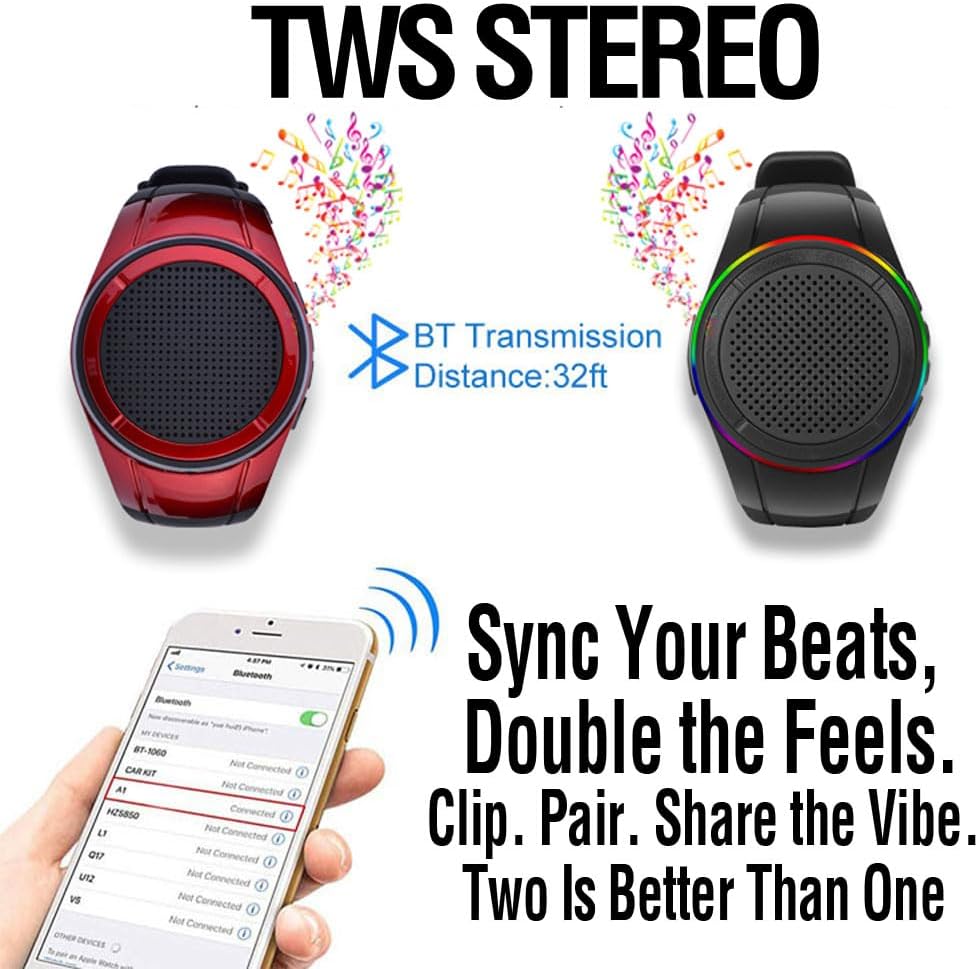
Image: Two Frewico Speaker Watches, one red and one black, shown with musical notes, demonstrating the TWS stereo pairing capability for a richer audio experience.
6.7 LED žibintuvėlis
The speaker watch features a bright LED flash. This can be activated by a specific button press (refer to device markings) to increase visibility in low-light conditions, enhancing safety during outdoor activities.

Image: The Frewico Speaker Watch with its LED light activated, highlighting its function as a portable light source, useful in various environments.
7. Priežiūra ir priežiūra
7.1 Atsparumas vandeniui (IP45)
The Frewico Speaker Watch is rated IP45 waterproof. This means it is protected against dust ingress and low-pressure water jets from any direction. It can be worn while washing hands, showering, or in rainy conditions. However, it is nėra skirtas būti iš dalies arba visiškai panardintam į vandenį. Avoid prolonged exposure to heavy rain or direct high-pressure water streams.

Image: A hand wearing the Frewico Speaker Watch under running water, demonstrating its IP45 waterproof capabilities for everyday activities.
7.2 Valymas
To clean your speaker watch, gently wipe it with a soft, damp cloth. Do not use harsh chemicals, cleaning solvents, or strong detergents, as these may damage the device's finish or internal components.
7.3 Akumuliatoriaus priežiūra
To prolong the life of the built-in Lithium Polymer battery:
- Venkite dažnai visiškai iškrauti akumuliatorių.
- Reguliariai kraukite prietaisą, net jei jis ilgą laiką nenaudojamas.
- Laikykite prietaisą vėsioje, sausoje vietoje, toliau nuo ekstremalių temperatūrų.
8. Problemų sprendimas
If you encounter issues with your Frewico Speaker Watch, please refer to the following common problems and solutions:
- Įrenginys neįsijungia: Ensure the battery is charged. Connect the device to a power source using the USB cable and try again after a few minutes.
- Nepavyksta susieti per „Bluetooth“:
- Ensure the speaker watch is in pairing mode (flashing LED).
- Įsitikinkite, kad šaltinio įrenginyje įjungtas „Bluetooth“.
- Move the speaker closer to your source device (within 32.8 feet).
- Turn off and on both the speaker and your source device, then try pairing again.
- Clear previous Bluetooth connections on your source device if necessary.
- Nėra garso:
- Check the volume levels on both the speaker watch and your connected device.
- Ensure the device is properly connected via Bluetooth or that the TF card is correctly inserted and functioning.
- TF card not playing:
- Ensure the TF card is inserted correctly and fully.
- Patikrinkite, ar muzika files on the TF card are in MP3 format.
- Try a different TF card to rule out card issues.
- Nepavyko susieti TWS: Ensure both speakers are powered off before attempting TWS pairing. Follow the steps in Section 6.6 carefully.
9. Techninės specifikacijos
| Funkcija | Specifikacija |
|---|---|
| Modelio pavadinimas | X10 black |
| Ryšio technologija | Bluetooth |
| Belaidžio ryšio technologija | Bluetooth |
| Bluetooth diapazonas | 32.8 pėdos (10 metro) |
| Garsiakalbio tipas | Nešiojamas Bluetooth garsiakalbis |
| Didžiausia garsiakalbio išėjimo galia | 3 vatų |
| Garso išvesties režimas | Stereo (su TWS susiejimu) |
| Dažnio atsakas | 100 Hz |
| Signalo ir triukšmo santykis | 70 dB |
| Varža | 4 omų |
| Garso tvarkyklės dydis | 36 milimetrų |
| Maitinimo šaltinis | Maitinamas baterijomis |
| Baterijos tipas | Reikalinga 1 ličio polimero baterija |
| Baterijos talpa | 500 milijonųamp Valandos |
| Įkrovimo laikas | 1.5 valandų |
| Prekės svoris | 2.85 uncijos |
| Gaminio matmenys | 0.8 "D x 0.12" P x 0.17" A |
| Medžiaga | Plastic, Silica |
| Atsparumo vandeniui lygis | IP45 Atsparus vandeniui |
| Kontrolės metodas | Lietikliai, mygtukai |
| Ar yra MP3 grotuvas? | Taip |

Image: Three distinct views of the Frewico Wearable Bluetooth Speaker Watch, providing a comprehensive visual overview of its design from various angles.
10. Informacija apie garantiją
The Frewico Wearable Bluetooth Speaker Watch comes with a 6 mėnesių garantija from the date of purchase. This warranty covers manufacturing defects and malfunctions under normal use. It does not cover damage caused by misuse, accidents, unauthorized modifications, or failure to follow the instructions in this manual. Please retain your proof of purchase for warranty claims.
11. Pagalba klientams
For further assistance, technical support, or warranty inquiries, please contact Frewico customer service through the official Frewico store or website. You can visit the Frewico Store at amazon.com/stores/Frewico.


