Įvadas
Ačiū, kad pirkoteasing the QUMOX L165U 2.4GHz Wireless Gamepad. This high-quality game controller is designed for use with PC and Android devices, offering a reliable 2.4GHz wireless connection for an enhanced gaming experience. Please read this manual carefully to ensure proper setup and operation of your new gamepad.

Figure 1: QUMOX L165U Gamepad with included USB adapter and OTG connection kit.
Pakuotės turinys
Įsitikinkite, kad jūsų siuntinyje yra visi daiktai:
- 1x QUMOX L165U Gamepad
- 1x 2.4GHz USB Wireless Adapter
- 1x OTG Connection Kit (Micro USB to USB-A adapter)
Sąranka
1. Akumuliatoriaus įdėjimas
The QUMOX L165U Gamepad is powered by 2 AAA batteries (not included). To install the batteries:
- Locate the battery compartment on the back of the gamepad.
- Atidarykite akumuliatoriaus dangtelį.
- Įdėkite 2 AAA tipo baterijas, užtikrindami teisingą poliškumą (+/-).
- Saugiai uždarykite akumuliatoriaus dangtelį.

Figure 2: Open battery compartment for AAA battery installation.
2. Prisijungimas prie kompiuterio
- Plug the 2.4GHz USB Wireless Adapter into an available USB port on your PC.
- Turn on the gamepad by pressing the 'START' button. The gamepad will automatically attempt to connect.
- The PC should recognize the gamepad and install necessary drivers automatically.
- If the gamepad does not connect, press the 'MODE' button on the gamepad to cycle through connection modes until it is recognized by your PC.
3. Connecting to an Android Device (with OTG support)
- Connect the OTG Connection Kit to your Android device's Micro USB port.
- Plug the 2.4GHz USB Wireless Adapter into the USB-A end of the OTG Connection Kit.
- Turn on the gamepad by pressing the 'START' button. The gamepad will automatically attempt to connect.
- Your Android device should recognize the gamepad.
- If the gamepad does not connect, press the 'MODE' button on the gamepad to cycle through connection modes until it is recognized by your Android device.
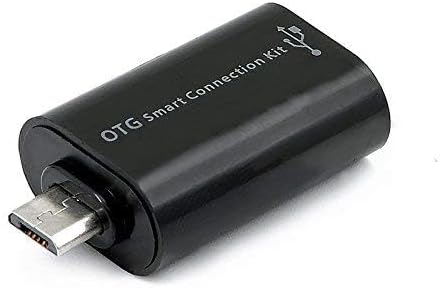
Figure 3: OTG Connection Kit for Android device connectivity.
Naudojimo instrukcijos
Once connected, your QUMOX L165U Gamepad is ready for use. The layout is standard for most game controllers.
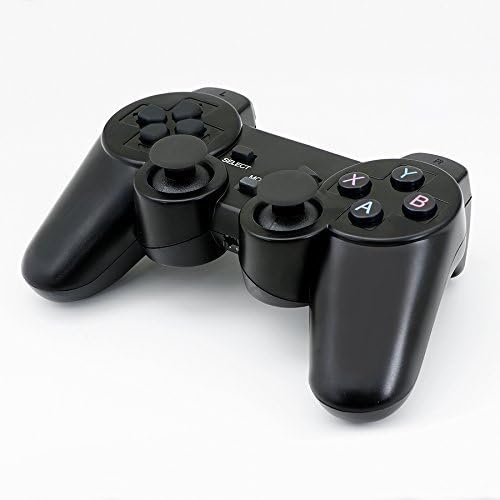
4 paveikslas: viršuje view of the QUMOX L165U Gamepad, highlighting button layout.
- Krypties valdikliai (D-Pad): Tiksliam krypties įvedimui.
- Analoginės valdymo svirtys: Dvi analoginės vairalazdės 360 laipsnių judėjimui ir kameros valdymui.
- Veiksmų mygtukai (A, B, X, Y): Standartiniai žaidimo komandų veiksmų mygtukai.
- Pečių mygtukai (L1, R1) ir gaidukai (L2, R2): Located on the top of the gamepad for additional actions.
- PASIRINKIMO/ATGAL mygtukas: Paprastai naudojamas meniu naršymui arba konkrečioms žaidimo funkcijoms.
- START mygtukas: Naudojamas žaidimams pristabdyti arba pasirinkimams patvirtinti.
- MODE mygtukas: Cycles through different operating modes (e.g., Android, PC) if automatic detection fails.
Vaizdo demonstravimas
1 vaizdo įrašas: Pardavėjo pateikta informacijaview of a 2-pack wireless controller, demonstrating its features and compatibility. While showing a similar product, it illustrates general wireless controller usage and setup.
Priežiūra
- Valymas: Žaidimų pultą valykite minkšta, sausa šluoste. Venkite naudoti stiprias chemines medžiagas ar abrazyvines medžiagas.
- Saugykla: Žaidimų planšetę laikykite vėsioje, sausoje vietoje, toliau nuo tiesioginių saulės spindulių ir ekstremalių temperatūrų.
- Akumuliatoriaus priežiūra: Remove batteries if the gamepad will not be used for an extended period to prevent leakage.
Trikčių šalinimas
| Problema | Galima priežastis | Sprendimas |
|---|---|---|
| Gamepad does not connect. | Low batteries, incorrect mode, adapter not properly inserted. | Replace batteries. Press the 'MODE' button to cycle through modes. Ensure USB adapter is fully inserted into PC or OTG adapter. |
| Mygtukai arba valdymo svirtys nereaguoja. | Connection issue, game incompatibility, physical damage. | Reconnect the gamepad. Check game settings for controller support. If issue persists, contact support. |
| Android device does not recognize gamepad. | Android device lacks OTG support, OTG adapter issue. | Verify your Android device supports OTG. Ensure OTG adapter is functioning correctly. |
Specifikacijos
| Funkcija | Detalė |
|---|---|
| Modelio numeris | L165U |
| Ryšio technologija | 2.4GHz Wireless (via USB Adapter) |
| Suderinami įrenginiai | PC, Android (with OTG support) |
| Maitinimo šaltinis | 2x AAA baterijos |
| Prekės svoris | 5.3 uncijos |
| Pakuotės matmenys | 8.07 x 5.63 x 2.95 colio |
| Spalva | Juoda |
Garantija ir palaikymas
For warranty information or technical support, please refer to the contact details provided with your purchase or visit the official QUMOX websvetainėje. Išsaugokite pirkimo įrodymą, jei prireiktų pateikti garantinį ieškinį.