1. Svarbios saugos instrukcijos
Please read all safety instructions carefully before using the Vivitek Qumi Q3 Plus-RD projector. Failure to follow these instructions may result in electric shock, fire, or damage to the device.
- Maitinimo šaltinis: Use only the supplied AC power adapter. Ensure the voltage atitinka projektoriaus reikalavimus.
- Vėdinimas: Neužblokuokite ventiliacijos angų. Palikite pakankamai vietos aplink projektorių tinkamam oro cirkuliavimui ir neperkaitimui.
- Drėgmė: Do not expose the projector to rain, moisture, or operate it near water.
- Šiluma: Avoid placing the projector near heat sources such as radiators, heat registers, stoves, or other apparatus that produce heat.
- Valymas: Unplug the projector from the power outlet before cleaning. Use a dry cloth for cleaning. Do not use liquid cleaners or aerosol cleaners.
- Aptarnavimas: Nemėginkite patys aptarnauti šio gaminio. Visą techninę priežiūrą patikėkite kvalifikuotam aptarnavimo personalui.
- Akių sauga: Nežiūrėkite tiesiai į projektoriaus objektyvą, kai lamp įjungtas. Ryški šviesa gali pažeisti akis.
2. Pakuotės turinys
Verify that all items listed below are included in your Vivitek Qumi Q3 Plus-RD package:
- Vivitek Qumi Q3 Plus-RD Projector
- AC Power Adapter with Cable
- HDMI kabelis
- Documentation Kit (Quick Start Guide, Warranty Card)

Image: The AC power adapter and cable for the Vivitek Qumi Q3 Plus-RD projector.
3. Produktas baigtasview
Familiarize yourself with the components and ports of your Vivitek Qumi Q3 Plus-RD projector.
3.1 Priekis View

Vaizdas: priekis view of the Vivitek Qumi Q3 Plus-RD projector, showing the projection lens and speaker grille.
3.2 Galinis View (Ports and Connections)

Vaizdas: Galinis view of the Vivitek Qumi Q3 Plus-RD projector, displaying various input/output ports including AV IN, USB 1, USB 2, HDMI, DC IN power input, microSD card slot, and the power button.
3.3 pusė View

Vaizdas: Šoninė view of the Vivitek Qumi Q3 Plus-RD projector, showing the ventilation grilles and the integrated kickstand for angle adjustment.
3.4 Nuotolinis valdymas
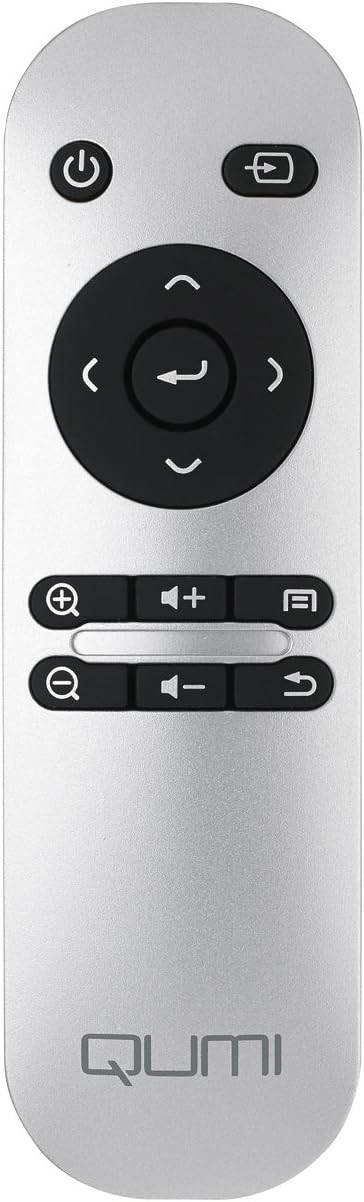
Image: The remote control for the Vivitek Qumi Q3 Plus-RD projector, featuring power, navigation, volume, and focus adjustment buttons.
4. Sąranka
Follow these steps to set up your Vivitek Qumi Q3 Plus-RD projector for first use.
- Maitinimo jungtis: Connect the supplied AC power adapter to the 'DC IN' port on the projector and then plug it into a power outlet. The projector can also operate on its internal battery.
- Vieta: Place the projector on a stable, flat surface. Use the integrated kickstand to adjust the projection angle if needed. Ensure there are no obstructions to the lens or ventilation openings.
- Maitinimas: Press and hold the power button on the projector or the remote control to turn on the device.
- Fokuso reguliavimas: Once powered on, use the focus buttons on the remote control to adjust the image sharpness. The Qumi Q3 Plus-RD features motorized focus for precise adjustment.
- Keystone korekcija: The projector features digital auto keystone correction. If the image appears trapezoidal, the projector will automatically adjust it. Manual adjustment options may be available in the settings menu.
5. Naudojimo instrukcijos
This section details how to operate your Vivitek Qumi Q3 Plus-RD projector.
5.1 Įjungimas / išjungimas
- Norėdami įjungti: Press and hold the power button on the projector or the remote control until the device starts.
- Norėdami išjungti: Press the power button on the projector or the remote control. A shutdown prompt will appear. Select 'Power Off' to shut down the system safely.
5.2 Naršymas „Android“ operacinėje sistemoje
The Qumi Q3 Plus-RD runs on an Android operating system. Use the remote control's navigation buttons (up, down, left, right, OK) to move through menus and select options. A Bluetooth keyboard/mouse can also be paired for easier navigation.
5.3 Medijos atkūrimas
- USB diskas: Insert a USB flash drive into one of the USB ports. The system will typically detect it and prompt you to open the file naršyklę arba medijos leistuvą.
- „MicroSD“ kortelė: Insert a microSD card into the microSD slot. Similar to USB, the system will allow you to access its contents.
- Vidinė saugykla: The projector has 5.1 GB of available on-board memory for storing files ir programos.
5.4 Connecting External Devices (HDMI)
To connect an external device such as a laptop, Blu-ray player, or gaming console:
- Connect one end of an HDMI cable to the HDMI port on the projector.
- Connect the other end of the HDMI cable to the HDMI output port on your external device.
- On the projector's home screen, navigate to the input selection and choose 'HDMI'.
6. Ryšys
The Vivitek Qumi Q3 Plus-RD offers various connectivity options for seamless integration with your devices.
6.1 „Wi-Fi“ sąranka
- From the home screen, navigate to 'Settings'.
- Pasirinkite „Wi-Fi“ ir įjunkite.
- Iš galimų tinklų sąrašo pasirinkite norimą „Wi-Fi“ tinklą.
- Enter the network password if prompted and connect.
6.2 Bluetooth poravimas
You can pair Bluetooth devices such as external speakers, headphones, or a keyboard/mouse with your projector.
- From the home screen, navigate to 'Settings'.
- Pasirinkite „Bluetooth“ ir įjunkite jį.
- Įjunkite „Bluetooth“ įrenginį į poravimo režimą.
- Select your device from the list of available devices on the projector and confirm pairing.
6.3 Wireless Content Sharing
The projector supports wireless content sharing from Android and iOS devices. Refer to the projector's specific application (e.g., HappyCast or similar pre-installed app) for detailed instructions on mirroring your device's screen.
7. Priežiūra
Tinkama priežiūra užtikrina projektoriaus ilgaamžiškumą ir optimalų veikimą.
- Objektyvo valymas: Gently wipe the projector lens with a soft, lint-free cloth specifically designed for optical surfaces. Do not use abrasive materials or harsh chemicals.
- Vėdinimas: Regularly check that the ventilation openings are clear of dust and debris. Use a soft brush or compressed air to clean them.
- Akumuliatoriaus priežiūra: For models with an internal battery, avoid fully discharging the battery frequently. If storing the projector for an extended period, charge the battery to approximately 50% to prolong its lifespan.
- Saugykla: Projektorių laikykite vėsioje, sausoje vietoje, toliau nuo tiesioginių saulės spindulių ir ekstremalių temperatūrų.
8. Problemų sprendimas
If you encounter issues with your Vivitek Qumi Q3 Plus-RD, refer to the following common problems and solutions.
- No Image Projected:
- Įsitikinkite, kad projektorius įjungtas ir nuimtas objektyvo dangtelis.
- Check the input source selection to ensure it matches the connected device (e.g., HDMI, USB).
- Verify that the external device is powered on and outputting a signal.
- Nėra garso:
- Sureguliuokite projektoriaus ir prijungto šaltinio įrenginio garsumą.
- Check if external speakers are connected via Bluetooth or AV IN, and ensure they are powered on and functioning.
- Ensure the audio output settings on the source device are correctly configured.
- Nuotolinio valdymo pultas nereaguoja:
- Ensure there are no obstructions between the remote and the projector's IR receiver (located at the rear).
- Replace the remote control battery (typically a coin cell battery).
- „Wi-Fi“ / „Bluetooth“ ryšio problemos:
- Ensure Wi-Fi/Bluetooth is enabled in the projector's settings.
- Restart the projector and the device you are trying to connect.
- Patikrinkite, ar netrukdo kiti belaidžiai įrenginiai.
- Vaizdas neryškus:
- Use the remote control's focus buttons to adjust the image sharpness.
- Įsitikinkite, kad projektoriaus paviršius yra lygus, o projektorius stabilus.
9. Specifikacijos
Key technical specifications for the Vivitek Qumi Q3 Plus-RD projector:
| Funkcija | Specifikacija |
|---|---|
| Modelio numeris | Q3 PLUS-RD |
| Ekrano tipas | DLP |
| Savoji ekrano skiriamoji geba | 1280 x 720 (HD 720p) |
| Ryškumas | Iki 500 liumenų |
| Kontrasto santykis | 5,000:1 |
| Ryšio technologija | „Bluetooth“, HDMI, „Wi-Fi“ |
| Ypatingos savybės | Bluetooth, Portable, Android OS |
| Operacinė sistema | Android V.4.42 |
| CPU | Quad-core CPU at 1.5GHz |
| Vidinė saugykla | 5.1 GB available |
| Baterija | 1 ličio polimero baterija (pridedama) |
| Gaminio matmenys | 6.9 x 4 x 1.1 colio |
| Prekės svoris | 1 svaras |
10. Garantija ir palaikymas
The Vivitek Qumi Q3 Plus-RD projector comes with a standard manufacturer's warranty. For detailed warranty information, please refer to the documentation kit included with your product or visit the official Vivitek websvetainę.
For technical support, troubleshooting assistance, or service inquiries, please contact Vivitek customer support through their official channels. Keep your product's model number (Q3 PLUS-RD) and serial number handy when contacting support.


