1. Įvadas
The Vivitek Qumi Q8-BK is a compact and portable DLP projector designed for both business and personal use. It offers Full HD 1080p resolution, 1000 lumens brightness, and versatile connectivity options including HDMI, USB, and wireless mirroring for Android and iOS devices. This manual provides essential information for setting up, operating, maintaining, and troubleshooting your projector to ensure optimal performance.
2. Saugos informacija
Please read all safety instructions before using the projector. Keep this manual for future reference.
- Neužblokuokite ventiliacijos angų. Užtikrinkite pakankamą oro srautą aplink projektorių.
- Nežiūrėkite tiesiai į projektoriaus objektyvą, kai lamp įjungtas. Ryški šviesa gali pažeisti akis.
- Avoid placing the projector in direct sunlight, near heat sources, or in environments with extreme temperatures or humidity.
- Naudokite tik prie projektorijaus pridėtą maitinimo adapterį.
- Nebandykite patys ardyti ar taisyti projektoriaus. Visus techninės priežiūros darbus patikėkite kvalifikuotiems specialistams.
- Projektorių laikykite atokiau nuo vandens ar kitų skysčių.
3. Pakuotės turinys
Patikrinkite, ar pakuotėje yra visi reikalingi daiktai:
- Vivitek Qumi Q8-BK Projector
- Maitinimo adapteris
- Nuotolinio valdymo pultas
- HDMI kabelis
- Greitos pradžios vadovas
- Dėklas nešiojimui
4. Produktas baigtasview
Familiarize yourself with the projector's components and connection ports.
4.1 Top Panel and Controls
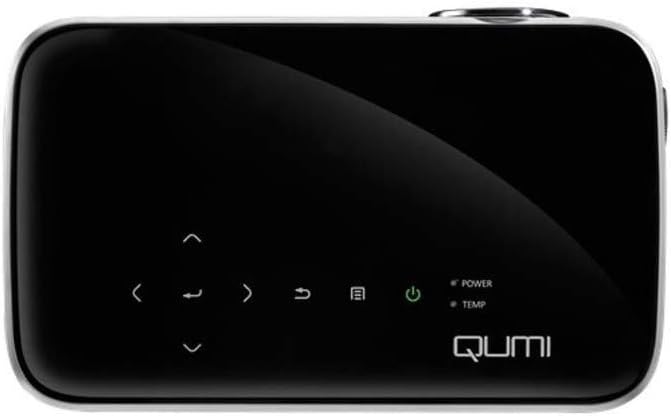
1 paveikslas: Į viršų view of the Vivitek Qumi Q8-BK projector, highlighting the touch-sensitive control panel. This panel includes navigation arrows, menu access, source selection, and power buttons, along with LED indicators for power and temperature.
The top panel features touch-sensitive controls for navigating menus, adjusting settings, and power management. LED indicators show the power status and temperature warnings.
4.2 Side Panel and Ports
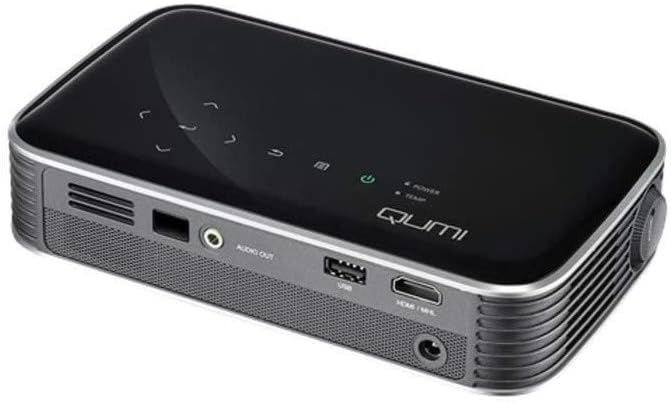
2 paveikslas: Šoninė view of the Vivitek Qumi Q8-BK projector, displaying its connectivity ports. These include an audio out jack, a USB port, and an HDMI/MHL input, along with ventilation grilles.
The side panel provides essential connectivity options:
- Garso išvestis: Prijunkite išorinius garsiakalbius arba ausines.
- USB: Skirta USB atmintinėms prijungti ir medijos atkūrimui filearba programinės įrangos atnaujinimams.
- HDMI/MHL: Connect to HDMI-enabled devices such as laptops, Blu-ray players, or MHL-compatible smartphones/tablets.
- Maitinimo įvestis: Prijunkite pridedamą maitinimo adapterį.
5. Sąranka
Follow these steps to set up your Vivitek Qumi Q8-BK projector.
5.1 Įjungimas
- Connect the power adapter to the projector's power input port and then to an electrical outlet.
- Press the power button on the projector's top panel or on the remote control. The power LED indicator will illuminate.
- Allow a few moments for the projector to warm up and display the initial screen.
5.2 Adjusting Focus and Keystone
- Fokusas: Rotate the focus ring located near the lens until the projected image is sharp and clear.
- Keystone korekcija: If the image appears trapezoidal (wider at the top or bottom), use the keystone correction function in the projector's menu to adjust it. This corrects the image geometry to a rectangular shape.
5.3 Įvesties šaltinių prijungimas
The Qumi Q8-BK supports multiple input sources:
- HDMI/MHL: Connect an HDMI cable from your source device (laptop, game console, Blu-ray player) to the HDMI/MHL port on the projector. For MHL-compatible mobile devices, use an MHL cable.
- USB: Įkiškite USB atmintinę į USB prievadą, kad galėtumėte pasiekti medijos failus filejame saugomi.
- Wireless (Miracast/AirPlay): The projector features built-in Wi-Fi for wireless content sharing from Android and iOS devices. Refer to the "Operating" section for detailed instructions on wireless setup.
6. Operacinis
This section covers the basic operation of your projector.
6.1 Meniu naršymas
Use the navigation buttons on the top panel or the remote control to browse the projector's on-screen menu. Press the "Menu" button to access settings such as image adjustments, source selection, and system configurations.
6.2 Šaltinio pasirinkimas
Press the "Source" button on the remote or the projector to cycle through available input sources (HDMI, USB, Wireless). Select the desired source from the on-screen menu.
6.3 Wireless Content Sharing (Miracast/AirPlay)
The Qumi Q8-BK supports wireless mirroring for compatible devices:
- Ensure the projector's Wi-Fi is enabled and connected to your network (if required for your device's mirroring function).
- Select the "Wireless" input source on the projector.
- On your Android device, enable "Screen Mirroring," "Smart View," or a similar function. On iOS devices, use "AirPlay Mirroring."
- Select the Qumi Q8-BK from the list of available devices on your mobile device.
- Your device's screen should now be mirrored on the projector.
Note: Performance may vary depending on network conditions and device compatibility. Some streaming services may restrict mirrored content.
6.4 Media Playback from USB
Insert a USB flash drive into the USB port. The projector's media player interface will typically launch automatically, allowing you to browse and play supported video, audio, and image files.
6.5 3D funkcionalumas
The Qumi Q8-BK supports 3D content. To view 3D content, you will need compatible 3D glasses (sold separately) and a 3D-enabled source device playing 3D content. Refer to the projector's on-screen menu for 3D settings and modes.
7. Priežiūra
Tinkama priežiūra užtikrina projektoriaus ilgaamžiškumą ir optimalų veikimą.
- Objektyvo valymas: Švelniai nuvalykite projektoriaus objektyvą minkštu, nepūkuotu audiniu, specialiai skirtu optiniams paviršiams. Nenaudokite abrazyvinių valiklių ar per didelės jėgos.
- Vėdinimas: Regularly check and clean the ventilation grilles to prevent dust buildup, which can lead to overheating. Use a soft brush or compressed air.
- Saugykla: Kai projektorius ilgesnį laiką nenaudojamas, laikykite jį nešiojimo dėkle vėsioje, sausoje ir be dulkių aplinkoje.
- LED L.amp: The projector uses an energy-efficient LED lamp with an estimated operational life of up to 30,000 hours, requiring no replacement under normal usage.
8. Problemų sprendimas
Jei kyla problemų dėl projektoriaus, žr. toliau pateiktas dažniausiai pasitaikančias problemas ir sprendimus.
| Problema | Galimas sprendimas |
|---|---|
| Vaizdas nerodomas |
|
| Nėra garso |
|
| Wireless mirroring issues |
|
| Projektorius perkaito arba išsijungia |
|
If the problem persists after trying these solutions, please contact Vivitek customer support.
9. Specifikacijos
Key technical specifications for the Vivitek Qumi Q8-BK projector:
| Funkcija | Detalė |
|---|---|
| Prekės ženklas | Vivitek |
| Modelio numeris | Qumi Q8-BK |
| Ekrano raiška | 1920 x 1080 (Full HD) |
| Ryškumas | Iki 1000 liumenų |
| Kontrasto santykis | 30,000:1 |
| Lamp Tipas | LED |
| Lamp Gyvenimas | Numatoma 50 000 valandų |
| Ryšio technologija | HDMI, USB, Wi-Fi (Miracast/AirPlay) |
| Ypatingos savybės | HDMI Connectivity, Portable, USB Connectivity, Wireless, Miracast |
| Gaminio matmenys | 1.7 x 4.4 x 7.4 colio |
| Prekės svoris | 1.4 svaro |
10. Garantija ir palaikymas
Vivitek products are designed for reliability and performance. For warranty information, please refer to the warranty card included in your product package or visit the official Vivitek website. For technical support, troubleshooting assistance beyond this manual, or service inquiries, please contact Vivitek customer support through their official channels.
Please have your product model number (Qumi Q8-BK) and serial number ready when contacting support.


