1. Įvadas
The Imperial DABMAN i400 is a versatile audio adapter designed to enhance your existing stereo system with modern radio and streaming capabilities. It provides access to thousands of internet radio stations, digital radio (DAB+), and traditional FM radio. Additionally, it supports audio streaming via Bluetooth, UPnP/DLNA, and USB, offering a comprehensive listening experience.
2. Saugos instrukcijos
- Maitinimas: Naudokite tik pateiktą maitinimo adapterį. Įsitikinkite, kad įtampatage atitinka jūsų vietinį maitinimo šaltinį.
- Vanduo ir drėgmė: Saugokite įrenginį nuo lietaus, drėgmės ar lašančių/taškančių skysčių. Nestatykite ant įrenginio daiktų, pripildytų skysčių, pavyzdžiui, vazų.
- Vėdinimas: Užtikrinkite tinkamą vėdinimą. Neužblokuokite ventiliacijos angų. Nestatykite įrenginio ant minkštų paviršių, kurie gali trukdyti oro srautui.
- Šilumos šaltiniai: Laikykite prietaisą atokiau nuo šilumos šaltinių, tokių kaip radiatoriai, šildytuvai, viryklės ar kiti šilumą skleidžiantys prietaisai.
- Valymas: Prieš valydami atjunkite maitinimą. Naudokite minkštą, sausą šluostę. Nenaudokite skystų ar aerozolinių valiklių.
- Aptarnavimas: Nemėginkite patys aptarnauti šio gaminio. Visą techninę priežiūrą patikėkite kvalifikuotam aptarnavimo personalui.
3. Pakuotės turinys
Prašome patikrinti, ar pakuotėje yra visi reikalingi daiktai:
- Imperial DABMAN i400 Internet Digital Radio
- Maitinimo adapteris
- Telescopic Antenna with F-connector
- Wire Antenna with F-connector
- RCA kabelis
- Garso kabelis (3.5 mm lizdas)
- Nuotolinio valdymo pultas
- Vartotojo vadovas (šis dokumentas)

Image: Imperial DABMAN i400 with its power adapter, telescopic antenna, wire antenna, RCA cable, 3.5mm audio cable, and remote control.
4. Produktas baigtasview
Priekyje View

Image: The front of the Imperial DABMAN i400, showing its display and control buttons on the top edge.
The front of the DABMAN i400 features a clear 3.2-inch LCD display for navigation and information. Control buttons are located on the top edge of the device for easy access to functions like power, mode selection, volume, and station presets.
Galinis View ir Ryšiai
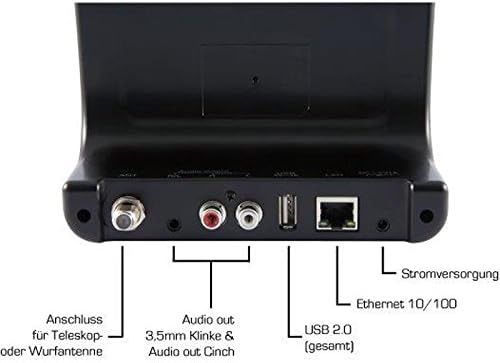
Image: The rear panel of the Imperial DABMAN i400, detailing its various connection ports. From left to right: Antenna connection (ANT), Audio output (RCA L/R and 3.5mm jack), USB 2.0 ports, Ethernet 10/100 (LAN), and Power supply (DC 5V/1A).
- ANT: F-connector for connecting the telescopic or wire antenna for DAB+/FM reception.
- Audio Output (R/L): RCA (Cinch) stereo audio output for connecting to an ampkeltuvas arba stereo sistema.
- Garso išvestis (3.5 mm lizdas): 3.5mm stereo audio output for connecting to other audio devices.
- USB 2.0: USB port for playing media from a USB storage device.
- LAN: Ethernet port (RJ45) for wired network connection.
- Nuolatinė srovė 5 V / 1 A: Maitinimo įvestis pridedamam maitinimo adapteriui.
5. Sąranka
- Prijunkite anteną: Screw the telescopic antenna or connect the wire antenna to the ANT F-connector on the rear panel. Extend the telescopic antenna for optimal reception.
- Prisijunkite prie garso sistemos: Use the provided RCA cable to connect the Audio Output (R/L) on the DABMAN i400 to an available audio input (e.g., AUX, CD, LINE IN) on your amplifier or stereo system. Alternatively, use the 3.5mm audio cable if your system has a compatible input.
- Tinklo prisijungimas:
- Laidinis (LAN): Prijunkite Ethernet kabelį nuo maršrutizatoriaus prie LAN port on the rear of the DABMAN i400.
- Wireless (WLAN): The device will prompt you to set up Wi-Fi during the initial startup wizard. Select your network and enter the password.
- Prijunkite maitinimą: Prijunkite maitinimo adapterį į DC 5V/1A input on the rear panel, then plug the adapter into a wall outlet. The device will power on automatically or enter standby mode.
- Pradinės sąrankos vedlys: Upon first power-on, the device will guide you through an initial setup process, including language selection, time/date settings, and network configuration. Follow the on-screen instructions.
6. Naudojimo instrukcijos
Pagrindinė navigacija
Use the control buttons on the top of the device or the remote control to navigate menus, select options, adjust volume, and change modes.
Režimo pasirinkimas
Press the 'Mode' button (or equivalent on remote) to switch between available modes:
- Interneto radijas: Access thousands of online radio stations worldwide. Browse by genre, location, or search for specific stations.
- DAB+ skaitmeninis radijas: Enjoy high-quality digital radio broadcasts. The device will scan for available stations in your area.
- FM radijas: Tune into traditional analog FM radio stations.
- Bluetooth: Belaidžiu būdu transliuokite garsą iš savo „Bluetooth“ palaikančio išmaniojo telefono, planšetinio kompiuterio ar kompiuterio.

Image: Bluetooth connectivity icon.
To pair: Select Bluetooth mode on the DABMAN i400. On your external device, search for available Bluetooth devices and select 'DABMAN i400'.
- UPnP/DLNA: Srautinė muzika files from compatible devices on your local network (e.g., a network-attached storage (NAS) drive or a computer running a media server).

Image: UPnP (Universal Plug & Play) icon.
- USB atkūrimas: Leisti garsą files (e.g., MP3) from a USB flash drive connected to the USB port on the rear of the device.

Image: MP3 music file piktogramą.
Išankstiniai nustatymai
Save your favorite stations as presets for quick access. Refer to the on-screen menu for instructions on how to save and recall presets.
Air Music Control App
Control your DABMAN i400 using the Air Music Control App available for smartphones and tablets. This app allows for convenient remote control and browsing of stations.

Image: Air Music Control App icon.
7. Priežiūra
- Valymas: Wipe the device with a soft, dry, lint-free cloth. Do not use abrasive cleaners, waxes, or solvents.
- Programinės įrangos atnaujinimai: Periodically check for available software updates through the device's system settings menu to ensure optimal performance and access to new features.
- Saugykla: Jei prietaisą ilgesnį laiką sandėliuosite, atjunkite jį nuo maitinimo šaltinio ir laikykite vėsioje, sausoje vietoje.
8. Problemų sprendimas
- Nėra galios:
- Įsitikinkite, kad maitinimo adapteris yra tvirtai prijungtas prie įrenginio ir veikiančio maitinimo lizdo.
- Išbandykite kitą maitinimo lizdą.
- Nėra garso:
- Check the volume level on both the DABMAN i400 and your connected audio system.
- Ensure the audio cables are correctly connected to the appropriate input on your audio system.
- Patikrinkite, ar jūsų garso sistema nustatyta į tinkamą įvesties šaltinį.
- Cannot Connect to Wi-Fi/Internet:
- Įsitikinkite, kad jūsų „Wi-Fi“ maršrutizatorius įjungtas ir veikia tinkamai.
- Dar kartą patikrinkite „Wi-Fi“ slaptažodį.
- Try moving the device closer to your Wi-Fi router or use a wired LAN connection.
- Restart your router and the DABMAN i400.
- Poor DAB+/FM Reception:
- Ensure the antenna is fully extended and positioned for optimal reception.
- Try repositioning the device or antenna.
- Check if you are in an area with good DAB+ or FM coverage.
- „Bluetooth“ poravimo problemos:
- Ensure the DABMAN i400 is in Bluetooth pairing mode.
- Įsitikinkite, kad išorinio įrenginio „Bluetooth“ ryšys įjungtas ir aptinkamas.
- Move your external device closer to the DABMAN i400.
- Pabandykite atjungti ir iš naujo susieti įrenginius.
9. Specifikacijos
| Funkcija | Specifikacija |
|---|---|
| Prekės ženklas | Imperatoriškasis |
| Modelio numeris | 22-241-00 |
| Spalva | Juoda |
| Ekrano dydis | 3.2 colių |
| Ryšio technologija | Bluetooth, LAN (Ethernet), WLAN (Wi-Fi), RCA (Cinch) L/R, 3.5mm Audio Jack |
| Ypatingos savybės | Portable (as an adapter), Internet Radio, DAB+, FM, UPnP/DLNA |
| Iš viso USB prievadų | 1 |
| Suderinami įrenginiai | Bluetooth devices, UPnP/DLNA compatible devices |
| Maitinimo šaltinis | Kintamoji srovė (per maitinimo adapterį) |
| Palaikomos radijo dažnių juostos | FM, DAB, DAB+, Internet Radio |
| Gaminio matmenys | 15L x 8.1W x 14H centimetrai |
| Įtraukti komponentai | Power Adapter, Telescopic Antenna, Wire Antenna, RCA Cable, Audio Cable, Remote Control, User Manual |
| Palaikomos kalbos | German, English, French, Dutch |
10. Garantija ir palaikymas
Gamintojo garantija
The Imperial DABMAN i400 comes with a manufacturer's warranty. Please refer to the warranty card included in your package or the manufacturer's official website for specific terms and conditions. Spare parts availability is guaranteed for 1 year.
Pagalba klientams
For technical assistance, troubleshooting beyond this manual, or warranty claims, please contact Imperial customer support. Contact information can typically be found on the manufacturer's websvetainėje arba produkto pakuotėje.


