1. Produktas baigtasview
The Intermatic ST01 is a versatile 7-day heavy-duty programmable timer designed for a wide range of applications. It allows users to set precise ON/OFF schedules for electrical loads, offering convenience and energy savings. This timer is suitable for 120-277 VAC systems and can handle up to 15A, making it ideal for controlling lighting, fans, pumps, and other heavy-duty electrical equipment.
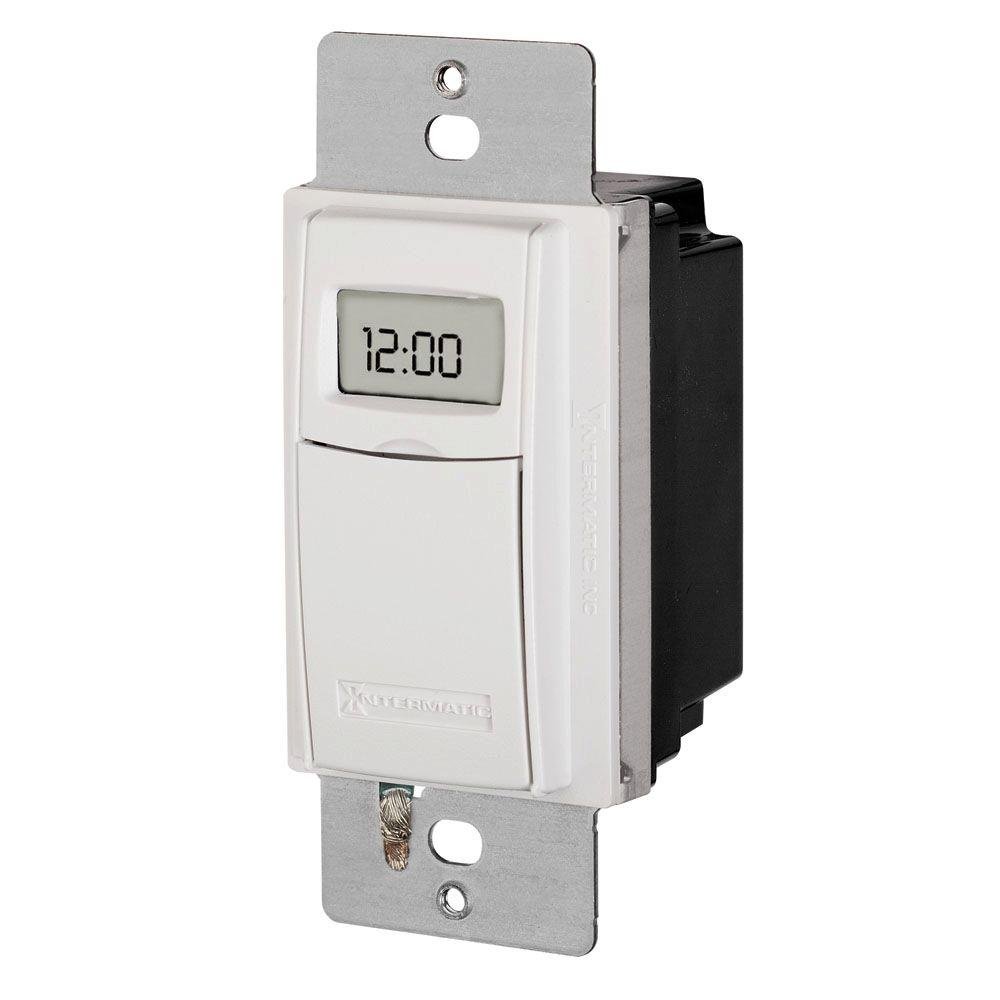
1 pav.: priekis view of the Intermatic ST01 Programmable Timer, showing its digital display and white finish.
2. Svarbios saugos instrukcijos
Please read and understand all instructions before installing or operating this timer. Failure to follow these instructions may result in electric shock, fire, or serious injury.
- Atjunkite maitinimą: Prieš montuodami arba atlikdami laikmačio techninę priežiūrą, visada išjunkite maitinimą grandinės pertraukikliu arba saugiklių dėžute.
- Kvalifikuotas elektrikas: Installation should be performed by a qualified electrician or trained personnel in accordance with all national and local electrical codes.
- Naudoti tik patalpose: This device is intended for indoor use in dry locations only. Do not expose to rain or moisture.
- Tinkamas laidas: Ensure all wiring connections are secure and correctly matched to the terminal markings. A neutral wire is required for operation.
- Apkrova: Do not exceed the maximum electrical ratings of the timer (15A, 120-277 VAC).
- Įžeminimas: Įsitikinkite, kad laikmatis yra tinkamai įžemintas.
3. Pakuotės turinys
Prieš pradėdami diegti, patikrinkite, ar yra visi komponentai:
- Intermatic ST01 7-Day Heavy-Duty Programmable Timer
- Instrukcijų vadovas
- Mounting Screws (typically included with wall plate, not explicitly listed in product data)
4. Pagrindinės savybės
- 7 dienų programavimo galimybė: Allows for different schedules on each day of the week.
- Heavy-Duty Rating: Capable of controlling loads up to 15 Amperes.
- Platus ttage Diapazonas: Operates on 120-277 VAC.
- Skaitmeninis ekranas: Clear and easy-to-read digital time and program display.
- Rankinis nepaisymas: Provides temporary or permanent manual control over programmed settings.
- Automatinis vasaros laiko perjungimas: Simplifies time changes.
- Baterijos atsarginė kopija: Išsaugo programos nustatymus išjungimo metutages.
5. Techninės specifikacijos
| Specifikacija | Vertė |
|---|---|
| Modelio numeris | ST01 |
| ttage | 120-277 VAC |
| Dabartinis reitingas | 15 Amperes |
| Gaminio matmenys | 2.3 x 4.9 x 3 colio |
| Prekės svoris | 0.01 uncijos |
| Spalva | Baltas |
| Medžiaga | Plastikiniai |
| Nustatymų skaičius | 3 (This refers to modes, not programs) |
6. Diegimo vadovas
This section provides general guidelines for installing the Intermatic ST01 timer. For detailed wiring diagrams and specific instructions, refer to the diagram included with your product packaging or consult a qualified electrician.
6.1. Paruošimas
- Turn off power to the circuit at the main service panel (breaker or fuse box).
- Ensure the power is off by testing the circuit with a voltage testeris.
- Remove the existing wall switch or cover plate.
6.2. Laidai
The ST01 timer requires a neutral wire for operation. Identify the Line (hot), Load, and Neutral wires in your electrical box. The timer typically has corresponding colored wires or marked terminals.
- Prijunkite Linija (karšta) wire from the electrical box to the designated Line terminal/wire on the timer.
- Prijunkite Įkelti wire (to the light/appliance) from the electrical box to the designated Load terminal/wire on the timer.
- Prijunkite Neutralus wire from the electrical box to the designated Neutral terminal/wire on the timer.
- Prijunkite Žemė wire from the electrical box to the ground screw on the timer or electrical box.
- Visoms jungtims pritvirtinti naudokite vielos veržles.
6.3. Montavimas
- Atsargiai įstumkite laidinį laikmatį į sieninę dėžutę.
- Secure the timer to the wall box using the provided mounting screws.
- Attach the decorative wall plate (not included) over the timer.
- Atkurkite maitinimą prie grandinės pertraukiklio.
7. Naudojimo instrukcijos
Once installed and powered, the timer's display will activate. Follow these steps for initial setup and programming.
7.1. Initial Setup: Setting Current Time and Date
- Paspauskite "LAIKRODIS" mygtuką. Valandų skaitmenys pradės mirksėti.
- Naudokite "VALANDA" ir "MINUTĖ" mygtukais nustatykite dabartinę valandą ir minutę.
- Paspauskite "DIENA" mygtuką, norėdami nustatyti dabartinę savaitės dieną.
- Paspauskite "LAIKRODIS" dar kartą išsaugoti ir išeiti.
7.2. Įjungimo/išjungimo tvarkaraščių programavimas
The ST01 allows for multiple ON/OFF programs per day. Refer to the specific button layout on your device for exact programming steps, as these can vary slightly.
- Paspauskite „PROGRAM“ mygtuką. Ekrane bus rodoma „1 ON“.
- Naudokite "VALANDA" ir "MINUTĖ" mygtukus, kad nustatytumėte norimą 1 programos įjungimo laiką.
- Paspauskite "DIENA" to select the days of the week for this program (e.g., Mon-Fri, Sat-Sun, or individual days).
- Paspauskite „PROGRAM“ dar kartą. Ekrane bus rodoma „1 OFF“.
- Set the desired OFF time for program 1 using "VALANDA" ir "MINUTĖ" mygtukai.
- Repeat steps 3-5 for additional programs (2 ON/OFF, 3 ON/OFF, etc.).
- Paspauskite "LAIKRODIS" mygtuką, kad išeitumėte iš programavimo režimo ir grįžtumėte į įprastą veikimą.
7.3. Rankinis nepaisymas
The timer typically features a manual override button (often labeled "MANUAL" or "ON/OFF").
- Laikinas nepaisymas: Pressing the manual button usually toggles the current state (ON to OFF, or OFF to ON) until the next programmed event.
- Nuolatinis nepaisymas: Some models allow holding the button or pressing it multiple times to enter a permanent ON or OFF state, overriding all programs until manually changed again. Consult your device's specific instructions for this feature.
8. Priežiūra
The Intermatic ST01 timer is designed for long-term, maintenance-free operation. However, a few simple steps can ensure its longevity:
- Valymas: Nuvalykite paviršių minkštu, sausu skudurėliu. Nenaudokite abrazyvinių valiklių ar tirpiklių.
- Baterijos atsarginė kopija: The timer contains an internal battery for program retention during power outages. This battery is typically long-lasting and not user-replaceable. If the display goes blank or programs are lost frequently during power interruptions, the unit may need servicing or replacement.
- Patikra: Periodiškai tikrinkite laidų jungtis, ar nėra tvirtumo ir susidėvėjimo požymių.
9. Problemų sprendimas
If you experience issues with your Intermatic ST01 timer, refer to the table below for common problems and solutions.
| Problema | Galima priežastis | Sprendimas |
|---|---|---|
| Laikmačio ekranas tuščias. | No power to the timer; incorrect wiring; internal battery depleted. | Check circuit breaker. Verify wiring connections (Line, Neutral). If power is present and wiring is correct, the unit may require replacement. |
| Laikmatis neįsijungia/neišsijungia užprogramuotu laiku. | Incorrect programming; manual override engaged; incorrect current time/day. | Review and re-enter program settings. Check if manual override is active. Verify current time and day are set correctly. |
| Load (light/appliance) does not turn ON/OFF. | Load wire not connected; load device faulty; timer faulty. | Ensure load wire is securely connected. Test the load device directly (e.g., plug into a working outlet). If the load works directly, the timer may be faulty. |
| Programs are lost after power outage. | Internal battery backup is depleted or faulty. | The internal battery is not user-replaceable. The unit may need replacement if this issue persists. |
10. Informacija apie garantiją
Intermatic products are manufactured to the highest quality standards. This product is covered by a limited warranty against defects in material and workmanship. The specific terms and duration of the warranty are typically provided with the product packaging or can be found on the official Intermatic websvetainėje. Prašome išsaugoti pirkimo įrodymą garantiniams reikalavimams.
11. Pagalba klientams
For technical assistance, troubleshooting beyond this manual, or warranty inquiries, please contact Intermatic Customer Support. Have your product model number (ST01) and purchase information ready when contacting support.
You can typically find contact information (phone number, email, or support portal) on the official Intermatic websvetainė: www.intermatic.com


