Produktas baigtasview
The Sauder Palladia Office Desk is designed to provide a functional and stylish workspace. This executive desk features a spacious top surface, multiple storage options including pencil drawers, storage drawers, and a file drawer, along with integrated cable management and a keyboard tray. Its Glacier Oak finish with Rosso Slate accents offers a sophisticated aesthetic suitable for various home office environments.

Vaizdas: priekis view of the Sauder Palladia Office Desk, showcasing its Glacier Oak finish and dark top surface.
Pagrindinės savybės
- Erdvus darbinis paviršius: Accommodates laptops, notepads, and other office essentials.
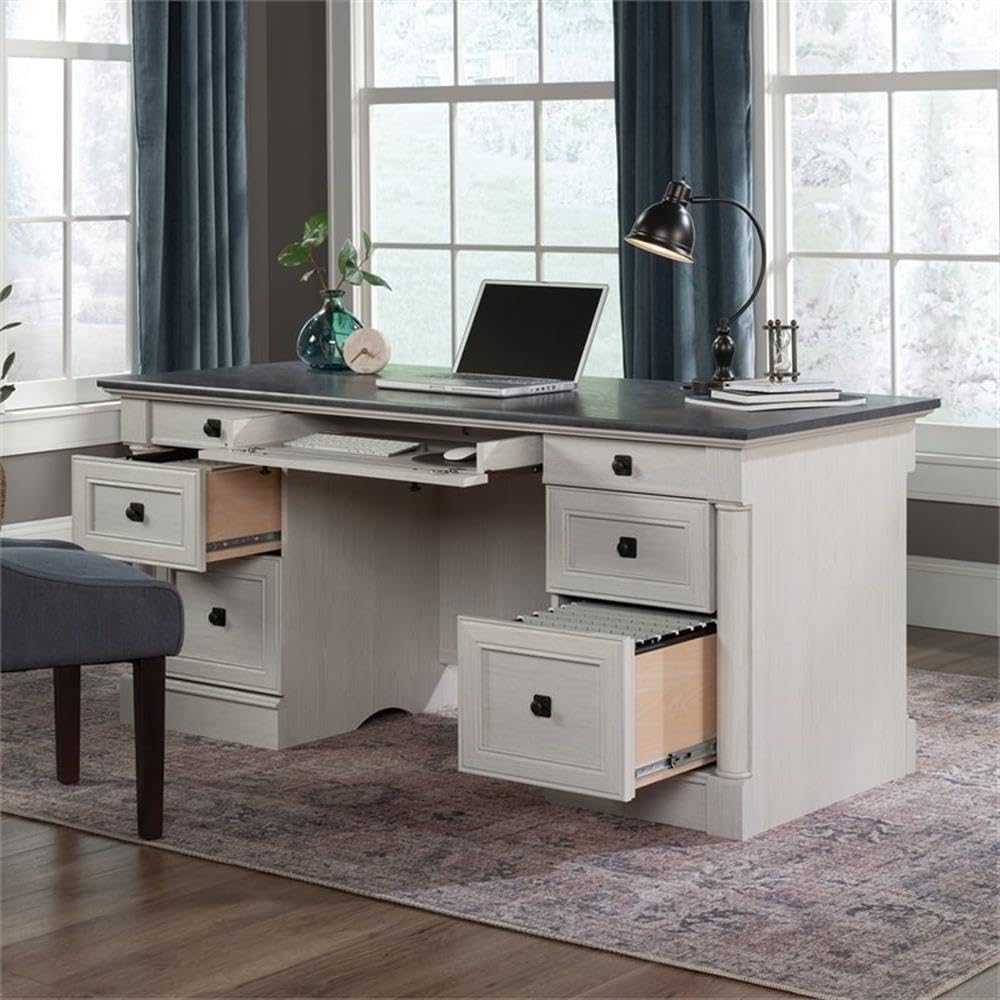
- Integrated Keyboard Tray: A large drawer with a flip-down panel for keyboard, mouse, or laptop.
- Keli laikymo stalčiai: Includes two pencil drawers and two storage drawers for organization.
- File Stalčius: Žemesnis file drawers with full extension slides accommodate letter, legal, or European size hanging files.
- Kabelių valdymas: Features two desktop grommets and numerous pass-throughs to reduce cord clutter.
- Patvari konstrukcija: Crafted with engineered wood and metal runners for smooth drawer operation.
- Elegantiška apdaila: Glacier Oak finish with Rosso Slate accents.
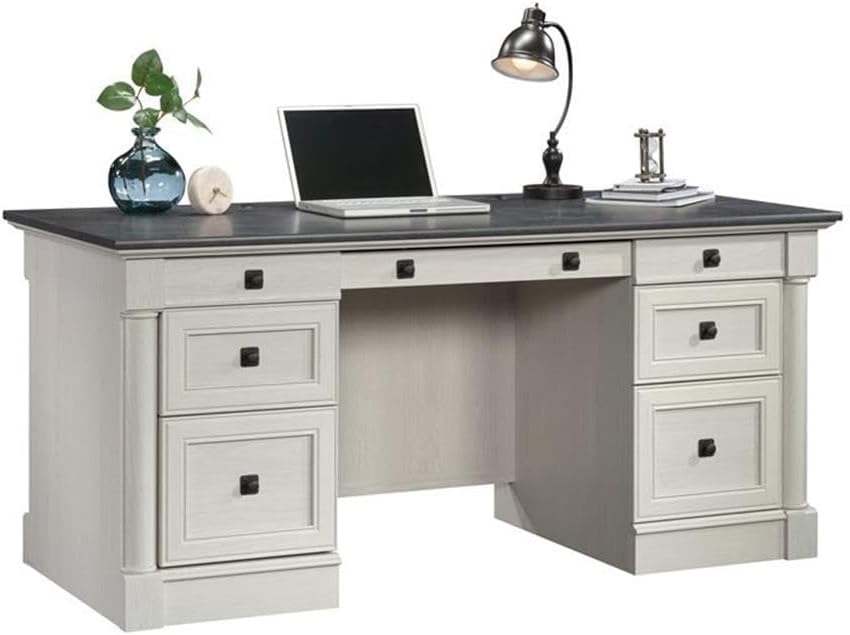
Image: The desk with its central keyboard tray pulled out and the bottom right file drawer open, demonstrating storage capabilities.

Vaizdas: Stambus planas view iš file stalčius, rodantis, kad jį galima pakabinti files.

Paveikslėlis: detalus view of the pull-out keyboard tray, designed to hold a keyboard and mouse.
Specifikacijos
| Atributas | Detalė |
|---|---|
| Prekės ženklas | Sauderis |
| Modelio numeris | 432726 |
| Modelio pavadinimas | Palladia |
| Spalva | Glacier Oak |
| Gaminio matmenys (D x P x A) | 29.53 "D x 65.12" P x 29.61" A |
| Prekės svoris | 242 svaro |
| Bazinė medžiaga | Inžinierinė mediena |
| Apdailos tipas | Paper Laminate |
| Stalčių skaičius | 4 (plus keyboard tray) |
| Stalčių slydimo mechanizmas | Metal runners or slides |
| Maximum Weight Recommendation (Top Surface) | 75 svaro |
| Reikalingas surinkimas | Taip |
| Surinkimui rekomenduojami įrankiai | Plaktukas, atsuktuvas |

Image: A detailed diagram showing the overall dimensions of the desk and the internal dimensions of its various drawers.
Surinkimo instrukcijos
This desk requires assembly. It is recommended to have at least two people for assembly due to the weight and size of the components. Follow the included manufacturer's assembly manual for detailed, step-by-step instructions. Ensure all parts are accounted for before beginning assembly.
Paruošimas:
- Clear a large, open workspace.
- Išpakuokite visus komponentus ir patikrinkite juos pagal dalių sąrašą, pateiktą vadove.
- Organize hardware and panels by their labels.
- Have a hammer and a #2 Phillips head screwdriver readily available.
Generalinės Asamblėjos patarimai:
- Read each step completely before performing it.
- Do not overtighten screws, especially into engineered wood, to prevent stripping.
- Ensure all cam locks and fasteners are securely engaged for structural integrity.
- For drawer slides, ensure they are properly aligned and lubricated if necessary for smooth operation.
Veikimo ypatybės
Klaviatūros dėklas:
The central drawer features a flip-down panel, allowing it to function as a keyboard and mouse tray. Gently pull the drawer out and flip down the front panel to access your keyboard and mouse. Push the panel back up and slide the drawer in to conceal them when not in use.
Sandėliavimo stalčiai:
The desk includes two smaller pencil drawers and two larger storage drawers. The bottom drawers are designed as file drawers, accommodating letter, legal, or European size hanging files. Utilize these drawers to organize documents, office supplies, and personal items.
Kabelių valdymas:
Two grommets are located on the top surface of the desk to route cables from your devices (e.g., monitor, laptop charger) through to the back of the desk. Internal pass-throughs are also integrated to help manage and conceal cables, maintaining a tidy workspace.
Paveikslėlis: Galinė dalis view of the desk, showing the finished back panel and potential cable routing areas.

Paveikslėlis: Galinė dalis view of the desk with a cabinet door open, revealing internal storage shelves for books or other items.
Priežiūra ir priežiūra
To maintain the appearance and longevity of your Sauder Palladia Office Desk, follow these care instructions:
- Valymas: Nuvalykite paviršius reklamaamp šluoste. Venkite naudoti stiprių cheminių medžiagų, abrazyvinių valiklių ar poliravimo priemonių, kurios gali pažeisti apdailą.
- Išsiliejimai: Nedelsdami nuvalykite išsiliejusius skysčius, kad drėgmė nepažeistų inžinerinės medienos.
- Šiluma ir drėgmė: Avoid placing hot items directly on the surface. Use coasters for beverages to prevent rings and stains.
- Saulės šviesa: Ilgalaikis tiesioginių saulės spindulių poveikis laikui bėgant gali išblukinti arba pakeisti spalvą.
- Persikėlimas: When moving the desk, lift it rather than dragging it to prevent damage to the legs and structure.
Trikčių šalinimas
Stalčiai neslysta sklandžiai:
- Ensure the drawer slides are correctly installed and aligned on both the drawer and the desk frame.
- Patikrinkite, ar stalčių slydikliai netrukdo.
- Verify that all screws securing the slides are tightened appropriately, but not overtightened, which can warp the wood.
- Apply a silicone-based lubricant to the metal runners if friction persists.
Desk feels wobbly after assembly:
- Recheck all cam locks and fasteners to ensure they are fully engaged and tightened.
- Verify that all panels are correctly seated in their grooves and connections.
- Ensure the desk is placed on a level surface. Adjust any leveling feet if present.
Trūkstamos arba pažeistos dalys:
- Refer to the manufacturer's contact information in the warranty section for assistance with replacement parts.
Informacija apie garantiją
The Sauder Palladia Office Desk is covered by a 5 metų ribota garantija on parts. This warranty covers manufacturing defects and material flaws under normal residential use. For specific terms and conditions, please refer to the warranty documentation included with your product or contact Sauder customer support.
Pagalba klientams
For further assistance, including assembly questions, replacement parts, or warranty claims, please contact Sauder customer support. Visit the official Sauder websvetainėje arba žr. kontaktinę informaciją, pateiktą ant produkto pakuotės.
Taip pat galite apsilankyti Sauder Store on Amazon jei reikia papildomos informacijos apie produktą ir pagalbos išteklių.


