1. Įvadas
The TSC TE200 is a desktop thermal label printer designed for various labeling applications. It supports both direct thermal and thermal transfer printing methods, making it suitable for a wide range of label types including shipping labels, product tags, receipts, and barcodes. This printer offers a resolution of 203 dots per inch (DPI) and can print at speeds up to 6 inches per second. Its robust ABS shell is designed for durability in various environments.

1.1 paveikslas: Priekinis dešinysis view of the TSC TE200 Desktop Thermal Label Printer.
2. Kas įskaičiuota
Upon unpacking your TSC TE200 printer, verify that all components listed below are present:
- TSC TE200 Thermal Label Printer
- Maitinimo laidas
- USB kabelis
- Labeling Software (typically provided via download or included media)
- Setup Installation Guide
- Ribbon Accessories (spindles, cores)

Image 2.1: All items included in the TSC TE200 printer package.
3. Sąranka
3.1 Fizinis ryšys
- Padėkite spausdintuvą ant stabilaus, lygaus paviršiaus.
- Prijunkite maitinimo laidą prie spausdintuvo, o tada – prie elektros lizdo.
- Connect the USB cable to the printer's USB port and to your computer.
3.2 Tvarkyklės ir programinės įrangos diegimas
Refer to the included Setup Installation Guide for detailed instructions on installing the printer drivers and labeling software on your operating system. Ensure that the correct drivers are installed for proper printer functionality.
3.3 Loading Labels and Ribbons
The TE200 printer supports various label and ribbon configurations.
- Etiketės: The printer accommodates 5-inch (127 mm) outer diameter (OD) label rolls on a 1-inch core, with a maximum print width of 4.25 inches (108 mm).
- Juostelės: It is compatible with 72-meter or 110-meter ribbons on a 0.5-inch core, or 300-meter ribbons on a 1-inch core.
To load labels and ribbons:
- Atidarykite spausdintuvo viršutinį dangtį.
- Follow the diagrams in the setup guide to correctly place the label roll and ribbon onto their respective spindles.
- Ensure the labels and ribbon are properly aligned and threaded through the print mechanism.
- Uždarykite viršutinį dangtį.
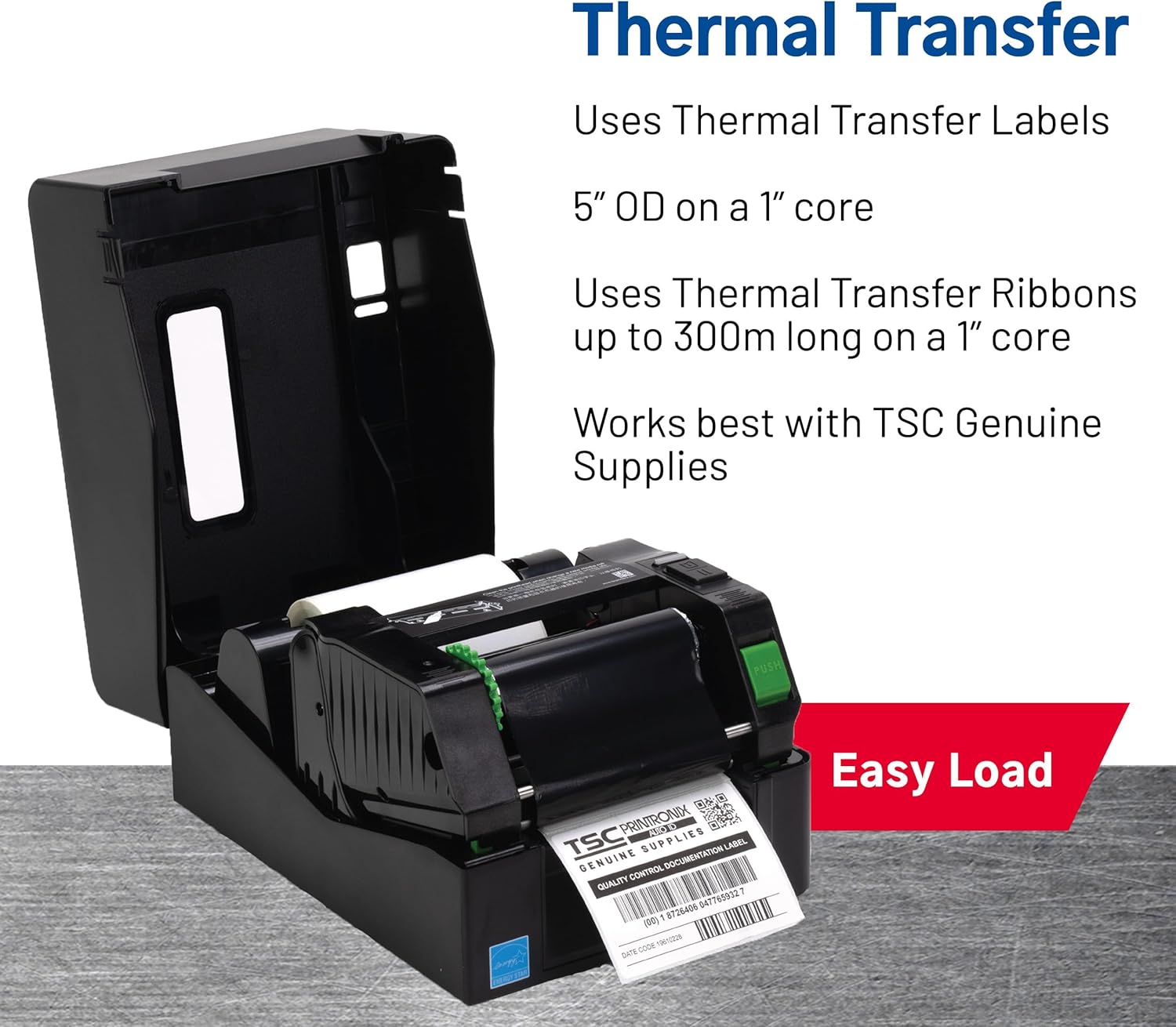
Image 3.1: Easy loading of thermal transfer labels and ribbons.
4. Spausdintuvo valdymas
4.1 Spausdinimo procesas
- Įsitikinkite, kad spausdintuvas įjungtas ir prijungtas prie kompiuterio.
- Open your labeling software (e.g., the design software included with the printer) or the application from which you intend to print.
- Design your label or select an existing template.
- Verify printer settings within the software, such as label size, print method (direct thermal or thermal transfer), and print quantity.
- Initiate the print command from your software.
- The printer will feed the label media and print the design.

Image 4.1: The TSC TE200 printer in operation, producing a label.
4.2 Programos
The TSC TE200 is versatile and suitable for various labeling needs, including:
- Shipping and Postage Etiketės
- Produkto identifikavimas Tags
- Retail Labels and Barcodes
- Kvitai
- File Folder Labels
- General Office and Home Office Labeling

4.2 pav.: pvz.amples of versatile applications for the TE200 printer.
4.3 Direct Thermal vs. Thermal Transfer Printing
The TE200 supports two printing methods:
- Direct Thermal: Uses heat-sensitive paper that darkens when heated. Ideal for short-term labeling applications where labels are not exposed to harsh physical or environmental conditions (e.g., receipts, temporary shipping labels).
- Thermal Transfer: Uses a ribbon that melts ink onto the label material. This method produces more durable and long-lasting labels, suitable for applications exposed to moisture, chemicals, high heat, or direct sunlight (e.g., product labels, asset tracking).
5. Priežiūra
Regular maintenance ensures optimal performance and extends the lifespan of your TSC TE200 printer.
- Spausdinimo galvutės valymas: Periodically clean the print head with an alcohol-based cleaning wipe designed for thermal printers. Ensure the printer is off and cooled down before cleaning.
- Veleno volelio valymas: Nuvalykite spausdinimo volelį nepūkuotu skudurėliu dampišvalykite izopropilo alkoholiu, kad pašalintumėte klijų likučius ar dulkes.
- Dulkių šalinimas: Use compressed air to remove dust and debris from the interior of the printer.
- Žiniasklaidos pakeitimas: Replace label rolls and ribbons as needed to prevent printing interruptions and maintain print quality.
Always refer to the detailed cleaning instructions in your Setup Installation Guide for specific procedures.
6. Problemų sprendimas
If you encounter issues with your TSC TE200 printer, consider the following common troubleshooting steps:
- Nėra galios: Ensure the power cord is securely connected to both the printer and a working power outlet.
- Spausdintuvas neatsako:
- Check the USB cable connection between the printer and the computer.
- Verify that the printer drivers are correctly installed and updated on your computer.
- Paleiskite iš naujo ir spausdintuvą, ir kompiuterį.
- Prasta spausdinimo kokybė:
- Ensure the correct label type (direct thermal or thermal transfer) is selected in your software settings.
- Check if the ribbon is correctly loaded and not depleted (for thermal transfer printing).
- Nuvalykite spausdinimo galvutę ir spausdinimo volelį, kaip aprašyta skyriuje „Priežiūra“.
- Adjust print darkness settings in your software.
- Etiketės netiekiamos tinkamai:
- Ensure labels are loaded correctly and aligned.
- Patikrinkite, ar etiketės kelyje nėra kliūčių.
- Perform a media calibration if available in your printer utility software.
For more complex issues, consult the comprehensive troubleshooting section in your Setup Installation Guide or contact TSC customer support.
7. Specifikacijos
| Funkcija | Specifikacija |
|---|---|
| Modelis | TE200 |
| Spausdinimo būdas | Tiesioginis terminis / terminis perdavimas |
| Rezoliucija | 203 DPI (8 taškai/mm) |
| Maks. Spausdinimo greitis | 6 coliai per sekundę (152.4 mm/s) |
| Maks. Spausdinimo plotis | 4.25 colio (108 mm) |
| Ryšys | USB |
| Atmintis | 16 MB SDRAM, 8 MB Flash |
| Juostos talpa | 72m/110m (0.5" core), 300m (1" core) |
| Label Roll OD | 5 inches (127 mm) on 1-inch core |
| Energijos suvartojimas | 60 vatų |
| Matmenys (I x P x A) | 11.02 x 8.03 x 11.02 colio (280 x 204 x 280 mm) |
| Svoris | 5.3 svaro (2.4 kg) |
8. Garantija ir palaikymas
8.1 Informacija apie garantiją
The TSC TE200 printer comes with a full warranty. For specific terms and conditions, please refer to the warranty documentation included with your product or visit the official TSC websvetainę.
8.2 Pagalba klientams
For technical assistance, troubleshooting, or further inquiries, please contact TSC customer support. With over 30 years of experience, TSC provides dedicated product and engineering support.
You can find more information and support resources on the official TSC websvetainė: tscprinters.com.


