Įvadas
The OCEANIC Pro Plus X Dive Computer is designed to provide divers with clear, essential information for safe and enjoyable underwater exploration. Featuring a large, easy-to-read color screen, intuitive controls, and advanced functionalities like a digital compass and smartphone connectivity, this dive computer is a reliable companion for both recreational and technical diving. Its robust design ensures durability in various marine environments.

Figure 1: The OCEANIC Pro Plus X Dive Computer, showcasing its large display and robust casing.
Sąranka
Before your first dive, ensure your Pro Plus X is properly configured. Use the four buttons located at the bottom of the computer to navigate through the menus.
Pradinė konfigūracija
- Nustatykite datą ir laiką: Access the 'Setup Menu' to adjust the current date and time.
- Kalibruoti kompasą: Perform a compass calibration prior to first use and after any battery changes. This ensures accurate navigation.
- Set Declination: Adjust the declination if you are diving in a new global region to maintain compass accuracy.
- Vandens tipas: Select 'Sea' for saltwater diving or 'Fresh' for freshwater. Note that selecting 'Fresh' will deactivate the water activation feature, as the computer assumes you are diving at altitude.
- Matavimo vienetai: Choose between Imperial (Feet, PSI) or Metric (Meters, Bar) units for depth, pressure, and temperature readings.
- Gas Settings: If diving with Nitrox, access 'Set Gas' to configure up to four gas mixes (Gas 1, Gas 2, Gas 3, Gas 4). Gas 1 is always your primary bottom gas. For each gas, set the FO2 (Fraction of Oxygen) and PO2 (Partial Pressure of Oxygen) alarm limits. If diving with air, no specific gas setting is required.
- Deep Stop & Safety Stop: Activate and configure Deep Stops and Safety Stops. A Deep Stop will pause your ascent for 3 minutes at 50% of your maximum depth (requires exceeding 80ft to activate). Safety Stops can be set for 3 or 5 minutes at 10, 15, or 20 feet. You are not penalized if you do not stop at a deep stop or safety stop.
- Algoritmas: Select your preferred decompression algorithm: DSAT (modified Haldanean) or Z+ (Buhlmann).
- Conservative Factor: Enable or disable the conservative factor. When enabled, the computer uses calculations for the next elevation level, making the dive profile more conservative.
- Sample Įvertinkite: Adjust the PC sampling rate for data logging. A 2-second sample rate provides approximately 160 minutes of dive time before overwriting older data. A 60-second rate offers about 40 hours, 30 seconds offers 20 hours, and 15 seconds offers 10 hours.
- Signalizacijos: Customize various alarms including audible alerts, maximum depth, elapsed dive time (EDT), tissue loading bar graph (TLBG), dive time remaining (DTR), turn pressure, and low pressure.
- Preview Nustatymai: Configure which dive data items are displayed in the preview screen for quick viewing.
DiverLog+ App Connectivity
The Pro Plus X features Bluetooth 4.0 connectivity for wireless connection to the DiverLog+ App on your smartphone or tablet. This allows for easy download of dive logs and management of personal data and settings.
Video 1: Detailed tutorial on setting up and navigating the OCEANIC Pro Plus X Dive Computer menus.
Naudojimo instrukcijos
The Pro Plus X is designed for ease of use during your dive. Its large color screen display ensures legibility in various lighting conditions, from bright sunlight to night dives.
Nardymo režimai
- Norm Mode: This is the standard operating mode for recreational and technical dives, providing full decompression calculations.
- Matuoklio režimas: This mode turns the computer into a digital depth gauge, displaying current depth, maximum depth, and dive time. Note that in Gauge Mode, the computer will not record oxygen or nitrogen loading for 24 hours after exiting the water.
Skaitmeninis kompasas
The integrated 3D digital compass can be accessed with a single button push. It offers three modes: North, Reference, and Reverse Reference, aiding in underwater navigation.
Viewing Dive Data
- Last Dive Data: Greitai review information from your most recent dive.
- Daugiau duomenų: Access current status information including temperature, altitude calibration, O2 saturation, time to fly, and desaturation time.
- Planas: While not required for real-time calculations, you can plan your next dive to review potential profiles and limits.
2 vaizdo įrašas: Produktas perview video highlighting the key features and benefits of the dive computer.
Priežiūra
Proper maintenance ensures the longevity and reliability of your OCEANIC Pro Plus X Dive Computer.
- Skalavimas: Always rinse your dive computer thoroughly with fresh water after each dive to remove salt, sand, and other debris.
- Saugykla: Store the computer in a cool, dry place away from direct sunlight and extreme temperatures.
- Baterija: The computer's battery life is optimized by turning off Bluetooth when not in use. Refer to the full user manual for battery replacement procedures, which should ideally be performed by an authorized service center.
- Greito atjungimo žarna: Regularly inspect the quick disconnect hose for any signs of wear or damage. This feature allows for easy removal and attachment of the computer from your regulator setup.
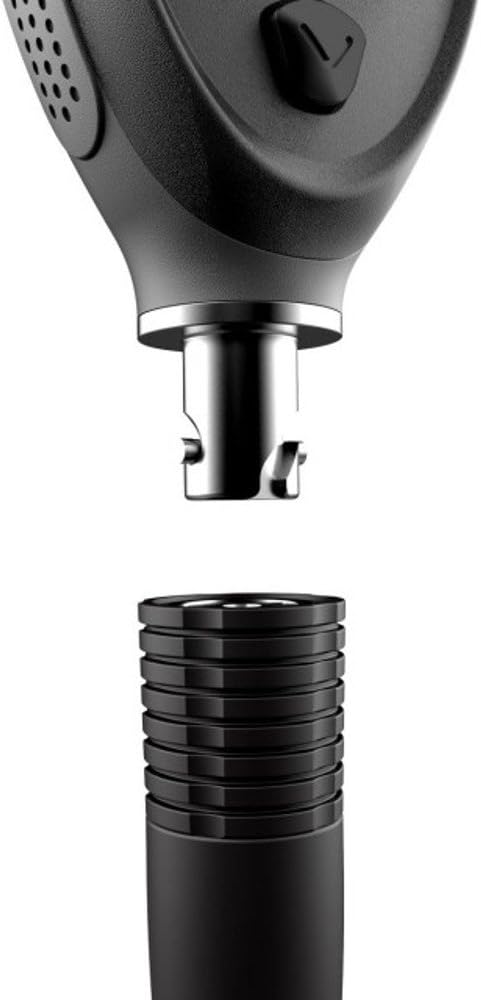
Figure 2: The quick disconnect hose feature of the Pro Plus X, allowing for easy detachment.

3 pav.: šonas view of the OCEANIC Pro Plus X, highlighting its compact design.
Trikčių šalinimas
If you encounter issues with your Pro Plus X, consider the following common problems and solutions:
- Screen Readability in Bright Light: While the screen is designed for clarity, extreme bright sunlight conditions can sometimes affect readability. Adjusting your viewing angle or shading the screen may help.
- Computer Not Resetting to Surface Mode: If the computer remains in dive mode or displays incorrect readings after surfacing, try rinsing it thoroughly with fresh water. If the issue persists, a factory reset (refer to the full manual) or contacting customer support may be necessary.
- Software Glitches/Freezing: In rare cases, the unit may experience software issues. If the computer freezes or behaves erratically, try restarting it. If a restart doesn't resolve the issue, a hard reset (often involving temporary battery removal) might be required.
- „Bluetooth“ ryšio problemos: Ensure Bluetooth is activated on both your dive computer and your smart device. If connection fails, try toggling Bluetooth off and on, or restarting both devices.
For persistent issues or problems not listed here, please refer to the comprehensive user manual or contact OCEANIC customer support.
Specifikacijos
- Prekinis ženklas: Okeaninis
- Modelio numeris: 04-1029-07
- Medžiaga: Plastikiniai
- Prekės matmenys (I x P x A): 7 x 4 x 4 colio
- Prekės svoris: 2 svaro
- Gijos tipas: 3/8" Unf
- UPC: 020545093916
- Gamintojas: „Suunto USA, Inc.“
- Įtraukti komponentai: Scuba Computer
Garantija ir palaikymas
The OCEANIC Pro Plus X Dive Computer comes with a manufacturer warranty. For specific details regarding warranty coverage, duration, and claims, please refer to the warranty card included with your product or visit the official Oceanic websvetainę.
For technical support, service, or inquiries, please contact Oceanic customer service. You can also utilize the DiverLog+ App for managing your dive data and accessing product information.


