1. Įvadas
This manual provides essential information for the proper use and maintenance of your WiMiUS Q4 4K Action Camera. Please read it thoroughly before operating the device to ensure optimal performance and longevity. Keep this manual for future reference.
Saugos priemonės
- Nelaikykite fotoaparato ilgą laiką tiesioginiuose saulės spinduliuose ar itin aukštose temperatūrose.
- Venkite fotoaparato numetimo ar stiprių smūgių.
- Laikykite fotoaparatą atokiau nuo stiprių magnetinių laukų.
- Ensure the waterproof case is properly sealed before submerging the camera in water.
- Naudokite tik patvirtintus priedus ir įkroviklius.
2. Produktas baigtasview
Fotoaparato komponentai
Familiarize yourself with the main components of your WiMiUS Q4 Action Camera:
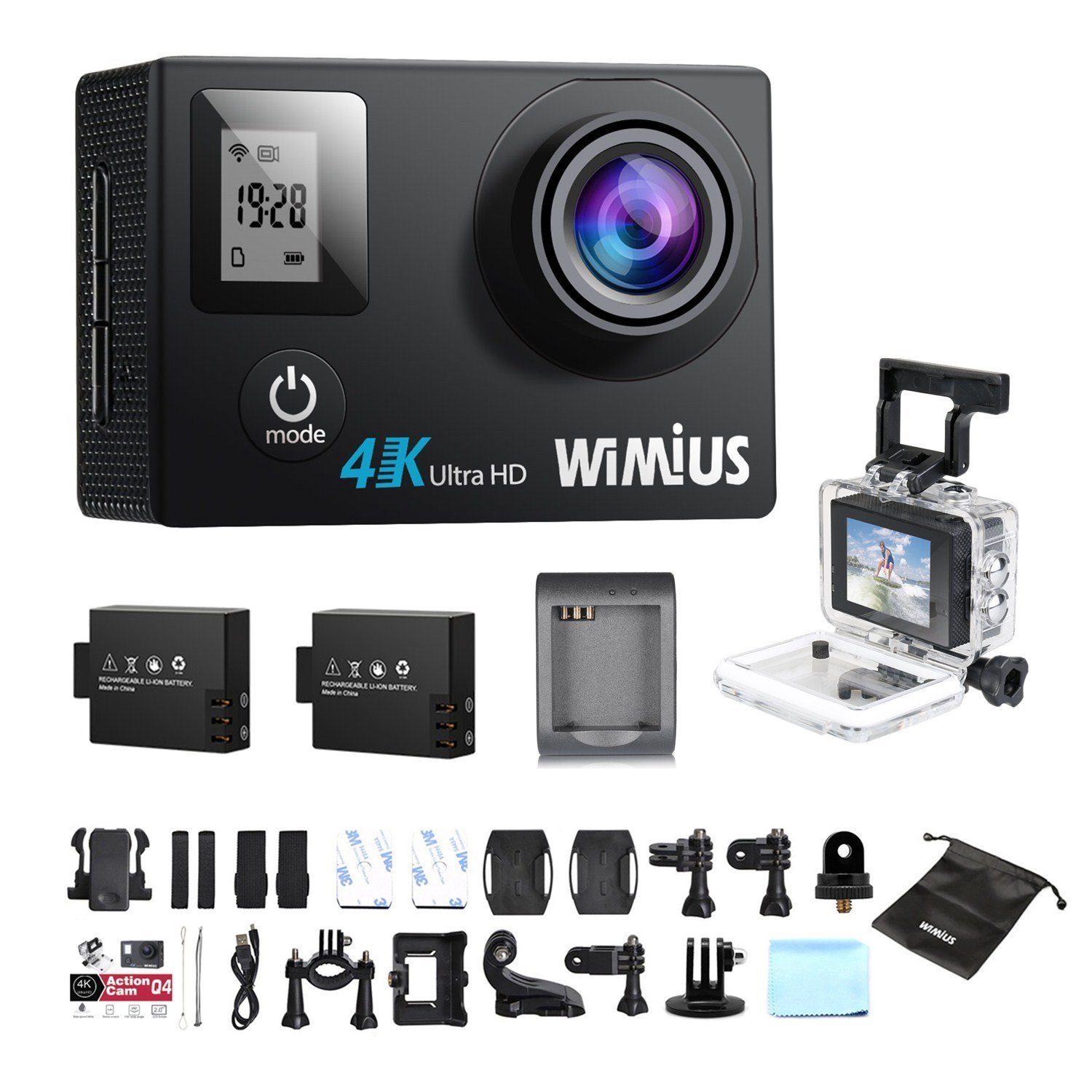
- Objektyvas: Captures video and photo footage.
- Maitinimo / režimo mygtukas: Powers the camera on/off and switches between modes.
- Užrakto / Gerai mygtukas: Starts/stops recording, takes photos, or confirms selections.
- Aukštyn/žemyn mygtukai: Navigates menu options.
- Main LCD Screen (2.0 inches): Rodo tiesiogiai view, playback, and menu interface.
- Status Screen (0.66 inches): Shows current mode, battery status, and recording time.
- „Micro USB“ prievadas: Įkrovimui ir duomenų perdavimui.
- Mikro HDMI prievadas: Skirta prijungti prie išorinio ekrano.
- MicroSD kortelės lizdas: Atminties kortelės įdėjimui.
Pridedami priedai
Your camera comes with a comprehensive kit of accessories:

- Waterproof Case (up to 40M)
- Rechargeable Li-ion Batteries (x2)
- USB kabelis
- Various Mounts and Adapters (e.g., helmet mount, bicycle mount)
- Lipniosios pagalvėlės
- Valymo šluostė
- Bands and Straps
3. Sąranka
3.1 Baterijos įdėjimas ir įkrovimas
- Atidarykite baterijų skyriaus dangtelį, esantį fotoaparato apačioje.
- Insert a fully charged Li-ion battery, ensuring the correct orientation.
- Saugiai uždarykite akumuliatoriaus skyriaus dangtelį.
- To charge, connect the camera to a USB power source (e.g., computer, USB wall adapter) using the provided USB cable. The charging indicator light will illuminate.
- Charging typically takes 2-3 hours. The indicator light will turn off or change color when fully charged.

3.2 „MicroSD“ kortelės įdėjimas
A MicroSD card (not included) is required for recording. The camera supports up to 64GB Class 10 or UHS-I MicroSD cards.
- Raskite „MicroSD“ kortelės lizdą kameros šone.
- Įdėkite „MicroSD“ kortelę auksiniais kontaktais į kameros galą, kol ji spragtelės ir užsifiksuos.
- Norėdami išimti, švelniai stumkite kortelę, kol ji iššoks.
- It is recommended to format the MicroSD card in the camera before first use and periodically thereafter to ensure stable recording.
3.3 Vandeniui atsparaus dėklo naudojimas
The waterproof case allows the camera to be used up to 40 meters underwater.
- Ensure the camera is dry before placing it inside the waterproof case.
- Close the case firmly, ensuring the rubber seal is clean and free of debris.
- Perform a dry test by submerging the empty case in water for a few minutes to check for leaks before inserting the camera.
3.4 Montavimo priedai
Utilize the various mounts and adapters to attach your camera to helmets, bicycles, or other surfaces. Refer to the accessory diagram for specific attachment methods.
4. Naudojimo instrukcijos
4.1 Įjungimas / išjungimas
- Maitinimas: Paspauskite ir 3–5 sekundes palaikykite nuspaudę maitinimo / režimo mygtuką.
- Išjungti: Paspauskite ir 3–5 sekundes palaikykite nuspaudę maitinimo / režimo mygtuką.
4.2 Režimo pasirinkimas
Press the Power/Mode button repeatedly to cycle through the main modes:
- Vaizdo įrašymo režimas: Nurodoma vaizdo kameros piktograma.
- Nuotraukų režimas: Pažymėta kameros piktograma.
- Atkūrimo režimas: Nurodoma paleidimo piktograma.
- Nustatymų meniu: Pažymėta krumpliaračio piktograma.
4.3 Vaizdo įrašymas
- Perjunkite į vaizdo įrašymo režimą.
- Press the Shutter/OK button to start recording. A red indicator light will flash, and the recording time will appear on the screen.
- Norėdami sustabdyti įrašymą, dar kartą paspauskite mygtuką „Užraktas / Gerai“.
Video Settings (via Settings Menu)
- Rezoliucija: Select from 4K 30fps, 2.7K 30fps, 1080p 60/30fps, 720p 120/60/30fps.
- Ciklo įrašymas: Set to 2min, 3min, 5min, or Off. When enabled, the camera will continuously record, overwriting the oldest files kai atminties kortelė pilna.
- Laiko trukmės vaizdo įrašas: Set intervals (0.5s, 1s, 5s, 10s, 30s, 60s) or Off. The camera will capture frames at set intervals and compile them into a video.
- Lėtas judėjimas: Available at 1080p/60fps and 720p/120fps.
4.4 Fotografavimas
- Perjungti į nuotraukų režimą.
- Norėdami nufotografuoti, paspauskite užrakto / gerai mygtuką.
Photo Settings (via Settings Menu)
- Rezoliucija: Up to 16 Megapixels.
- Nuotraukų serija: Capture multiple photos in quick succession (e.g., 3P/1S, 5P/1S, 10P/1S).
4.5 „Wi-Fi“ ryšys ir programėlių naudojimas
The camera features Wi-Fi connectivity for remote control via a smartphone app.
- Enable Wi-Fi on the camera via the Settings Menu. The Wi-Fi name (SSID) and password will be displayed.
- Download the compatible WiMiUS app from your smartphone's app store (e.g., App Store for iOS, Google Play for Android).
- On your smartphone, connect to the camera's Wi-Fi network using the provided password.
- Open the WiMiUS app to control the camera, view gyvas kvailystage, ir pervedimas files.
4.6 Menu Navigation and General Settings
Access the Settings Menu by cycling through modes. Use the Up/Down buttons to navigate and the Shutter/OK button to select.
- Kalba: Select your preferred language (French is available).
- Data/Laikas: Nustatykite teisingą datą ir laiką. Note: The date/time setting may reset to 2016/09/01 00:00:00 when batteries are changed. This is a known behavior; reset manually after each battery change.
- Transporto priemonės režimas: (OUI/NON - Yes/No) This mode typically enables automatic recording when the camera detects power, useful for dashcam functionality.
- Formato kortelė: Erases all data on the MicroSD card.
- Gamykliniai nustatymai: Atkuria visus nustatymus į numatytąsias reikšmes.
5. Priežiūra
5.1 Fotoaparato ir objektyvo valymas
- Fotoaparato korpusą valykite minkštu, nepūkuotu audiniu.
- For the lens, use a specialized lens cleaning cloth or pen to avoid scratches. Do not use abrasive materials.
- Prieš valydami įsitikinkite, kad kamera išjungta ir sausa.
5.2 Vandeniui atsparaus dėklo priežiūra
- Po kiekvieno naudojimo vandenyje vandeniui atsparų dėklą nuplaukite gėlu vandeniu ir leiskite jam išdžiūti ore.
- Inspect the rubber seal for any dirt, sand, or damage. Clean or replace if necessary to maintain waterproofing.
5.3 Akumuliatoriaus priežiūra
- Nenaudojamas baterijas laikykite vėsioje, sausoje vietoje.
- Do not expose batteries to high temperatures or direct flame.
- Jei akumuliatorius sandėliuojamas ilgesnį laiką, įkraukite jį maždaug iki 50 % talpos.
5.4 Saugykla
When not in use, store the camera and accessories in a protective case to prevent damage from dust and impacts.
6. Problemų sprendimas
This section addresses common issues you might encounter with your WiMiUS Q4 camera.
| Problema | Galima priežastis | Sprendimas |
|---|---|---|
| Kamera neįsijungia. | Žemas arba išsikrovęs akumuliatorius. | Charge the battery fully. Ensure battery is correctly inserted. |
| Nepavyksta įrašyti vaizdo / fotografuoti. | No MicroSD card, card full, or card error. | Insert a MicroSD card. Delete old files or replace card. Format the card in the camera. |
| Date/Time resets after battery change. | Standard behavior for this model. | Manually reset the date and time in the settings menu after each battery change. |
| Prasta vaizdo kokybė esant silpnam apšvietimui. | Limitations of the camera sensor in low light conditions. | Ensure adequate lighting. Adjust exposure settings if available. |
| Sound is muffled in waterproof case. | Waterproof case seals the microphone. | This is normal. For better audio, use the camera without the waterproof case in dry conditions. |
| „Wi-Fi“ ryšio problemos. | Incorrect password, app issues, or signal interference. | Verify Wi-Fi password. Restart camera and smartphone. Ensure app is updated. Try resetting camera Wi-Fi settings. |
| Accessories breaking easily. | Material quality or improper use. | Handle accessories with care. Consider purchasing higher quality third-party mounts if needed for demanding activities. |
Bendrieji trikčių šalinimo veiksmai
- Iš naujo paleiskite fotoaparatą: Power off and then on again.
- Check MicroSD Card: Ensure it's correctly inserted and formatted. Try a different card if issues persist.
- Gamykliniai nustatymai: If problems continue, perform a factory reset via the settings menu. Note that this will erase all custom settings.
7. Specifikacijos
Key technical specifications for the WiMiUS Q4 Action Camera:
- Prekinis ženklas: „WiMiUS“
- Modelis: Q4
- Veiksminga nejudančioji rezoliucija: 16 megapikselio
- Vaizdo įrašo raiška: 4K (30fps), 2.7K (30fps), 1080p (60/30fps), 720p (120/60/30fps)
- Ekrano dydis: 2.0 inches (main LCD), 0.66 inches (status screen)
- Ryšio technologija: Wi-Fi
- Atsparus vandeniui gylis: Iki 40 metrų (su vandeniui atspariu dėklu)
- Vaizdo stabilizavimas: Nr
- Jutiklio technologija: CMOS
- Objektyvo tipas: Platus kampas
- Spalva: Gold (Note: Product title indicates 'Noir' (Black), but specifications list 'or' (Gold). This manual refers to the Q4 model generally.)
- Saugykla: Supports MicroSD cards up to 64GB (Class 10 or UHS-I recommended)
8. Garantija ir palaikymas
For warranty information and customer support, please refer to the documentation provided at the time of purchase or contact your retailer. Specific details regarding warranty duration and terms are typically included with your product packaging.
Software updates and spare parts availability information are not provided in the product specifications. Please check the manufacturer's official website or contact customer service for the most current information.


