1. Įvadas
Thank you for choosing the V-Guard Digital UPS DU875 Pure Sine Wave Inverter. This manual provides essential information for the safe and efficient operation, installation, and maintenance of your new UPS system. Please read this manual thoroughly before installation and use, and retain it for future reference.
The V-Guard DU875 is designed to provide reliable power backup for your home or office, featuring a fully DSP-based design and MOSFET-based PWM technology for dynamic stability and pure sine wave output, ensuring the safety and longevity of your connected appliances.
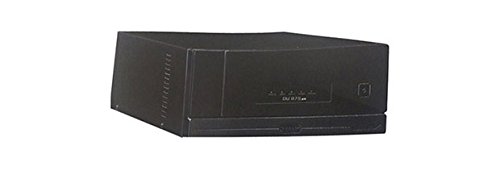
1 pav.: priekis view of the V-Guard Digital UPS DU875. This image shows the compact black unit with indicator lights on the front panel.
2. Svarbios saugos instrukcijos
Always follow these basic safety precautions to reduce the risk of fire, electric shock, and injury to persons:
- Read all instructions before using the UPS.
- This UPS is designed for indoor use only. Do not expose it to rain, snow, or any liquids.
- Do not operate the UPS if it has received a sharp blow, been dropped, or otherwise damaged.
- To reduce the risk of electric shock, do not disassemble the UPS. Contact qualified service personnel when service or repair is required. Incorrect reassembly may result in a risk of electric shock.
- To reduce the risk of electric shock, disconnect the UPS from the AC outlet before attempting any maintenance or cleaning.
- Užtikrinkite tinkamą vėdinimą. Neužblokuokite jokių ventiliacijos angų.
- Do not connect non-recommended accessories.
- This UPS requires external batteries. Ensure proper battery connection and polarity.
3. Sąranka ir diegimas
3.1 Išpakavimas
Carefully unpack the UPS and inspect it for any damage that may have occurred during transit. If any damage is found, contact your dealer immediately.
3.2 Įdėjimas
Choose a suitable location for the UPS:
- Place the UPS on a flat, stable surface.
- Ensure adequate ventilation. Maintain at least 10 cm (4 inches) of clearance around all sides of the UPS for proper airflow.
- Avoid direct sunlight, heat sources, and areas with excessive dust or humidity.
- Keep the UPS away from flammable materials.
3.3 Akumuliatoriaus prijungimas
The V-Guard DU875 requires external batteries (not included). Follow these steps to connect the battery:
- Ensure the UPS is turned OFF and disconnected from the mains power supply.
- Connect the positive (+) terminal of the battery to the positive (+) terminal of the UPS using the red battery cable.
- Connect the negative (-) terminal of the battery to the negative (-) terminal of the UPS using the black battery cable.
- Double-check all connections for correct polarity and secure fastening. Incorrect polarity can damage the UPS and battery.
3.4 Prijungimas prie elektros tinklo
Plug the UPS power cord into a grounded AC wall outlet. The UPS will begin charging the connected battery.
3.5 Prietaisų prijungimas
Connect your appliances (e.g., lights, fans, computers) to the output sockets provided on the rear panel of the UPS. Ensure that the total load does not exceed the UPS's rated capacity.
4. Operacija
4.1 Įjungimas / išjungimas
- Norėdami įjungti: Press and hold the Power button on the front panel for a few seconds until the UPS powers on and the indicators light up.
- Norėdami išjungti: Press and hold the Power button again until the UPS shuts down.
4.2 Intelligent Audio/LED Indications
The V-Guard DU875 features intelligent audio and LED indications to provide real-time status updates. Refer to the table below for common indications:
| Rodiklis | Būsena | Aprašymas |
|---|---|---|
| Tinklo ON LED | Žalias, tvirtas | UPS is operating on mains power and charging the battery. |
| Inverter ON LED | Žalias, tvirtas | UPS is operating on battery power (inverter mode). |
| Battery Low LED | Raudona, mirksi | Battery charge is low. UPS will soon shut down. |
| Perkrovos šviesos diodas | Red, Solid | Connected load exceeds UPS capacity. Reduce load immediately. |
| Gedimo šviesos diodas | Red, Solid | Internal fault detected. Contact service. |
| Garso signalas | Pypsėjimas | Indicates power failure, battery low, or overload condition. |
4.3 Darbo režimai
- UPS režimas: When mains power is available, the UPS charges the battery and provides power to connected appliances. Upon power failure, it automatically switches to battery power.
- Battery Mode (Inverter Mode): When mains power is absent, the UPS draws power from the battery and converts it to AC power for your appliances.
5. Priežiūra
Regular maintenance ensures the longevity and optimal performance of your V-Guard DU875 UPS.
5.1 Valymas
- Ensure the UPS is turned OFF and disconnected from mains power before cleaning.
- Use a soft, dry cloth to wipe the exterior of the UPS.
- Nenaudokite skystų ar aerozolinių valiklių.
- Laikykite ventiliacijos angas švarias nuo dulkių ir šiukšlių.
5.2 Akumuliatoriaus priežiūra
- Įsitikinkite, kad akumuliatoriaus gnybtai yra švarūs ir be korozijos.
- Periodically check the electrolyte level in flooded lead-acid batteries (if applicable to your battery type) and top up with distilled water as needed.
- Avoid deep discharge of the battery. Allow the UPS to recharge fully after a power outage.
- If the UPS is to be stored for an extended period, ensure the battery is fully charged and recharge it every 3-6 months to prevent permanent damage.
6. Problemų sprendimas
This section provides solutions to common issues you might encounter with your V-Guard DU875 UPS. If the problem persists after following these steps, contact V-Guard customer support.
| Problema | Galima priežastis | Sprendimas |
|---|---|---|
| UPS neįsijungia. | No mains power / Discharged battery / Loose battery connection. | Check mains power supply. Ensure battery is charged. Verify battery connections are secure. |
| UPS beeps continuously / Overload LED is ON. | Perkrovos būklė. | Disconnect non-essential appliances to reduce the load. Restart the UPS. |
| UPS dažnai persijungia į akumuliatoriaus režimą. | Unstable mains power / Weak battery. | Check mains power quality. Have the battery tested or replaced if it's old. |
| Akumuliatorius neįkraunamas. | Mains power not connected / Faulty battery / Internal fault. | Ensure UPS is plugged into a live AC outlet. Check battery connections. If problem persists, contact service. |
| Trumpas atsarginės kopijos laikas. | Battery degradation / Overload. | Battery may need replacement. Reduce connected load. |
7. Specifikacijos
| Funkcija | Aprašymas |
|---|---|
| Prekės ženklas | V-Guard |
| Modelis | DU875 |
| Tipas | Digital UPS, Pure Sine Wave Inverter |
| Technologijos | Fully DSP Based Design, MOSFET based PWM technology with dynamic stability |
| Indikacijos | Intelligent audio/LED indications |
| Reikalingos baterijos | Yes (External, not included) |
| Medžiaga | Metalas |
| Formos faktorius | Stovas |
| Jungties tipas | IEC 320, USB |
| Spalva | Juoda |
8. Garantija ir palaikymas
For warranty information, service, or technical support, please refer to the warranty card included with your product or visit the official V-Guard websvetainėje. Išsaugokite pirkimo kvitą kaip pirkimo įrodymą garantiniams reikalavimams.


