Įvadas
The American Lifetime 8-inch Digital Day Clock is designed to provide clear and easy-to-read time, day, and date information. Its large display and customizable features make it a valuable tool for maintaining daily routines and orientation. This manual will guide you through the setup, operation, and maintenance of your new clock.
Pagrindinės funkcijos:
- Patvari konstrukcija: Pagaminta iš tvirtų medžiagų ilgam naudojimui.
- Lengvai skaitomas ekranas: Features a large, clear, high-contrast 8-inch display for optimal visibility, even in low light.
- Paprasta sąranka: User-friendly interface with an easy-to-follow manual for quick operation.
- Pritaikomi aliarmai: Set up to 5 daily alarms for reminders such as medication times or appointments.
- Automatinis pritemdymas: Adjusts display brightness automatically based on ambient room light.
- Kelių kalbų palaikymas: Offers various language and time format options.
- Baterijos atsarginė kopija: Internal battery ensures time and date are maintained during power outages, automatically resetting when power returns.
- Aiškus ekranas: Spells out the time, period of the day, full day of the week, month, and date without confusing abbreviations.
Sąranka
Setting up your American Lifetime Digital Day Clock is straightforward. Follow these steps to get started:
- Išpakuokite laikrodį: Atsargiai išimkite laikrodį ir visus priedus iš pakuotės.
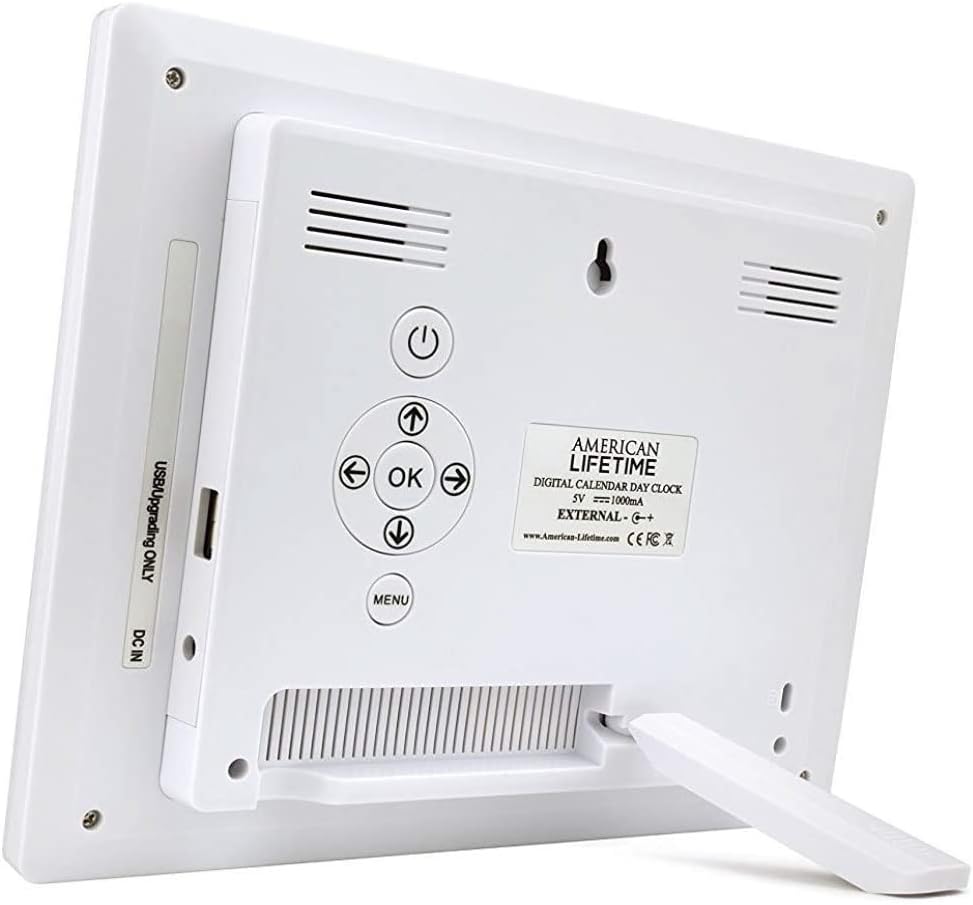
- Pritvirtinkite stovą: The clock includes a removable stand that can be inserted into the back for tabletop display. It supports both horizontal and vertical orientations.
- Prijunkite maitinimą: Plug the provided power adapter into the DC IN port on the back of the clock and then into a standard electrical outlet. The clock will automatically power on and display the current time and date.
- Pradiniai nustatymai: Use the control buttons on the back of the clock to navigate the menu and set the correct time, date, time mode (12/24 hour), date mode (Month-Day-Year, Day-Month-Year), and language.

Naudojimo instrukcijos
Your Digital Day Clock offers several customizable settings to enhance its utility. All adjustments are made using the buttons located on the back of the unit.
Valdymo mygtukai:
- Maitinimo mygtukas: Įjungia arba išjungia ekraną.
- Gerai mygtukas: Patvirtina meniu pasirinkimus.
- Rodyklių mygtukai (aukštyn / žemyn / kairėn / dešinėn): Naršykite meniu parinktis ir koreguokite vertes.
- Meniu mygtukas: Pasiekia pagrindinį nustatymų meniu.
Laiko ir datos nustatymas:
- Paspauskite Meniu mygtuką, norėdami įvesti nustatymus.
- Naudokite Aukštyn/Žemyn arrows to select "Set Time" or "Set Date".
- Paspauskite OK to enter the setting. Use Kairė/dešinė arrows to move between digits/fields and Aukštyn/Žemyn arrows to change values.
- Paspauskite OK to confirm each change.
Customizing Alarms:
The clock supports up to 5 customizable alarms with messages.
- From the main menu, navigate to "Alarm Time 1" through "Alarm Time 5".
- Paspauskite OK norėdami pasirinkti žadintuvą.
- Set the alarm time and frequency (e.g., daily, weekdays).
- Choose a pre-set message (e.g., "Time to take medication", "Appointment Reminder") or set a custom message if available.
- Ensure the alarm is set to "On" and press OK išsaugoti.
Kiti nustatymai:
- Laiko režimas: Switch between 12-hour and 24-hour formats.
- Datos režimas: Select your preferred date display format (e.g., Month-Day-Year).
- Kalba: Choose from multiple language options.
- Show Period Of The Day: Enable or disable the display of "Morning," "Afternoon," "Evening," or "Night."
- Automatinis pritemdymas: Turn this feature on to allow the clock to automatically adjust its brightness.
Priežiūra
To ensure the longevity and optimal performance of your Digital Day Clock, follow these simple maintenance guidelines:
- Valymas: Use a soft, dry cloth to gently wipe the screen and frame. Avoid abrasive cleaners or sprays that could damage the display or finish.
- Vieta: Place the clock on a stable, flat surface or mount it securely on a wall. Avoid direct sunlight or extreme temperatures, which can affect performance and display life.
- Galia: Always use the original power adapter provided with the clock.
Trikčių šalinimas
If you encounter any issues with your American Lifetime Digital Day Clock, refer to the following common problems and solutions:
| Problema | Sprendimas |
|---|---|
| Laikrodis neįsijungia. | Ensure the power adapter is securely plugged into both the clock and a working electrical outlet. Try a different outlet. |
| Ekranas per tamsus arba per ryškus. | Check the "Auto Dimming" setting in the menu. You can turn it off to manually adjust brightness if needed. |
| Laikas arba data yra neteisingi. | Access the "Set Time" and "Set Date" options in the menu to manually correct the settings. |
| Signalizacijos neskamba. | Verify that the alarm time is correctly set, the alarm is enabled ("On"), and the volume is not muted. |
Specifikacijos
- Prekinis ženklas: Amerikietiškas gyvenimas
- Modelio numeris: H1-HO1A--JB6HDWLAO4
- Spalva: Ruda
- Ekrano tipas: Skaitmeninis
- Gaminio matmenys: 8.5 colio pločio x 6.75 colio aukščio
- Maitinimo šaltinis: Su laidu elektra
- Medžiaga: Plastikiniai
- Montavimo tipas: Tvirtinimas prie sienos, stalviršis
- Ypatingos savybės: Alarm, Calendar Display, Auto-Dimming, Multi-Language Support, Battery Backup
- Prekės svoris: 15.8 uncijos
- UPC: 728044490976
Garantija ir palaikymas
American Lifetime stands behind its products. Your Digital Day Clock comes with a 1 metų gamintojo ribota garantija. Additionally, you can return the product for free within the first 30 days of purchase, no questions asked.
For any questions, troubleshooting assistance, or warranty claims, please contact American Lifetime customer service. Our team is dedicated to providing support and ensuring your satisfaction.
Aplankykite American Lifetime Store Norėdami gauti daugiau informacijos ir paramos išteklių.


