1. Įvadas
This manual provides detailed instructions for the Gembird MUSG-04 USB Optical Gaming Mouse. It covers product features, setup procedures, operational guidelines, maintenance tips, and troubleshooting information to ensure optimal use of your device.

Image 1.1: The Gembird MUSG-04 Gaming Mouse presented in its retail packaging, highlighting the product's design and branding.
2. Produkto ypatybės
The Gembird MUSG-04 is designed for gaming, offering a range of features for enhanced control and customization:
- Programmable 8-Button Design: Provides extensive customization options for various in-game actions.
- Reguliuojamas DPI: Quick DPI button allows on-the-fly sensitivity adjustments from 1200 to 3200 DPI.
- Makro programavimas: Dedicated software enables creation and assignment of complex macro commands to buttons.
- Illuminated Elements: Features an illuminated scroll wheel, logo, and side accents for visual feedback and aesthetic appeal.
- Ergonomic Right-Handed Design: Shaped for comfortable use during extended gaming sessions.
- USB jungtis: Standartinė USB sąsaja plačiam suderinamumui.
- Patvarus kabelis: 1.5-meter braided cable for reliable connection and longevity.
- Platus operacinių sistemų palaikymas: Compatible with Windows 10 and other recent Windows operating systems.

2.1 pav.: A pusė view of the Gembird MUSG-04 mouse, showcasing its ergonomic contours and button placement designed for right-handed users.
3. Pakuotės turinys
Patikrinkite, ar jūsų pakuotėje yra šie elementai:
- Gembird MUSG-04 USB Optical Gaming Mouse
- Vartotojo vadovas (šis dokumentas)
- Macro Programming Software (typically available via download or included on a mini-CD)

Image 3.1: The side of the Gembird MUSG-04 retail box, displaying key features and specifications of the gaming mouse.
4. Sąrankos instrukcijos
4.1. Aparatinės įrangos ryšys
- Kompiuteryje raskite laisvą USB prievadą.
- Plug the USB connector of the Gembird MUSG-04 mouse into the USB port.
- Your operating system will typically detect the mouse automatically and install the necessary drivers. This process may take a few moments.
4.2. Software Installation (Optional for Macro Programming)
To utilize the programmable buttons and macro features, install the dedicated software:
- If a mini-CD is included, insert it into your computer's optical drive and follow the on-screen instructions.
- Alternatively, download the latest software from the official Gembird support websvetainę.
- Run the installer and follow the prompts to complete the software installation.
- Iš naujo paleiskite kompiuterį, jei būsite paraginti.
5. Pelės valdymas
5.1. Mygtukų funkcijos
The Gembird MUSG-04 features 8 buttons with default functions:
- Kairysis mygtukas: Pirminė paspaudimo funkcija.
- Dešinysis mygtukas: Antrinio paspaudimo funkcija (kontekstinis meniu).
- Slinkties ratukas: Scrolls content up/down. Pressing it acts as a middle click.
- DPI mygtukas: Cycles through preset DPI sensitivity levels (e.g., 1200, 1600, 2400, 3200 DPI).
- Pirmyn/atgal mygtukai: Naršyti web pages or folders.
- Ugnies mygtukas: Often used for rapid-fire actions in games.
- Makro mygtukai: Customizable via software for specific commands or macros.
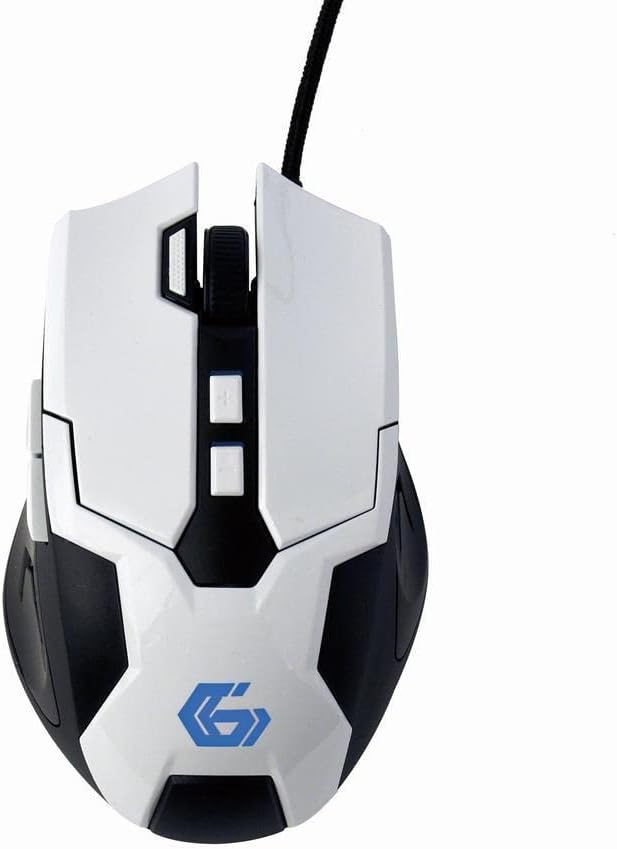
5.1 paveikslas: Iš viršaus į apačią view of the Gembird MUSG-04 mouse, illustrating the placement of its various buttons, including the left, right, scroll wheel, DPI, and side buttons. The Gembird logo is illuminated in blue.
5.2. Adjusting DPI
Paspauskite DPI mygtukas (usually located behind the scroll wheel) to cycle through the available sensitivity settings. Each press will switch to the next DPI level, indicated by a change in the mouse's illumination color or pattern (if supported).
5.3. Makrokomandų programavimas
The included macro programming software allows you to customize button functions and create complex sequences of commands. Refer to the software's built-in help or the Gembird support websvetainėje, kurioje pateikiamos išsamios makrokomandų kūrimo ir priskyrimo instrukcijos.
5.4. Apšvietimas
The mouse features dynamic illumination on its scroll wheel, logo, and side accents. These lights may change color based on the selected DPI setting or can be customized via the macro programming software.

Image 5.2: The Gembird MUSG-04 mouse with its logo and side accents illuminated in green, demonstrating the customizable lighting feature.
6. Priežiūra
To ensure the longevity and optimal performance of your Gembird MUSG-04 mouse, follow these maintenance guidelines:
- Valymas: Pelės paviršiui nuvalyti naudokite minkštą, sausą, nepūkuotą šluostę. Jei nešvarumai sunkiai įveikiami, šiek tiek pamirkykite.ampNuvalykite šluostę vandeniu arba švelniu valymo tirpalu. Venkite stiprių cheminių medžiagų ar abrazyvinių medžiagų.
- Optinis jutiklis: Periodically clean the optical sensor area on the underside of the mouse with a cotton swab to prevent tracking issues.
- Kabelio priežiūra: Avoid sharply bending or twisting the USB cable. Store the mouse in a way that prevents stress on the cable connection.
- Saugykla: Kai ilgesnį laiką nenaudojate pelės, laikykite ją švarioje, sausoje vietoje, toliau nuo tiesioginių saulės spindulių ir ekstremalių temperatūrų.
7. Problemų sprendimas
If you encounter issues with your Gembird MUSG-04 mouse, refer to the following common problems and solutions:
- Pelė nereaguoja:
- Įsitikinkite, kad USB laidas yra tvirtai prijungtas prie veikiančio USB prievado.
- Pabandykite prijungti pelę prie kito kompiuterio USB prievado.
- Išbandykite pelę kitame kompiuteryje, kad nustatytumėte, ar problema susijusi su pele, ar su kompiuteriu.
- Iš naujo paleiskite kompiuterį.
- Nereguliarus žymeklio judėjimas:
- Nuvalykite optinį jutiklį pelės apačioje.
- Įsitikinkite, kad pelę naudojate ant tinkamo paviršiaus (pvz., pelės kilimėlio). Venkite labai atspindinčių ar skaidrių paviršių.
- Patikrinkite, ar nėra programinės įrangos konfliktų ar pasenusių tvarkyklių.
- Buttons Not Working/Macros Not Activating:
- Verify that the macro programming software is correctly installed and running.
- Check the button assignments within the software.
- Užtikrinkite programinės įrangos profesionalumąfile yra aktyvus.
- Apšvietimas neveikia:
- Check software settings for illumination control.
- Įsitikinkite, kad pelė gauna pakankamai energijos iš USB prievado.
8. Specifikacijos
| Funkcija | Specifikacija |
|---|---|
| Prekės ženklas | Gembird |
| Modelis | MUSG-04 |
| Ryšio technologija | USB |
| Judesio aptikimo technologija | Optinis |
| DPI jautrumas | Reguliuojamas (1200–3200 DPI) |
| Mygtukų skaičius | 8 (programuojamas) |
| Kabelio ilgis | 1.5 metrų |
| Operacinės sistemos palaikymas | „Windows 10“ ir naujesnės versijos |
| Gaminio matmenys (IxPxH) | 4.96 x 3.19 x 1.61 colio (12.6 x 8.1 x 4.1 cm) |
| Prekės svoris | 8.3 uncijos (235 gramų) |
9. Garantija ir palaikymas
For warranty information, please refer to the documentation provided with your purchase or visit the official Gembird website. Technical support and driver downloads can also be found on the Gembird support portal.
For further assistance, please contact Gembird customer service through their official channels.


